English · 简体中文
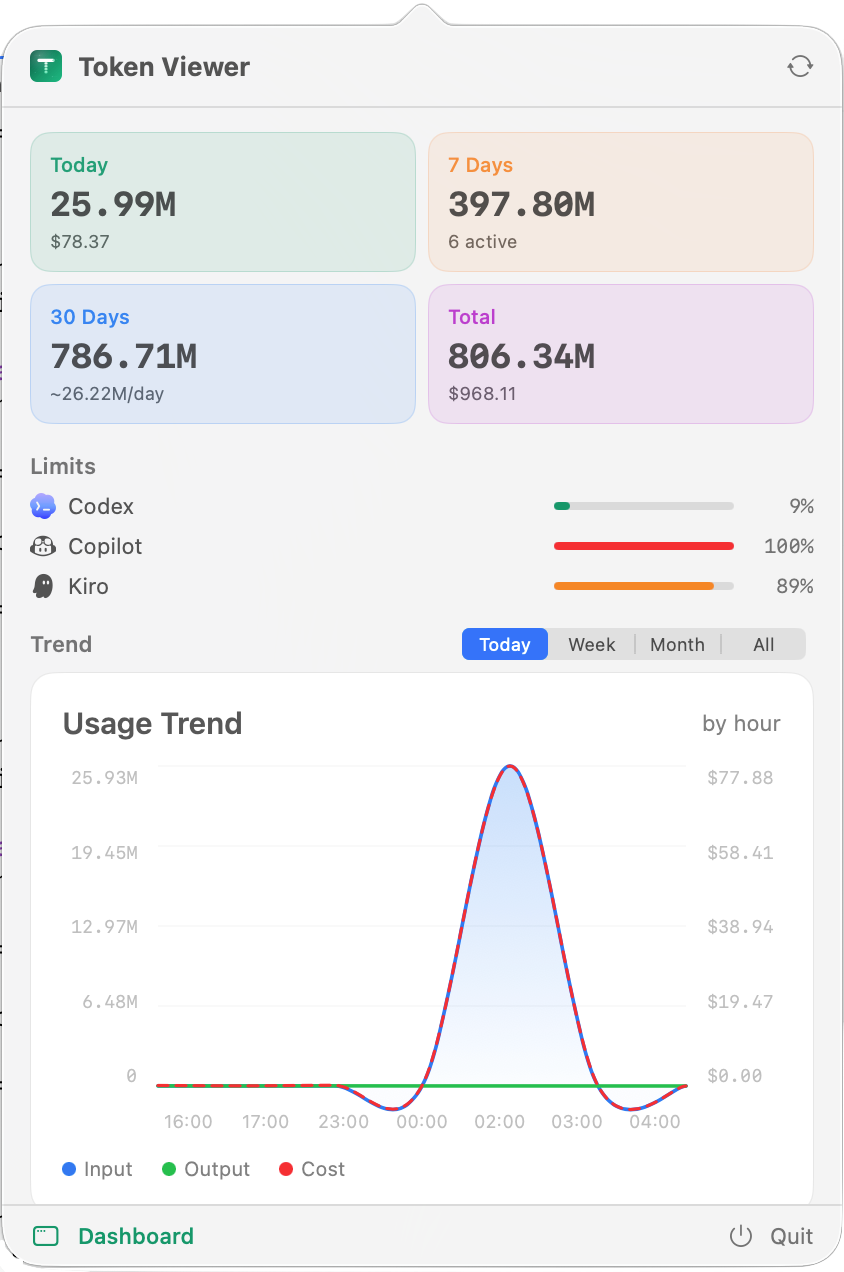
A native macOS menu-bar app built with SwiftUI + Rust that auto-collects token counts and costs from 25 AI coding tools, aggregates them locally, and surfaces real usage trends in a beautiful dashboard. No cloud account, no Node.js, no browser — just a tiny native app.




⭐ If TokenViewer saves you money, please star it on GitHub — it helps other developers find it.
Requirements: macOS 14 (Sonoma) or later, Apple Silicon or Intel.
- Download the latest DMG
- Open the DMG and drag TokenViewer.app to
/Applications - Launch — the T icon appears in your menu bar
- Click the icon for an instant usage summary
- Open Dashboard for the full view
What you get immediately:
- 📊 Today / 7-day / 30-day / Total token counts and cost estimates
- 📈 Daily trend chart with cache hit rate and cost overlay
- 🗓️ 53-week activity heatmap
- 🔒 Live quota bars for 8 providers (ChatGPT, Copilot, Kiro, Cursor, Gemini, Kimi …)
- 🏠 100% local — all data in
~/.tokenviewer/data.db. No account, no API keys.
"TokenViewer.app can't be opened" — first-launch Gatekeeper warning
The app is ad-hoc signed (not notarized — that requires a paid Apple Developer ID account).
- Go to System Settings → Privacy & Security
- Scroll to the Security section → click Open Anyway
- Confirm Open in the follow-up dialog
You only need to do this once. Alternatively, right-click the app → Open → Open.
- 🔌 25 AI tools out of the box — Claude Code, ChatGPT, Kiro, Cursor, GitHub Copilot, Gemini CLI, Opencode, Roocode, Kilo Code, Zed, Goose, Grok, Kimi, Craft, OpenClaw, Hermes, Antigravity, CodeBuddy, WorkBuddy, OhMyPi, Pi, KiloCLI, EveryCode, MiMoCode, ZCode
- 🏠 100% local — Token data never leaves your machine. No account, no API keys.
- 🚀 Zero config — Reads existing log files your tools already produce. Nothing installed into those tools.
- 📊 Beautiful dashboard — Usage trends, model breakdown, cost analysis, provider breakdown, daily detail table
- 🖥️ Native app — SwiftUI + Rust core. No Electron, no Node.js, no browser. Instant launch.
- 📈 Smooth trend chart — Catmull-Rom spline with hover tooltip showing input / output / cache / reasoning / cost
- 🗓️ Activity heatmap — 53-week GitHub-style grid in both the dashboard and the menu-bar panel
- 📉 Rate limit tracking — Live quota bars with reset countdowns for 8 providers: ChatGPT, GitHub Copilot, Kiro (Free / Pro / Pro+ / Power), Cursor, Gemini, Kimi, Claude, Antigravity
- 💰 Cost engine — Per-model pricing for all major providers + Kiro, Cursor, Kimi overrides. Multi-currency display (live exchange rates).
- 🌍 Chinese / English UI — Switch in Settings at any time
- ⚡ Incremental sync — File offset cursors + mtime skip + rayon parallel parsing keep repeated syncs under 100 ms when nothing changed
- 🔒 Privacy-first — Only token counts and timestamps. Never prompts, responses, or file contents.
Menu Bar Panel — quick summary, limits, trend 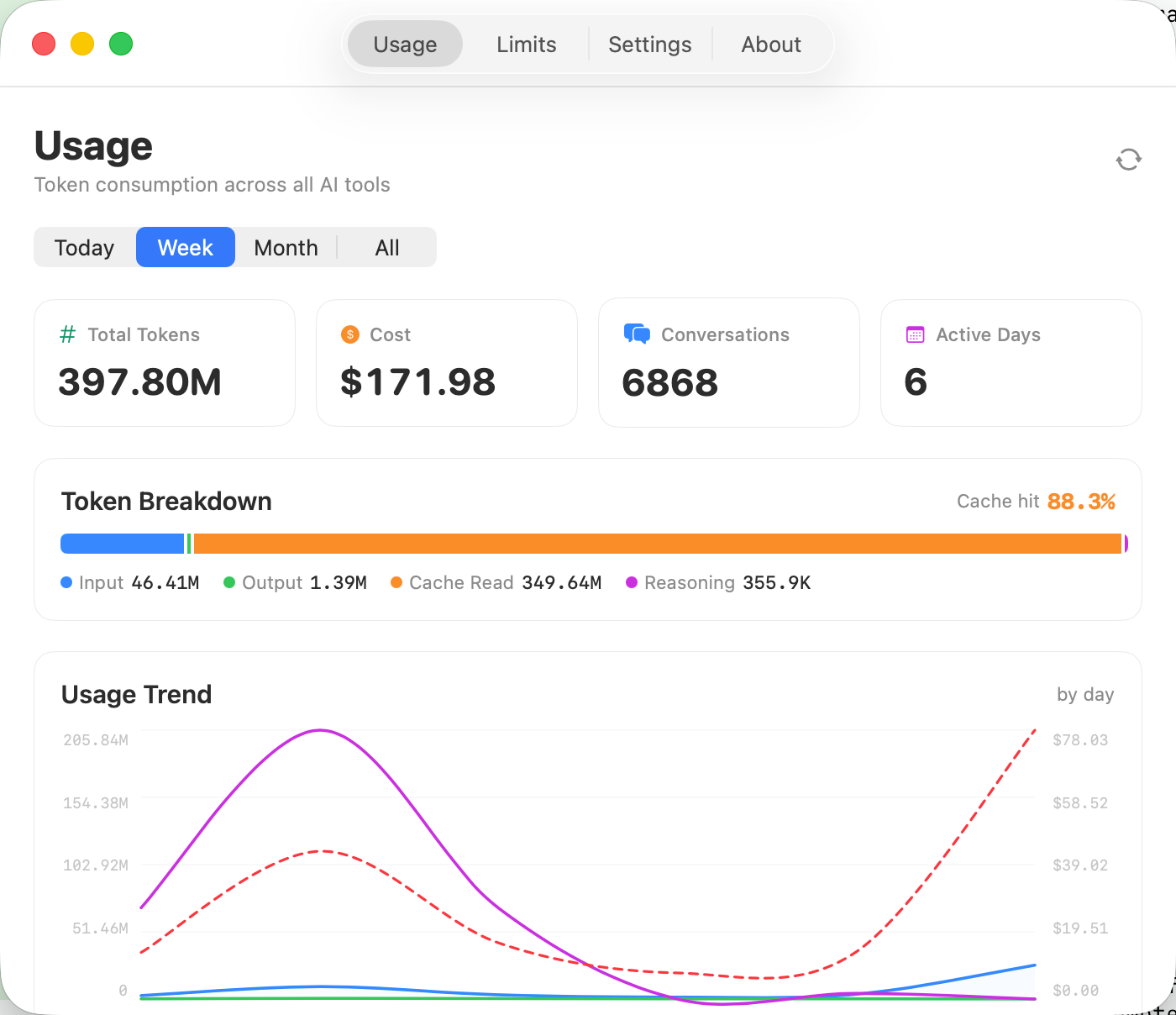 | Dashboard — full usage view 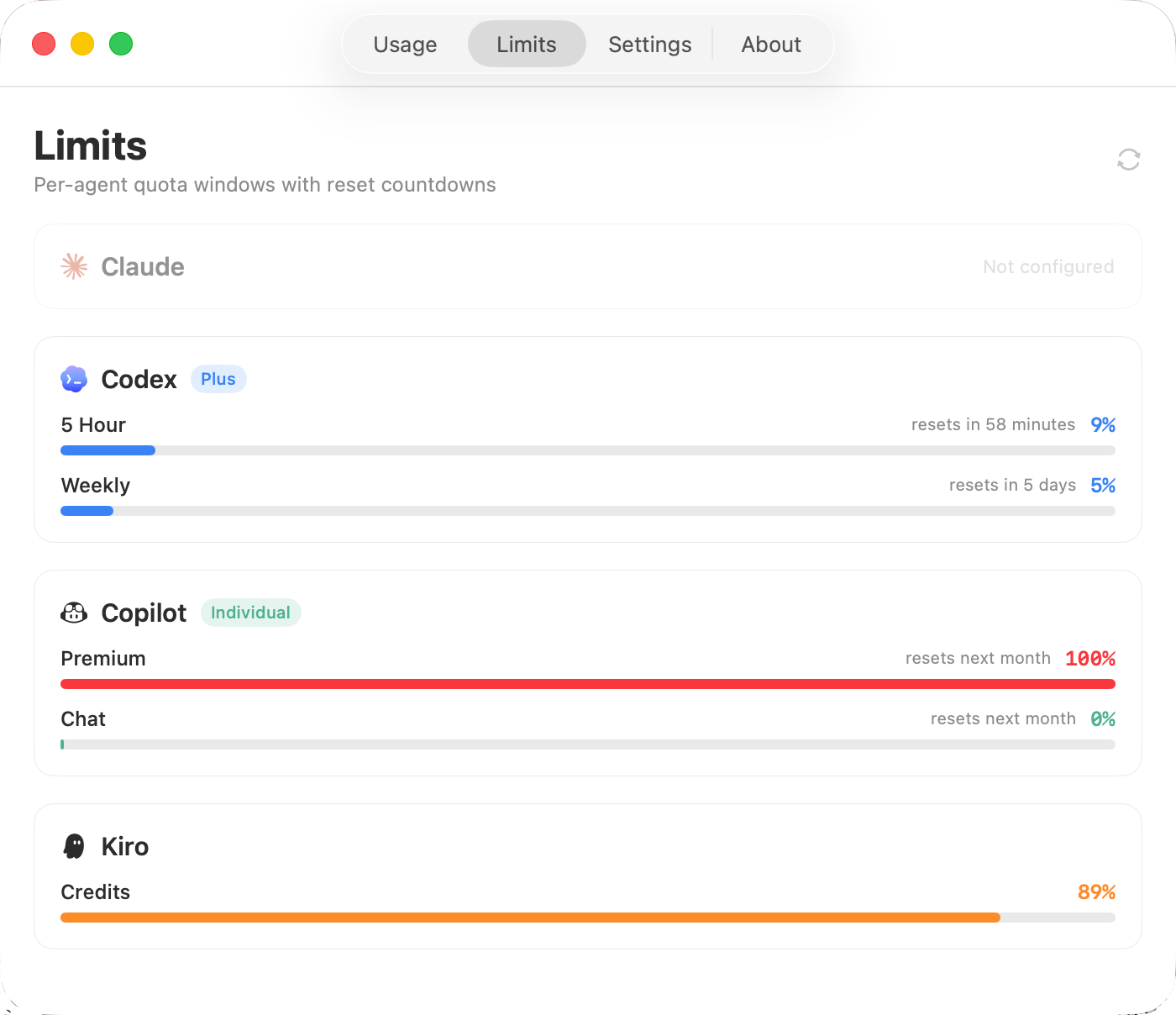 |
| Tool | Data Source | Method |
|---|---|---|
| Claude Code | ~/.claude/projects/*.jsonl | Passive reader |
| ChatGPT | ~/.codex/sessions/**/rollout-*.jsonl | Passive reader |
| ZCode | ~/.zcode/cli/db/db.sqlite | SQLite reader (model_usage table) |
| Kiro CLI | ~/.kiro/sessions/cli/*.json + .jsonl | Session file reader + char-based token estimate |
| Kiro IDE | ~/Library/.../kiro.kiroagent/dev_data/ | SQLite + JSONL |
| GitHub Copilot | ~/.copilot/otel/*.jsonl | OpenTelemetry file reader |
| Cursor | cursorDiskModel/usage.json | Passive reader |
| Gemini CLI | ~/.gemini/tmp/*/chats/session-*.json | Passive reader |
| Opencode | ~/.local/share/opencode/opencode.db | SQLite reader |
| Roocode | VSCode globalStorage tasks/*/ui_messages.json | Passive reader |
| Kilo Code | VSCode globalStorage | Passive reader |
| Zed | ~/Library/.../threads.db | SQLite reader |
| Goose | ~/Library/.../sessions.db | SQLite reader |
| Grok | ~/.grok/sessions/**/updates.jsonl | Passive reader |
| Kimi | ~/.kimi/sessions/**/*.jsonl | Passive reader |
| Craft | ~/.craft-agent/**/*.jsonl | Passive reader |
| OpenClaw | ~/.openclaw/agents/**/*.jsonl | Passive reader |
| Hermes | ~/.hermes/state.db | SQLite reader |
| Antigravity | ~/.gemini/antigravity*/brain/**/transcript.jsonl | Passive reader |
| CodeBuddy | ~/.codebuddy/**/*.jsonl | Passive reader |
| WorkBuddy | ~/.antigravity_cockpit/workbuddy_accounts/*.json | Local quota snapshot reader |
| OhMyPi | ~/.omp/agent/sessions/**/*.jsonl | Passive reader |
| Pi | ~/.pi/agent/sessions/**/*.jsonl | Passive reader |
| KiloCLI | ~/.local/share/kilo/kilo.db | SQLite reader |
| MiMoCode | ~/.local/share/mimocode/mimocode.db | SQLite reader (message table) |
All integrations are passive readers — TokenViewer only reads files your tools already produce. Nothing is installed into those tools.
Missing your tool? Open an issue — adding a new parser is usually one file.
TokenViewer can show live quota usage and reset countdowns for 9 providers:
| Provider | Plan Labels | Data Source |
|---|---|---|
| Claude | Max / Pro | Anthropic OAuth API (Keychain) |
| ChatGPT | Plus / Business / Pro | ChatGPT wham API (~/.codex/auth.json) |
| GitHub Copilot | Individual / Business | GitHub API (~/.config/github-copilot/) |
| Kiro | Free / Pro / Pro+ / Power | kiro-cli /usage |
| Cursor | Pro / Team / Enterprise | cursor.com/api/usage-summary (SQLite session token) |
| Gemini | — | cloudcode-pa.googleapis.com (~/.gemini/oauth_creds.json) |
| Kimi | Adagio / Andante / Moderato / Allegretto / Allegro | api.kimi.com/coding/v1/usages |
| Antigravity | — | Uses Gemini quota |
| WorkBuddy | Pro / Free / Enterprise | codebuddy.cn billing APIs (workbuddy-desktop.info) |
Providers not installed show as greyed-out cards (configured providers sort to the top).
AI Tool Logs → 25 Rust Parsers → SQLite (~/.tokenviewer/data.db)
↓
FFI (tt_sync / tt_query_*)
↓
SwiftUI Views ← CoreBridge ← UsageViewModel
- Rust core (
core/) — 25 parsers, SQLite storage, pricing engine. Compiled tolibtokenviewer_core.a. - SwiftUI app (
macos/) — Menu-bar status item, popover panel, full dashboard window. - Incremental sync — Each parser stores a file offset cursor in SQLite. On the next sync only new bytes are read. Parsers run in parallel (rayon). Files with unchanged mtime are skipped entirely.
| Protection | Detail |
|---|---|
| No content captured | Only token counts, model names, and timestamps. Never prompts, responses, or file contents. |
| Local-only | All data stays in ~/.tokenviewer/data.db. No network calls except optional exchange rate fetch and update check. |
| No telemetry | No analytics, no crash reporting, no phone-home. |
| Auditable | Open source. The Rust parsers only extract numeric fields — see core/src/parsers/. |
Requirements: macOS 14+, Xcode 16+, Rust + aarch64-apple-darwin target, XcodeGen
git clone https://github.com/webkong/TokenViewer.git
cd TokenViewer/TokenViewerNew
# One-shot build + run
./run.sh
Step by step:
# 1. Install Rust target
rustup target add aarch64-apple-darwin
# 2. Build Rust corecd core
cargo build --release --target aarch64-apple-darwin
# 3. Generate Xcode projectcd ../macos
xcodegen generate
# 4. Build and run
xcodebuild -scheme TokenViewer -configuration Release build
open ~/Library/Developer/Xcode/DerivedData/TokenViewer-*/Build/Products/Release/TokenViewer.appbrew install create-dmg gh
./script/release.sh build-dmg # → dist/release/TokenViewer.dmg
./script/release.sh push-release # → GitHub Release (requires gh auth login)
./script/release.sh build-website # → website/dist
./script/release.sh push-website # → gh-pagesNo data showing after first launch
Click the sync button (↻) in the menu-bar panel or Dashboard. Data is not synced until you explicitly trigger it or the auto-sync timer fires (default: every 30 min).
Check that your AI tools are on the supported list and have been used at least once.
Kiro token count seems low
Kiro CLI sessions store turns in .json files. Token counts (input_token_count / output_token_count) are 0 by design in kiro-cli — the app estimates tokens from message character counts (÷ 4 chars/token, same as TokenTracker).
Kiro IDE data comes from tokens_generated.jsonl and is stored separately under the kiro-ide source.
Limits page shows "Not configured" for a provider
The rate-limit fetch requires local authentication state:
- Kiro — must be logged in via
kiro-cli(runkiro-cli chat /usageto verify) - Cursor — needs
state.vscdbfrom the Cursor app - Gemini — needs
~/.gemini/oauth_creds.json(rungeminito authenticate) - Kimi — needs
~/.kimi/credentials/kimi-code.json
Today's data shows zero
TokenViewer converts "today" to UTC using your local timezone. If you're in UTC+8 (CST), "today" starts at UTC 16:00 the previous calendar day. Trigger a manual sync — the data should appear.
- Bugs / feature requests: open an issue
- New tool parser: add a file in
core/src/parsers/, register it inmod.rsandscheduler.rs. See existing parsers for reference. - Pull requests: fork → branch → PR. Please describe what you changed and why.
CC BY-NC 4.0 — Free for personal and non-commercial use.
Attribution required when redistributing or modifying.
Commercial use is not permitted.
- Windows support — system-tray app with native Win32 UI (planned)
- Homebrew Cask formula
Built by webkong.
Inspired by TokenTracker.
TokenViewer — Know exactly what you're spending on AI.