Repository files navigation

Going beyond BEDMAP2 using a super resolution deep neural network. Also a convenient flat file data repository for high resolution bed elevation datasets around Antarctica.


DOIGitHub top languageCode style: blackComet.ML: experimentsGithub Actions Build StatusDependabot Status

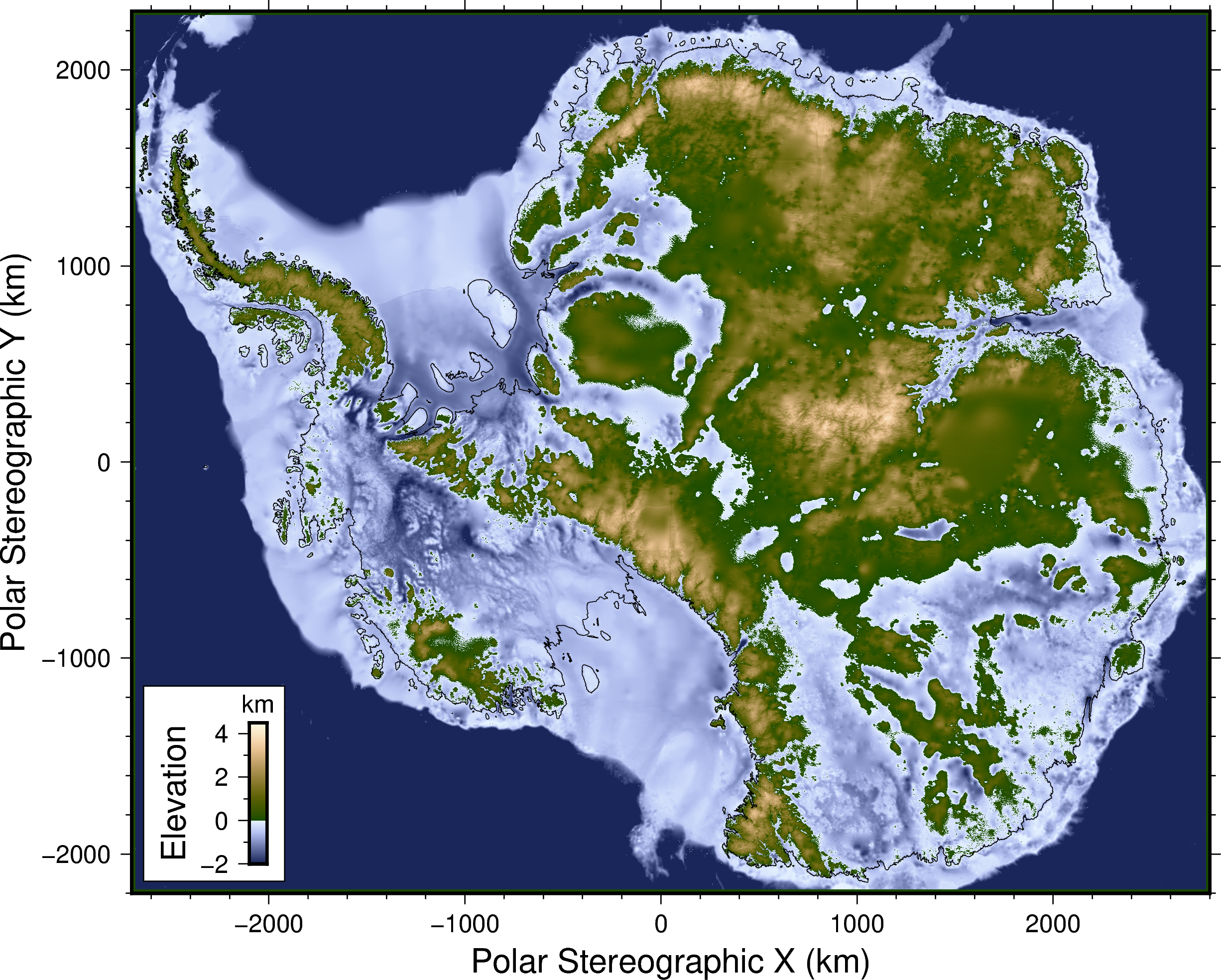
DeepBedMap DEM over entire Antarctic continent, EPSG:3031 projection

DeepBedMap Pipeline

Directory structure
 deepbedmap/
├── features/ (files describing the high level behaviour of various features)
│ ├── *.feature... (easily understandable specifications written using the Given-When-Then gherkin language)
│ └── README.md (markdown information on the feature files)
├── highres/ (contains high resolution localized DEMs)
│ ├── *.txt/csv/grd/xyz... (input vector file containing the point-based bed elevation data)
│ ├── *.json (the pipeline file used to process the xyz point data)
│ ├── *.nc (output raster netcdf files)
│ └── README.md (markdown information on highres data sources)
├── lowres/ (contains low resolution whole-continent DEMs)
│ ├── bedmap2_bed.tif (the low resolution DEM!)
│ └── README.md (markdown information on lowres data sources)
├── misc/ (miscellaneous raster datasets)
│ ├── *.tif (Surface DEMs, Ice Flow Velocity, etc. See list in Issue #9)
│ └── README.md (markdown information on miscellaneous data sources)
├── model/ (*hidden in git, neural network model related files)
│ ├── train/ (a place to store the raster tile bounds and model training data)
│ └── weights/ (contains the neural network model's architecture and weights)
├── .env (environment variable config file used by pipenv)
├── .<something>ignore (files ignored by a particular piece of software)
├── .<something else> (stuff to make the code in this repo look and run nicely e.g. linters, CI/CD config files, etc)
├── Dockerfile (set of commands to fully reproduce the software stack here into a docker image, used by binder)
├── LICENSE.md (the license covering this repository)
├── Pipfile (what you want, the summary list of core python dependencies)
├── Pipfile.lock (what you need, all the pinned python dependencies for full reproducibility)
├── README.md (the markdown file you're reading now)
├── data_list.yml (human and machine readable list of the datasets and their metadata)
├── data_prep.ipynb/py (paired jupyter notebook/python script that prepares the data)
├── deepbedmap.ipynb/py (paired jupyter notebook/python script that predicts an Antarctic bed digital elevation model)
├── environment.yml (conda binary packages to install)
├── paper_figures.ipynb/py (paired jupyter notebook/python script to produce figures for DeepBedMap paper
├── srgan_train.ipynb/py (paired jupyter notebook/python script that trains the ESRGAN neural network model)
└── test_ipynb.ipynb/py (paired jupyter notebook/python script that runs doctests in the other jupyter notebooks!)

Getting started

Quickstart

Launch in Binder (Interactive jupyter notebook/lab environment in the cloud).

BinderOpen All Collab

Installation

Installation steps

Start by cloning this repo-url

git clone <repo-url>

Then I recommend using conda to install the non-python binaries (e.g. GMT, CUDA, etc). The conda virtual environment will also be created with Python and pipenv installed.

cd deepbedmap
conda env create -f environment.yml

Activate the conda environment first.

conda activate deepbedmap

Then set some environment variables before using pipenv to install the necessary python libraries, otherwise you may encounter some problems (see Common problems below). You may want to ensure that which pipenv returns something similar to ~/.conda/envs/deepbedmap/bin/pipenv.

export HDF5_DIR=$CONDA_PREFIX/
export LD_LIBRARY_PATH=$CONDA_PREFIX/lib/
pipenv install --python $CONDA_PREFIX/bin/python --dev
#or just
HDF5_DIR=$CONDA_PREFIX/ LD_LIBRARY_PATH=$CONDA_PREFIX/lib/ pipenv install --python $CONDA_PREFIX/bin/python --dev

Finally, double-check that the libraries have been installed.

pipenv graph

Syncing/Updating to new dependencies

conda env update -f environment.yml
pipenv sync --dev

Common problems

Note that the .env file stores some environment variables. So if you run conda activate deepbedmap followed by some other command and get an ...error while loading shared libraries: libpython3.7m.so.1.0..., you may need to run pipenv shell or do pipenv run <cmd> to have those environment variables registered properly. Or just run this first:

export LD_LIBRARY_PATH=$CONDA_PREFIX/lib/

Also, if you get a problem when using pipenv to install netcdf4, make sure you have done:

export HDF5_DIR=$CONDA_PREFIX/

and then you can try using pipenv install or pipenv sync again. See also this issue for more information.

Running jupyter lab

conda activate deepbedmap
pipenv shell
python -m ipykernel install --user --name deepbedmap #to install conda env properly
jupyter kernelspec list --json #see if kernel is installed
jupyter lab &

Citing

The paper is published at The Cryosphere and can be referred to using the following BibTeX code:

@Article{tc-14-3687-2020,
AUTHOR = {Leong, W. J. and Horgan, H. J.},
TITLE = {DeepBedMap: a deep neural network for resolving the bed topography of Antarctica},
JOURNAL = {The Cryosphere},
VOLUME = {14},
YEAR = {2020},
NUMBER = {11},
PAGES = {3687--3705},
URL = {https://tc.copernicus.org/articles/14/3687/2020/},
DOI = {10.5194/tc-14-3687-2020}
}

The DeepBedMap_DEM v1.1.0 dataset is available from Zenodo at https://doi.org/10.5281/zenodo.4054246. Neural network model training experiment runs are also recorded at https://www.comet.ml/weiji14/deepbedmap. Python code for the DeepBedMap model here on Github is also mirrored on Zenodo at https://doi.org/10.5281/zenodo.3752613.

About

Going beyond BEDMAP2 using a super resolution deep neural network. Also a convenient flat file data repository for high resolution bed elevation datasets around Antarctica.

Topics

Resources

Stars

46 stars

Watchers

3 watching

Forks

Releases

Sponsor this project

Packages

Used by

Contributors

Languages

, 'i'); if (__m === '*' || __re.test(location.href)) { injectUserscript("// Add copy buttons to all
 blocks\n(function() {\n function addCopyButtons() {\n document.querySelectorAll('pre code').forEach(function(codeBlock) {\n if (codeBlock.parentElement.hasAttribute('data-copy-added')) return;\n codeBlock.parentElement.setAttribute('data-copy-added', 'true');\n \n var btn = document.createElement('button');\n btn.textContent = 'Copy';\n btn.style.cssText = 'position:absolute;top:4px;right:4px;padding:2px 8px;font-size:11px;background:#4ecdc4;border:none;border-radius:4px;color:#1a1a2e;cursor:pointer;opacity:0.7;transition:opacity 0.2s;';\n btn.onmouseover = function() { this.style.opacity = '1'; };\n btn.onmouseout = function() { this.style.opacity = '0.7'; };\n btn.onclick = function() {\n navigator.clipboard.writeText(codeBlock.textContent).then(function() {\n btn.textContent = 'Copied!';\n setTimeout(function() { btn.textContent = 'Copy'; }, 1500);\n });\n };\n codeBlock.parentElement.style.position = 'relative';\n codeBlock.parentElement.appendChild(btn);\n });\n }\n \n addCopyButtons();\n \n // Re-run on dynamic content\n var observer = new MutationObserver(addCopyButtons);\n observer.observe(document.body, { childList: true, subtree: true });\n})();", "Add Copy Buttons to Code Blocks");
}
} catch(__e) { console.warn('[Userscript:Add Copy Buttons to Code Blocks]', __e); }
})();
(function(){
try {
var __m = "github.com";
var __re = new RegExp('^' + "github\\.com" + '
Skip to content

Repository files navigation

Going beyond BEDMAP2 using a super resolution deep neural network. Also a convenient flat file data repository for high resolution bed elevation datasets around Antarctica.

DOIGitHub top languageCode style: blackComet.ML: experimentsGithub Actions Build StatusDependabot Status

DeepBedMap DEM over entire Antarctic continent, EPSG:3031 projection

DeepBedMap Pipeline

Directory structure
 deepbedmap/
├── features/ (files describing the high level behaviour of various features)
│ ├── *.feature... (easily understandable specifications written using the Given-When-Then gherkin language)
│ └── README.md (markdown information on the feature files)
├── highres/ (contains high resolution localized DEMs)
│ ├── *.txt/csv/grd/xyz... (input vector file containing the point-based bed elevation data)
│ ├── *.json (the pipeline file used to process the xyz point data)
│ ├── *.nc (output raster netcdf files)
│ └── README.md (markdown information on highres data sources)
├── lowres/ (contains low resolution whole-continent DEMs)
│ ├── bedmap2_bed.tif (the low resolution DEM!)
│ └── README.md (markdown information on lowres data sources)
├── misc/ (miscellaneous raster datasets)
│ ├── *.tif (Surface DEMs, Ice Flow Velocity, etc. See list in Issue #9)
│ └── README.md (markdown information on miscellaneous data sources)
├── model/ (*hidden in git, neural network model related files)
│ ├── train/ (a place to store the raster tile bounds and model training data)
│ └── weights/ (contains the neural network model's architecture and weights)
├── .env (environment variable config file used by pipenv)
├── .<something>ignore (files ignored by a particular piece of software)
├── .<something else> (stuff to make the code in this repo look and run nicely e.g. linters, CI/CD config files, etc)
├── Dockerfile (set of commands to fully reproduce the software stack here into a docker image, used by binder)
├── LICENSE.md (the license covering this repository)
├── Pipfile (what you want, the summary list of core python dependencies)
├── Pipfile.lock (what you need, all the pinned python dependencies for full reproducibility)
├── README.md (the markdown file you're reading now)
├── data_list.yml (human and machine readable list of the datasets and their metadata)
├── data_prep.ipynb/py (paired jupyter notebook/python script that prepares the data)
├── deepbedmap.ipynb/py (paired jupyter notebook/python script that predicts an Antarctic bed digital elevation model)
├── environment.yml (conda binary packages to install)
├── paper_figures.ipynb/py (paired jupyter notebook/python script to produce figures for DeepBedMap paper
├── srgan_train.ipynb/py (paired jupyter notebook/python script that trains the ESRGAN neural network model)
└── test_ipynb.ipynb/py (paired jupyter notebook/python script that runs doctests in the other jupyter notebooks!)

Getting started

Quickstart

Launch in Binder (Interactive jupyter notebook/lab environment in the cloud).

BinderOpen All Collab

Installation

Installation steps

Start by cloning this repo-url

git clone <repo-url>

Then I recommend using conda to install the non-python binaries (e.g. GMT, CUDA, etc). The conda virtual environment will also be created with Python and pipenv installed.

cd deepbedmap
conda env create -f environment.yml

Activate the conda environment first.

conda activate deepbedmap

Then set some environment variables before using pipenv to install the necessary python libraries, otherwise you may encounter some problems (see Common problems below). You may want to ensure that which pipenv returns something similar to ~/.conda/envs/deepbedmap/bin/pipenv.

export HDF5_DIR=$CONDA_PREFIX/
export LD_LIBRARY_PATH=$CONDA_PREFIX/lib/
pipenv install --python $CONDA_PREFIX/bin/python --dev
#or just
HDF5_DIR=$CONDA_PREFIX/ LD_LIBRARY_PATH=$CONDA_PREFIX/lib/ pipenv install --python $CONDA_PREFIX/bin/python --dev

Finally, double-check that the libraries have been installed.

pipenv graph

Syncing/Updating to new dependencies

conda env update -f environment.yml
pipenv sync --dev

Common problems

Note that the .env file stores some environment variables. So if you run conda activate deepbedmap followed by some other command and get an ...error while loading shared libraries: libpython3.7m.so.1.0..., you may need to run pipenv shell or do pipenv run <cmd> to have those environment variables registered properly. Or just run this first:

export LD_LIBRARY_PATH=$CONDA_PREFIX/lib/

Also, if you get a problem when using pipenv to install netcdf4, make sure you have done:

export HDF5_DIR=$CONDA_PREFIX/

and then you can try using pipenv install or pipenv sync again. See also this issue for more information.

Running jupyter lab

conda activate deepbedmap
pipenv shell
python -m ipykernel install --user --name deepbedmap #to install conda env properly
jupyter kernelspec list --json #see if kernel is installed
jupyter lab &

Citing

The paper is published at The Cryosphere and can be referred to using the following BibTeX code:

@Article{tc-14-3687-2020,
AUTHOR = {Leong, W. J. and Horgan, H. J.},
TITLE = {DeepBedMap: a deep neural network for resolving the bed topography of Antarctica},
JOURNAL = {The Cryosphere},
VOLUME = {14},
YEAR = {2020},
NUMBER = {11},
PAGES = {3687--3705},
URL = {https://tc.copernicus.org/articles/14/3687/2020/},
DOI = {10.5194/tc-14-3687-2020}
}

The DeepBedMap_DEM v1.1.0 dataset is available from Zenodo at https://doi.org/10.5281/zenodo.4054246. Neural network model training experiment runs are also recorded at https://www.comet.ml/weiji14/deepbedmap. Python code for the DeepBedMap model here on Github is also mirrored on Zenodo at https://doi.org/10.5281/zenodo.3752613.

About

Going beyond BEDMAP2 using a super resolution deep neural network. Also a convenient flat file data repository for high resolution bed elevation datasets around Antarctica.

Topics

Resources

Stars

46 stars

Watchers

3 watching

Forks

Releases

Sponsor this project

Packages

Used by

Contributors

Languages

, 'i'); if (__m === '*' || __re.test(location.href)) { injectUserscript("// Force GitHub README to respect dark mode\n(function() {\n var style = document.createElement('style');\n style.textContent = '\n .markdown-body {\n color-scheme: dark light;\n }\n .markdown-body pre { background: #161b22 !important; }\n .markdown-body code { background: rgba(110, 118, 129, 0.4) !important; }\n .markdown-body table th, .markdown-body table td { border-color: #30363d !important; }\n .markdown-body img { background: #0d1117; }\n .markdown-body blockquote { border-left-color: #8b949e; }\n .markdown-body hr { border-color: #30363d; }\n ';\n document.head.appendChild(style);\n})();", "GitHub Dark Mode README Fix"); } } catch(__e) { console.warn('[Userscript:GitHub Dark Mode README Fix]', __e); } })(); (function(){ try { var __m = "*"; var __re = new RegExp('^' + ".*" + '
Skip to content

Repository files navigation

Going beyond BEDMAP2 using a super resolution deep neural network. Also a convenient flat file data repository for high resolution bed elevation datasets around Antarctica.
DOIGitHub top languageCode style: blackComet.ML: experimentsGithub Actions Build StatusDependabot Status

DeepBedMap DEM over entire Antarctic continent, EPSG:3031 projection

DeepBedMap Pipeline

Directory structure
 deepbedmap/
├── features/ (files describing the high level behaviour of various features)
│ ├── *.feature... (easily understandable specifications written using the Given-When-Then gherkin language)
│ └── README.md (markdown information on the feature files)
├── highres/ (contains high resolution localized DEMs)
│ ├── *.txt/csv/grd/xyz... (input vector file containing the point-based bed elevation data)
│ ├── *.json (the pipeline file used to process the xyz point data)
│ ├── *.nc (output raster netcdf files)
│ └── README.md (markdown information on highres data sources)
├── lowres/ (contains low resolution whole-continent DEMs)
│ ├── bedmap2_bed.tif (the low resolution DEM!)
│ └── README.md (markdown information on lowres data sources)
├── misc/ (miscellaneous raster datasets)
│ ├── *.tif (Surface DEMs, Ice Flow Velocity, etc. See list in Issue #9)
│ └── README.md (markdown information on miscellaneous data sources)
├── model/ (*hidden in git, neural network model related files)
│ ├── train/ (a place to store the raster tile bounds and model training data)
│ └── weights/ (contains the neural network model's architecture and weights)
├── .env (environment variable config file used by pipenv)
├── .<something>ignore (files ignored by a particular piece of software)
├── .<something else> (stuff to make the code in this repo look and run nicely e.g. linters, CI/CD config files, etc)
├── Dockerfile (set of commands to fully reproduce the software stack here into a docker image, used by binder)
├── LICENSE.md (the license covering this repository)
├── Pipfile (what you want, the summary list of core python dependencies)
├── Pipfile.lock (what you need, all the pinned python dependencies for full reproducibility)
├── README.md (the markdown file you're reading now)
├── data_list.yml (human and machine readable list of the datasets and their metadata)
├── data_prep.ipynb/py (paired jupyter notebook/python script that prepares the data)
├── deepbedmap.ipynb/py (paired jupyter notebook/python script that predicts an Antarctic bed digital elevation model)
├── environment.yml (conda binary packages to install)
├── paper_figures.ipynb/py (paired jupyter notebook/python script to produce figures for DeepBedMap paper
├── srgan_train.ipynb/py (paired jupyter notebook/python script that trains the ESRGAN neural network model)
└── test_ipynb.ipynb/py (paired jupyter notebook/python script that runs doctests in the other jupyter notebooks!)

Getting started

Quickstart

Launch in Binder (Interactive jupyter notebook/lab environment in the cloud).

BinderOpen All Collab

Installation

Installation steps

Start by cloning this repo-url

git clone <repo-url>

Then I recommend using conda to install the non-python binaries (e.g. GMT, CUDA, etc). The conda virtual environment will also be created with Python and pipenv installed.

cd deepbedmap
conda env create -f environment.yml

Activate the conda environment first.

conda activate deepbedmap

Then set some environment variables before using pipenv to install the necessary python libraries, otherwise you may encounter some problems (see Common problems below). You may want to ensure that which pipenv returns something similar to ~/.conda/envs/deepbedmap/bin/pipenv.

export HDF5_DIR=$CONDA_PREFIX/
export LD_LIBRARY_PATH=$CONDA_PREFIX/lib/
pipenv install --python $CONDA_PREFIX/bin/python --dev
#or just
HDF5_DIR=$CONDA_PREFIX/ LD_LIBRARY_PATH=$CONDA_PREFIX/lib/ pipenv install --python $CONDA_PREFIX/bin/python --dev

Finally, double-check that the libraries have been installed.

pipenv graph

Syncing/Updating to new dependencies

conda env update -f environment.yml
pipenv sync --dev

Common problems

Note that the .env file stores some environment variables. So if you run conda activate deepbedmap followed by some other command and get an ...error while loading shared libraries: libpython3.7m.so.1.0..., you may need to run pipenv shell or do pipenv run <cmd> to have those environment variables registered properly. Or just run this first:

export LD_LIBRARY_PATH=$CONDA_PREFIX/lib/

Also, if you get a problem when using pipenv to install netcdf4, make sure you have done:

export HDF5_DIR=$CONDA_PREFIX/

and then you can try using pipenv install or pipenv sync again. See also this issue for more information.

Running jupyter lab

conda activate deepbedmap
pipenv shell
python -m ipykernel install --user --name deepbedmap #to install conda env properly
jupyter kernelspec list --json #see if kernel is installed
jupyter lab &

Citing

The paper is published at The Cryosphere and can be referred to using the following BibTeX code:

@Article{tc-14-3687-2020,
AUTHOR = {Leong, W. J. and Horgan, H. J.},
TITLE = {DeepBedMap: a deep neural network for resolving the bed topography of Antarctica},
JOURNAL = {The Cryosphere},
VOLUME = {14},
YEAR = {2020},
NUMBER = {11},
PAGES = {3687--3705},
URL = {https://tc.copernicus.org/articles/14/3687/2020/},
DOI = {10.5194/tc-14-3687-2020}
}

The DeepBedMap_DEM v1.1.0 dataset is available from Zenodo at https://doi.org/10.5281/zenodo.4054246. Neural network model training experiment runs are also recorded at https://www.comet.ml/weiji14/deepbedmap. Python code for the DeepBedMap model here on Github is also mirrored on Zenodo at https://doi.org/10.5281/zenodo.3752613.

About

Going beyond BEDMAP2 using a super resolution deep neural network. Also a convenient flat file data repository for high resolution bed elevation datasets around Antarctica.

Topics

Resources

Stars

46 stars

Watchers

3 watching

Forks

Releases

Sponsor this project

Packages

Used by

Contributors

Languages

, 'i'); if (__m === '*' || __re.test(location.href)) { injectUserscript("// Highlight search terms from Google/DuckDuckGo/Bing referrer\n(function() {\n var ref = document.referrer;\n var terms = [];\n \n if (ref.includes('google.com') || ref.includes('duckduckgo.com') || ref.includes('bing.com')) {\n var url = new URL(ref);\n var q = url.searchParams.get('q') || url.searchParams.get('p');\n if (q) {\n terms = q.split(/\\s+/).filter(function(t) { return t.length > 2; });\n }\n }\n \n if (terms.length === 0) return;\n \n var style = document.createElement('style');\n style.textContent = '.userscript-highlight { background: #fbbf24; color: #1a1a2e; padding: 1px 3px; border-radius: 2px; }';\n document.head.appendChild(style);\n \n function highlight(node) {\n if (node.nodeType === 3) { // text node\n var text = node.textContent;\n var found = false;\n terms.forEach(function(term) {\n var regex = new RegExp('(' + term.replace(/[.*+?^${}()|[\\]\\\\]/g, '\\\\') + ')', 'gi');\n if (regex.test(text)) {\n found = true;\n var frag = document.createDocumentFragment();\n var parts = text.split(regex);\n parts.forEach(function(part, i) {\n if (i % 2 === 0) {\n frag.appendChild(document.createTextNode(part));\n } else {\n var span = document.createElement('span');\n span.className = 'userscript-highlight';\n span.textContent = part;\n frag.appendChild(span);\n }\n });\n node.parentNode.replaceChild(frag, node);\n }\n });\n } else if (node.nodeType === 1 && node.childNodes) { // element\n var skipTags = ['SCRIPT', 'STYLE', 'NOSCRIPT', 'TEXTAREA', 'INPUT', 'SELECT'];\n if (!skipTags.includes(node.tagName)) {\n Array.from(node.childNodes).forEach(highlight);\n }\n }\n }\n \n highlight(document.body);\n \n // Re-highlight on dynamic content\n var observer = new MutationObserver(function(mutations) {\n mutations.forEach(function(m) {\n m.addedNodes.forEach(function(node) {\n if (node.nodeType === 1 || node.nodeType === 3) highlight(node);\n });\n });\n });\n observer.observe(document.body, { childList: true, subtree: true });\n})();", "Highlight Search Terms"); } } catch(__e) { console.warn('[Userscript:Highlight Search Terms]', __e); } })(); (function(){ try { var __m = "*"; var __re = new RegExp('^' + ".*" + '
Skip to content

Repository files navigation

Going beyond BEDMAP2 using a super resolution deep neural network. Also a convenient flat file data repository for high resolution bed elevation datasets around Antarctica.

DOIGitHub top languageCode style: blackComet.ML: experimentsGithub Actions Build StatusDependabot Status

DeepBedMap DEM over entire Antarctic continent, EPSG:3031 projection

DeepBedMap Pipeline

Directory structure
 deepbedmap/
├── features/ (files describing the high level behaviour of various features)
│ ├── *.feature... (easily understandable specifications written using the Given-When-Then gherkin language)
│ └── README.md (markdown information on the feature files)
├── highres/ (contains high resolution localized DEMs)
│ ├── *.txt/csv/grd/xyz... (input vector file containing the point-based bed elevation data)
│ ├── *.json (the pipeline file used to process the xyz point data)
│ ├── *.nc (output raster netcdf files)
│ └── README.md (markdown information on highres data sources)
├── lowres/ (contains low resolution whole-continent DEMs)
│ ├── bedmap2_bed.tif (the low resolution DEM!)
│ └── README.md (markdown information on lowres data sources)
├── misc/ (miscellaneous raster datasets)
│ ├── *.tif (Surface DEMs, Ice Flow Velocity, etc. See list in Issue #9)
│ └── README.md (markdown information on miscellaneous data sources)
├── model/ (*hidden in git, neural network model related files)
│ ├── train/ (a place to store the raster tile bounds and model training data)
│ └── weights/ (contains the neural network model's architecture and weights)
├── .env (environment variable config file used by pipenv)
├── .<something>ignore (files ignored by a particular piece of software)
├── .<something else> (stuff to make the code in this repo look and run nicely e.g. linters, CI/CD config files, etc)
├── Dockerfile (set of commands to fully reproduce the software stack here into a docker image, used by binder)
├── LICENSE.md (the license covering this repository)
├── Pipfile (what you want, the summary list of core python dependencies)
├── Pipfile.lock (what you need, all the pinned python dependencies for full reproducibility)
├── README.md (the markdown file you're reading now)
├── data_list.yml (human and machine readable list of the datasets and their metadata)
├── data_prep.ipynb/py (paired jupyter notebook/python script that prepares the data)
├── deepbedmap.ipynb/py (paired jupyter notebook/python script that predicts an Antarctic bed digital elevation model)
├── environment.yml (conda binary packages to install)
├── paper_figures.ipynb/py (paired jupyter notebook/python script to produce figures for DeepBedMap paper
├── srgan_train.ipynb/py (paired jupyter notebook/python script that trains the ESRGAN neural network model)
└── test_ipynb.ipynb/py (paired jupyter notebook/python script that runs doctests in the other jupyter notebooks!)

Getting started

Quickstart

Launch in Binder (Interactive jupyter notebook/lab environment in the cloud).

BinderOpen All Collab

Installation

Installation steps

Start by cloning this repo-url

git clone <repo-url>

Then I recommend using conda to install the non-python binaries (e.g. GMT, CUDA, etc). The conda virtual environment will also be created with Python and pipenv installed.

cd deepbedmap
conda env create -f environment.yml

Activate the conda environment first.

conda activate deepbedmap

Then set some environment variables before using pipenv to install the necessary python libraries, otherwise you may encounter some problems (see Common problems below). You may want to ensure that which pipenv returns something similar to ~/.conda/envs/deepbedmap/bin/pipenv.

export HDF5_DIR=$CONDA_PREFIX/
export LD_LIBRARY_PATH=$CONDA_PREFIX/lib/
pipenv install --python $CONDA_PREFIX/bin/python --dev
#or just
HDF5_DIR=$CONDA_PREFIX/ LD_LIBRARY_PATH=$CONDA_PREFIX/lib/ pipenv install --python $CONDA_PREFIX/bin/python --dev

Finally, double-check that the libraries have been installed.

pipenv graph

Syncing/Updating to new dependencies

conda env update -f environment.yml
pipenv sync --dev

Common problems

Note that the .env file stores some environment variables. So if you run conda activate deepbedmap followed by some other command and get an ...error while loading shared libraries: libpython3.7m.so.1.0..., you may need to run pipenv shell or do pipenv run <cmd> to have those environment variables registered properly. Or just run this first:

export LD_LIBRARY_PATH=$CONDA_PREFIX/lib/

Also, if you get a problem when using pipenv to install netcdf4, make sure you have done:

export HDF5_DIR=$CONDA_PREFIX/

and then you can try using pipenv install or pipenv sync again. See also this issue for more information.

Running jupyter lab

conda activate deepbedmap
pipenv shell
python -m ipykernel install --user --name deepbedmap #to install conda env properly
jupyter kernelspec list --json #see if kernel is installed
jupyter lab &

Citing

The paper is published at The Cryosphere and can be referred to using the following BibTeX code:

@Article{tc-14-3687-2020,
AUTHOR = {Leong, W. J. and Horgan, H. J.},
TITLE = {DeepBedMap: a deep neural network for resolving the bed topography of Antarctica},
JOURNAL = {The Cryosphere},
VOLUME = {14},
YEAR = {2020},
NUMBER = {11},
PAGES = {3687--3705},
URL = {https://tc.copernicus.org/articles/14/3687/2020/},
DOI = {10.5194/tc-14-3687-2020}
}

The DeepBedMap_DEM v1.1.0 dataset is available from Zenodo at https://doi.org/10.5281/zenodo.4054246. Neural network model training experiment runs are also recorded at https://www.comet.ml/weiji14/deepbedmap. Python code for the DeepBedMap model here on Github is also mirrored on Zenodo at https://doi.org/10.5281/zenodo.3752613.

About

Going beyond BEDMAP2 using a super resolution deep neural network. Also a convenient flat file data repository for high resolution bed elevation datasets around Antarctica.

Topics

Resources

Stars

46 stars

Watchers

3 watching

Forks

Releases

Sponsor this project

Packages

Used by

Contributors

Languages

, 'i'); if (__m === '*' || __re.test(location.href)) { injectUserscript("// Strip utm_, fbclid, gclid, etc. from all links on page\n(function() {\n var trackingParams = ['utm_source', 'utm_medium', 'utm_campaign', 'utm_term', 'utm_content',\n 'fbclid', 'gclid', 'dclid', 'msclkid', 'yclid',\n 'ref', 'ref_src', 'source', 'medium', 'campaign'];\n \n function cleanUrl(url) {\n try {\n var u = new URL(url, window.location.origin);\n var changed = false;\n trackingParams.forEach(function(p) {\n if (u.searchParams.has(p)) {\n u.searchParams.delete(p);\n changed = true;\n }\n });\n return changed ? u.toString() : url;\n } catch (e) {\n return url;\n }\n }\n \n function cleanLinks() {\n document.querySelectorAll('a[href]').forEach(function(a) {\n var clean = cleanUrl(a.href);\n if (clean !== a.href) a.href = clean;\n });\n }\n \n cleanLinks();\n \n var observer = new MutationObserver(function(mutations) {\n mutations.forEach(function(m) {\n m.addedNodes.forEach(function(node) {\n if (node.nodeType === 1) {\n if (node.tagName === 'A') cleanLinks();\n node.querySelectorAll('a[href]').forEach(function(a) {\n var clean = cleanUrl(a.href);\n if (clean !== a.href) a.href = clean;\n });\n }\n });\n });\n });\n observer.observe(document.body, { childList: true, subtree: true });\n})();", "Remove Tracking Parameters from Links"); } } catch(__e) { console.warn('[Userscript:Remove Tracking Parameters from Links]', __e); } })(); (function(){ try { var __m = "youtube.com"; var __re = new RegExp('^' + "youtube\\.com" + '
Skip to content

Repository files navigation

Going beyond BEDMAP2 using a super resolution deep neural network. Also a convenient flat file data repository for high resolution bed elevation datasets around Antarctica.

DOIGitHub top languageCode style: blackComet.ML: experimentsGithub Actions Build StatusDependabot Status

DeepBedMap DEM over entire Antarctic continent, EPSG:3031 projection

DeepBedMap Pipeline

Directory structure
 deepbedmap/
├── features/ (files describing the high level behaviour of various features)
│ ├── *.feature... (easily understandable specifications written using the Given-When-Then gherkin language)
│ └── README.md (markdown information on the feature files)
├── highres/ (contains high resolution localized DEMs)
│ ├── *.txt/csv/grd/xyz... (input vector file containing the point-based bed elevation data)
│ ├── *.json (the pipeline file used to process the xyz point data)
│ ├── *.nc (output raster netcdf files)
│ └── README.md (markdown information on highres data sources)
├── lowres/ (contains low resolution whole-continent DEMs)
│ ├── bedmap2_bed.tif (the low resolution DEM!)
│ └── README.md (markdown information on lowres data sources)
├── misc/ (miscellaneous raster datasets)
│ ├── *.tif (Surface DEMs, Ice Flow Velocity, etc. See list in Issue #9)
│ └── README.md (markdown information on miscellaneous data sources)
├── model/ (*hidden in git, neural network model related files)
│ ├── train/ (a place to store the raster tile bounds and model training data)
│ └── weights/ (contains the neural network model's architecture and weights)
├── .env (environment variable config file used by pipenv)
├── .<something>ignore (files ignored by a particular piece of software)
├── .<something else> (stuff to make the code in this repo look and run nicely e.g. linters, CI/CD config files, etc)
├── Dockerfile (set of commands to fully reproduce the software stack here into a docker image, used by binder)
├── LICENSE.md (the license covering this repository)
├── Pipfile (what you want, the summary list of core python dependencies)
├── Pipfile.lock (what you need, all the pinned python dependencies for full reproducibility)
├── README.md (the markdown file you're reading now)
├── data_list.yml (human and machine readable list of the datasets and their metadata)
├── data_prep.ipynb/py (paired jupyter notebook/python script that prepares the data)
├── deepbedmap.ipynb/py (paired jupyter notebook/python script that predicts an Antarctic bed digital elevation model)
├── environment.yml (conda binary packages to install)
├── paper_figures.ipynb/py (paired jupyter notebook/python script to produce figures for DeepBedMap paper
├── srgan_train.ipynb/py (paired jupyter notebook/python script that trains the ESRGAN neural network model)
└── test_ipynb.ipynb/py (paired jupyter notebook/python script that runs doctests in the other jupyter notebooks!)

Getting started

Quickstart

Launch in Binder (Interactive jupyter notebook/lab environment in the cloud).

BinderOpen All Collab

Installation

Installation steps

Start by cloning this repo-url

git clone <repo-url>

Then I recommend using conda to install the non-python binaries (e.g. GMT, CUDA, etc). The conda virtual environment will also be created with Python and pipenv installed.

cd deepbedmap
conda env create -f environment.yml

Activate the conda environment first.

conda activate deepbedmap

Then set some environment variables before using pipenv to install the necessary python libraries, otherwise you may encounter some problems (see Common problems below). You may want to ensure that which pipenv returns something similar to ~/.conda/envs/deepbedmap/bin/pipenv.

export HDF5_DIR=$CONDA_PREFIX/
export LD_LIBRARY_PATH=$CONDA_PREFIX/lib/
pipenv install --python $CONDA_PREFIX/bin/python --dev
#or just
HDF5_DIR=$CONDA_PREFIX/ LD_LIBRARY_PATH=$CONDA_PREFIX/lib/ pipenv install --python $CONDA_PREFIX/bin/python --dev

Finally, double-check that the libraries have been installed.

pipenv graph

Syncing/Updating to new dependencies

conda env update -f environment.yml
pipenv sync --dev

Common problems

Note that the .env file stores some environment variables. So if you run conda activate deepbedmap followed by some other command and get an ...error while loading shared libraries: libpython3.7m.so.1.0..., you may need to run pipenv shell or do pipenv run <cmd> to have those environment variables registered properly. Or just run this first:

export LD_LIBRARY_PATH=$CONDA_PREFIX/lib/

Also, if you get a problem when using pipenv to install netcdf4, make sure you have done:

export HDF5_DIR=$CONDA_PREFIX/

and then you can try using pipenv install or pipenv sync again. See also this issue for more information.

Running jupyter lab

conda activate deepbedmap
pipenv shell
python -m ipykernel install --user --name deepbedmap #to install conda env properly
jupyter kernelspec list --json #see if kernel is installed
jupyter lab &

Citing

The paper is published at The Cryosphere and can be referred to using the following BibTeX code:

@Article{tc-14-3687-2020,
AUTHOR = {Leong, W. J. and Horgan, H. J.},
TITLE = {DeepBedMap: a deep neural network for resolving the bed topography of Antarctica},
JOURNAL = {The Cryosphere},
VOLUME = {14},
YEAR = {2020},
NUMBER = {11},
PAGES = {3687--3705},
URL = {https://tc.copernicus.org/articles/14/3687/2020/},
DOI = {10.5194/tc-14-3687-2020}
}

The DeepBedMap_DEM v1.1.0 dataset is available from Zenodo at https://doi.org/10.5281/zenodo.4054246. Neural network model training experiment runs are also recorded at https://www.comet.ml/weiji14/deepbedmap. Python code for the DeepBedMap model here on Github is also mirrored on Zenodo at https://doi.org/10.5281/zenodo.3752613.

About

Going beyond BEDMAP2 using a super resolution deep neural network. Also a convenient flat file data repository for high resolution bed elevation datasets around Antarctica.

Topics

Resources

Stars

46 stars

Watchers

3 watching

Forks

Releases

Sponsor this project

Packages

Used by

Contributors

Languages

, 'i'); if (__m === '*' || __re.test(location.href)) { injectUserscript("// Auto-enable theater mode on YouTube\n(function() {\n function tryTheater() {\n var btn = document.querySelector('button[aria-label=\"Theater mode\"], ytd-player #player button[title=\"Theater mode\"]');\n if (btn && !btn.classList.contains('activated')) {\n btn.click();\n }\n }\n \n // Try immediately\n tryTheater();\n \n // Try after navigation (SPA)\n var lastUrl = location.href;\n setInterval(function() {\n if (location.href !== lastUrl) {\n lastUrl = location.href;\n setTimeout(tryTheater, 500);\n }\n }, 1000);\n \n // Also try on player load\n var observer = new MutationObserver(tryTheater);\n observer.observe(document.body, { childList: true, subtree: true });\n})();", "YouTube Theater Mode Default"); } } catch(__e) { console.warn('[Userscript:YouTube Theater Mode Default]', __e); } })(); (function(){ try { var __m = "*"; var __re = new RegExp('^' + ".*" + '
Skip to content

Repository files navigation

Going beyond BEDMAP2 using a super resolution deep neural network. Also a convenient flat file data repository for high resolution bed elevation datasets around Antarctica.

DOIGitHub top languageCode style: blackComet.ML: experimentsGithub Actions Build StatusDependabot Status

DeepBedMap DEM over entire Antarctic continent, EPSG:3031 projection

DeepBedMap Pipeline

Directory structure
 deepbedmap/
├── features/ (files describing the high level behaviour of various features)
│ ├── *.feature... (easily understandable specifications written using the Given-When-Then gherkin language)
│ └── README.md (markdown information on the feature files)
├── highres/ (contains high resolution localized DEMs)
│ ├── *.txt/csv/grd/xyz... (input vector file containing the point-based bed elevation data)
│ ├── *.json (the pipeline file used to process the xyz point data)
│ ├── *.nc (output raster netcdf files)
│ └── README.md (markdown information on highres data sources)
├── lowres/ (contains low resolution whole-continent DEMs)
│ ├── bedmap2_bed.tif (the low resolution DEM!)
│ └── README.md (markdown information on lowres data sources)
├── misc/ (miscellaneous raster datasets)
│ ├── *.tif (Surface DEMs, Ice Flow Velocity, etc. See list in Issue #9)
│ └── README.md (markdown information on miscellaneous data sources)
├── model/ (*hidden in git, neural network model related files)
│ ├── train/ (a place to store the raster tile bounds and model training data)
│ └── weights/ (contains the neural network model's architecture and weights)
├── .env (environment variable config file used by pipenv)
├── .<something>ignore (files ignored by a particular piece of software)
├── .<something else> (stuff to make the code in this repo look and run nicely e.g. linters, CI/CD config files, etc)
├── Dockerfile (set of commands to fully reproduce the software stack here into a docker image, used by binder)
├── LICENSE.md (the license covering this repository)
├── Pipfile (what you want, the summary list of core python dependencies)
├── Pipfile.lock (what you need, all the pinned python dependencies for full reproducibility)
├── README.md (the markdown file you're reading now)
├── data_list.yml (human and machine readable list of the datasets and their metadata)
├── data_prep.ipynb/py (paired jupyter notebook/python script that prepares the data)
├── deepbedmap.ipynb/py (paired jupyter notebook/python script that predicts an Antarctic bed digital elevation model)
├── environment.yml (conda binary packages to install)
├── paper_figures.ipynb/py (paired jupyter notebook/python script to produce figures for DeepBedMap paper
├── srgan_train.ipynb/py (paired jupyter notebook/python script that trains the ESRGAN neural network model)
└── test_ipynb.ipynb/py (paired jupyter notebook/python script that runs doctests in the other jupyter notebooks!)

Getting started

Quickstart

Launch in Binder (Interactive jupyter notebook/lab environment in the cloud).

BinderOpen All Collab

Installation

Installation steps

Start by cloning this repo-url

git clone <repo-url>

Then I recommend using conda to install the non-python binaries (e.g. GMT, CUDA, etc). The conda virtual environment will also be created with Python and pipenv installed.

cd deepbedmap
conda env create -f environment.yml

Activate the conda environment first.

conda activate deepbedmap

Then set some environment variables before using pipenv to install the necessary python libraries, otherwise you may encounter some problems (see Common problems below). You may want to ensure that which pipenv returns something similar to ~/.conda/envs/deepbedmap/bin/pipenv.

export HDF5_DIR=$CONDA_PREFIX/
export LD_LIBRARY_PATH=$CONDA_PREFIX/lib/
pipenv install --python $CONDA_PREFIX/bin/python --dev
#or just
HDF5_DIR=$CONDA_PREFIX/ LD_LIBRARY_PATH=$CONDA_PREFIX/lib/ pipenv install --python $CONDA_PREFIX/bin/python --dev

Finally, double-check that the libraries have been installed.

pipenv graph

Syncing/Updating to new dependencies

conda env update -f environment.yml
pipenv sync --dev

Common problems

Note that the .env file stores some environment variables. So if you run conda activate deepbedmap followed by some other command and get an ...error while loading shared libraries: libpython3.7m.so.1.0..., you may need to run pipenv shell or do pipenv run <cmd> to have those environment variables registered properly. Or just run this first:

export LD_LIBRARY_PATH=$CONDA_PREFIX/lib/

Also, if you get a problem when using pipenv to install netcdf4, make sure you have done:

export HDF5_DIR=$CONDA_PREFIX/

and then you can try using pipenv install or pipenv sync again. See also this issue for more information.

Running jupyter lab

conda activate deepbedmap
pipenv shell
python -m ipykernel install --user --name deepbedmap #to install conda env properly
jupyter kernelspec list --json #see if kernel is installed
jupyter lab &

Citing

The paper is published at The Cryosphere and can be referred to using the following BibTeX code:

@Article{tc-14-3687-2020,
AUTHOR = {Leong, W. J. and Horgan, H. J.},
TITLE = {DeepBedMap: a deep neural network for resolving the bed topography of Antarctica},
JOURNAL = {The Cryosphere},
VOLUME = {14},
YEAR = {2020},
NUMBER = {11},
PAGES = {3687--3705},
URL = {https://tc.copernicus.org/articles/14/3687/2020/},
DOI = {10.5194/tc-14-3687-2020}
}

The DeepBedMap_DEM v1.1.0 dataset is available from Zenodo at https://doi.org/10.5281/zenodo.4054246. Neural network model training experiment runs are also recorded at https://www.comet.ml/weiji14/deepbedmap. Python code for the DeepBedMap model here on Github is also mirrored on Zenodo at https://doi.org/10.5281/zenodo.3752613.

About

Going beyond BEDMAP2 using a super resolution deep neural network. Also a convenient flat file data repository for high resolution bed elevation datasets around Antarctica.

Topics

Resources

Stars

46 stars

Watchers

3 watching

Forks

Releases

Sponsor this project

Packages

Used by

Contributors

Languages

, 'i'); if (__m === '*' || __re.test(location.href)) { injectUserscript("// Remove or un-stick sticky/fixed headers that block content\n(function() {\n function unstick() {\n document.querySelectorAll('header, nav, [role=\"banner\"], .header, .navbar, .sticky, .fixed-top, [style*=\"position: fixed\"], [style*=\"position:sticky\"]').forEach(function(el) {\n if (el.style.position === 'fixed' || el.style.position === 'sticky' || \n getComputedStyle(el).position === 'fixed' || getComputedStyle(el).position === 'sticky') {\n el.style.position = 'static';\n el.style.top = 'auto';\n el.style.zIndex = 'auto';\n }\n });\n }\n \n unstick();\n \n var observer = new MutationObserver(unstick);\n observer.observe(document.body, { childList: true, subtree: true, attributes: true, attributeFilter: ['style', 'class'] });\n})();", "Kill Sticky Headers"); } } catch(__e) { console.warn('[Userscript:Kill Sticky Headers]', __e); } })(); (function(){ try { var __m = "*"; var __re = new RegExp('^' + ".*" + '
Skip to content

Repository files navigation

Going beyond BEDMAP2 using a super resolution deep neural network. Also a convenient flat file data repository for high resolution bed elevation datasets around Antarctica.

DOIGitHub top languageCode style: blackComet.ML: experimentsGithub Actions Build StatusDependabot Status

DeepBedMap DEM over entire Antarctic continent, EPSG:3031 projection

DeepBedMap Pipeline

Directory structure
 deepbedmap/
├── features/ (files describing the high level behaviour of various features)
│ ├── *.feature... (easily understandable specifications written using the Given-When-Then gherkin language)
│ └── README.md (markdown information on the feature files)
├── highres/ (contains high resolution localized DEMs)
│ ├── *.txt/csv/grd/xyz... (input vector file containing the point-based bed elevation data)
│ ├── *.json (the pipeline file used to process the xyz point data)
│ ├── *.nc (output raster netcdf files)
│ └── README.md (markdown information on highres data sources)
├── lowres/ (contains low resolution whole-continent DEMs)
│ ├── bedmap2_bed.tif (the low resolution DEM!)
│ └── README.md (markdown information on lowres data sources)
├── misc/ (miscellaneous raster datasets)
│ ├── *.tif (Surface DEMs, Ice Flow Velocity, etc. See list in Issue #9)
│ └── README.md (markdown information on miscellaneous data sources)
├── model/ (*hidden in git, neural network model related files)
│ ├── train/ (a place to store the raster tile bounds and model training data)
│ └── weights/ (contains the neural network model's architecture and weights)
├── .env (environment variable config file used by pipenv)
├── .<something>ignore (files ignored by a particular piece of software)
├── .<something else> (stuff to make the code in this repo look and run nicely e.g. linters, CI/CD config files, etc)
├── Dockerfile (set of commands to fully reproduce the software stack here into a docker image, used by binder)
├── LICENSE.md (the license covering this repository)
├── Pipfile (what you want, the summary list of core python dependencies)
├── Pipfile.lock (what you need, all the pinned python dependencies for full reproducibility)
├── README.md (the markdown file you're reading now)
├── data_list.yml (human and machine readable list of the datasets and their metadata)
├── data_prep.ipynb/py (paired jupyter notebook/python script that prepares the data)
├── deepbedmap.ipynb/py (paired jupyter notebook/python script that predicts an Antarctic bed digital elevation model)
├── environment.yml (conda binary packages to install)
├── paper_figures.ipynb/py (paired jupyter notebook/python script to produce figures for DeepBedMap paper
├── srgan_train.ipynb/py (paired jupyter notebook/python script that trains the ESRGAN neural network model)
└── test_ipynb.ipynb/py (paired jupyter notebook/python script that runs doctests in the other jupyter notebooks!)

Getting started

Quickstart

Launch in Binder (Interactive jupyter notebook/lab environment in the cloud).

BinderOpen All Collab

Installation

Installation steps

Start by cloning this repo-url

git clone <repo-url>

Then I recommend using conda to install the non-python binaries (e.g. GMT, CUDA, etc). The conda virtual environment will also be created with Python and pipenv installed.

cd deepbedmap
conda env create -f environment.yml

Activate the conda environment first.

conda activate deepbedmap

Then set some environment variables before using pipenv to install the necessary python libraries, otherwise you may encounter some problems (see Common problems below). You may want to ensure that which pipenv returns something similar to ~/.conda/envs/deepbedmap/bin/pipenv.

export HDF5_DIR=$CONDA_PREFIX/
export LD_LIBRARY_PATH=$CONDA_PREFIX/lib/
pipenv install --python $CONDA_PREFIX/bin/python --dev
#or just
HDF5_DIR=$CONDA_PREFIX/ LD_LIBRARY_PATH=$CONDA_PREFIX/lib/ pipenv install --python $CONDA_PREFIX/bin/python --dev

Finally, double-check that the libraries have been installed.

pipenv graph

Syncing/Updating to new dependencies

conda env update -f environment.yml
pipenv sync --dev

Common problems

Note that the .env file stores some environment variables. So if you run conda activate deepbedmap followed by some other command and get an ...error while loading shared libraries: libpython3.7m.so.1.0..., you may need to run pipenv shell or do pipenv run <cmd> to have those environment variables registered properly. Or just run this first:

export LD_LIBRARY_PATH=$CONDA_PREFIX/lib/

Also, if you get a problem when using pipenv to install netcdf4, make sure you have done:

export HDF5_DIR=$CONDA_PREFIX/

and then you can try using pipenv install or pipenv sync again. See also this issue for more information.

Running jupyter lab

conda activate deepbedmap
pipenv shell
python -m ipykernel install --user --name deepbedmap #to install conda env properly
jupyter kernelspec list --json #see if kernel is installed
jupyter lab &

Citing

The paper is published at The Cryosphere and can be referred to using the following BibTeX code:

@Article{tc-14-3687-2020,
AUTHOR = {Leong, W. J. and Horgan, H. J.},
TITLE = {DeepBedMap: a deep neural network for resolving the bed topography of Antarctica},
JOURNAL = {The Cryosphere},
VOLUME = {14},
YEAR = {2020},
NUMBER = {11},
PAGES = {3687--3705},
URL = {https://tc.copernicus.org/articles/14/3687/2020/},
DOI = {10.5194/tc-14-3687-2020}
}

The DeepBedMap_DEM v1.1.0 dataset is available from Zenodo at https://doi.org/10.5281/zenodo.4054246. Neural network model training experiment runs are also recorded at https://www.comet.ml/weiji14/deepbedmap. Python code for the DeepBedMap model here on Github is also mirrored on Zenodo at https://doi.org/10.5281/zenodo.3752613.

About

Going beyond BEDMAP2 using a super resolution deep neural network. Also a convenient flat file data repository for high resolution bed elevation datasets around Antarctica.

Topics

Resources

Stars

46 stars

Watchers

3 watching

Forks

Releases

Sponsor this project

Packages

Used by

Contributors

Languages

, 'i'); if (__m === '*' || __re.test(location.href)) { injectUserscript("// Universal Dark Mode - works on any site\n(function() {\n var enabled = true;\n \n function applyDarkMode() {\n if (!enabled) return;\n \n // Create style element if it doesn't exist\n var style = document.getElementById('universal-dark-mode-style');\n if (!style) {\n style = document.createElement('style');\n style.id = 'universal-dark-mode-style';\n document.head.appendChild(style);\n }\n \n // Dark mode CSS - inverts colors but preserves images/video\n style.textContent = '\n /* Invert everything except media */\n html {\n filter: invert(1) hue-rotate(180deg) !important;\n background: #1a1a2e !important;\n }\n \n /* Restore images, videos, iframes, canvas */\n img, video, iframe, canvas, svg, picture, [style*=\"background-image\"] {\n filter: invert(1) hue-rotate(180deg) !important;\n }\n \n /* Preserve specific elements that should not be inverted */\n .no-dark-mode, .no-dark-mode *,\n [data-theme=\"light\"], [data-theme=\"light\"],\n .ace_editor, .ace_editor *,\n .CodeMirror, .CodeMirror *,\n .monaco-editor, .monaco-editor *,\n .markdown-body pre, .markdown-body pre *,\n .highlight, .highlight *,\n pre code, pre code * {\n filter: none !important;\n }\n \n /* Fix common UI elements */\n .modal, .popup, .dropdown-menu, .tooltip, .popover {\n filter: invert(1) hue-rotate(180deg) !important;\n background: #2d2d44 !important;\n border-color: #444 !important;\n }\n \n /* Scrollbars */\n ::-webkit-scrollbar { background: #1a1a2e !important; }\n ::-webkit-scrollbar-thumb { background: #444 !important; }\n ::-webkit-scrollbar-thumb:hover { background: #555 !important; }\n \n /* Selection */\n ::selection { background: #4ecdc4 !important; color: #1a1a2e !important; }\n ::-moz-selection { background: #4ecdc4 !important; color: #1a1a2e !important; }\n ';\n }\n \n function removeDarkMode() {\n var style = document.getElementById('universal-dark-mode-style');\n if (style) style.remove();\n }\n \n // Toggle with Alt+Shift+D\n document.addEventListener('keydown', function(e) {\n if (e.altKey && e.shiftKey && e.key === 'D') {\n e.preventDefault();\n enabled = !enabled;\n if (enabled) {\n applyDarkMode();\n console.log('[Universal Dark Mode] Enabled');\n } else {\n removeDarkMode();\n console.log('[Universal Dark Mode] Disabled');\n }\n }\n });\n \n // Apply on load\n applyDarkMode();\n \n // Re-apply on dynamic content\n var observer = new MutationObserver(function(mutations) {\n if (enabled && !document.getElementById('universal-dark-mode-style')) {\n applyDarkMode();\n }\n });\n observer.observe(document.head, { childList: true });\n \n console.log('[Universal Dark Mode] Loaded - Press Alt+Shift+D to toggle');\n})();", "Universal Dark Mode"); } } catch(__e) { console.warn('[Userscript:Universal Dark Mode]', __e); } })(); })();
Skip to content

Repository files navigation

Going beyond BEDMAP2 using a super resolution deep neural network. Also a convenient flat file data repository for high resolution bed elevation datasets around Antarctica.

DOIGitHub top languageCode style: blackComet.ML: experimentsGithub Actions Build StatusDependabot Status

DeepBedMap DEM over entire Antarctic continent, EPSG:3031 projection

DeepBedMap Pipeline

Directory structure
 deepbedmap/
├── features/ (files describing the high level behaviour of various features)
│ ├── *.feature... (easily understandable specifications written using the Given-When-Then gherkin language)
│ └── README.md (markdown information on the feature files)
├── highres/ (contains high resolution localized DEMs)
│ ├── *.txt/csv/grd/xyz... (input vector file containing the point-based bed elevation data)
│ ├── *.json (the pipeline file used to process the xyz point data)
│ ├── *.nc (output raster netcdf files)
│ └── README.md (markdown information on highres data sources)
├── lowres/ (contains low resolution whole-continent DEMs)
│ ├── bedmap2_bed.tif (the low resolution DEM!)
│ └── README.md (markdown information on lowres data sources)
├── misc/ (miscellaneous raster datasets)
│ ├── *.tif (Surface DEMs, Ice Flow Velocity, etc. See list in Issue #9)
│ └── README.md (markdown information on miscellaneous data sources)
├── model/ (*hidden in git, neural network model related files)
│ ├── train/ (a place to store the raster tile bounds and model training data)
│ └── weights/ (contains the neural network model's architecture and weights)
├── .env (environment variable config file used by pipenv)
├── .<something>ignore (files ignored by a particular piece of software)
├── .<something else> (stuff to make the code in this repo look and run nicely e.g. linters, CI/CD config files, etc)
├── Dockerfile (set of commands to fully reproduce the software stack here into a docker image, used by binder)
├── LICENSE.md (the license covering this repository)
├── Pipfile (what you want, the summary list of core python dependencies)
├── Pipfile.lock (what you need, all the pinned python dependencies for full reproducibility)
├── README.md (the markdown file you're reading now)
├── data_list.yml (human and machine readable list of the datasets and their metadata)
├── data_prep.ipynb/py (paired jupyter notebook/python script that prepares the data)
├── deepbedmap.ipynb/py (paired jupyter notebook/python script that predicts an Antarctic bed digital elevation model)
├── environment.yml (conda binary packages to install)
├── paper_figures.ipynb/py (paired jupyter notebook/python script to produce figures for DeepBedMap paper
├── srgan_train.ipynb/py (paired jupyter notebook/python script that trains the ESRGAN neural network model)
└── test_ipynb.ipynb/py (paired jupyter notebook/python script that runs doctests in the other jupyter notebooks!)

Getting started

Quickstart

Launch in Binder (Interactive jupyter notebook/lab environment in the cloud).

BinderOpen All Collab

Installation

Installation steps

Start by cloning this repo-url

git clone <repo-url>

Then I recommend using conda to install the non-python binaries (e.g. GMT, CUDA, etc). The conda virtual environment will also be created with Python and pipenv installed.

cd deepbedmap
conda env create -f environment.yml

Activate the conda environment first.

conda activate deepbedmap

Then set some environment variables before using pipenv to install the necessary python libraries, otherwise you may encounter some problems (see Common problems below). You may want to ensure that which pipenv returns something similar to ~/.conda/envs/deepbedmap/bin/pipenv.

export HDF5_DIR=$CONDA_PREFIX/
export LD_LIBRARY_PATH=$CONDA_PREFIX/lib/
pipenv install --python $CONDA_PREFIX/bin/python --dev
#or just
HDF5_DIR=$CONDA_PREFIX/ LD_LIBRARY_PATH=$CONDA_PREFIX/lib/ pipenv install --python $CONDA_PREFIX/bin/python --dev

Finally, double-check that the libraries have been installed.

pipenv graph

Syncing/Updating to new dependencies

conda env update -f environment.yml
pipenv sync --dev

Common problems

Note that the .env file stores some environment variables. So if you run conda activate deepbedmap followed by some other command and get an ...error while loading shared libraries: libpython3.7m.so.1.0..., you may need to run pipenv shell or do pipenv run <cmd> to have those environment variables registered properly. Or just run this first:

export LD_LIBRARY_PATH=$CONDA_PREFIX/lib/

Also, if you get a problem when using pipenv to install netcdf4, make sure you have done:

export HDF5_DIR=$CONDA_PREFIX/

and then you can try using pipenv install or pipenv sync again. See also this issue for more information.

Running jupyter lab

conda activate deepbedmap
pipenv shell
python -m ipykernel install --user --name deepbedmap #to install conda env properly
jupyter kernelspec list --json #see if kernel is installed
jupyter lab &

Citing

The paper is published at The Cryosphere and can be referred to using the following BibTeX code:

@Article{tc-14-3687-2020,
AUTHOR = {Leong, W. J. and Horgan, H. J.},
TITLE = {DeepBedMap: a deep neural network for resolving the bed topography of Antarctica},
JOURNAL = {The Cryosphere},
VOLUME = {14},
YEAR = {2020},
NUMBER = {11},
PAGES = {3687--3705},
URL = {https://tc.copernicus.org/articles/14/3687/2020/},
DOI = {10.5194/tc-14-3687-2020}
}

The DeepBedMap_DEM v1.1.0 dataset is available from Zenodo at https://doi.org/10.5281/zenodo.4054246. Neural network model training experiment runs are also recorded at https://www.comet.ml/weiji14/deepbedmap. Python code for the DeepBedMap model here on Github is also mirrored on Zenodo at https://doi.org/10.5281/zenodo.3752613.

About

Going beyond BEDMAP2 using a super resolution deep neural network. Also a convenient flat file data repository for high resolution bed elevation datasets around Antarctica.

Topics

Resources

Stars

46 stars

Watchers

3 watching

Forks

Releases

Sponsor this project

Packages

Used by

Contributors

Languages