
一个动态导入加载组件的高阶组件.
importLoadablefrom'react-loadable';importLoadingfrom'./my-loading-component';constLoadableComponent=Loadable({loader: ()=>import('./my-component'),loading: Loading,});exportdefaultclassAppextendsReact.Component{render(){return<LoadableComponent/>;}}- "我现在非常痴迷于: create-react-app、React Router v4 和 react-loadable的使用. 自由的代码分割, 太简单了."
- "Webpack 2 upgrade & react-loadable; 花两个小时就可以将初始化加载文件从1.1mb降到529kb."
- "Oh hey - 使用 loadable 组件 让我初始化加载文件降到13kB. yeah!轻松搞定"
- "太令人惊叹了. 让我主打包文件减少了50kb."
- "我使用了 server-side rendering(服务端渲染) + code splitting(代码分割) + PWA ServiceWorker 来缓存数据和资源 😎 (感谢 react-loadable). 现在我的前端程序快到飞起."
_ 如果你的公司或者项目也在使用 React Loadable,请加入这个列表(按照字母顺序)
react-loadable-visibility和react-loadable使用相同的API构建, 这个组件能让你动态加载只显示在屏幕上的组件.

所以你现在有了一个React App, 并且你用Webpack去打包你的应用, 所有的事情看起来是那么的顺畅. 但是有一天你突然发现你的文件变得越来越大,打包变得越来越慢。
这时候我们是时候该引入 code-splitting(代码分割)到我们的项目中了!

Code-splitting(代码分割)是把项目中一个大的入口文件分割成多个小的、单独的文件的进程。
这看起来很难,但是一些类似于Webpack的工具已经做到这些了,并且React Loadable是为了让这件事儿变得更加简单。
一般我们建议通过不同路由切断你的程序,并且异步加载它们,这对于大多数应用来讲很不错-在浏览器里一个用户点击一个链接并且等待页面加载完成是一个在正常不过的行为。
但是我们可以做的更好。
在React的大多数路由工具中,一个路由就是一个简单的组件,这真没有什么特殊的(Sorry Ryan和Michael-你们是特殊的)。所以我们如果通过组件而不是路由优化分割代码,我们会得到什么呢?
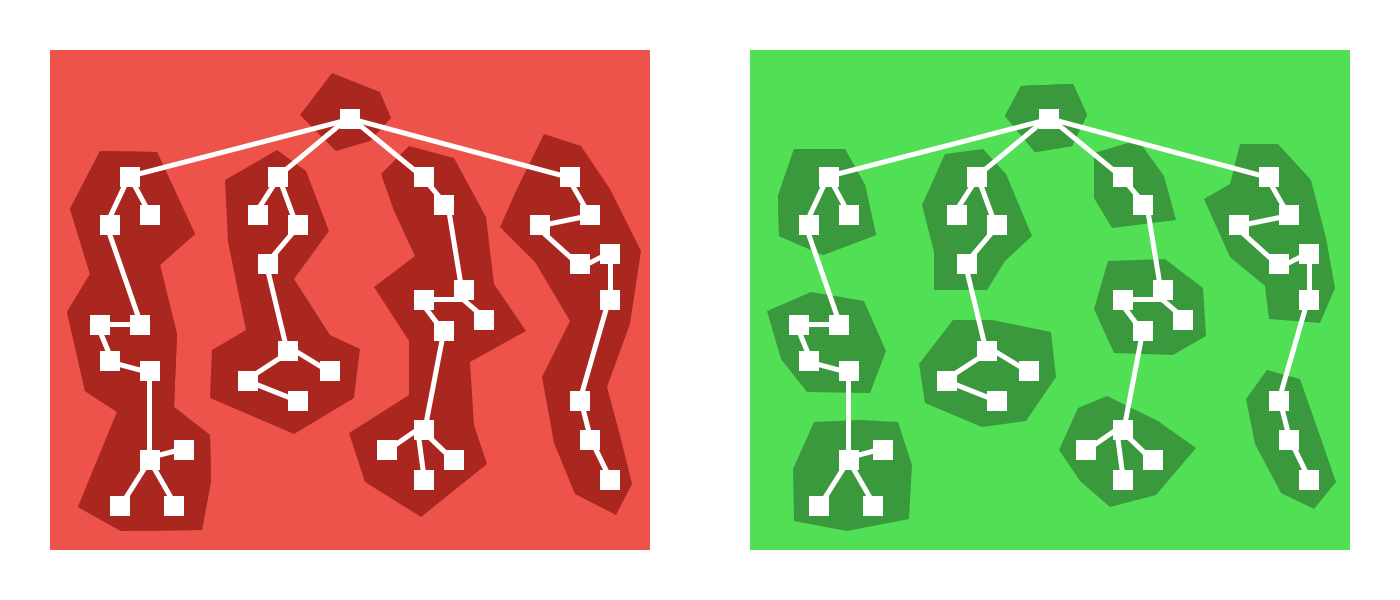
事实证明:相当多。不仅仅是通过路由,还有更多的地方你可以将你的应用程序拆分出来,Modals、tabs还有许多隐藏的UI组件,当用户执行某些操作的时候,你再去加载他们。
Example: 假设你的主应用程序是在一个选项卡里,用户可能永远也不会进入这个选项卡下的应用程序,所以父路由组件为何要加载这个选项卡所对应的组件呢?
还有一个地方,你可以优先加载优先级高的组件。那些页面底部的组件为何要和页面顶部的组件同时加载呢?
由于路由即组件,所以我们仍然可以很轻松的在组件层面做code-split(代码分割)
在一个新项目中使用code-spliting非常简单,以至于你都不用想两遍,你只需要改动少量代码就可以完成自动的代码分割。
React Loadable 是一个轻量级的代码分割组件,它简单到令人难以置信。
Loadable 是一个告诫组件 (一个创建并返回组件的函数),它能让你的应用程序在渲染之前动态的加载任何模块
想象有两个组件,一个组件是import的组件,另一个是渲染组件
importBarfrom'./components/Bar';classFooextendsReact.Component{render(){return<Bar/>;}}现在我们通过import引入Bar这个组件,这是一个同步的引入,但是我们在渲染之前是并不需要这个组件的,所以我们为何不推迟引入这个组件呢?
使用 dynamic import(动态引入) (a tc39 proposal currently at Stage 3)
我们可以修改组件Bar使之成为一个异步的。
classMyComponentextendsReact.Component{state={Bar: null};componentWillMount(){import('./components/Bar').then(Bar=>{this.setState({ Bar });});}render(){let{Bar}=this.state;if(!Bar){return<div>Loading...</div>;}else{return<Bar/>;};}}但是这是一整个工作流程,并不是单纯的代码分割这一件事儿这么简单,比如当import()失败我们该怎么办?怎么作server-side rendering(服务端渲染)?这时候你可以抽象出Loadable来解决这些问题。
importLoadablefrom'react-loadable';constLoadableBar=Loadable({loader: ()=>import('./components/Bar'),loading(){return<div>Loading...</div>}});classMyComponentextendsReact.Component{render(){return<LoadableBar/>;}}在webpack2+中,当你使用import()的时候,它会为你自动代码分割,而不用做外的设置。
这意味着通过使用React Loadable和import()可以很快的实验出新的代码分割点来,这是程序中的最佳实践.
渲染一个静态的"Loading..."已经不能传达出足够的信息给用户了。有时有我们还要想要表现出更多的状态来,比如错误和超时等,这是一个非常好的经历。
functionLoading(){return<div>Loading...</div>;}Loadable({loader: ()=>import('./WillFailToLoad'),// oh no!loading: Loading,});这样做非常好,你的loading component会接收多个不同的props。
当loader加载失败,loading component组件会接收一个error为true的prop(否则为false).
functionLoading(props){if(props.error){return<div>Error!</div>;}else{return<div>Loading...</div>;}}有时候你的组件加载速度非常快(<200ms),Loading组件的loading效果在屏幕上一闪而过. 许多用户反馈,这样的效果会导致用户认为等待的时间要比实际时间还要长,但是如果你什么都不显示,用户反而认为加载很快。
所以你的loading compoent将会得到一个布尔类型为truepastDelay prop的返回值,当组件的加载时间比设置的delay时间长的时候。
functionLoading(props){if(props.error){return<div>Error!</div>;}elseif(props.pastDelay){return<div>Loading...</div>;}else{returnnull;}}默认的delay参数为200ms,但是你可以根据需要自定义delay这个参数值
Loadable({loader: ()=>import('./components/Bar'),loading: Loading,delay: 300,// 0.3 seconds});有时候网络连接断开或者失败,或者永久性挂起,这时候网页无反应,用户不知道是继续等待还是重新刷新页面。这时候当loader超时后loading component 将会接收一个timedOut prop 并且这个只值为true
functionLoading(props){if(props.error){return<div>Error!</div>;}elseif(props.timedOut){return<div>Taking a long time...</div>;}elseif(props.pastDelay){return<div>Loading...</div>;}else{returnnull;}}然而这个特性默认是被禁止的,如果想打开特性,你可以通过timeout option参数传递给 Loadable.
Loadable({loader: ()=>import('./components/Bar'),loading: Loading,timeout: 10000,// 10 seconds});Loadable会渲染default导出的组件,如果你想渲染自定义导出的组件,请使用render option参数
Loadable({loader: ()=>import('./my-component'),render(loaded,props){letComponent=loaded.namedExport;return<Component{...props}/>;}});从技术上讲,你可以用loader()加载任何只要是一个promise的资源you're able to render something,但是这样用起来确实有点让人恼火。
你可以使用Loadable.Map让加载多个资源变得更加容易一些。
Loadable.Map({loader: {Bar: ()=>import('./Bar'),i18n: ()=>fetch('./i18n/bar.json').then(res=>res.json()),},render(loaded,props){letBar=loaded.Bar.default;leti18n=loaded.i18n;return<Bar{...props}i18n={i18n}/>;},});当使用Loadable.Map的时候,render() method是一个必要参数,他会传递一个匹配后的对象参数到loader中去。
还有一个优化项,你可以决定哪些组件在渲染之前进行预先加载。
比如:当按钮点击之前你需要加载一个新的组件,这个组件是被Loadable中的static preload method创建的。
constLoadableBar=Loadable({loader: ()=>import('./Bar'),loading: Loading,});classMyComponentextendsReact.Component{state={showBar: false};onClick=()=>{this.setState({showBar: true});};onMouseOver=()=>{LoadableBar.preload();};render(){return(<div><buttononClick={this.onClick}onMouseOver={this.onMouseOver}>
Show Bar
</button>{this.state.showBar&&<LoadableBar/>}</div>)}}
当你渲染所有所有已经动态加载完成的组件的时候,你将会得到一堆loading的效果,这看起来确实很糟糕,但是好消息是React Loadable在设计之初就支持服务端渲染的,这样就不会出现首屏加载效果了。
我们通过Express开启一个服务。
importexpressfrom'express';importReactfrom'react';importReactDOMServerfrom'react-dom/server';importAppfrom'./components/App';constapp=express();app.get('/',(req,res)=>{res.send(` <!doctype html> <html lang="en"> <head>...</head> <body> <div id="app">${ReactDOMServer.renderToString(<App/>)}</div> <script src="/dist/main.js"></script> </body> </html> `);});app.listen(3000,()=>{console.log('Running on http://localhost:3000/');});第一件事儿就是在渲染正确的内容之前,确保你的服务端已经加载了所有的组件了。
我们可以使用 Loadable.preloadAll
这个方法.他会返回一个所有组件加载完成的一个代理。
Loadable.preloadAll().then(()=>{app.listen(3000,()=>{console.log('Running on http://localhost:3000/');});});这可能稍微有一些复杂,这可能会话费我们多一些的精力。 为了能让客户端接管服务端的状态,我们需要在服务端使用相同的代码, 为了实现这一点,我们首先就要通过loadable组件告诉我们到底哪个组件正在渲染。
这里有两个参数Loadable和Loadable.Map能告诉我们哪个组件正在加载: opts.modules 和
opts.webpack
Loadable({loader: ()=>import('./Bar'),modules: ['./Bar'],webpack: ()=>[require.resolveWeak('./Bar')],});但是我们不必太担心这些参数,React Loadable有一个Babel plugin插件可以完成这些设置。
将 react-loadable/babel 加入到你的Babel config中:
{
"plugins": [
"react-loadable/babel"
]
}
现在这些参数将会被自动被创建。
下一步我们将找到当请求进来的时候,哪些模块是真正需要被加载的。
为此,我们有一个Loadable.Capture组件可以使用,它能收集所有的被加载的模块。
importLoadablefrom'react-loadable';app.get('/',(req,res)=>{letmodules=[];lethtml=ReactDOMServer.renderToString(<Loadable.Capturereport={moduleName=>modules.push(moduleName)}><App/></Loadable.Capture>);console.log(modules);res.send(`...${html}...`);});为了确保客户端加载了所有服务端渲染的模块,我们需要将服务端的模块和webpack打包出来的打包文件做一个映射。
这包含两部分,第一部分我们需要让Webpack告诉我们每个模块需要哪个打包文件,为此我们可以使用React Loadable Webpack plugin插件,在webpack config中从react-loadable/webpack 引入ReactLoadablePlugin插件,传递一个filename参数,webpack会将打包文件作为一个JSON数据输出到这个文件中去。
// webpack.config.jsimport{ReactLoadablePlugin}from'react-loadable/webpack';exportdefault{plugins: [newReactLoadablePlugin({filename: './dist/react-loadable.json',}),],};然后我们回到我们的服务端,用刚才文件中的数据将模块转换成打包文件的数据
将模块转换成打包文件,需要从react-loadable/webpack引入getBundles方法。
importLoadablefrom'react-loadable';import{getBundles}from'react-loadable/webpack'importstatsfrom'./dist/react-loadable.json';app.get('/',(req,res)=>{letmodules=[];lethtml=ReactDOMServer.renderToString(<Loadable.Capturereport={moduleName=>modules.push(moduleName)}><App/></Loadable.Capture>);letbundles=getBundles(stats,modules);// ...});这时候我们可以通过<script>标签渲染这些打包后的文件输出到HTML中。
letbundles=getBundles(stats,modules);res.send(` <!doctype html> <html lang="en"> <head>...</head> <body> <div id="app">${html}</div> <script src="/dist/main.js"></script>${bundles.map(bundle=>{return`<script src="/dist/${bundle.file}"></script>`}).join('\n')} </body> </html>`);因为Webpack的工作方式是,我们的主打包文件会比其他的scripts预先加载,所以我们需要等待所有的文件加载完成后才开始渲染。
为此我们需要一个全局的函数供我们调用当所有的打包文件被加载后,我们将在客户端使用Loadable.preloadReady()这个方法,就像在服务器使用Loadable.preloadAll()这个方法一样。
// src/entry.jsimportReactfrom'react';importReactDOMfrom'react-dom';importLoadablefrom'react-loadable';importAppfrom'./components/App';window.main=()=>{Loadable.preloadReady().then(()=>{ReactDOM.hydrate(<App/>,document.getElementById('app'));});};这时候在我们服务端返回的HTML的末尾处的 <script>标签中调用那个全局函数。
letbundles=getBundles(stats,modules);res.send(` ... <script src="/dist/main.js"></script>${bundles.map(...).join('\n')} <script>window.main();</script> </body> </html>`);
rendering前动态loading模块的一个高阶组件,当模块无法被加载的时候,loading 组件会被渲染.
constLoadableComponent=Loadable({loader: ()=>import('./Bar'),loading: Loading,delay: 200,timeout: 10000,});它返回一个 LoadableComponent组件.
一个允许你并行加载多个资源点的高阶组件。
Loadable.Map's opts.loader接收一个对象,并且需要opts.render方法
Loadable.Map({loader: {Bar: ()=>import('./Bar'),i18n: ()=>fetch('./i18n/bar.json').then(res=>res.json()),},render(loaded,props){letBar=loaded.Bar.default;leti18n=loaded.i18n;return<Bar{...props}i18n={i18n}/>;}});当调用Loadable.Map中的render()方法, 这个方法中的loaded参数将会和loader方法起到一样的作用。
一个加载模块的promose函数
Loadable({loader: ()=>import('./Bar'),});当调用Loadable.Map的时候,它接收对象行函数。
Loadable.Map({loader: {Bar: ()=>import('./Bar'),i18n: ()=>fetch('./i18n/bar.json').then(res=>res.json()),},});当调用Loadable.Map的时候,你也需要传递opts.render函数
当模块加载或者加载失败的时候,这个组件会被渲染。
Loadable({loading: LoadingComponent,});这个参数是必选参数,如果你不想渲染任何,让它返回null就好了。
Loadable({loading: ()=>null,});延时毫秒数props.pastDelay后加载渲染loading组件,默认值是200
Loadable({delay: 200});props.timedOut超时的毫秒数后显示loading组件,默认是关闭的。
Loadable({timeout: 10000});自定义渲染加载模块的函数
它接收 opts.loader代理返回的loaded参数和LoadableComponent传递的props两个参数。
Loadable({render(loaded,props){letComponent=loaded.default;return<Component{...props}/>;}});可选参数,可通过require.resolveWeak获取返回的一个Webpack模块id的集合。
Loadable({loader: ()=>import('./Foo'),webpack: ()=>[require.resolveWeak('./Foo')],});这个参数可通过Babel Plugin自动生成.
可选参数,imports模块路径的数组集合
Loadable({loader: ()=>import('./my-component'),modules: ['./my-component'],});可选参数,可通过Babel Plugin插件自动生成。
Loadable 和 Loadable.Map返回的组件.
constLoadableComponent=Loadable({// ...});当组件加载的时候调用opts.render方法,它会直接接收props参数。
LoadableComponent调用的一个静态方法,可以让组件��预加载。
constLoadableComponent=Loadable({...});LoadableComponent.preload();返回一个代理,但是尽量避免此代理阻塞你的UI更新,�否则会带来非常不好的用户体验。
传给opts.loading方法的一个组件.
functionLoadingComponent(props){if(props.error){// When the loader has erroredreturn<div>Error!</div>;}elseif(props.timedOut){// When the loader has taken longer than the timeoutreturn<div>Taking a long time...</div>;}elseif(props.pastDelay){// When the loader has taken longer than the delayreturn<div>Loading...</div>;}else{// When the loader has just startedreturnnull;}}Loading({loading: LoadingComponent,});LoadingComponent的一个布尔类型的参数,当loader模块加载失败的时候,为true.
functionLoadingComponent(props){if(props.error){return<div>Error!</div>;}else{return<div>Loading...</div>;}}LoadingComponent组件设置timeout�参数后,props.timedOut将接受一个布尔类型的返回值。
functionLoadingComponent(props){if(props.timedOut){return<div>Taking a long time...</div>;}else{return<div>Loading...</div>;}}LoadingComponent设置delay参数后,props.pastDelay将接受一个布尔类型的返回值.
functionLoadingComponent(props){if(props.pastDelay){return<div>Loading...</div>;}else{returnnull;}}等待所有被预加载的组件LoadableComponent.preload完成加载,允许你在各种环境里预加载你的组件,比如在服务端。
Loadable.preloadAll().then(()=>{app.listen(3000,()=>{console.log('Running on http://localhost:3000/');});});注意非常重要的一点,�预先加载你所有声明过的loadable组件在启动你的服务.
Good:
// During module initialization...constLoadableComponent=Loadable({...});classMyComponentextendsReact.Component{componentDidMount(){// ...}}Bad:
// ...classMyComponentextendsReact.Component{componentDidMount(){// During app render...constLoadableComponent=Loadable({...});}}注意:
Loadable.preloadAll()如果你的项目里有多个Loadable.preloadAll(),react-loadable将会失效。
更多关于 preloading on the server.
检查浏览器里已经加载所有模块并且调用matchingLoadableComponent.preload方法
window.main=()=>{Loadable.preloadReady().then(()=>{ReactDOM.hydrate(<App/>,document.getElementById('app'));});};更多�关于 preloading on the client.
记录哪个模块被渲染的�一个组件.
每个被React Loadable组件在被渲染的时候,接收一个被每个moduleName调用的report prop。
letmodules=[];lethtml=ReactDOMServer.renderToString(<Loadable.Capturereport={moduleName=>modules.push(moduleName)}><App/></Loadable.Capture>);console.log(modules);更多关于 capturing rendered modules.
为每个loadable 组件适配opts.webpack和opts.modules参数是一件很耗费�体力的一件事儿,并且你还要始终记着去做�。
你可以用Babel plugin写到你的配置文件里去�让Webpack自动完成这件事儿,从而代替手动去做。
{
"plugins": ["react-loadable/babel"]
}
Input
importLoadablefrom'react-loadable';constLoadableMyComponent=Loadable({loader: ()=>import('./MyComponent'),});constLoadableComponents=Loadable.Map({loader: {One: ()=>import('./One'),Two: ()=>import('./Two'),},});Output
importLoadablefrom'react-loadable';importpathfrom'path';constLoadableMyComponent=Loadable({loader: ()=>import('./MyComponent'),webpack: ()=>[require.resolveWeak('./MyComponent')],modules: [path.join(__dirname,'./MyComponent')],});constLoadableComponents=Loadable.Map({loader: {One: ()=>import('./One'),Two: ()=>import('./Two'),},webpack: ()=>[require.resolveWeak('./One'),require.resolveWeak('./Two')],modules: [path.join(__dirname,'./One'),path.join(__dirname,'./Two')],});当服务端渲染的时候,为了send the right bundles down,你需要React Loadable Webpack plugin�插件生成一个模块和打包文件�有对应关系的JSON文件.
// webpack.config.jsimport{ReactLoadablePlugin}from'react-loadable/webpack';exportdefault{plugins: [newReactLoadablePlugin({filename: './dist/react-loadable.json',}),],};它将产生一个JSON文件(opts.filename),你可以引入这个模块和打包文件�相对应的JSON文件
更多关于 mapping modules to bundles.
通过react-loadable/webpack方法可以导出一个模块和打包文件的映射关系.
import{getBundles}from'react-loadable/webpack';letbundles=getBundles(stats,modules);更多关于 mapping modules to bundles.

假定你的Loadable()会重复设置loading组件和delay参数,你可以用高阶组件 (HOC)去封装一层Loadable,并为它设置一些默认参数.
importLoadablefrom'react-loadable';importLoadingfrom'./my-loading-component';exportdefaultfunctionMyLoadable(opts){returnLoadable(Object.assign({loading: Loading,delay: 200,timeout: 10,},opts));};这时候你只需要设置loader就可以使用它。
importMyLoadablefrom'./MyLoadable';constLoadableMyComponent=MyLoadable({loader: ()=>import('./MyComponent'),});exportdefaultclassAppextendsReact.Component{render(){return<LoadableMyComponent/>;}}不幸的是,如果你用HOC对Loadable封装一层会使react-loadable/babel失效,所以这时候你需要手动的添加必要参数(modules, webpack).
importMyLoadablefrom'./MyLoadable';constLoadableMyComponent=MyLoadable({loader: ()=>import('./MyComponent'),modules: ['./MyComponent'],webpack: ()=>[require.resolveWeak('./MyComponent')],});exportdefaultclassAppextendsReact.Component{render(){return<LoadableMyComponent/>;}}当你调用getBundles方法的时候,它会返回Javascript依赖的文件类型在你的Webpack配置中.
为得到这些,你需要手动的过滤一下文件类型,像这样:
letbundles=getBundles(stats,modules);letstyles=bundles.filter(bundle=>bundle.file.endsWith('.css'));letscripts=bundles.filter(bundle=>bundle.file.endsWith('.js'));res.send(` <!doctype html> <html lang="en"> <head> ...${styles.map(style=>{return`<link href="/dist/${style.file}" rel="stylesheet"/>`}).join('\n')} </head> <body> <div id="app">${html}</div> <script src="/dist/main.js"></script>${scripts.map(script=>{return`<script src="/dist/${script.file}"></script>`}).join('\n')} </body> </html>`);