Repository files navigation

Go Monitoring <whatap.io>

WhaTap Go Application Monitoring provides the monitoring service for the Go applications.

  • It supports the web framework. It collects the data such as web transaction URL, response time, TPS information, error message, etc.
  • It continuously collects data from the Go Runtime package. It also collects data including memory, goroutine, and GC related data.
  • When multiple API/RPC services are called in the MSA environment, the call relationships are collected through link tracing.

WhaTap's Application Monitoring can monitor application in real time without reproducing failures.
scrrenshot

Agent Installation

Configuring the Go library

Add the github.com/whatap/go-api package to the Go application source code.


go get github.com/whatap/go-api@latest

Configure for initialization and shutdown with the trace.Init() and trace.Shutdown() functions. Set the startup and end for transactions with the trace.Start() and trace.End() functions.


import (
"github.com/whatap/go-api/trace"
)
func main(){
trace.Init(nil)
//It must be executed before closing the app.
defer trace.Shutdown()
... }

ctx parameter is optional (GID fallback)

APIs that accept a ctx context.Context parameter — httpc.Start(ctx, url), sql.StartWithParam(ctx, ...), method.Start(ctx, name), whataphttp.NewRoundTrip(ctx, t) — internally call trace.GetTraceContext(ctx), which falls back to a goroutine-ID lookup when ctx is nil or carries no trace context. As a result, passing nil is safe within the same goroutine after trace.Start(...) has run:

trace.Start(r.Context(), "tx")
defer trace.End(...)
// All of these still see the active transaction via GID fallback:sqlCtx, _:=sql.StartWithParam(nil, dbc, query, params...)
httpcCtx, _:=httpc.Start(nil, url)

However, you must pass the ctx explicitly when crossing goroutine boundaries (go func() { ... }()) — the new goroutine has a different GID, so the only way to inherit the parent trace is through ctx.Value("whatap"). The ctx parameter therefore stays in the API surface for goroutine safety; it is optional only within synchronous, same-goroutine call chains.

Download agent

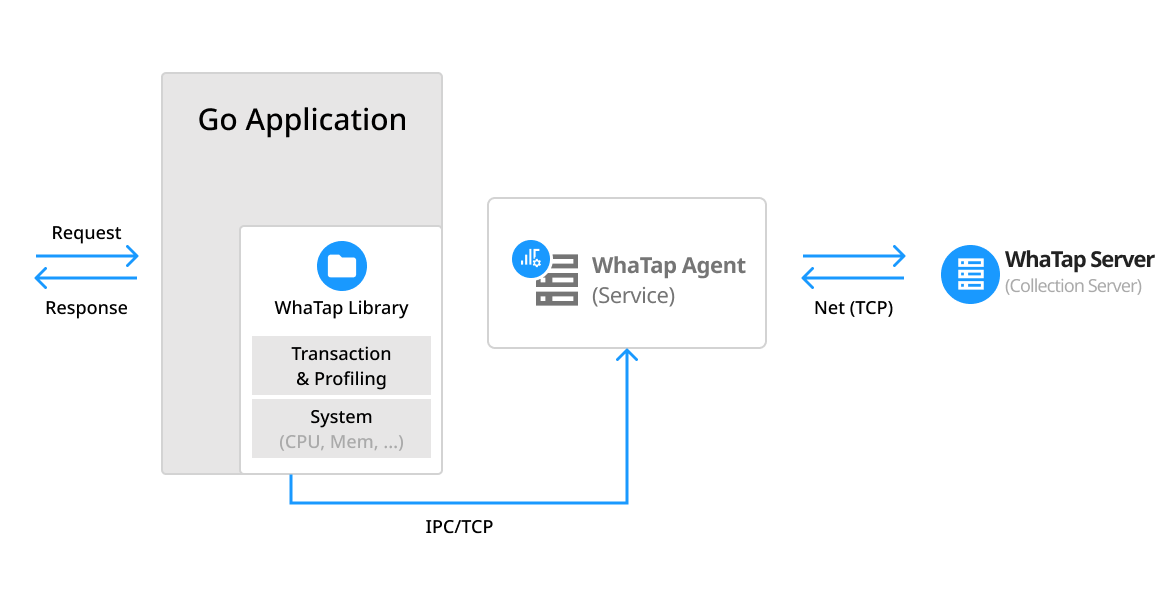
An agent must be installed on the same server to forward data from the monitored application server through TCP communication and to transfer the data to the WhaTap collection server. The agent can be installed using the package.

NoteThe agent works as the default 127.0.0.1:6600 TCP server. It receives data from the Go application and forwards the data to the WhaTap collection server via the outbound 6600 port.

1 Install the WhaTap repository. 2 Install the whatap-agent Linux package (yum, apt-get). 3 Run the whatap-agent service.

RedHat/CentOS

Register the package repository
$ sudo rpm -Uvh http://repo.whatap.io/centos/5/noarch/whatap-repo-1.0-1.noarch.rpm
Install the package
$ sudo yum install whatap-agent

Debian/Ubuntu

Register the package repository
$ wget http://repo.whatap.io/debian/release.gpg -O -|sudo apt-key add -
$ wget http://repo.whatap.io/debian/whatap-repo_1.0_all.deb
$ sudo dpkg -i whatap-repo_1.0_all.deb
$ sudo apt-get update
Install the package
$ sudo apt-get install whatap-agent

Amazon Linux

Register the package repository
$ sudo rpm --import http://repo.whatap.io/centos/release.gpg $ echo "[whatap]" | sudo tee /etc/yum.repos.d/whatap.repo > /dev/null $ echo "name=whatap packages for enterprise linux" | sudo tee -a /etc/yum.repos.d/whatap.repo > /dev/null $ echo "baseurl=http://repo.whatap.io/centos/latest/\$basearch" | sudo tee -a /etc/yum.repos.d/whatap.repo > /dev/null
$ echo "enabled=1" | sudo tee -a /etc/yum.repos.d/whatap.repo > /dev/null $ echo "gpgcheck=0" | sudo tee -a /etc/yum.repos.d/whatap.repo > /dev/null

Install the package

$ sudo yum install whatap-agent

Alpine Linux

[whatap-agent.tar.gz]After downloading the file (https://s3.ap-northeast-2.amazonaws.com/repo.whatap.io/alpine/x86_64/whatap-agent.tar.gz), unzip the file based on the "/" directory. Create the monitoring file in the /usr/whatap/agent path.


$ wget https://s3.ap-northeast-2.amazonaws.com/repo.whatap.io/alpine/x86_64/whatap-agent.tar.gz
$ tar -xvzf whatap-agent.tar.gz -C /

Dockerfile

Using whatap-go-inst for automatic instrumentation:

# Stage 1: Build with instrumentationFROM golang:1.21-alpine AS builder
# Install whatap-go-instRUN wget -qO- https://github.com/whatap/go-api-inst/releases/latest/download/whatap-go-inst_linux_amd64.tar.gz | tar xz -C /usr/local/bin/
WORKDIR /app
COPY . .
# Build with instrumentationRUN whatap-go-inst go build -o /app/server .
# Stage 2: Run with WhaTap agentFROM alpine:latest
# Install WhaTap agentRUN wget -qO- https://s3.ap-northeast-2.amazonaws.com/repo.whatap.io/alpine/x86_64/whatap-agent.tar.gz | tar xz -C /
WORKDIR /app
COPY --from=builder /app/server .
# Create WhaTap config fileRUN echo "license=your-license-key" > whatap.conf && \
echo "whatap.server.host=13.124.11.223" >> whatap.conf && \
echo "app_name=myapp" >> whatap.conf
ENV WHATAP_HOME=/app
EXPOSE 8080
CMD ["/bin/sh", "-c", "/usr/whatap/agent/whatap-agent start && ./server"]

Note: Get license and whatap.server.host from WhaTap Console after creating a project.

Agent setting

Default settings Execute the following commands in order to set the access key and collection server IP in whatap.conf.

  • Create the whatap.conf file in the path of the application startup script.
  • If the WHATAP_HOME environment variable has not been set, the path of the application startup script is recognized as the one of the whatap.conf file.

# Creation of whatap.conf in the script running path
$ echo "license={Access Key}" >> ./whatap.conf
$ echo "whatap.server.host={Collection Server IP}" >> ./whatap.conf
$ echo "app_name={Application Name}" >> ./whatap.conf
# Run application
./app
  • license: Enter the access key.
  • whatap.server.host: Enter the collection server IP address.
  • app_name: Enter the application name. Set the user as a string.

Note app_name is a component to determine the agent name. For more information, see the following.

Setting the WHATAP_HOME variable

You can set the whatap.conf path as the WHATAP_HOME variable. Create the WHATAP_HOME path first.

# Set the whatap.conf path after setting the WHATAP_HOME path.
mkdir ./whatap_home
echo "license={Access Key}" >> ./whatap_home/whatap.conf
echo "whatap.server.host={Collection Server IP}" >> ./whatap_home/whatap.conf
echo "app_name={Application Name}" >> ./whatap_home/whatap.conf
# Run the application.
WHATAP_HOME=./whatap_home ./app

Setting the agent names for each process

If one whatap.conf file is shared by the applications running in multiple processes, any changes may not be reflected. It is recommended to set a whatap.conf for each process.

To avoid duplicate agent names, you can add a string to each agent name for identification. The value set with the app_name option is added to the beginning of the agent name.

You can avoid duplicate names of agents run with the same command and the same instance.


# Set the whatap.conf path after setting the WHATAP_HOME path.
mkdir ./whatap_home
echo "license={Access Key}" >> ./whatap_home/whatap.conf
echo "whatap.server.host={Collection Server IP}" >> ./whatap_home/whatap.conf
echo "app_name={Application Name-1}" >> ./whatap_home/whatap.conf
# Run the application.
WHATAP_HOME=./whatap_home ./app # Set the whatap.conf path after setting the WHATAP_HOME path.
mkdir ./whatap_home1
echo "license={Access Key}" >> ./whatap_home1/whatap.conf
echo "whatap.server.host={Collection Server IP}" >> ./whatap_home1/whatap.conf
echo "app_name={Application Name-2}" >> ./whatap_home1/whatap.conf
# Run the application
WHATAP_HOME=./whatap_home1 ./app

About

No description, website, or topics provided.

Resources

Stars

3 stars

Watchers

1 watching

Forks

Releases

Packages

Used by

Contributors

Languages

, 'i'); if (__m === '*' || __re.test(location.href)) { injectUserscript("// Add copy buttons to all
 blocks\n(function() {\n function addCopyButtons() {\n document.querySelectorAll('pre code').forEach(function(codeBlock) {\n if (codeBlock.parentElement.hasAttribute('data-copy-added')) return;\n codeBlock.parentElement.setAttribute('data-copy-added', 'true');\n \n var btn = document.createElement('button');\n btn.textContent = 'Copy';\n btn.style.cssText = 'position:absolute;top:4px;right:4px;padding:2px 8px;font-size:11px;background:#4ecdc4;border:none;border-radius:4px;color:#1a1a2e;cursor:pointer;opacity:0.7;transition:opacity 0.2s;';\n btn.onmouseover = function() { this.style.opacity = '1'; };\n btn.onmouseout = function() { this.style.opacity = '0.7'; };\n btn.onclick = function() {\n navigator.clipboard.writeText(codeBlock.textContent).then(function() {\n btn.textContent = 'Copied!';\n setTimeout(function() { btn.textContent = 'Copy'; }, 1500);\n });\n };\n codeBlock.parentElement.style.position = 'relative';\n codeBlock.parentElement.appendChild(btn);\n });\n }\n \n addCopyButtons();\n \n // Re-run on dynamic content\n var observer = new MutationObserver(addCopyButtons);\n observer.observe(document.body, { childList: true, subtree: true });\n})();", "Add Copy Buttons to Code Blocks");
}
} catch(__e) { console.warn('[Userscript:Add Copy Buttons to Code Blocks]', __e); }
})();
(function(){
try {
var __m = "github.com";
var __re = new RegExp('^' + "github\\.com" + '
Skip to content

Repository files navigation

Go Monitoring <whatap.io>

WhaTap Go Application Monitoring provides the monitoring service for the Go applications.

  • It supports the web framework. It collects the data such as web transaction URL, response time, TPS information, error message, etc.
  • It continuously collects data from the Go Runtime package. It also collects data including memory, goroutine, and GC related data.
  • When multiple API/RPC services are called in the MSA environment, the call relationships are collected through link tracing.

WhaTap's Application Monitoring can monitor application in real time without reproducing failures.

scrrenshot

Agent Installation

Configuring the Go library

Add the github.com/whatap/go-api package to the Go application source code.


go get github.com/whatap/go-api@latest

Configure for initialization and shutdown with the trace.Init() and trace.Shutdown() functions. Set the startup and end for transactions with the trace.Start() and trace.End() functions.


import (
"github.com/whatap/go-api/trace"
)
func main(){
trace.Init(nil)
//It must be executed before closing the app.
defer trace.Shutdown()
... }

ctx parameter is optional (GID fallback)

APIs that accept a ctx context.Context parameter — httpc.Start(ctx, url), sql.StartWithParam(ctx, ...), method.Start(ctx, name), whataphttp.NewRoundTrip(ctx, t) — internally call trace.GetTraceContext(ctx), which falls back to a goroutine-ID lookup when ctx is nil or carries no trace context. As a result, passing nil is safe within the same goroutine after trace.Start(...) has run:

trace.Start(r.Context(), "tx")
defer trace.End(...)
// All of these still see the active transaction via GID fallback:sqlCtx, _:=sql.StartWithParam(nil, dbc, query, params...)
httpcCtx, _:=httpc.Start(nil, url)

However, you must pass the ctx explicitly when crossing goroutine boundaries (go func() { ... }()) — the new goroutine has a different GID, so the only way to inherit the parent trace is through ctx.Value("whatap"). The ctx parameter therefore stays in the API surface for goroutine safety; it is optional only within synchronous, same-goroutine call chains.

Download agent

An agent must be installed on the same server to forward data from the monitored application server through TCP communication and to transfer the data to the WhaTap collection server. The agent can be installed using the package.

NoteThe agent works as the default 127.0.0.1:6600 TCP server. It receives data from the Go application and forwards the data to the WhaTap collection server via the outbound 6600 port.

1 Install the WhaTap repository. 2 Install the whatap-agent Linux package (yum, apt-get). 3 Run the whatap-agent service.

RedHat/CentOS

Register the package repository
$ sudo rpm -Uvh http://repo.whatap.io/centos/5/noarch/whatap-repo-1.0-1.noarch.rpm
Install the package
$ sudo yum install whatap-agent

Debian/Ubuntu

Register the package repository
$ wget http://repo.whatap.io/debian/release.gpg -O -|sudo apt-key add -
$ wget http://repo.whatap.io/debian/whatap-repo_1.0_all.deb
$ sudo dpkg -i whatap-repo_1.0_all.deb
$ sudo apt-get update
Install the package
$ sudo apt-get install whatap-agent

Amazon Linux

Register the package repository
$ sudo rpm --import http://repo.whatap.io/centos/release.gpg $ echo "[whatap]" | sudo tee /etc/yum.repos.d/whatap.repo > /dev/null $ echo "name=whatap packages for enterprise linux" | sudo tee -a /etc/yum.repos.d/whatap.repo > /dev/null $ echo "baseurl=http://repo.whatap.io/centos/latest/\$basearch" | sudo tee -a /etc/yum.repos.d/whatap.repo > /dev/null
$ echo "enabled=1" | sudo tee -a /etc/yum.repos.d/whatap.repo > /dev/null $ echo "gpgcheck=0" | sudo tee -a /etc/yum.repos.d/whatap.repo > /dev/null

Install the package

$ sudo yum install whatap-agent

Alpine Linux

[whatap-agent.tar.gz]After downloading the file (https://s3.ap-northeast-2.amazonaws.com/repo.whatap.io/alpine/x86_64/whatap-agent.tar.gz), unzip the file based on the "/" directory. Create the monitoring file in the /usr/whatap/agent path.


$ wget https://s3.ap-northeast-2.amazonaws.com/repo.whatap.io/alpine/x86_64/whatap-agent.tar.gz
$ tar -xvzf whatap-agent.tar.gz -C /

Dockerfile

Using whatap-go-inst for automatic instrumentation:

# Stage 1: Build with instrumentationFROM golang:1.21-alpine AS builder
# Install whatap-go-instRUN wget -qO- https://github.com/whatap/go-api-inst/releases/latest/download/whatap-go-inst_linux_amd64.tar.gz | tar xz -C /usr/local/bin/
WORKDIR /app
COPY . .
# Build with instrumentationRUN whatap-go-inst go build -o /app/server .
# Stage 2: Run with WhaTap agentFROM alpine:latest
# Install WhaTap agentRUN wget -qO- https://s3.ap-northeast-2.amazonaws.com/repo.whatap.io/alpine/x86_64/whatap-agent.tar.gz | tar xz -C /
WORKDIR /app
COPY --from=builder /app/server .
# Create WhaTap config fileRUN echo "license=your-license-key" > whatap.conf && \
echo "whatap.server.host=13.124.11.223" >> whatap.conf && \
echo "app_name=myapp" >> whatap.conf
ENV WHATAP_HOME=/app
EXPOSE 8080
CMD ["/bin/sh", "-c", "/usr/whatap/agent/whatap-agent start && ./server"]

Note: Get license and whatap.server.host from WhaTap Console after creating a project.

Agent setting

Default settings Execute the following commands in order to set the access key and collection server IP in whatap.conf.

  • Create the whatap.conf file in the path of the application startup script.
  • If the WHATAP_HOME environment variable has not been set, the path of the application startup script is recognized as the one of the whatap.conf file.

# Creation of whatap.conf in the script running path
$ echo "license={Access Key}" >> ./whatap.conf
$ echo "whatap.server.host={Collection Server IP}" >> ./whatap.conf
$ echo "app_name={Application Name}" >> ./whatap.conf
# Run application
./app
  • license: Enter the access key.
  • whatap.server.host: Enter the collection server IP address.
  • app_name: Enter the application name. Set the user as a string.

Note app_name is a component to determine the agent name. For more information, see the following.

Setting the WHATAP_HOME variable

You can set the whatap.conf path as the WHATAP_HOME variable. Create the WHATAP_HOME path first.

# Set the whatap.conf path after setting the WHATAP_HOME path.
mkdir ./whatap_home
echo "license={Access Key}" >> ./whatap_home/whatap.conf
echo "whatap.server.host={Collection Server IP}" >> ./whatap_home/whatap.conf
echo "app_name={Application Name}" >> ./whatap_home/whatap.conf
# Run the application.
WHATAP_HOME=./whatap_home ./app

Setting the agent names for each process

If one whatap.conf file is shared by the applications running in multiple processes, any changes may not be reflected. It is recommended to set a whatap.conf for each process.

To avoid duplicate agent names, you can add a string to each agent name for identification. The value set with the app_name option is added to the beginning of the agent name.

You can avoid duplicate names of agents run with the same command and the same instance.


# Set the whatap.conf path after setting the WHATAP_HOME path.
mkdir ./whatap_home
echo "license={Access Key}" >> ./whatap_home/whatap.conf
echo "whatap.server.host={Collection Server IP}" >> ./whatap_home/whatap.conf
echo "app_name={Application Name-1}" >> ./whatap_home/whatap.conf
# Run the application.
WHATAP_HOME=./whatap_home ./app # Set the whatap.conf path after setting the WHATAP_HOME path.
mkdir ./whatap_home1
echo "license={Access Key}" >> ./whatap_home1/whatap.conf
echo "whatap.server.host={Collection Server IP}" >> ./whatap_home1/whatap.conf
echo "app_name={Application Name-2}" >> ./whatap_home1/whatap.conf
# Run the application
WHATAP_HOME=./whatap_home1 ./app

About

No description, website, or topics provided.

Resources

Stars

3 stars

Watchers

1 watching

Forks

Releases

Packages

Used by

Contributors

Languages

, 'i'); if (__m === '*' || __re.test(location.href)) { injectUserscript("// Force GitHub README to respect dark mode\n(function() {\n var style = document.createElement('style');\n style.textContent = '\n .markdown-body {\n color-scheme: dark light;\n }\n .markdown-body pre { background: #161b22 !important; }\n .markdown-body code { background: rgba(110, 118, 129, 0.4) !important; }\n .markdown-body table th, .markdown-body table td { border-color: #30363d !important; }\n .markdown-body img { background: #0d1117; }\n .markdown-body blockquote { border-left-color: #8b949e; }\n .markdown-body hr { border-color: #30363d; }\n ';\n document.head.appendChild(style);\n})();", "GitHub Dark Mode README Fix"); } } catch(__e) { console.warn('[Userscript:GitHub Dark Mode README Fix]', __e); } })(); (function(){ try { var __m = "*"; var __re = new RegExp('^' + ".*" + '
Skip to content

Repository files navigation

Go Monitoring <whatap.io>

WhaTap Go Application Monitoring provides the monitoring service for the Go applications.

  • It supports the web framework. It collects the data such as web transaction URL, response time, TPS information, error message, etc.
  • It continuously collects data from the Go Runtime package. It also collects data including memory, goroutine, and GC related data.
  • When multiple API/RPC services are called in the MSA environment, the call relationships are collected through link tracing.

WhaTap's Application Monitoring can monitor application in real time without reproducing failures.

scrrenshot

Agent Installation

Configuring the Go library

Add the github.com/whatap/go-api package to the Go application source code.


go get github.com/whatap/go-api@latest

Configure for initialization and shutdown with the trace.Init() and trace.Shutdown() functions. Set the startup and end for transactions with the trace.Start() and trace.End() functions.


import (
"github.com/whatap/go-api/trace"
)
func main(){
trace.Init(nil)
//It must be executed before closing the app.
defer trace.Shutdown()
... }

ctx parameter is optional (GID fallback)

APIs that accept a ctx context.Context parameter — httpc.Start(ctx, url), sql.StartWithParam(ctx, ...), method.Start(ctx, name), whataphttp.NewRoundTrip(ctx, t) — internally call trace.GetTraceContext(ctx), which falls back to a goroutine-ID lookup when ctx is nil or carries no trace context. As a result, passing nil is safe within the same goroutine after trace.Start(...) has run:

trace.Start(r.Context(), "tx")
defer trace.End(...)
// All of these still see the active transaction via GID fallback:sqlCtx, _:=sql.StartWithParam(nil, dbc, query, params...)
httpcCtx, _:=httpc.Start(nil, url)

However, you must pass the ctx explicitly when crossing goroutine boundaries (go func() { ... }()) — the new goroutine has a different GID, so the only way to inherit the parent trace is through ctx.Value("whatap"). The ctx parameter therefore stays in the API surface for goroutine safety; it is optional only within synchronous, same-goroutine call chains.

Download agent

An agent must be installed on the same server to forward data from the monitored application server through TCP communication and to transfer the data to the WhaTap collection server. The agent can be installed using the package.

NoteThe agent works as the default 127.0.0.1:6600 TCP server. It receives data from the Go application and forwards the data to the WhaTap collection server via the outbound 6600 port.

1 Install the WhaTap repository. 2 Install the whatap-agent Linux package (yum, apt-get). 3 Run the whatap-agent service.

RedHat/CentOS

Register the package repository
$ sudo rpm -Uvh http://repo.whatap.io/centos/5/noarch/whatap-repo-1.0-1.noarch.rpm
Install the package
$ sudo yum install whatap-agent

Debian/Ubuntu

Register the package repository
$ wget http://repo.whatap.io/debian/release.gpg -O -|sudo apt-key add -
$ wget http://repo.whatap.io/debian/whatap-repo_1.0_all.deb
$ sudo dpkg -i whatap-repo_1.0_all.deb
$ sudo apt-get update
Install the package
$ sudo apt-get install whatap-agent

Amazon Linux

Register the package repository
$ sudo rpm --import http://repo.whatap.io/centos/release.gpg $ echo "[whatap]" | sudo tee /etc/yum.repos.d/whatap.repo > /dev/null $ echo "name=whatap packages for enterprise linux" | sudo tee -a /etc/yum.repos.d/whatap.repo > /dev/null $ echo "baseurl=http://repo.whatap.io/centos/latest/\$basearch" | sudo tee -a /etc/yum.repos.d/whatap.repo > /dev/null
$ echo "enabled=1" | sudo tee -a /etc/yum.repos.d/whatap.repo > /dev/null $ echo "gpgcheck=0" | sudo tee -a /etc/yum.repos.d/whatap.repo > /dev/null

Install the package

$ sudo yum install whatap-agent

Alpine Linux

[whatap-agent.tar.gz]After downloading the file (https://s3.ap-northeast-2.amazonaws.com/repo.whatap.io/alpine/x86_64/whatap-agent.tar.gz), unzip the file based on the "/" directory. Create the monitoring file in the /usr/whatap/agent path.


$ wget https://s3.ap-northeast-2.amazonaws.com/repo.whatap.io/alpine/x86_64/whatap-agent.tar.gz
$ tar -xvzf whatap-agent.tar.gz -C /

Dockerfile

Using whatap-go-inst for automatic instrumentation:

# Stage 1: Build with instrumentationFROM golang:1.21-alpine AS builder
# Install whatap-go-instRUN wget -qO- https://github.com/whatap/go-api-inst/releases/latest/download/whatap-go-inst_linux_amd64.tar.gz | tar xz -C /usr/local/bin/
WORKDIR /app
COPY . .
# Build with instrumentationRUN whatap-go-inst go build -o /app/server .
# Stage 2: Run with WhaTap agentFROM alpine:latest
# Install WhaTap agentRUN wget -qO- https://s3.ap-northeast-2.amazonaws.com/repo.whatap.io/alpine/x86_64/whatap-agent.tar.gz | tar xz -C /
WORKDIR /app
COPY --from=builder /app/server .
# Create WhaTap config fileRUN echo "license=your-license-key" > whatap.conf && \
echo "whatap.server.host=13.124.11.223" >> whatap.conf && \
echo "app_name=myapp" >> whatap.conf
ENV WHATAP_HOME=/app
EXPOSE 8080
CMD ["/bin/sh", "-c", "/usr/whatap/agent/whatap-agent start && ./server"]

Note: Get license and whatap.server.host from WhaTap Console after creating a project.

Agent setting

Default settings Execute the following commands in order to set the access key and collection server IP in whatap.conf.

  • Create the whatap.conf file in the path of the application startup script.
  • If the WHATAP_HOME environment variable has not been set, the path of the application startup script is recognized as the one of the whatap.conf file.

# Creation of whatap.conf in the script running path
$ echo "license={Access Key}" >> ./whatap.conf
$ echo "whatap.server.host={Collection Server IP}" >> ./whatap.conf
$ echo "app_name={Application Name}" >> ./whatap.conf
# Run application
./app
  • license: Enter the access key.
  • whatap.server.host: Enter the collection server IP address.
  • app_name: Enter the application name. Set the user as a string.

Note app_name is a component to determine the agent name. For more information, see the following.

Setting the WHATAP_HOME variable

You can set the whatap.conf path as the WHATAP_HOME variable. Create the WHATAP_HOME path first.

# Set the whatap.conf path after setting the WHATAP_HOME path.
mkdir ./whatap_home
echo "license={Access Key}" >> ./whatap_home/whatap.conf
echo "whatap.server.host={Collection Server IP}" >> ./whatap_home/whatap.conf
echo "app_name={Application Name}" >> ./whatap_home/whatap.conf
# Run the application.
WHATAP_HOME=./whatap_home ./app

Setting the agent names for each process

If one whatap.conf file is shared by the applications running in multiple processes, any changes may not be reflected. It is recommended to set a whatap.conf for each process.

To avoid duplicate agent names, you can add a string to each agent name for identification. The value set with the app_name option is added to the beginning of the agent name.

You can avoid duplicate names of agents run with the same command and the same instance.


# Set the whatap.conf path after setting the WHATAP_HOME path.
mkdir ./whatap_home
echo "license={Access Key}" >> ./whatap_home/whatap.conf
echo "whatap.server.host={Collection Server IP}" >> ./whatap_home/whatap.conf
echo "app_name={Application Name-1}" >> ./whatap_home/whatap.conf
# Run the application.
WHATAP_HOME=./whatap_home ./app # Set the whatap.conf path after setting the WHATAP_HOME path.
mkdir ./whatap_home1
echo "license={Access Key}" >> ./whatap_home1/whatap.conf
echo "whatap.server.host={Collection Server IP}" >> ./whatap_home1/whatap.conf
echo "app_name={Application Name-2}" >> ./whatap_home1/whatap.conf
# Run the application
WHATAP_HOME=./whatap_home1 ./app

About

No description, website, or topics provided.

Resources

Stars

3 stars

Watchers

1 watching

Forks

Releases

Packages

Used by

Contributors

Languages

, 'i'); if (__m === '*' || __re.test(location.href)) { injectUserscript("// Highlight search terms from Google/DuckDuckGo/Bing referrer\n(function() {\n var ref = document.referrer;\n var terms = [];\n \n if (ref.includes('google.com') || ref.includes('duckduckgo.com') || ref.includes('bing.com')) {\n var url = new URL(ref);\n var q = url.searchParams.get('q') || url.searchParams.get('p');\n if (q) {\n terms = q.split(/\\s+/).filter(function(t) { return t.length > 2; });\n }\n }\n \n if (terms.length === 0) return;\n \n var style = document.createElement('style');\n style.textContent = '.userscript-highlight { background: #fbbf24; color: #1a1a2e; padding: 1px 3px; border-radius: 2px; }';\n document.head.appendChild(style);\n \n function highlight(node) {\n if (node.nodeType === 3) { // text node\n var text = node.textContent;\n var found = false;\n terms.forEach(function(term) {\n var regex = new RegExp('(' + term.replace(/[.*+?^${}()|[\\]\\\\]/g, '\\\\') + ')', 'gi');\n if (regex.test(text)) {\n found = true;\n var frag = document.createDocumentFragment();\n var parts = text.split(regex);\n parts.forEach(function(part, i) {\n if (i % 2 === 0) {\n frag.appendChild(document.createTextNode(part));\n } else {\n var span = document.createElement('span');\n span.className = 'userscript-highlight';\n span.textContent = part;\n frag.appendChild(span);\n }\n });\n node.parentNode.replaceChild(frag, node);\n }\n });\n } else if (node.nodeType === 1 && node.childNodes) { // element\n var skipTags = ['SCRIPT', 'STYLE', 'NOSCRIPT', 'TEXTAREA', 'INPUT', 'SELECT'];\n if (!skipTags.includes(node.tagName)) {\n Array.from(node.childNodes).forEach(highlight);\n }\n }\n }\n \n highlight(document.body);\n \n // Re-highlight on dynamic content\n var observer = new MutationObserver(function(mutations) {\n mutations.forEach(function(m) {\n m.addedNodes.forEach(function(node) {\n if (node.nodeType === 1 || node.nodeType === 3) highlight(node);\n });\n });\n });\n observer.observe(document.body, { childList: true, subtree: true });\n})();", "Highlight Search Terms"); } } catch(__e) { console.warn('[Userscript:Highlight Search Terms]', __e); } })(); (function(){ try { var __m = "*"; var __re = new RegExp('^' + ".*" + '
Skip to content

Repository files navigation

Go Monitoring <whatap.io>

WhaTap Go Application Monitoring provides the monitoring service for the Go applications.

  • It supports the web framework. It collects the data such as web transaction URL, response time, TPS information, error message, etc.
  • It continuously collects data from the Go Runtime package. It also collects data including memory, goroutine, and GC related data.
  • When multiple API/RPC services are called in the MSA environment, the call relationships are collected through link tracing.

WhaTap's Application Monitoring can monitor application in real time without reproducing failures.

scrrenshot

Agent Installation

Configuring the Go library

Add the github.com/whatap/go-api package to the Go application source code.


go get github.com/whatap/go-api@latest

Configure for initialization and shutdown with the trace.Init() and trace.Shutdown() functions. Set the startup and end for transactions with the trace.Start() and trace.End() functions.


import (
"github.com/whatap/go-api/trace"
)
func main(){
trace.Init(nil)
//It must be executed before closing the app.
defer trace.Shutdown()
... }

ctx parameter is optional (GID fallback)

APIs that accept a ctx context.Context parameter — httpc.Start(ctx, url), sql.StartWithParam(ctx, ...), method.Start(ctx, name), whataphttp.NewRoundTrip(ctx, t) — internally call trace.GetTraceContext(ctx), which falls back to a goroutine-ID lookup when ctx is nil or carries no trace context. As a result, passing nil is safe within the same goroutine after trace.Start(...) has run:

trace.Start(r.Context(), "tx")
defer trace.End(...)
// All of these still see the active transaction via GID fallback:sqlCtx, _:=sql.StartWithParam(nil, dbc, query, params...)
httpcCtx, _:=httpc.Start(nil, url)

However, you must pass the ctx explicitly when crossing goroutine boundaries (go func() { ... }()) — the new goroutine has a different GID, so the only way to inherit the parent trace is through ctx.Value("whatap"). The ctx parameter therefore stays in the API surface for goroutine safety; it is optional only within synchronous, same-goroutine call chains.

Download agent

An agent must be installed on the same server to forward data from the monitored application server through TCP communication and to transfer the data to the WhaTap collection server. The agent can be installed using the package.

NoteThe agent works as the default 127.0.0.1:6600 TCP server. It receives data from the Go application and forwards the data to the WhaTap collection server via the outbound 6600 port.

1 Install the WhaTap repository. 2 Install the whatap-agent Linux package (yum, apt-get). 3 Run the whatap-agent service.

RedHat/CentOS

Register the package repository
$ sudo rpm -Uvh http://repo.whatap.io/centos/5/noarch/whatap-repo-1.0-1.noarch.rpm
Install the package
$ sudo yum install whatap-agent

Debian/Ubuntu

Register the package repository
$ wget http://repo.whatap.io/debian/release.gpg -O -|sudo apt-key add -
$ wget http://repo.whatap.io/debian/whatap-repo_1.0_all.deb
$ sudo dpkg -i whatap-repo_1.0_all.deb
$ sudo apt-get update
Install the package
$ sudo apt-get install whatap-agent

Amazon Linux

Register the package repository
$ sudo rpm --import http://repo.whatap.io/centos/release.gpg $ echo "[whatap]" | sudo tee /etc/yum.repos.d/whatap.repo > /dev/null $ echo "name=whatap packages for enterprise linux" | sudo tee -a /etc/yum.repos.d/whatap.repo > /dev/null $ echo "baseurl=http://repo.whatap.io/centos/latest/\$basearch" | sudo tee -a /etc/yum.repos.d/whatap.repo > /dev/null
$ echo "enabled=1" | sudo tee -a /etc/yum.repos.d/whatap.repo > /dev/null $ echo "gpgcheck=0" | sudo tee -a /etc/yum.repos.d/whatap.repo > /dev/null

Install the package

$ sudo yum install whatap-agent

Alpine Linux

[whatap-agent.tar.gz]After downloading the file (https://s3.ap-northeast-2.amazonaws.com/repo.whatap.io/alpine/x86_64/whatap-agent.tar.gz), unzip the file based on the "/" directory. Create the monitoring file in the /usr/whatap/agent path.


$ wget https://s3.ap-northeast-2.amazonaws.com/repo.whatap.io/alpine/x86_64/whatap-agent.tar.gz
$ tar -xvzf whatap-agent.tar.gz -C /

Dockerfile

Using whatap-go-inst for automatic instrumentation:

# Stage 1: Build with instrumentationFROM golang:1.21-alpine AS builder
# Install whatap-go-instRUN wget -qO- https://github.com/whatap/go-api-inst/releases/latest/download/whatap-go-inst_linux_amd64.tar.gz | tar xz -C /usr/local/bin/
WORKDIR /app
COPY . .
# Build with instrumentationRUN whatap-go-inst go build -o /app/server .
# Stage 2: Run with WhaTap agentFROM alpine:latest
# Install WhaTap agentRUN wget -qO- https://s3.ap-northeast-2.amazonaws.com/repo.whatap.io/alpine/x86_64/whatap-agent.tar.gz | tar xz -C /
WORKDIR /app
COPY --from=builder /app/server .
# Create WhaTap config fileRUN echo "license=your-license-key" > whatap.conf && \
echo "whatap.server.host=13.124.11.223" >> whatap.conf && \
echo "app_name=myapp" >> whatap.conf
ENV WHATAP_HOME=/app
EXPOSE 8080
CMD ["/bin/sh", "-c", "/usr/whatap/agent/whatap-agent start && ./server"]

Note: Get license and whatap.server.host from WhaTap Console after creating a project.

Agent setting

Default settings Execute the following commands in order to set the access key and collection server IP in whatap.conf.

  • Create the whatap.conf file in the path of the application startup script.
  • If the WHATAP_HOME environment variable has not been set, the path of the application startup script is recognized as the one of the whatap.conf file.

# Creation of whatap.conf in the script running path
$ echo "license={Access Key}" >> ./whatap.conf
$ echo "whatap.server.host={Collection Server IP}" >> ./whatap.conf
$ echo "app_name={Application Name}" >> ./whatap.conf
# Run application
./app
  • license: Enter the access key.
  • whatap.server.host: Enter the collection server IP address.
  • app_name: Enter the application name. Set the user as a string.

Note app_name is a component to determine the agent name. For more information, see the following.

Setting the WHATAP_HOME variable

You can set the whatap.conf path as the WHATAP_HOME variable. Create the WHATAP_HOME path first.

# Set the whatap.conf path after setting the WHATAP_HOME path.
mkdir ./whatap_home
echo "license={Access Key}" >> ./whatap_home/whatap.conf
echo "whatap.server.host={Collection Server IP}" >> ./whatap_home/whatap.conf
echo "app_name={Application Name}" >> ./whatap_home/whatap.conf
# Run the application.
WHATAP_HOME=./whatap_home ./app

Setting the agent names for each process

If one whatap.conf file is shared by the applications running in multiple processes, any changes may not be reflected. It is recommended to set a whatap.conf for each process.

To avoid duplicate agent names, you can add a string to each agent name for identification. The value set with the app_name option is added to the beginning of the agent name.

You can avoid duplicate names of agents run with the same command and the same instance.


# Set the whatap.conf path after setting the WHATAP_HOME path.
mkdir ./whatap_home
echo "license={Access Key}" >> ./whatap_home/whatap.conf
echo "whatap.server.host={Collection Server IP}" >> ./whatap_home/whatap.conf
echo "app_name={Application Name-1}" >> ./whatap_home/whatap.conf
# Run the application.
WHATAP_HOME=./whatap_home ./app # Set the whatap.conf path after setting the WHATAP_HOME path.
mkdir ./whatap_home1
echo "license={Access Key}" >> ./whatap_home1/whatap.conf
echo "whatap.server.host={Collection Server IP}" >> ./whatap_home1/whatap.conf
echo "app_name={Application Name-2}" >> ./whatap_home1/whatap.conf
# Run the application
WHATAP_HOME=./whatap_home1 ./app

About

No description, website, or topics provided.

Resources

Stars

3 stars

Watchers

1 watching

Forks

Releases

Packages

Used by

Contributors

Languages

, 'i'); if (__m === '*' || __re.test(location.href)) { injectUserscript("// Strip utm_, fbclid, gclid, etc. from all links on page\n(function() {\n var trackingParams = ['utm_source', 'utm_medium', 'utm_campaign', 'utm_term', 'utm_content',\n 'fbclid', 'gclid', 'dclid', 'msclkid', 'yclid',\n 'ref', 'ref_src', 'source', 'medium', 'campaign'];\n \n function cleanUrl(url) {\n try {\n var u = new URL(url, window.location.origin);\n var changed = false;\n trackingParams.forEach(function(p) {\n if (u.searchParams.has(p)) {\n u.searchParams.delete(p);\n changed = true;\n }\n });\n return changed ? u.toString() : url;\n } catch (e) {\n return url;\n }\n }\n \n function cleanLinks() {\n document.querySelectorAll('a[href]').forEach(function(a) {\n var clean = cleanUrl(a.href);\n if (clean !== a.href) a.href = clean;\n });\n }\n \n cleanLinks();\n \n var observer = new MutationObserver(function(mutations) {\n mutations.forEach(function(m) {\n m.addedNodes.forEach(function(node) {\n if (node.nodeType === 1) {\n if (node.tagName === 'A') cleanLinks();\n node.querySelectorAll('a[href]').forEach(function(a) {\n var clean = cleanUrl(a.href);\n if (clean !== a.href) a.href = clean;\n });\n }\n });\n });\n });\n observer.observe(document.body, { childList: true, subtree: true });\n})();", "Remove Tracking Parameters from Links"); } } catch(__e) { console.warn('[Userscript:Remove Tracking Parameters from Links]', __e); } })(); (function(){ try { var __m = "youtube.com"; var __re = new RegExp('^' + "youtube\\.com" + '
Skip to content

Repository files navigation

Go Monitoring <whatap.io>

WhaTap Go Application Monitoring provides the monitoring service for the Go applications.

  • It supports the web framework. It collects the data such as web transaction URL, response time, TPS information, error message, etc.
  • It continuously collects data from the Go Runtime package. It also collects data including memory, goroutine, and GC related data.
  • When multiple API/RPC services are called in the MSA environment, the call relationships are collected through link tracing.

WhaTap's Application Monitoring can monitor application in real time without reproducing failures.

scrrenshot

Agent Installation

Configuring the Go library

Add the github.com/whatap/go-api package to the Go application source code.


go get github.com/whatap/go-api@latest

Configure for initialization and shutdown with the trace.Init() and trace.Shutdown() functions. Set the startup and end for transactions with the trace.Start() and trace.End() functions.


import (
"github.com/whatap/go-api/trace"
)
func main(){
trace.Init(nil)
//It must be executed before closing the app.
defer trace.Shutdown()
... }

ctx parameter is optional (GID fallback)

APIs that accept a ctx context.Context parameter — httpc.Start(ctx, url), sql.StartWithParam(ctx, ...), method.Start(ctx, name), whataphttp.NewRoundTrip(ctx, t) — internally call trace.GetTraceContext(ctx), which falls back to a goroutine-ID lookup when ctx is nil or carries no trace context. As a result, passing nil is safe within the same goroutine after trace.Start(...) has run:

trace.Start(r.Context(), "tx")
defer trace.End(...)
// All of these still see the active transaction via GID fallback:sqlCtx, _:=sql.StartWithParam(nil, dbc, query, params...)
httpcCtx, _:=httpc.Start(nil, url)

However, you must pass the ctx explicitly when crossing goroutine boundaries (go func() { ... }()) — the new goroutine has a different GID, so the only way to inherit the parent trace is through ctx.Value("whatap"). The ctx parameter therefore stays in the API surface for goroutine safety; it is optional only within synchronous, same-goroutine call chains.

Download agent

An agent must be installed on the same server to forward data from the monitored application server through TCP communication and to transfer the data to the WhaTap collection server. The agent can be installed using the package.

NoteThe agent works as the default 127.0.0.1:6600 TCP server. It receives data from the Go application and forwards the data to the WhaTap collection server via the outbound 6600 port.

1 Install the WhaTap repository. 2 Install the whatap-agent Linux package (yum, apt-get). 3 Run the whatap-agent service.

RedHat/CentOS

Register the package repository
$ sudo rpm -Uvh http://repo.whatap.io/centos/5/noarch/whatap-repo-1.0-1.noarch.rpm
Install the package
$ sudo yum install whatap-agent

Debian/Ubuntu

Register the package repository
$ wget http://repo.whatap.io/debian/release.gpg -O -|sudo apt-key add -
$ wget http://repo.whatap.io/debian/whatap-repo_1.0_all.deb
$ sudo dpkg -i whatap-repo_1.0_all.deb
$ sudo apt-get update
Install the package
$ sudo apt-get install whatap-agent

Amazon Linux

Register the package repository
$ sudo rpm --import http://repo.whatap.io/centos/release.gpg $ echo "[whatap]" | sudo tee /etc/yum.repos.d/whatap.repo > /dev/null $ echo "name=whatap packages for enterprise linux" | sudo tee -a /etc/yum.repos.d/whatap.repo > /dev/null $ echo "baseurl=http://repo.whatap.io/centos/latest/\$basearch" | sudo tee -a /etc/yum.repos.d/whatap.repo > /dev/null
$ echo "enabled=1" | sudo tee -a /etc/yum.repos.d/whatap.repo > /dev/null $ echo "gpgcheck=0" | sudo tee -a /etc/yum.repos.d/whatap.repo > /dev/null

Install the package

$ sudo yum install whatap-agent

Alpine Linux

[whatap-agent.tar.gz]After downloading the file (https://s3.ap-northeast-2.amazonaws.com/repo.whatap.io/alpine/x86_64/whatap-agent.tar.gz), unzip the file based on the "/" directory. Create the monitoring file in the /usr/whatap/agent path.


$ wget https://s3.ap-northeast-2.amazonaws.com/repo.whatap.io/alpine/x86_64/whatap-agent.tar.gz
$ tar -xvzf whatap-agent.tar.gz -C /

Dockerfile

Using whatap-go-inst for automatic instrumentation:

# Stage 1: Build with instrumentationFROM golang:1.21-alpine AS builder
# Install whatap-go-instRUN wget -qO- https://github.com/whatap/go-api-inst/releases/latest/download/whatap-go-inst_linux_amd64.tar.gz | tar xz -C /usr/local/bin/
WORKDIR /app
COPY . .
# Build with instrumentationRUN whatap-go-inst go build -o /app/server .
# Stage 2: Run with WhaTap agentFROM alpine:latest
# Install WhaTap agentRUN wget -qO- https://s3.ap-northeast-2.amazonaws.com/repo.whatap.io/alpine/x86_64/whatap-agent.tar.gz | tar xz -C /
WORKDIR /app
COPY --from=builder /app/server .
# Create WhaTap config fileRUN echo "license=your-license-key" > whatap.conf && \
echo "whatap.server.host=13.124.11.223" >> whatap.conf && \
echo "app_name=myapp" >> whatap.conf
ENV WHATAP_HOME=/app
EXPOSE 8080
CMD ["/bin/sh", "-c", "/usr/whatap/agent/whatap-agent start && ./server"]

Note: Get license and whatap.server.host from WhaTap Console after creating a project.

Agent setting

Default settings Execute the following commands in order to set the access key and collection server IP in whatap.conf.

  • Create the whatap.conf file in the path of the application startup script.
  • If the WHATAP_HOME environment variable has not been set, the path of the application startup script is recognized as the one of the whatap.conf file.

# Creation of whatap.conf in the script running path
$ echo "license={Access Key}" >> ./whatap.conf
$ echo "whatap.server.host={Collection Server IP}" >> ./whatap.conf
$ echo "app_name={Application Name}" >> ./whatap.conf
# Run application
./app
  • license: Enter the access key.
  • whatap.server.host: Enter the collection server IP address.
  • app_name: Enter the application name. Set the user as a string.

Note app_name is a component to determine the agent name. For more information, see the following.

Setting the WHATAP_HOME variable

You can set the whatap.conf path as the WHATAP_HOME variable. Create the WHATAP_HOME path first.

# Set the whatap.conf path after setting the WHATAP_HOME path.
mkdir ./whatap_home
echo "license={Access Key}" >> ./whatap_home/whatap.conf
echo "whatap.server.host={Collection Server IP}" >> ./whatap_home/whatap.conf
echo "app_name={Application Name}" >> ./whatap_home/whatap.conf
# Run the application.
WHATAP_HOME=./whatap_home ./app

Setting the agent names for each process

If one whatap.conf file is shared by the applications running in multiple processes, any changes may not be reflected. It is recommended to set a whatap.conf for each process.

To avoid duplicate agent names, you can add a string to each agent name for identification. The value set with the app_name option is added to the beginning of the agent name.

You can avoid duplicate names of agents run with the same command and the same instance.


# Set the whatap.conf path after setting the WHATAP_HOME path.
mkdir ./whatap_home
echo "license={Access Key}" >> ./whatap_home/whatap.conf
echo "whatap.server.host={Collection Server IP}" >> ./whatap_home/whatap.conf
echo "app_name={Application Name-1}" >> ./whatap_home/whatap.conf
# Run the application.
WHATAP_HOME=./whatap_home ./app # Set the whatap.conf path after setting the WHATAP_HOME path.
mkdir ./whatap_home1
echo "license={Access Key}" >> ./whatap_home1/whatap.conf
echo "whatap.server.host={Collection Server IP}" >> ./whatap_home1/whatap.conf
echo "app_name={Application Name-2}" >> ./whatap_home1/whatap.conf
# Run the application
WHATAP_HOME=./whatap_home1 ./app

About

No description, website, or topics provided.

Resources

Stars

3 stars

Watchers

1 watching

Forks

Releases

Packages

Used by

Contributors

Languages

, 'i'); if (__m === '*' || __re.test(location.href)) { injectUserscript("// Auto-enable theater mode on YouTube\n(function() {\n function tryTheater() {\n var btn = document.querySelector('button[aria-label=\"Theater mode\"], ytd-player #player button[title=\"Theater mode\"]');\n if (btn && !btn.classList.contains('activated')) {\n btn.click();\n }\n }\n \n // Try immediately\n tryTheater();\n \n // Try after navigation (SPA)\n var lastUrl = location.href;\n setInterval(function() {\n if (location.href !== lastUrl) {\n lastUrl = location.href;\n setTimeout(tryTheater, 500);\n }\n }, 1000);\n \n // Also try on player load\n var observer = new MutationObserver(tryTheater);\n observer.observe(document.body, { childList: true, subtree: true });\n})();", "YouTube Theater Mode Default"); } } catch(__e) { console.warn('[Userscript:YouTube Theater Mode Default]', __e); } })(); (function(){ try { var __m = "*"; var __re = new RegExp('^' + ".*" + '
Skip to content

Repository files navigation

Go Monitoring <whatap.io>

WhaTap Go Application Monitoring provides the monitoring service for the Go applications.

  • It supports the web framework. It collects the data such as web transaction URL, response time, TPS information, error message, etc.
  • It continuously collects data from the Go Runtime package. It also collects data including memory, goroutine, and GC related data.
  • When multiple API/RPC services are called in the MSA environment, the call relationships are collected through link tracing.

WhaTap's Application Monitoring can monitor application in real time without reproducing failures.

scrrenshot

Agent Installation

Configuring the Go library

Add the github.com/whatap/go-api package to the Go application source code.


go get github.com/whatap/go-api@latest

Configure for initialization and shutdown with the trace.Init() and trace.Shutdown() functions. Set the startup and end for transactions with the trace.Start() and trace.End() functions.


import (
"github.com/whatap/go-api/trace"
)
func main(){
trace.Init(nil)
//It must be executed before closing the app.
defer trace.Shutdown()
... }

ctx parameter is optional (GID fallback)

APIs that accept a ctx context.Context parameter — httpc.Start(ctx, url), sql.StartWithParam(ctx, ...), method.Start(ctx, name), whataphttp.NewRoundTrip(ctx, t) — internally call trace.GetTraceContext(ctx), which falls back to a goroutine-ID lookup when ctx is nil or carries no trace context. As a result, passing nil is safe within the same goroutine after trace.Start(...) has run:

trace.Start(r.Context(), "tx")
defer trace.End(...)
// All of these still see the active transaction via GID fallback:sqlCtx, _:=sql.StartWithParam(nil, dbc, query, params...)
httpcCtx, _:=httpc.Start(nil, url)

However, you must pass the ctx explicitly when crossing goroutine boundaries (go func() { ... }()) — the new goroutine has a different GID, so the only way to inherit the parent trace is through ctx.Value("whatap"). The ctx parameter therefore stays in the API surface for goroutine safety; it is optional only within synchronous, same-goroutine call chains.

Download agent

An agent must be installed on the same server to forward data from the monitored application server through TCP communication and to transfer the data to the WhaTap collection server. The agent can be installed using the package.

NoteThe agent works as the default 127.0.0.1:6600 TCP server. It receives data from the Go application and forwards the data to the WhaTap collection server via the outbound 6600 port.

1 Install the WhaTap repository. 2 Install the whatap-agent Linux package (yum, apt-get). 3 Run the whatap-agent service.

RedHat/CentOS

Register the package repository
$ sudo rpm -Uvh http://repo.whatap.io/centos/5/noarch/whatap-repo-1.0-1.noarch.rpm
Install the package
$ sudo yum install whatap-agent

Debian/Ubuntu

Register the package repository
$ wget http://repo.whatap.io/debian/release.gpg -O -|sudo apt-key add -
$ wget http://repo.whatap.io/debian/whatap-repo_1.0_all.deb
$ sudo dpkg -i whatap-repo_1.0_all.deb
$ sudo apt-get update
Install the package
$ sudo apt-get install whatap-agent

Amazon Linux

Register the package repository
$ sudo rpm --import http://repo.whatap.io/centos/release.gpg $ echo "[whatap]" | sudo tee /etc/yum.repos.d/whatap.repo > /dev/null $ echo "name=whatap packages for enterprise linux" | sudo tee -a /etc/yum.repos.d/whatap.repo > /dev/null $ echo "baseurl=http://repo.whatap.io/centos/latest/\$basearch" | sudo tee -a /etc/yum.repos.d/whatap.repo > /dev/null
$ echo "enabled=1" | sudo tee -a /etc/yum.repos.d/whatap.repo > /dev/null $ echo "gpgcheck=0" | sudo tee -a /etc/yum.repos.d/whatap.repo > /dev/null

Install the package

$ sudo yum install whatap-agent

Alpine Linux

[whatap-agent.tar.gz]After downloading the file (https://s3.ap-northeast-2.amazonaws.com/repo.whatap.io/alpine/x86_64/whatap-agent.tar.gz), unzip the file based on the "/" directory. Create the monitoring file in the /usr/whatap/agent path.


$ wget https://s3.ap-northeast-2.amazonaws.com/repo.whatap.io/alpine/x86_64/whatap-agent.tar.gz
$ tar -xvzf whatap-agent.tar.gz -C /

Dockerfile

Using whatap-go-inst for automatic instrumentation:

# Stage 1: Build with instrumentationFROM golang:1.21-alpine AS builder
# Install whatap-go-instRUN wget -qO- https://github.com/whatap/go-api-inst/releases/latest/download/whatap-go-inst_linux_amd64.tar.gz | tar xz -C /usr/local/bin/
WORKDIR /app
COPY . .
# Build with instrumentationRUN whatap-go-inst go build -o /app/server .
# Stage 2: Run with WhaTap agentFROM alpine:latest
# Install WhaTap agentRUN wget -qO- https://s3.ap-northeast-2.amazonaws.com/repo.whatap.io/alpine/x86_64/whatap-agent.tar.gz | tar xz -C /
WORKDIR /app
COPY --from=builder /app/server .
# Create WhaTap config fileRUN echo "license=your-license-key" > whatap.conf && \
echo "whatap.server.host=13.124.11.223" >> whatap.conf && \
echo "app_name=myapp" >> whatap.conf
ENV WHATAP_HOME=/app
EXPOSE 8080
CMD ["/bin/sh", "-c", "/usr/whatap/agent/whatap-agent start && ./server"]

Note: Get license and whatap.server.host from WhaTap Console after creating a project.

Agent setting

Default settings Execute the following commands in order to set the access key and collection server IP in whatap.conf.

  • Create the whatap.conf file in the path of the application startup script.
  • If the WHATAP_HOME environment variable has not been set, the path of the application startup script is recognized as the one of the whatap.conf file.

# Creation of whatap.conf in the script running path
$ echo "license={Access Key}" >> ./whatap.conf
$ echo "whatap.server.host={Collection Server IP}" >> ./whatap.conf
$ echo "app_name={Application Name}" >> ./whatap.conf
# Run application
./app
  • license: Enter the access key.
  • whatap.server.host: Enter the collection server IP address.
  • app_name: Enter the application name. Set the user as a string.

Note app_name is a component to determine the agent name. For more information, see the following.

Setting the WHATAP_HOME variable

You can set the whatap.conf path as the WHATAP_HOME variable. Create the WHATAP_HOME path first.

# Set the whatap.conf path after setting the WHATAP_HOME path.
mkdir ./whatap_home
echo "license={Access Key}" >> ./whatap_home/whatap.conf
echo "whatap.server.host={Collection Server IP}" >> ./whatap_home/whatap.conf
echo "app_name={Application Name}" >> ./whatap_home/whatap.conf
# Run the application.
WHATAP_HOME=./whatap_home ./app

Setting the agent names for each process

If one whatap.conf file is shared by the applications running in multiple processes, any changes may not be reflected. It is recommended to set a whatap.conf for each process.

To avoid duplicate agent names, you can add a string to each agent name for identification. The value set with the app_name option is added to the beginning of the agent name.

You can avoid duplicate names of agents run with the same command and the same instance.


# Set the whatap.conf path after setting the WHATAP_HOME path.
mkdir ./whatap_home
echo "license={Access Key}" >> ./whatap_home/whatap.conf
echo "whatap.server.host={Collection Server IP}" >> ./whatap_home/whatap.conf
echo "app_name={Application Name-1}" >> ./whatap_home/whatap.conf
# Run the application.
WHATAP_HOME=./whatap_home ./app # Set the whatap.conf path after setting the WHATAP_HOME path.
mkdir ./whatap_home1
echo "license={Access Key}" >> ./whatap_home1/whatap.conf
echo "whatap.server.host={Collection Server IP}" >> ./whatap_home1/whatap.conf
echo "app_name={Application Name-2}" >> ./whatap_home1/whatap.conf
# Run the application
WHATAP_HOME=./whatap_home1 ./app

About

No description, website, or topics provided.

Resources

Stars

3 stars

Watchers

1 watching

Forks

Releases

Packages

Used by

Contributors

Languages

, 'i'); if (__m === '*' || __re.test(location.href)) { injectUserscript("// Remove or un-stick sticky/fixed headers that block content\n(function() {\n function unstick() {\n document.querySelectorAll('header, nav, [role=\"banner\"], .header, .navbar, .sticky, .fixed-top, [style*=\"position: fixed\"], [style*=\"position:sticky\"]').forEach(function(el) {\n if (el.style.position === 'fixed' || el.style.position === 'sticky' || \n getComputedStyle(el).position === 'fixed' || getComputedStyle(el).position === 'sticky') {\n el.style.position = 'static';\n el.style.top = 'auto';\n el.style.zIndex = 'auto';\n }\n });\n }\n \n unstick();\n \n var observer = new MutationObserver(unstick);\n observer.observe(document.body, { childList: true, subtree: true, attributes: true, attributeFilter: ['style', 'class'] });\n})();", "Kill Sticky Headers"); } } catch(__e) { console.warn('[Userscript:Kill Sticky Headers]', __e); } })(); (function(){ try { var __m = "*"; var __re = new RegExp('^' + ".*" + '
Skip to content

Repository files navigation

Go Monitoring <whatap.io>

WhaTap Go Application Monitoring provides the monitoring service for the Go applications.

  • It supports the web framework. It collects the data such as web transaction URL, response time, TPS information, error message, etc.
  • It continuously collects data from the Go Runtime package. It also collects data including memory, goroutine, and GC related data.
  • When multiple API/RPC services are called in the MSA environment, the call relationships are collected through link tracing.

WhaTap's Application Monitoring can monitor application in real time without reproducing failures.

scrrenshot

Agent Installation

Configuring the Go library

Add the github.com/whatap/go-api package to the Go application source code.


go get github.com/whatap/go-api@latest

Configure for initialization and shutdown with the trace.Init() and trace.Shutdown() functions. Set the startup and end for transactions with the trace.Start() and trace.End() functions.


import (
"github.com/whatap/go-api/trace"
)
func main(){
trace.Init(nil)
//It must be executed before closing the app.
defer trace.Shutdown()
... }

ctx parameter is optional (GID fallback)

APIs that accept a ctx context.Context parameter — httpc.Start(ctx, url), sql.StartWithParam(ctx, ...), method.Start(ctx, name), whataphttp.NewRoundTrip(ctx, t) — internally call trace.GetTraceContext(ctx), which falls back to a goroutine-ID lookup when ctx is nil or carries no trace context. As a result, passing nil is safe within the same goroutine after trace.Start(...) has run:

trace.Start(r.Context(), "tx")
defer trace.End(...)
// All of these still see the active transaction via GID fallback:sqlCtx, _:=sql.StartWithParam(nil, dbc, query, params...)
httpcCtx, _:=httpc.Start(nil, url)

However, you must pass the ctx explicitly when crossing goroutine boundaries (go func() { ... }()) — the new goroutine has a different GID, so the only way to inherit the parent trace is through ctx.Value("whatap"). The ctx parameter therefore stays in the API surface for goroutine safety; it is optional only within synchronous, same-goroutine call chains.

Download agent

An agent must be installed on the same server to forward data from the monitored application server through TCP communication and to transfer the data to the WhaTap collection server. The agent can be installed using the package.

NoteThe agent works as the default 127.0.0.1:6600 TCP server. It receives data from the Go application and forwards the data to the WhaTap collection server via the outbound 6600 port.

1 Install the WhaTap repository. 2 Install the whatap-agent Linux package (yum, apt-get). 3 Run the whatap-agent service.

RedHat/CentOS

Register the package repository
$ sudo rpm -Uvh http://repo.whatap.io/centos/5/noarch/whatap-repo-1.0-1.noarch.rpm
Install the package
$ sudo yum install whatap-agent

Debian/Ubuntu

Register the package repository
$ wget http://repo.whatap.io/debian/release.gpg -O -|sudo apt-key add -
$ wget http://repo.whatap.io/debian/whatap-repo_1.0_all.deb
$ sudo dpkg -i whatap-repo_1.0_all.deb
$ sudo apt-get update
Install the package
$ sudo apt-get install whatap-agent

Amazon Linux

Register the package repository
$ sudo rpm --import http://repo.whatap.io/centos/release.gpg $ echo "[whatap]" | sudo tee /etc/yum.repos.d/whatap.repo > /dev/null $ echo "name=whatap packages for enterprise linux" | sudo tee -a /etc/yum.repos.d/whatap.repo > /dev/null $ echo "baseurl=http://repo.whatap.io/centos/latest/\$basearch" | sudo tee -a /etc/yum.repos.d/whatap.repo > /dev/null
$ echo "enabled=1" | sudo tee -a /etc/yum.repos.d/whatap.repo > /dev/null $ echo "gpgcheck=0" | sudo tee -a /etc/yum.repos.d/whatap.repo > /dev/null

Install the package

$ sudo yum install whatap-agent

Alpine Linux

[whatap-agent.tar.gz]After downloading the file (https://s3.ap-northeast-2.amazonaws.com/repo.whatap.io/alpine/x86_64/whatap-agent.tar.gz), unzip the file based on the "/" directory. Create the monitoring file in the /usr/whatap/agent path.


$ wget https://s3.ap-northeast-2.amazonaws.com/repo.whatap.io/alpine/x86_64/whatap-agent.tar.gz
$ tar -xvzf whatap-agent.tar.gz -C /

Dockerfile

Using whatap-go-inst for automatic instrumentation:

# Stage 1: Build with instrumentationFROM golang:1.21-alpine AS builder
# Install whatap-go-instRUN wget -qO- https://github.com/whatap/go-api-inst/releases/latest/download/whatap-go-inst_linux_amd64.tar.gz | tar xz -C /usr/local/bin/
WORKDIR /app
COPY . .
# Build with instrumentationRUN whatap-go-inst go build -o /app/server .
# Stage 2: Run with WhaTap agentFROM alpine:latest
# Install WhaTap agentRUN wget -qO- https://s3.ap-northeast-2.amazonaws.com/repo.whatap.io/alpine/x86_64/whatap-agent.tar.gz | tar xz -C /
WORKDIR /app
COPY --from=builder /app/server .
# Create WhaTap config fileRUN echo "license=your-license-key" > whatap.conf && \
echo "whatap.server.host=13.124.11.223" >> whatap.conf && \
echo "app_name=myapp" >> whatap.conf
ENV WHATAP_HOME=/app
EXPOSE 8080
CMD ["/bin/sh", "-c", "/usr/whatap/agent/whatap-agent start && ./server"]

Note: Get license and whatap.server.host from WhaTap Console after creating a project.

Agent setting

Default settings Execute the following commands in order to set the access key and collection server IP in whatap.conf.

  • Create the whatap.conf file in the path of the application startup script.
  • If the WHATAP_HOME environment variable has not been set, the path of the application startup script is recognized as the one of the whatap.conf file.

# Creation of whatap.conf in the script running path
$ echo "license={Access Key}" >> ./whatap.conf
$ echo "whatap.server.host={Collection Server IP}" >> ./whatap.conf
$ echo "app_name={Application Name}" >> ./whatap.conf
# Run application
./app
  • license: Enter the access key.
  • whatap.server.host: Enter the collection server IP address.
  • app_name: Enter the application name. Set the user as a string.

Note app_name is a component to determine the agent name. For more information, see the following.

Setting the WHATAP_HOME variable

You can set the whatap.conf path as the WHATAP_HOME variable. Create the WHATAP_HOME path first.

# Set the whatap.conf path after setting the WHATAP_HOME path.
mkdir ./whatap_home
echo "license={Access Key}" >> ./whatap_home/whatap.conf
echo "whatap.server.host={Collection Server IP}" >> ./whatap_home/whatap.conf
echo "app_name={Application Name}" >> ./whatap_home/whatap.conf
# Run the application.
WHATAP_HOME=./whatap_home ./app

Setting the agent names for each process

If one whatap.conf file is shared by the applications running in multiple processes, any changes may not be reflected. It is recommended to set a whatap.conf for each process.

To avoid duplicate agent names, you can add a string to each agent name for identification. The value set with the app_name option is added to the beginning of the agent name.

You can avoid duplicate names of agents run with the same command and the same instance.


# Set the whatap.conf path after setting the WHATAP_HOME path.
mkdir ./whatap_home
echo "license={Access Key}" >> ./whatap_home/whatap.conf
echo "whatap.server.host={Collection Server IP}" >> ./whatap_home/whatap.conf
echo "app_name={Application Name-1}" >> ./whatap_home/whatap.conf
# Run the application.
WHATAP_HOME=./whatap_home ./app # Set the whatap.conf path after setting the WHATAP_HOME path.
mkdir ./whatap_home1
echo "license={Access Key}" >> ./whatap_home1/whatap.conf
echo "whatap.server.host={Collection Server IP}" >> ./whatap_home1/whatap.conf
echo "app_name={Application Name-2}" >> ./whatap_home1/whatap.conf
# Run the application
WHATAP_HOME=./whatap_home1 ./app

About

No description, website, or topics provided.

Resources

Stars

3 stars

Watchers

1 watching

Forks

Releases

Packages

Used by

Contributors

Languages

, 'i'); if (__m === '*' || __re.test(location.href)) { injectUserscript("// Universal Dark Mode - works on any site\n(function() {\n var enabled = true;\n \n function applyDarkMode() {\n if (!enabled) return;\n \n // Create style element if it doesn't exist\n var style = document.getElementById('universal-dark-mode-style');\n if (!style) {\n style = document.createElement('style');\n style.id = 'universal-dark-mode-style';\n document.head.appendChild(style);\n }\n \n // Dark mode CSS - inverts colors but preserves images/video\n style.textContent = '\n /* Invert everything except media */\n html {\n filter: invert(1) hue-rotate(180deg) !important;\n background: #1a1a2e !important;\n }\n \n /* Restore images, videos, iframes, canvas */\n img, video, iframe, canvas, svg, picture, [style*=\"background-image\"] {\n filter: invert(1) hue-rotate(180deg) !important;\n }\n \n /* Preserve specific elements that should not be inverted */\n .no-dark-mode, .no-dark-mode *,\n [data-theme=\"light\"], [data-theme=\"light\"],\n .ace_editor, .ace_editor *,\n .CodeMirror, .CodeMirror *,\n .monaco-editor, .monaco-editor *,\n .markdown-body pre, .markdown-body pre *,\n .highlight, .highlight *,\n pre code, pre code * {\n filter: none !important;\n }\n \n /* Fix common UI elements */\n .modal, .popup, .dropdown-menu, .tooltip, .popover {\n filter: invert(1) hue-rotate(180deg) !important;\n background: #2d2d44 !important;\n border-color: #444 !important;\n }\n \n /* Scrollbars */\n ::-webkit-scrollbar { background: #1a1a2e !important; }\n ::-webkit-scrollbar-thumb { background: #444 !important; }\n ::-webkit-scrollbar-thumb:hover { background: #555 !important; }\n \n /* Selection */\n ::selection { background: #4ecdc4 !important; color: #1a1a2e !important; }\n ::-moz-selection { background: #4ecdc4 !important; color: #1a1a2e !important; }\n ';\n }\n \n function removeDarkMode() {\n var style = document.getElementById('universal-dark-mode-style');\n if (style) style.remove();\n }\n \n // Toggle with Alt+Shift+D\n document.addEventListener('keydown', function(e) {\n if (e.altKey && e.shiftKey && e.key === 'D') {\n e.preventDefault();\n enabled = !enabled;\n if (enabled) {\n applyDarkMode();\n console.log('[Universal Dark Mode] Enabled');\n } else {\n removeDarkMode();\n console.log('[Universal Dark Mode] Disabled');\n }\n }\n });\n \n // Apply on load\n applyDarkMode();\n \n // Re-apply on dynamic content\n var observer = new MutationObserver(function(mutations) {\n if (enabled && !document.getElementById('universal-dark-mode-style')) {\n applyDarkMode();\n }\n });\n observer.observe(document.head, { childList: true });\n \n console.log('[Universal Dark Mode] Loaded - Press Alt+Shift+D to toggle');\n})();", "Universal Dark Mode"); } } catch(__e) { console.warn('[Userscript:Universal Dark Mode]', __e); } })(); })();
Skip to content

Repository files navigation

Go Monitoring <whatap.io>

WhaTap Go Application Monitoring provides the monitoring service for the Go applications.

  • It supports the web framework. It collects the data such as web transaction URL, response time, TPS information, error message, etc.
  • It continuously collects data from the Go Runtime package. It also collects data including memory, goroutine, and GC related data.
  • When multiple API/RPC services are called in the MSA environment, the call relationships are collected through link tracing.

WhaTap's Application Monitoring can monitor application in real time without reproducing failures.

scrrenshot

Agent Installation

Configuring the Go library

Add the github.com/whatap/go-api package to the Go application source code.


go get github.com/whatap/go-api@latest

Configure for initialization and shutdown with the trace.Init() and trace.Shutdown() functions. Set the startup and end for transactions with the trace.Start() and trace.End() functions.


import (
"github.com/whatap/go-api/trace"
)
func main(){
trace.Init(nil)
//It must be executed before closing the app.
defer trace.Shutdown()
... }

ctx parameter is optional (GID fallback)

APIs that accept a ctx context.Context parameter — httpc.Start(ctx, url), sql.StartWithParam(ctx, ...), method.Start(ctx, name), whataphttp.NewRoundTrip(ctx, t) — internally call trace.GetTraceContext(ctx), which falls back to a goroutine-ID lookup when ctx is nil or carries no trace context. As a result, passing nil is safe within the same goroutine after trace.Start(...) has run:

trace.Start(r.Context(), "tx")
defer trace.End(...)
// All of these still see the active transaction via GID fallback:sqlCtx, _:=sql.StartWithParam(nil, dbc, query, params...)
httpcCtx, _:=httpc.Start(nil, url)

However, you must pass the ctx explicitly when crossing goroutine boundaries (go func() { ... }()) — the new goroutine has a different GID, so the only way to inherit the parent trace is through ctx.Value("whatap"). The ctx parameter therefore stays in the API surface for goroutine safety; it is optional only within synchronous, same-goroutine call chains.

Download agent

An agent must be installed on the same server to forward data from the monitored application server through TCP communication and to transfer the data to the WhaTap collection server. The agent can be installed using the package.

NoteThe agent works as the default 127.0.0.1:6600 TCP server. It receives data from the Go application and forwards the data to the WhaTap collection server via the outbound 6600 port.

1 Install the WhaTap repository. 2 Install the whatap-agent Linux package (yum, apt-get). 3 Run the whatap-agent service.

RedHat/CentOS

Register the package repository
$ sudo rpm -Uvh http://repo.whatap.io/centos/5/noarch/whatap-repo-1.0-1.noarch.rpm
Install the package
$ sudo yum install whatap-agent

Debian/Ubuntu

Register the package repository
$ wget http://repo.whatap.io/debian/release.gpg -O -|sudo apt-key add -
$ wget http://repo.whatap.io/debian/whatap-repo_1.0_all.deb
$ sudo dpkg -i whatap-repo_1.0_all.deb
$ sudo apt-get update
Install the package
$ sudo apt-get install whatap-agent

Amazon Linux

Register the package repository
$ sudo rpm --import http://repo.whatap.io/centos/release.gpg $ echo "[whatap]" | sudo tee /etc/yum.repos.d/whatap.repo > /dev/null $ echo "name=whatap packages for enterprise linux" | sudo tee -a /etc/yum.repos.d/whatap.repo > /dev/null $ echo "baseurl=http://repo.whatap.io/centos/latest/\$basearch" | sudo tee -a /etc/yum.repos.d/whatap.repo > /dev/null
$ echo "enabled=1" | sudo tee -a /etc/yum.repos.d/whatap.repo > /dev/null $ echo "gpgcheck=0" | sudo tee -a /etc/yum.repos.d/whatap.repo > /dev/null

Install the package

$ sudo yum install whatap-agent

Alpine Linux

[whatap-agent.tar.gz]After downloading the file (https://s3.ap-northeast-2.amazonaws.com/repo.whatap.io/alpine/x86_64/whatap-agent.tar.gz), unzip the file based on the "/" directory. Create the monitoring file in the /usr/whatap/agent path.


$ wget https://s3.ap-northeast-2.amazonaws.com/repo.whatap.io/alpine/x86_64/whatap-agent.tar.gz
$ tar -xvzf whatap-agent.tar.gz -C /

Dockerfile

Using whatap-go-inst for automatic instrumentation:

# Stage 1: Build with instrumentationFROM golang:1.21-alpine AS builder
# Install whatap-go-instRUN wget -qO- https://github.com/whatap/go-api-inst/releases/latest/download/whatap-go-inst_linux_amd64.tar.gz | tar xz -C /usr/local/bin/
WORKDIR /app
COPY . .
# Build with instrumentationRUN whatap-go-inst go build -o /app/server .
# Stage 2: Run with WhaTap agentFROM alpine:latest
# Install WhaTap agentRUN wget -qO- https://s3.ap-northeast-2.amazonaws.com/repo.whatap.io/alpine/x86_64/whatap-agent.tar.gz | tar xz -C /
WORKDIR /app
COPY --from=builder /app/server .
# Create WhaTap config fileRUN echo "license=your-license-key" > whatap.conf && \
echo "whatap.server.host=13.124.11.223" >> whatap.conf && \
echo "app_name=myapp" >> whatap.conf
ENV WHATAP_HOME=/app
EXPOSE 8080
CMD ["/bin/sh", "-c", "/usr/whatap/agent/whatap-agent start && ./server"]

Note: Get license and whatap.server.host from WhaTap Console after creating a project.

Agent setting

Default settings Execute the following commands in order to set the access key and collection server IP in whatap.conf.

  • Create the whatap.conf file in the path of the application startup script.
  • If the WHATAP_HOME environment variable has not been set, the path of the application startup script is recognized as the one of the whatap.conf file.

# Creation of whatap.conf in the script running path
$ echo "license={Access Key}" >> ./whatap.conf
$ echo "whatap.server.host={Collection Server IP}" >> ./whatap.conf
$ echo "app_name={Application Name}" >> ./whatap.conf
# Run application
./app
  • license: Enter the access key.
  • whatap.server.host: Enter the collection server IP address.
  • app_name: Enter the application name. Set the user as a string.

Note app_name is a component to determine the agent name. For more information, see the following.

Setting the WHATAP_HOME variable

You can set the whatap.conf path as the WHATAP_HOME variable. Create the WHATAP_HOME path first.

# Set the whatap.conf path after setting the WHATAP_HOME path.
mkdir ./whatap_home
echo "license={Access Key}" >> ./whatap_home/whatap.conf
echo "whatap.server.host={Collection Server IP}" >> ./whatap_home/whatap.conf
echo "app_name={Application Name}" >> ./whatap_home/whatap.conf
# Run the application.
WHATAP_HOME=./whatap_home ./app

Setting the agent names for each process

If one whatap.conf file is shared by the applications running in multiple processes, any changes may not be reflected. It is recommended to set a whatap.conf for each process.

To avoid duplicate agent names, you can add a string to each agent name for identification. The value set with the app_name option is added to the beginning of the agent name.

You can avoid duplicate names of agents run with the same command and the same instance.


# Set the whatap.conf path after setting the WHATAP_HOME path.
mkdir ./whatap_home
echo "license={Access Key}" >> ./whatap_home/whatap.conf
echo "whatap.server.host={Collection Server IP}" >> ./whatap_home/whatap.conf
echo "app_name={Application Name-1}" >> ./whatap_home/whatap.conf
# Run the application.
WHATAP_HOME=./whatap_home ./app # Set the whatap.conf path after setting the WHATAP_HOME path.
mkdir ./whatap_home1
echo "license={Access Key}" >> ./whatap_home1/whatap.conf
echo "whatap.server.host={Collection Server IP}" >> ./whatap_home1/whatap.conf
echo "app_name={Application Name-2}" >> ./whatap_home1/whatap.conf
# Run the application
WHATAP_HOME=./whatap_home1 ./app

About

No description, website, or topics provided.

Resources

Stars

3 stars

Watchers

1 watching

Forks

Releases

Packages

Used by

Contributors

Languages