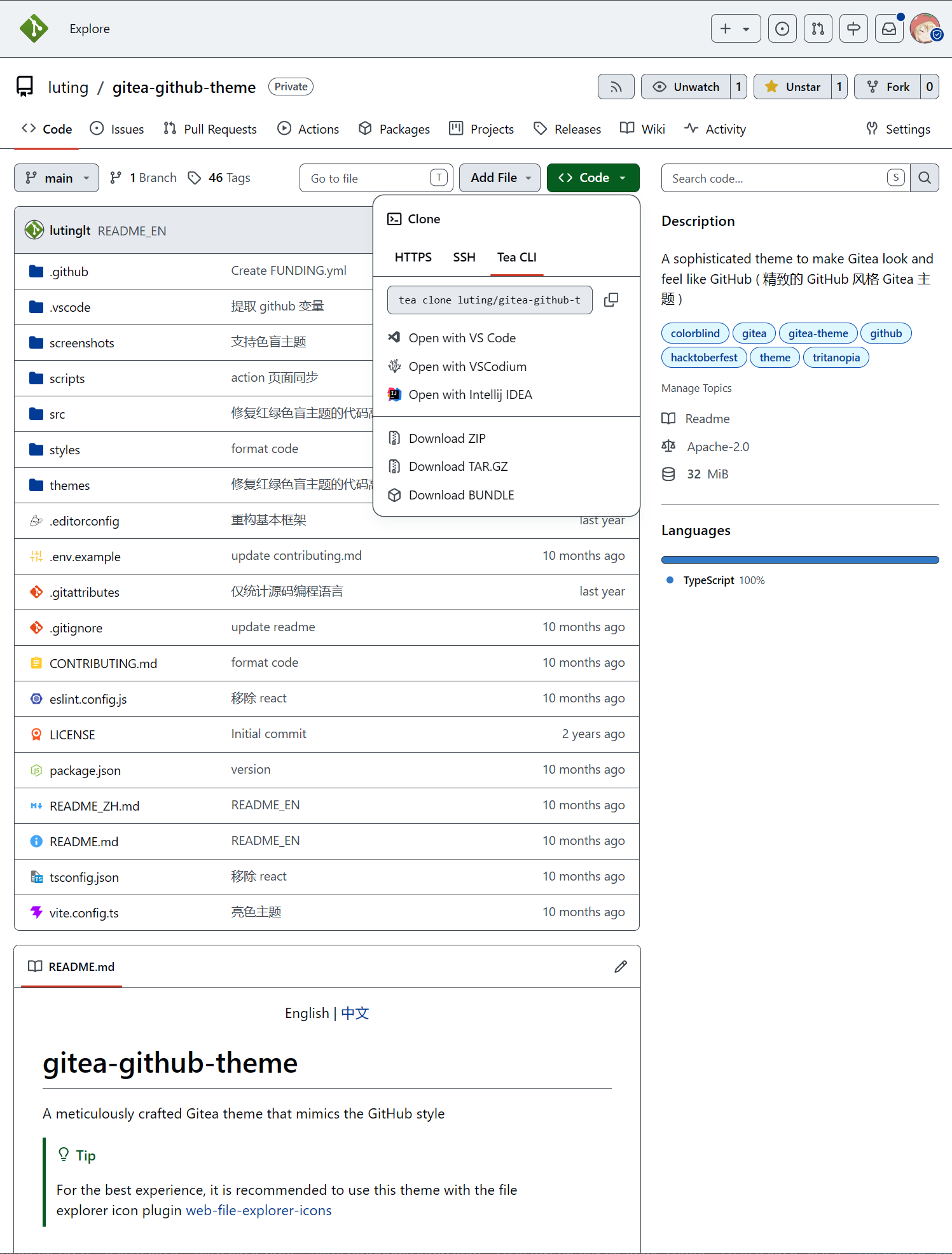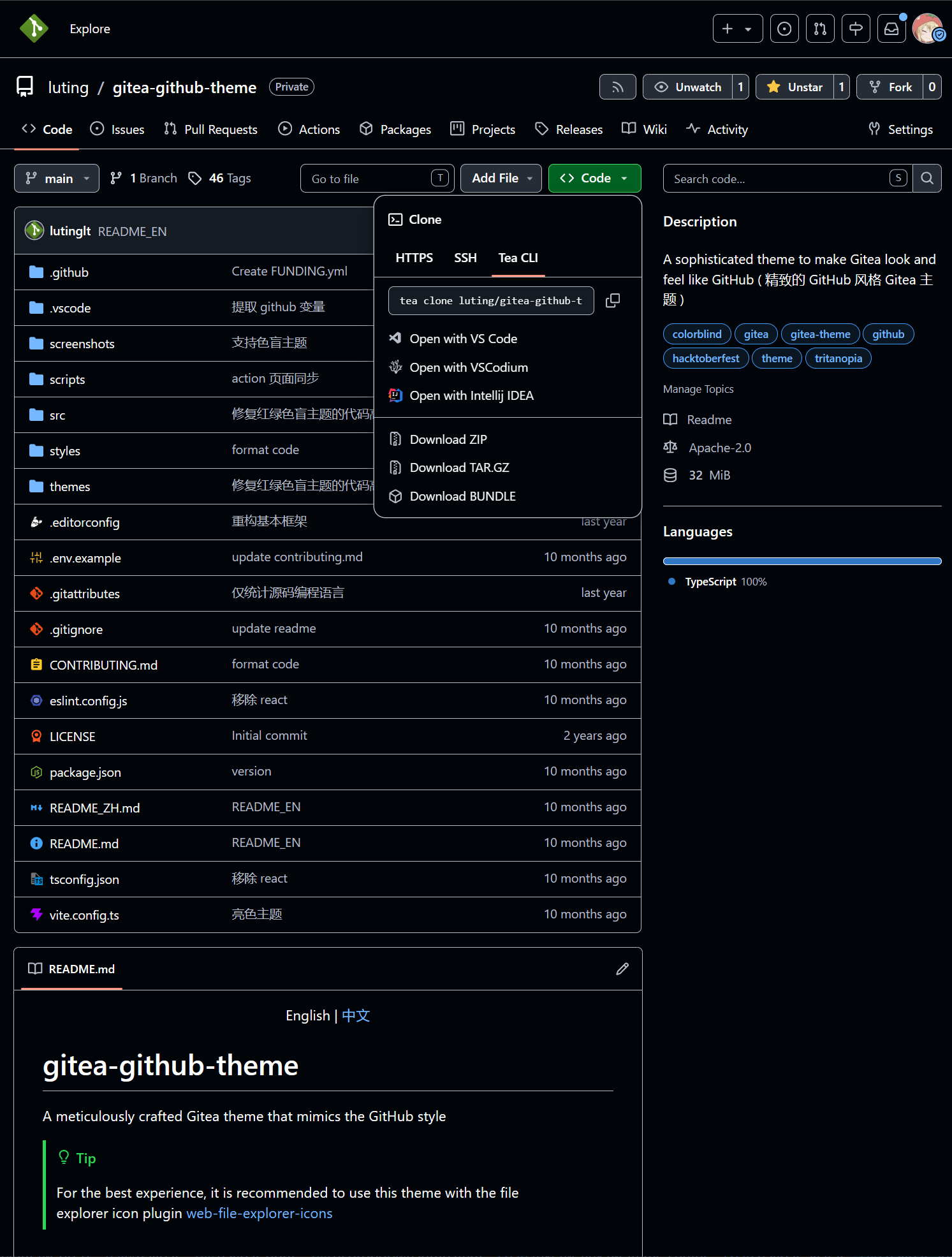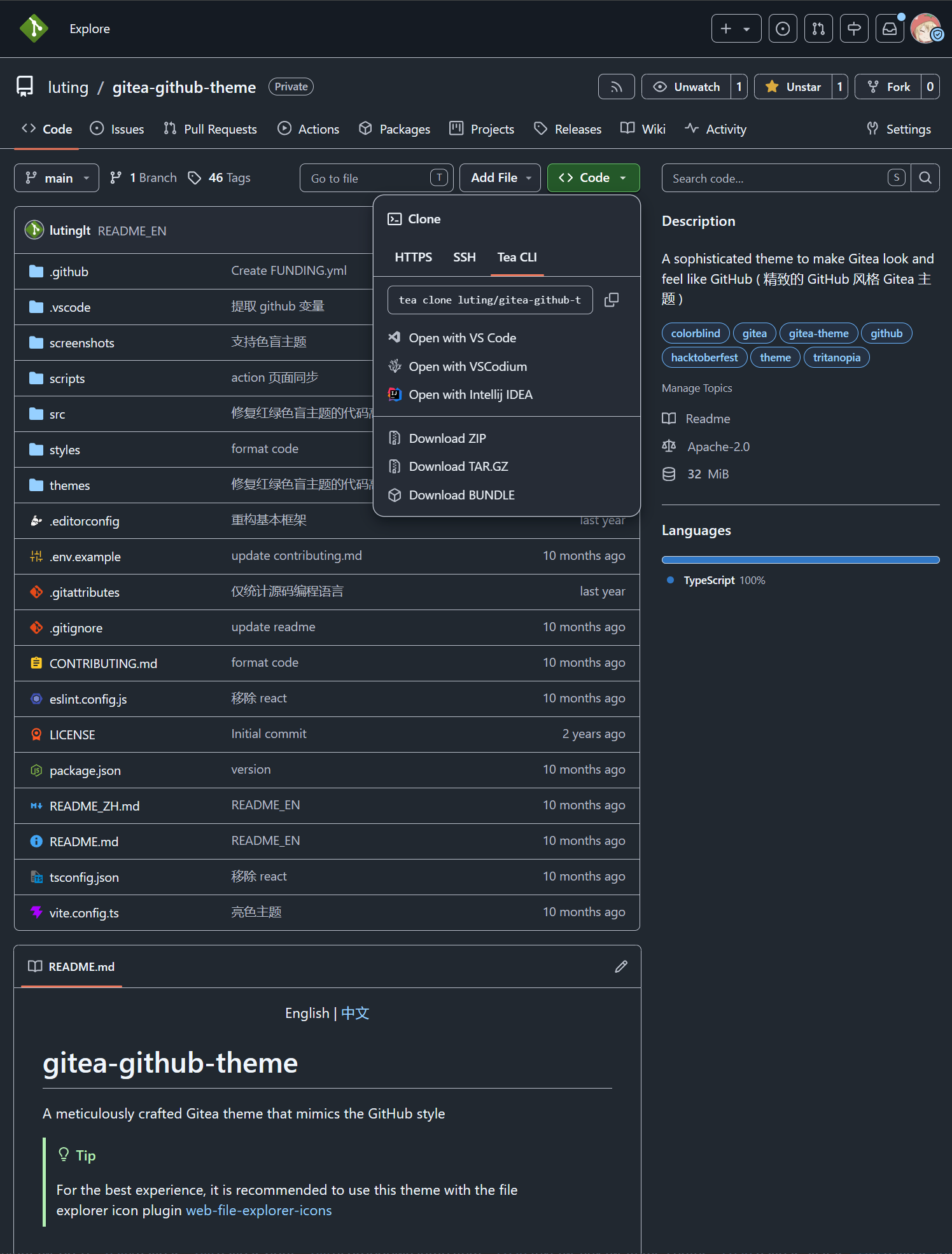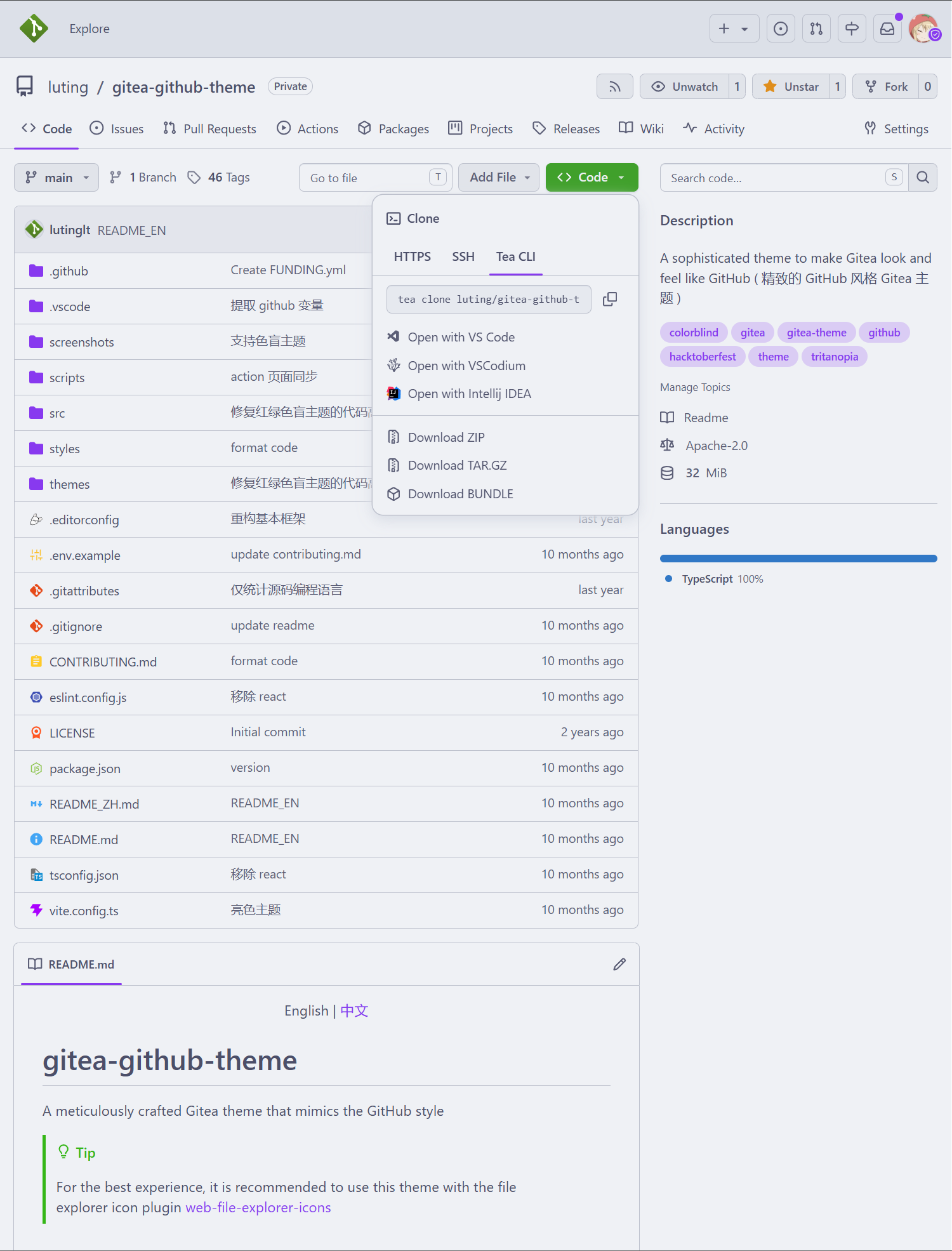



Latest commit

History

619 Commits

Folders and files

NameName
Last commit message
Last commit date

Repository files navigation

Gitea GitHub Theme

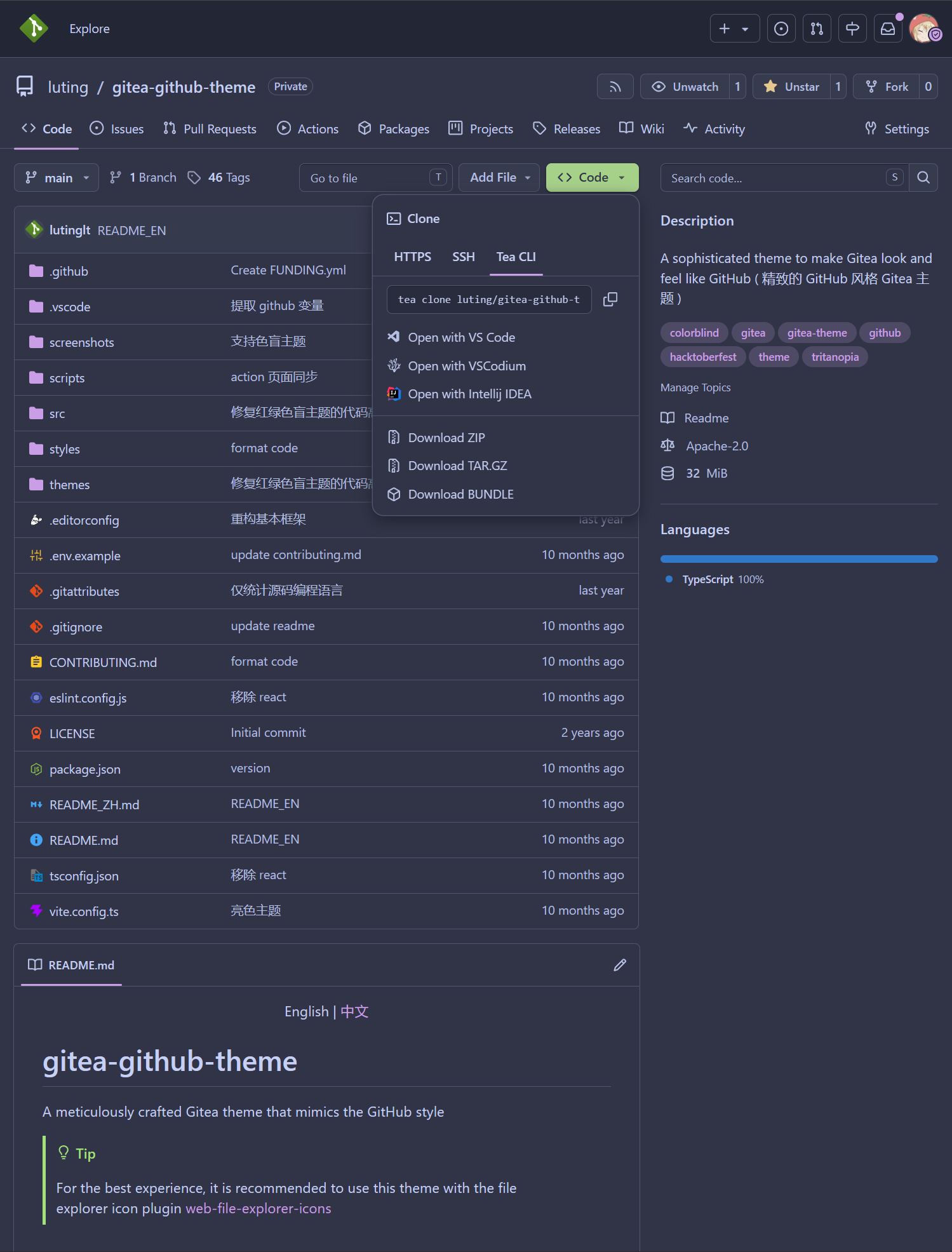
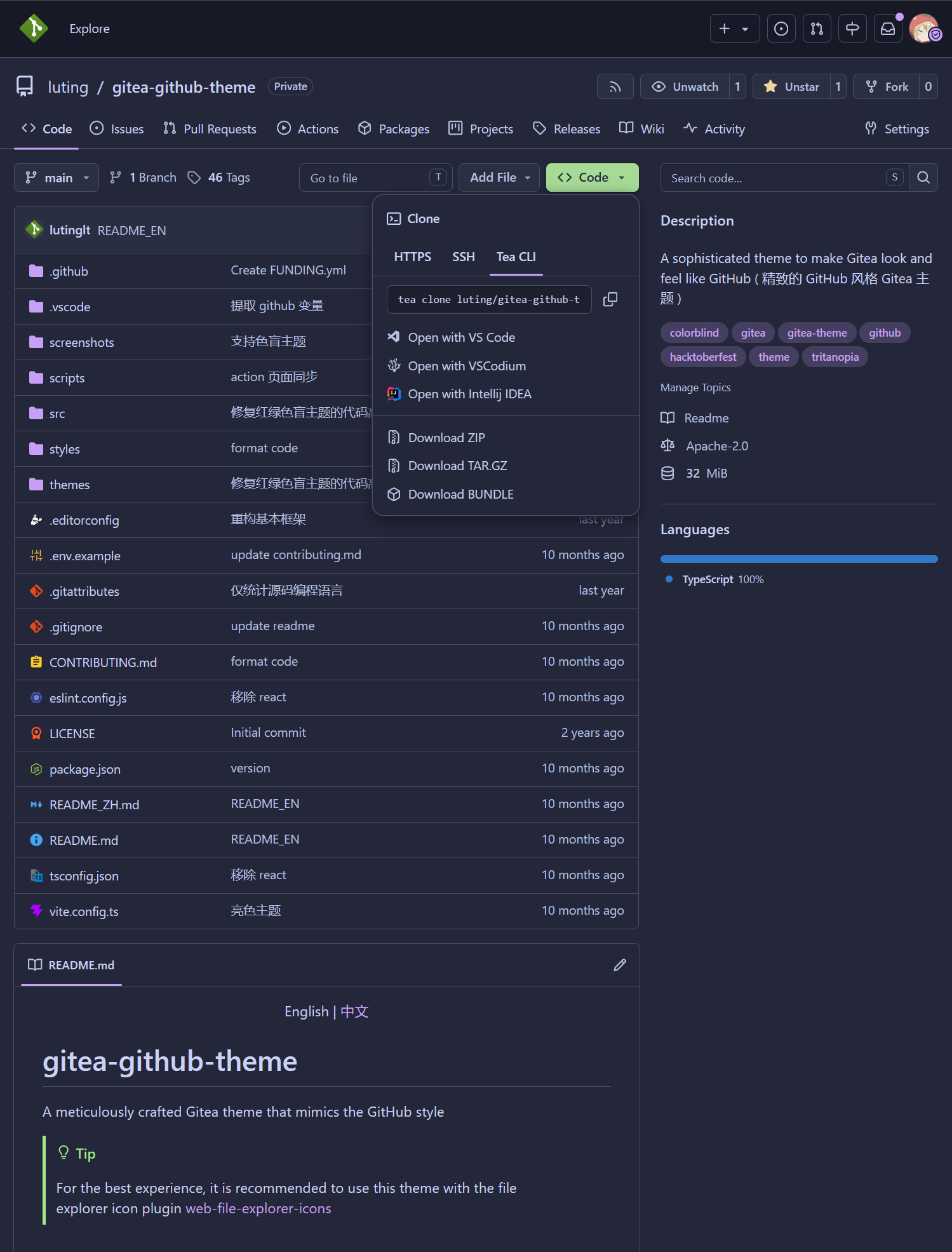
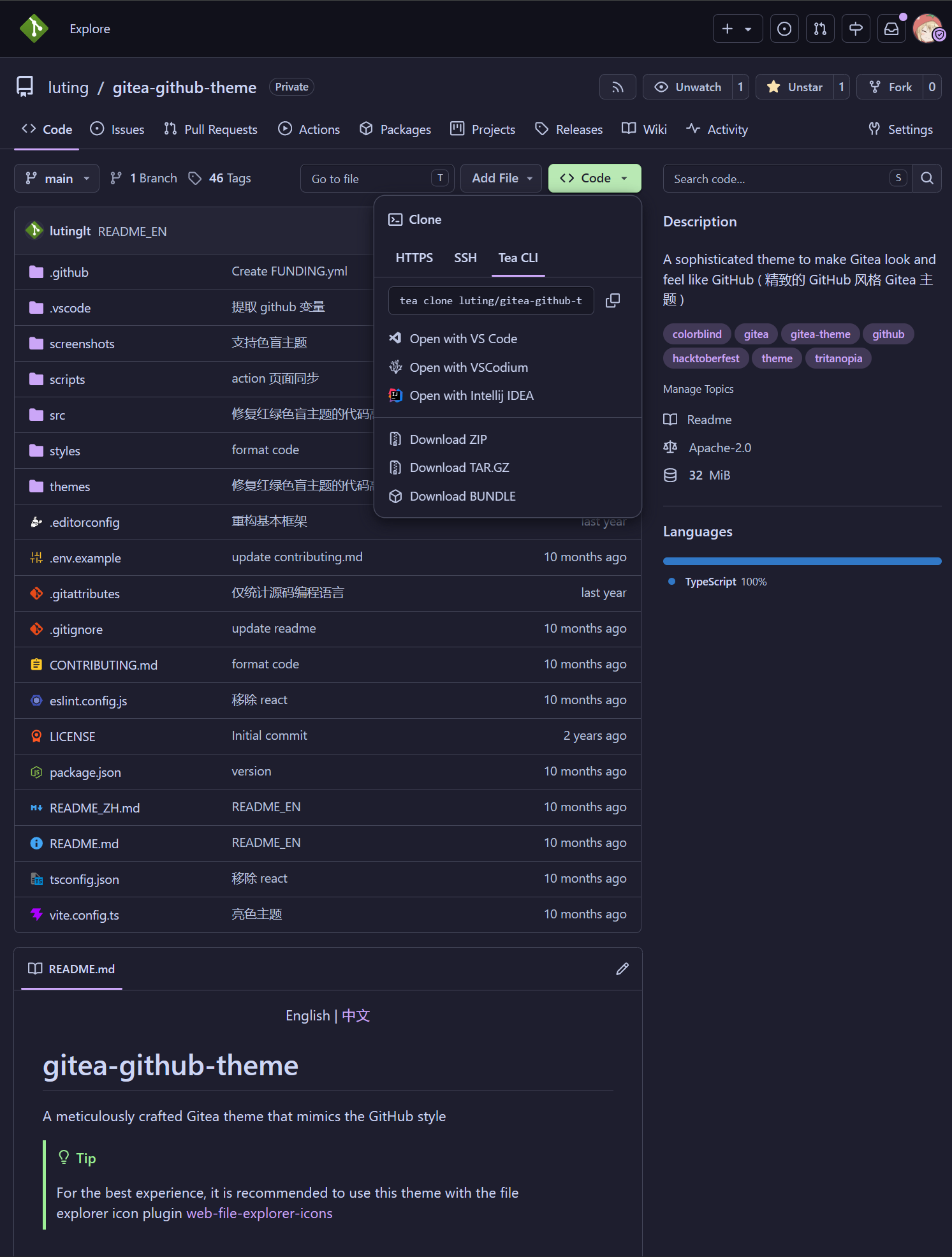
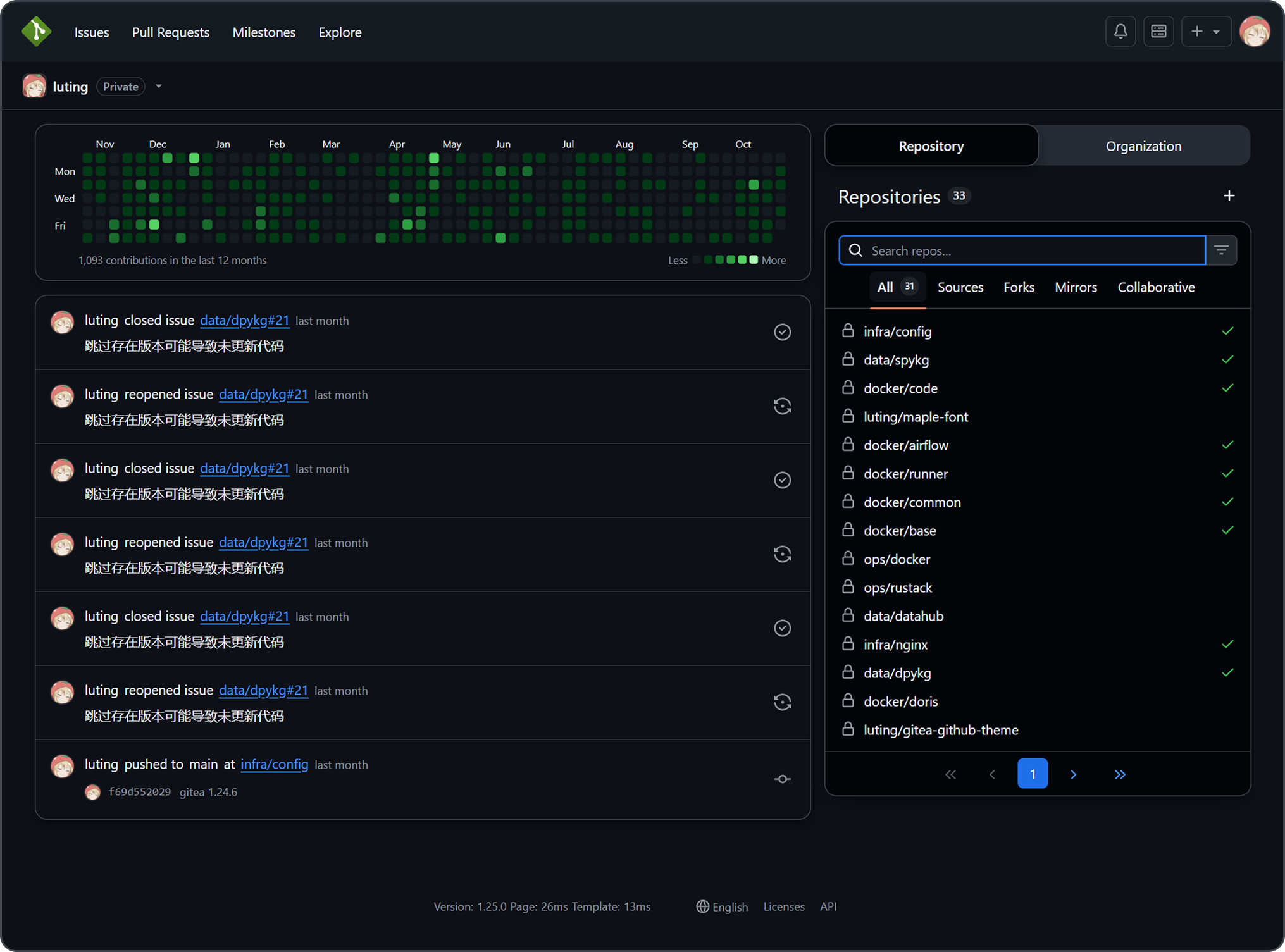
A Gitea theme that pursues GitHub style not only in colors but also in styling details.

Dashboard

Forgejo 15 Target

This fork targets Forgejo 15.0.5+gitea-1.22.0 while retaining the upstream theme engine and design system. Styles address Forgejo's native markup directly in the existing styles pipeline; they do not layer a newer-Gitea selector set over compatibility aliases. Adapted Go templates live in the top-level templates tree. The standard bun bundle command generates all themes in dist; generated CSS remains excluded from Git.

The included templates are version-bound and should not be installed on another Forgejo release without reviewing its routes and template data.

Version Number Explanation

The theme version number is kept consistent with the Gitea version number

Gitea version number format: 1.major.minor

Theoretically, minor version changes in Gitea do not modify the frontend layout, so the minor version of the theme is applicable to all Gitea versions with the same major version number.

For example: Theme version 1.24.5 is applicable to Gitea versions >=1.24.0<1.25.0

Only the latest released Gitea version is maintained. Issues and PRs for other older theme versions will not be accepted.

Installation

Important

Because the project uses new CSS features, ensure styles are applied correctly by keeping Chrome/Edge >= 120, Firefox >= 121, Safari >= 16.5

  1. Download the latest CSS theme file from the release page and place it in the data/gitea/public/assets/css directory (This directory may not be available by default and needs to be manually created)
  2. Download theme-github-fonts.tar.gz from the same release and extract its assets/fonts directory into data/gitea/public. This supplies the Mona Sans variable font used by GitHub; the packaged SIL Open Font License is retained beside the font.
  3. Modify data/gitea/conf/app.ini and append the CSS filename without the theme- prefix to the end of THEMES under the [ui] section
  4. Restart Gitea
  5. Check the theme in the settings

Example: If the theme filename is theme-github-dark.css, add github-dark to the end of THEMES

Example data/gitea/conf/app.ini:

[ui]THEMES = gitea-auto, gitea-light, gitea-dark, github-auto, github-light, github-dark, github-soft-dark
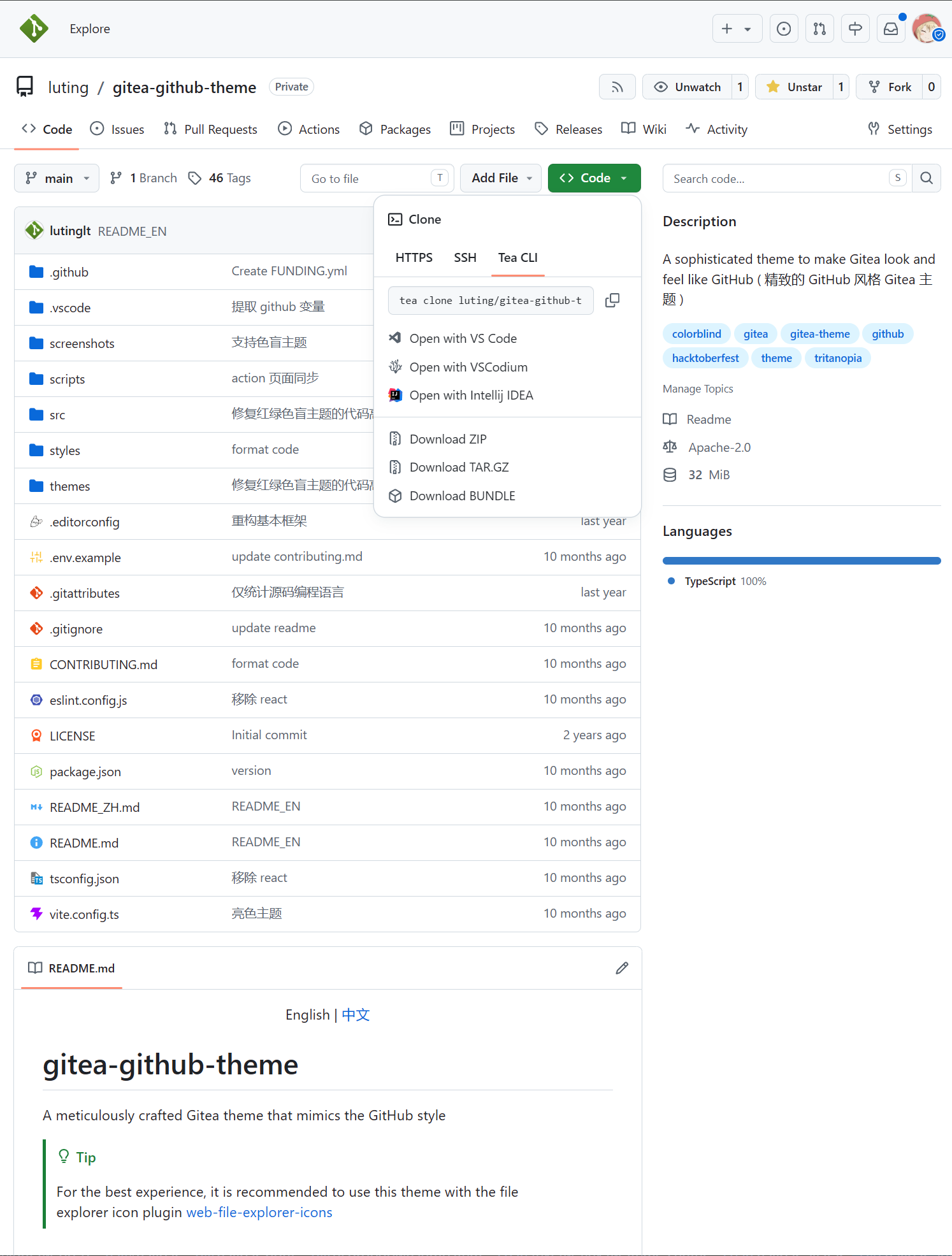
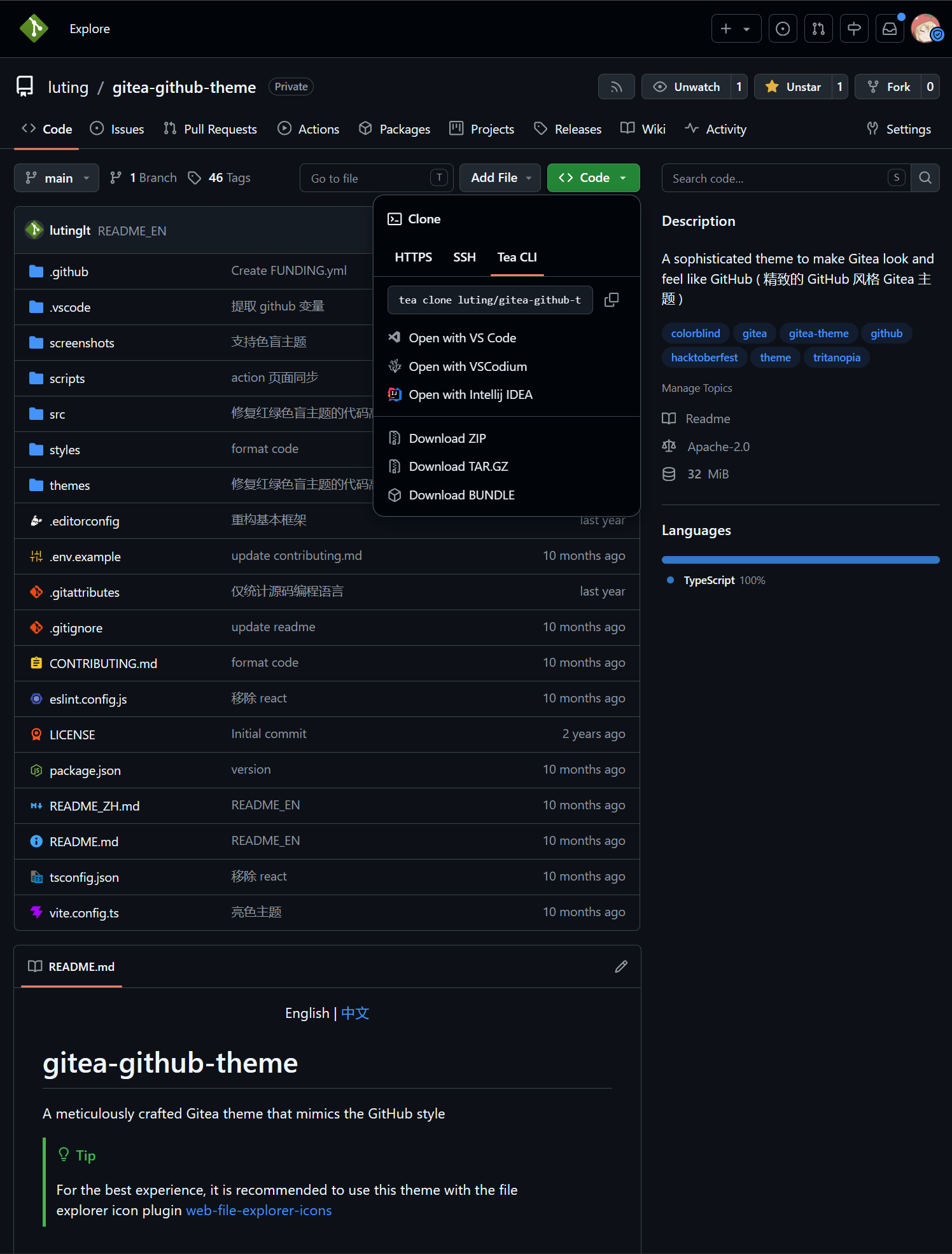
Tip

When THEMES is not set, Gitea will use all themes

Important

Automatic color theme requires both light and dark theme files.

For details, please refer to the Gitea documentation Gitea docs

Template File Installation (Optional)

Important

The template modifies Gitea's layout to make it closer to GitHub's layout. Do not use template files across versions, as this may lead to missing functionality, Gitea instance failing to start, and other issues.

Template layout is bound to the Gitea instance and will affect all themes, impacting the experience of other non-project themes.

  1. Download the latest template files from the release page and place them in the data/gitea/templates directory (This directory may not be available by default and needs to be manually created)
  2. Restart Gitea

Translation File Installation (Optional)

Tip

Translation files are only needed when using this project's template files to provide support for non-English languages.

  1. Download the latest translation files from the release page and place them in the data/gitea/options/locale directory (This directory may not be available by default and needs to be manually created)
  2. Restart Gitea

Screenshots

Default Themes

THEMES = github-auto, github-light, github-dark, github-soft-dark
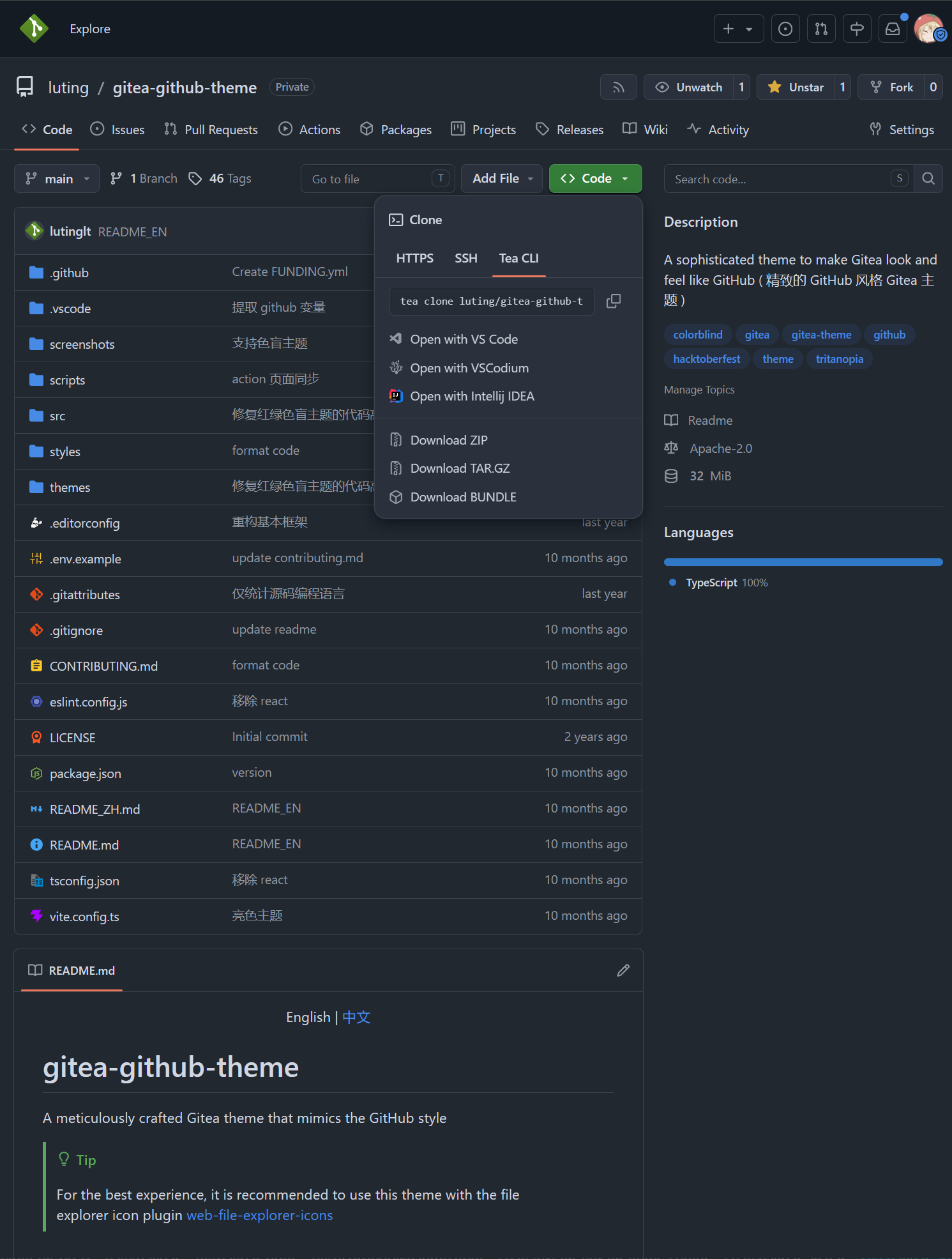
Default

theme-github-light.css

theme-github-dark.css

theme-github-soft-dark.css

Colorblind Themes (Beta)

THEMES = github-colorblind-auto, github-colorblind-light, github-colorblind-dark
THEMES = github-tritanopia-auto, github-tritanopia-light, github-tritanopia-dark
Colorblind & Tritanopia
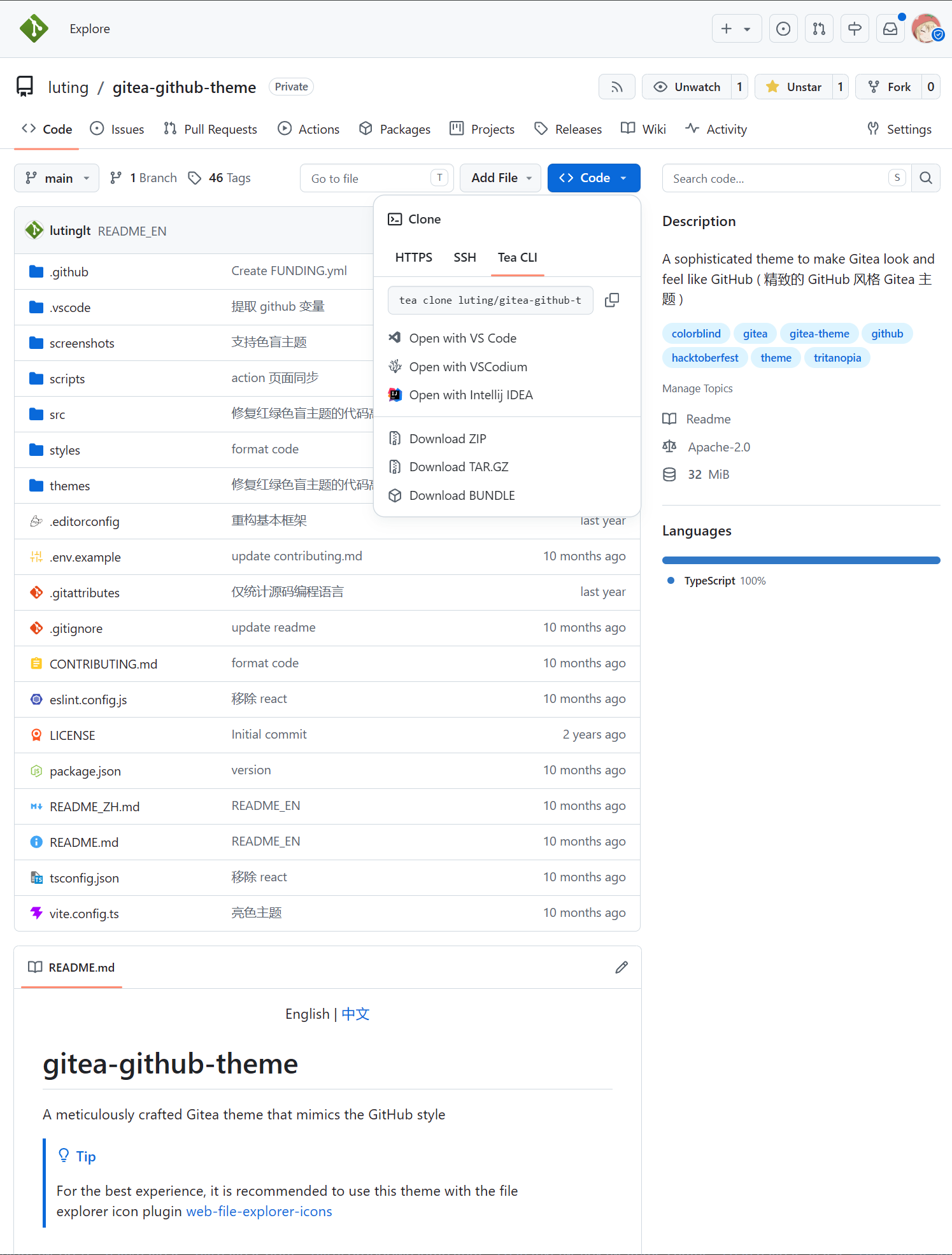
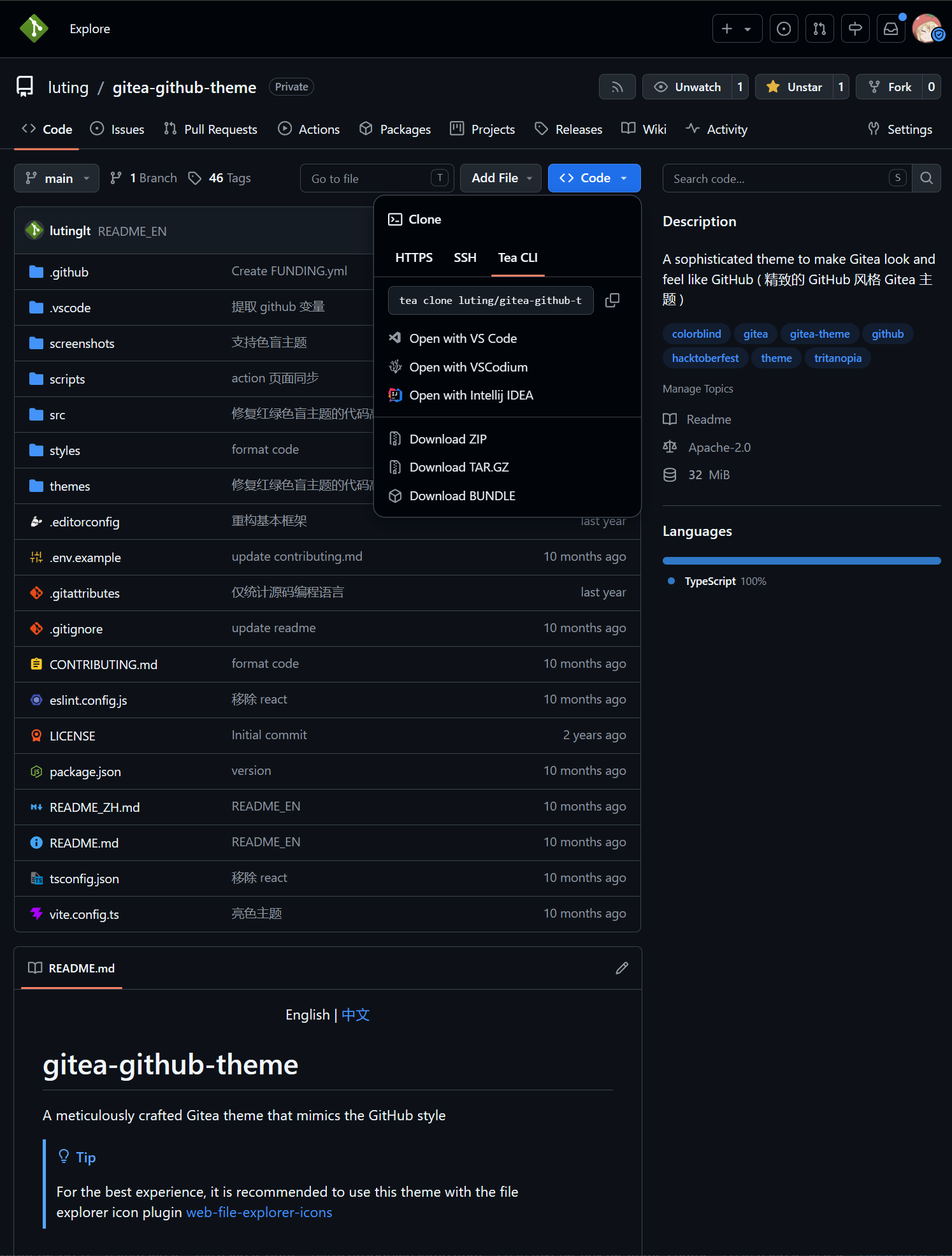
theme-github-colorblind-light.css & theme-github-tritanopia-light.css

theme-github-colorblind-dark.css & theme-github-tritanopia-dark.css

HighContrast Themes

THEMES = github-high-contrast-auto, github-high-contrast-light, github-high-contrast-dark, github-high-contrast-soft-dark
HighContrast

theme-github-high-contrast-light.css

theme-github-high-contrast-dark.css

theme-github-high-contrast-soft-dark.css

HighContrast Colorblind Themes ( Beta )

THEMES = github-high-contrast-colorblind-auto, github-high-contrast-colorblind-light, github-high-contrast-colorblind-dark
THEMES = github-high-contrast-tritanopia-auto, github-high-contrast-tritanopia-light, github-high-contrast-tritanopia-dark
HighContrast Colorblind & Tritanopia
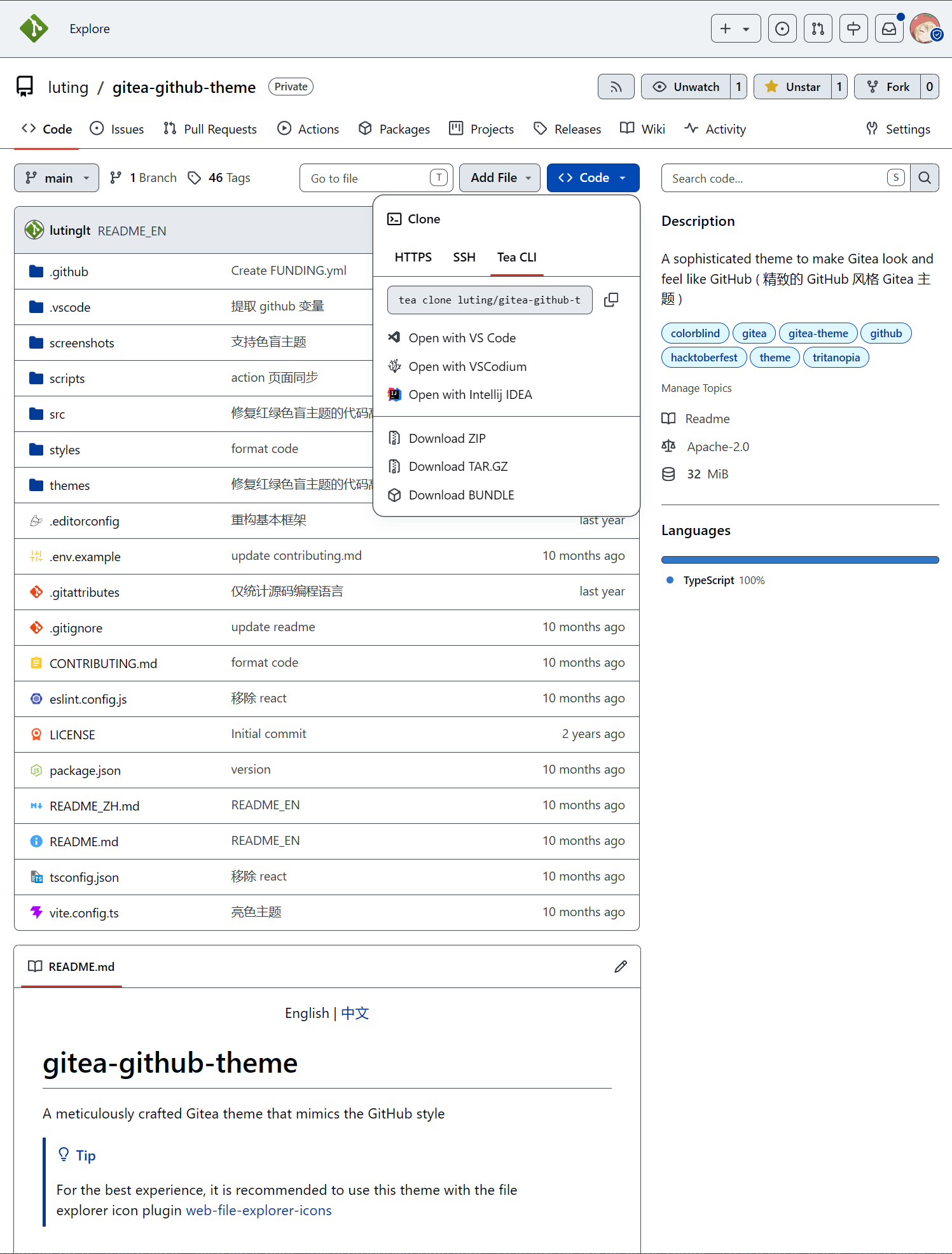
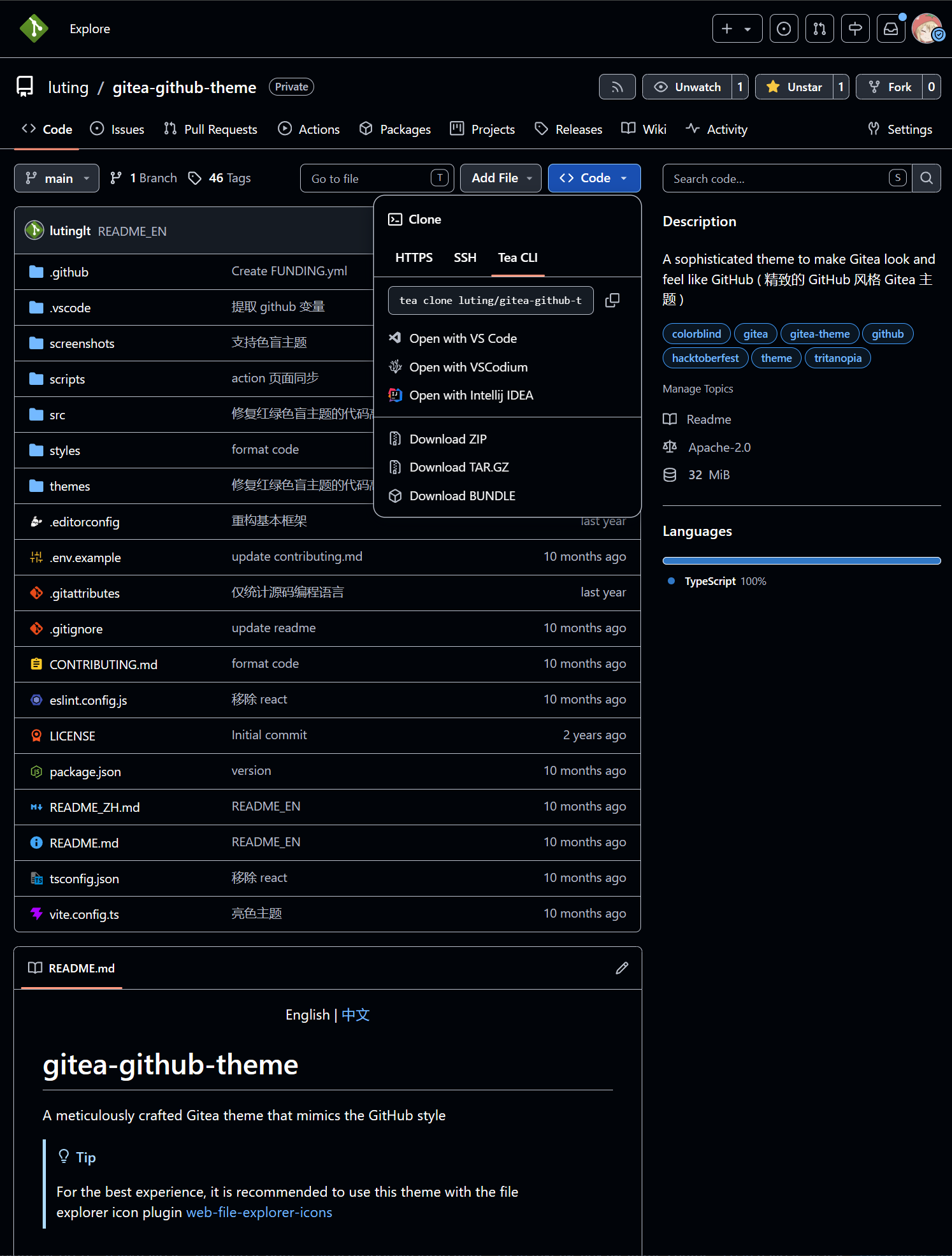
theme-github-high-contrast-colorblind-light.css & theme-github-high-contrast-tritanopia-light.css

theme-github-high-contrast-colorblind-dark.css & theme-github-high-contrast-tritanopia-dark.css

Pink Themes

THEMES = github-pink-auto, github-pink-light, github-pink-dark, github-pink-soft-dark
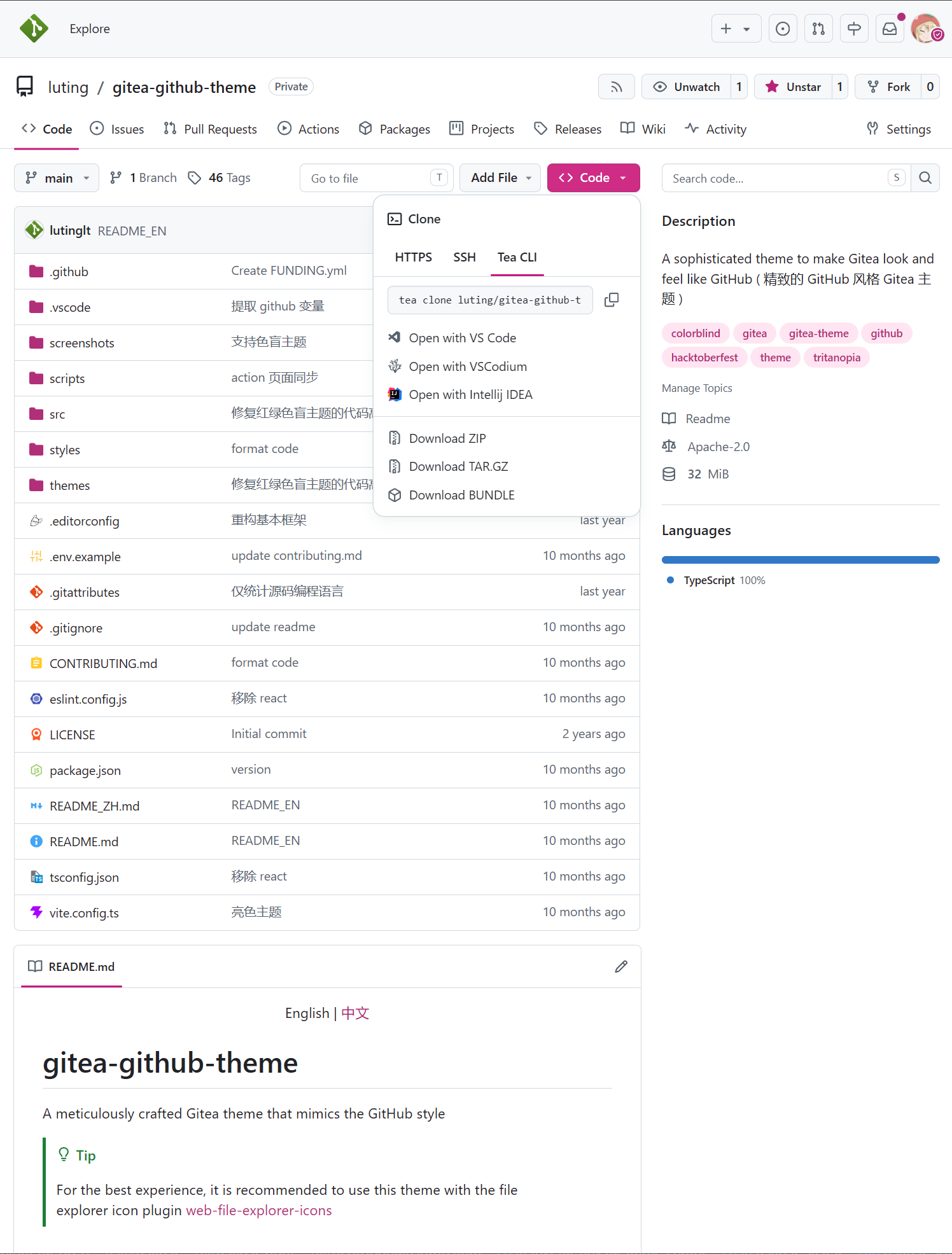
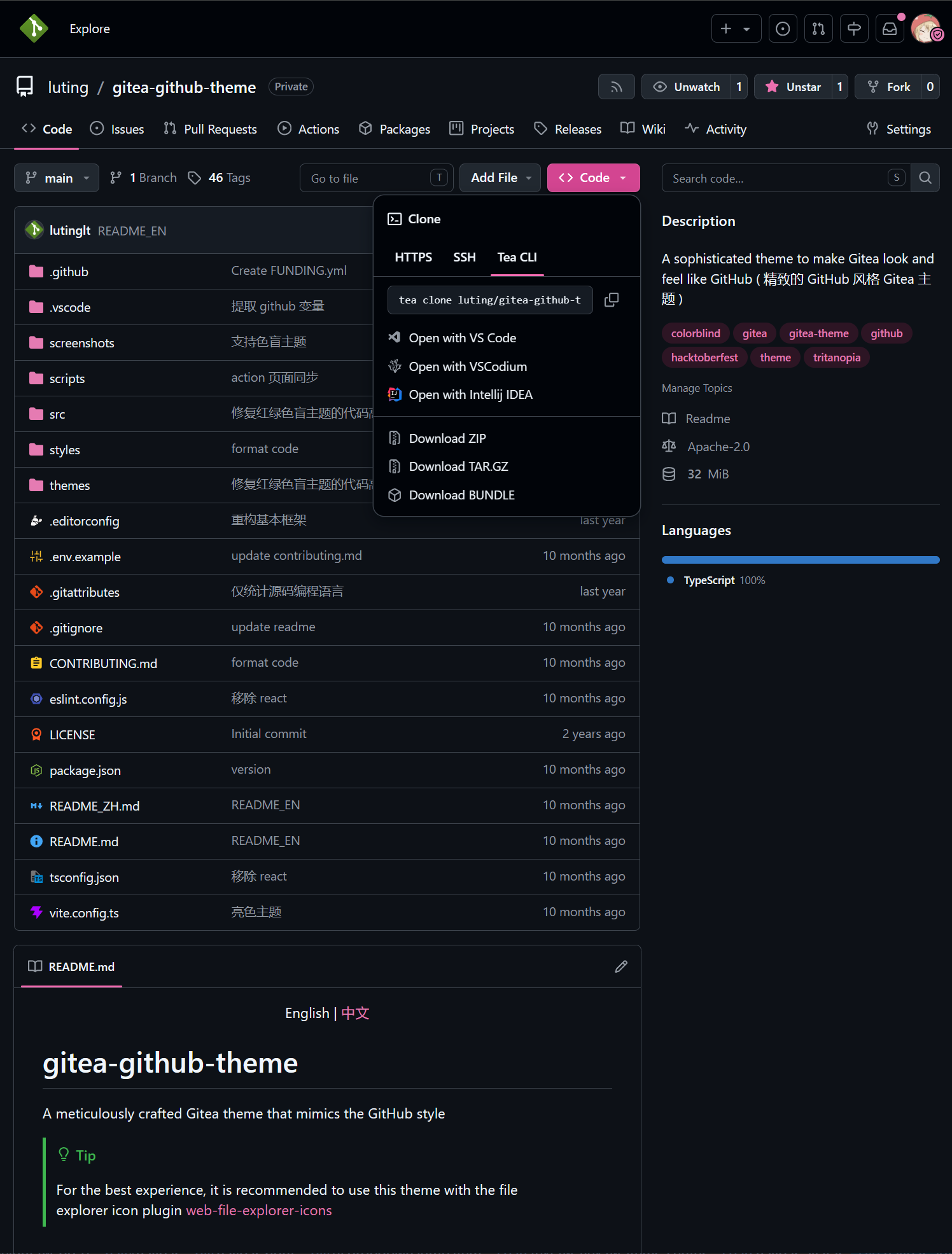
Pink

theme-github-pink-light.css

theme-github-pink-dark.css

theme-github-pink-soft-dark.css

Gitea Themes

THEMES = github-gitea-auto, github-gitea-light, github-gitea-dark
Gitea

theme-github-gitea-light.css

theme-github-gitea-dark.css

Catppuccin Themes

THEMES = github-catppuccin-auto, github-catppuccin-latte, github-catppuccin-frappe, github-catppuccin-macchiato, github-catppuccin-mocha
Catppuccin

theme-github-catppuccin-latte.css

theme-github-catppuccin-frappe.css

theme-github-catppuccin-macchiato.css

theme-github-catppuccin-mocha.css

Custom CSS Variables

You can customize parts of the theme style according to your preferences

Usage Method

Add the following code at the beginning or end of the theme's CSS file

:root {
--custom-clone-menu-width:150px;
...
}

Important

Please ensure to add custom variables in the :root selector, otherwise they will not take effect

Variables are separated by ;

It is recommended to place custom variables in a separate file and append them to the theme file using shell commands or other methods

CSS Variables

Variable NameDescriptionDefaultGithubRecommendMinMax
--custom-branch-menu-widthBranch menu width320px320px320pxGitea640px
--custom-clone-menu-widthClone button menu widthGitea332px200px150px400px
--custom-user-menu-widthUser menu width192px200pxGitea320px
--custom-explore-repolist-columnsNumber of repository list columns on explore page222
--custom-explore-userlist-columnsNumber of user/organization list columns on explore page312/3
--custom-user-repolist-columnsNumber of repository list columns on user page221/2
--custom-org-repolist-columnsNumber of repository list columns on organization page111/2
--custom-org-userlist-columnsNumber of user list columns on organization page211/2

Using Development Version of the Theme

You might want to use the development version of the theme instead of the released version

Please ensure you have Bun environment installed, Bun 1.3.14 or above is recommended

git clone https://github.com/lutinglt/gitea-github-theme.git
cd gitea-github-theme
bun install
bun bundle

After compilation, theme files will be generated in the dist directory. You can place the theme files into the gitea/public/assets/css directory, then add the theme name to the end of THEMES in gitea/conf/app.ini

Star History

Star History Chart

About

Exquisite GitHub style Forgejo themes

Topics

Resources

Contributing

Stars

4 stars

Watchers

0 watching

Forks

Releases

Contributors

Languages

, 'i'); if (__m === '*' || __re.test(location.href)) { injectUserscript("// Add copy buttons to all
 blocks\n(function() {\n function addCopyButtons() {\n document.querySelectorAll('pre code').forEach(function(codeBlock) {\n if (codeBlock.parentElement.hasAttribute('data-copy-added')) return;\n codeBlock.parentElement.setAttribute('data-copy-added', 'true');\n \n var btn = document.createElement('button');\n btn.textContent = 'Copy';\n btn.style.cssText = 'position:absolute;top:4px;right:4px;padding:2px 8px;font-size:11px;background:#4ecdc4;border:none;border-radius:4px;color:#1a1a2e;cursor:pointer;opacity:0.7;transition:opacity 0.2s;';\n btn.onmouseover = function() { this.style.opacity = '1'; };\n btn.onmouseout = function() { this.style.opacity = '0.7'; };\n btn.onclick = function() {\n navigator.clipboard.writeText(codeBlock.textContent).then(function() {\n btn.textContent = 'Copied!';\n setTimeout(function() { btn.textContent = 'Copy'; }, 1500);\n });\n };\n codeBlock.parentElement.style.position = 'relative';\n codeBlock.parentElement.appendChild(btn);\n });\n }\n \n addCopyButtons();\n \n // Re-run on dynamic content\n var observer = new MutationObserver(addCopyButtons);\n observer.observe(document.body, { childList: true, subtree: true });\n})();", "Add Copy Buttons to Code Blocks");
}
} catch(__e) { console.warn('[Userscript:Add Copy Buttons to Code Blocks]', __e); }
})();
(function(){
try {
var __m = "github.com";
var __re = new RegExp('^' + "github\\.com" + '
Skip to content

Latest commit

History

619 Commits

Folders and files

NameName
Last commit message
Last commit date

Repository files navigation

Gitea GitHub Theme

A Gitea theme that pursues GitHub style not only in colors but also in styling details.

Dashboard

Forgejo 15 Target

This fork targets Forgejo 15.0.5+gitea-1.22.0 while retaining the upstream theme engine and design system. Styles address Forgejo's native markup directly in the existing styles pipeline; they do not layer a newer-Gitea selector set over compatibility aliases. Adapted Go templates live in the top-level templates tree. The standard bun bundle command generates all themes in dist; generated CSS remains excluded from Git.

The included templates are version-bound and should not be installed on another Forgejo release without reviewing its routes and template data.

Version Number Explanation

The theme version number is kept consistent with the Gitea version number

Gitea version number format: 1.major.minor

Theoretically, minor version changes in Gitea do not modify the frontend layout, so the minor version of the theme is applicable to all Gitea versions with the same major version number.

For example: Theme version 1.24.5 is applicable to Gitea versions >=1.24.0<1.25.0

Only the latest released Gitea version is maintained. Issues and PRs for other older theme versions will not be accepted.

Installation

Important

Because the project uses new CSS features, ensure styles are applied correctly by keeping Chrome/Edge >= 120, Firefox >= 121, Safari >= 16.5

  1. Download the latest CSS theme file from the release page and place it in the data/gitea/public/assets/css directory (This directory may not be available by default and needs to be manually created)
  2. Download theme-github-fonts.tar.gz from the same release and extract its assets/fonts directory into data/gitea/public. This supplies the Mona Sans variable font used by GitHub; the packaged SIL Open Font License is retained beside the font.
  3. Modify data/gitea/conf/app.ini and append the CSS filename without the theme- prefix to the end of THEMES under the [ui] section
  4. Restart Gitea
  5. Check the theme in the settings

Example: If the theme filename is theme-github-dark.css, add github-dark to the end of THEMES

Example data/gitea/conf/app.ini:

[ui]THEMES = gitea-auto, gitea-light, gitea-dark, github-auto, github-light, github-dark, github-soft-dark

Tip

When THEMES is not set, Gitea will use all themes

Important

Automatic color theme requires both light and dark theme files.

For details, please refer to the Gitea documentation Gitea docs

Template File Installation (Optional)

Important

The template modifies Gitea's layout to make it closer to GitHub's layout. Do not use template files across versions, as this may lead to missing functionality, Gitea instance failing to start, and other issues.

Template layout is bound to the Gitea instance and will affect all themes, impacting the experience of other non-project themes.

  1. Download the latest template files from the release page and place them in the data/gitea/templates directory (This directory may not be available by default and needs to be manually created)
  2. Restart Gitea

Translation File Installation (Optional)

Tip

Translation files are only needed when using this project's template files to provide support for non-English languages.

  1. Download the latest translation files from the release page and place them in the data/gitea/options/locale directory (This directory may not be available by default and needs to be manually created)
  2. Restart Gitea

Screenshots

Default Themes

THEMES = github-auto, github-light, github-dark, github-soft-dark
Default

theme-github-light.css

theme-github-dark.css

theme-github-soft-dark.css

Colorblind Themes (Beta)

THEMES = github-colorblind-auto, github-colorblind-light, github-colorblind-dark
THEMES = github-tritanopia-auto, github-tritanopia-light, github-tritanopia-dark
Colorblind & Tritanopia

theme-github-colorblind-light.css & theme-github-tritanopia-light.css

theme-github-colorblind-dark.css & theme-github-tritanopia-dark.css

HighContrast Themes

THEMES = github-high-contrast-auto, github-high-contrast-light, github-high-contrast-dark, github-high-contrast-soft-dark
HighContrast

theme-github-high-contrast-light.css

theme-github-high-contrast-dark.css

theme-github-high-contrast-soft-dark.css

HighContrast Colorblind Themes ( Beta )

THEMES = github-high-contrast-colorblind-auto, github-high-contrast-colorblind-light, github-high-contrast-colorblind-dark
THEMES = github-high-contrast-tritanopia-auto, github-high-contrast-tritanopia-light, github-high-contrast-tritanopia-dark
HighContrast Colorblind & Tritanopia

theme-github-high-contrast-colorblind-light.css & theme-github-high-contrast-tritanopia-light.css

theme-github-high-contrast-colorblind-dark.css & theme-github-high-contrast-tritanopia-dark.css

Pink Themes

THEMES = github-pink-auto, github-pink-light, github-pink-dark, github-pink-soft-dark
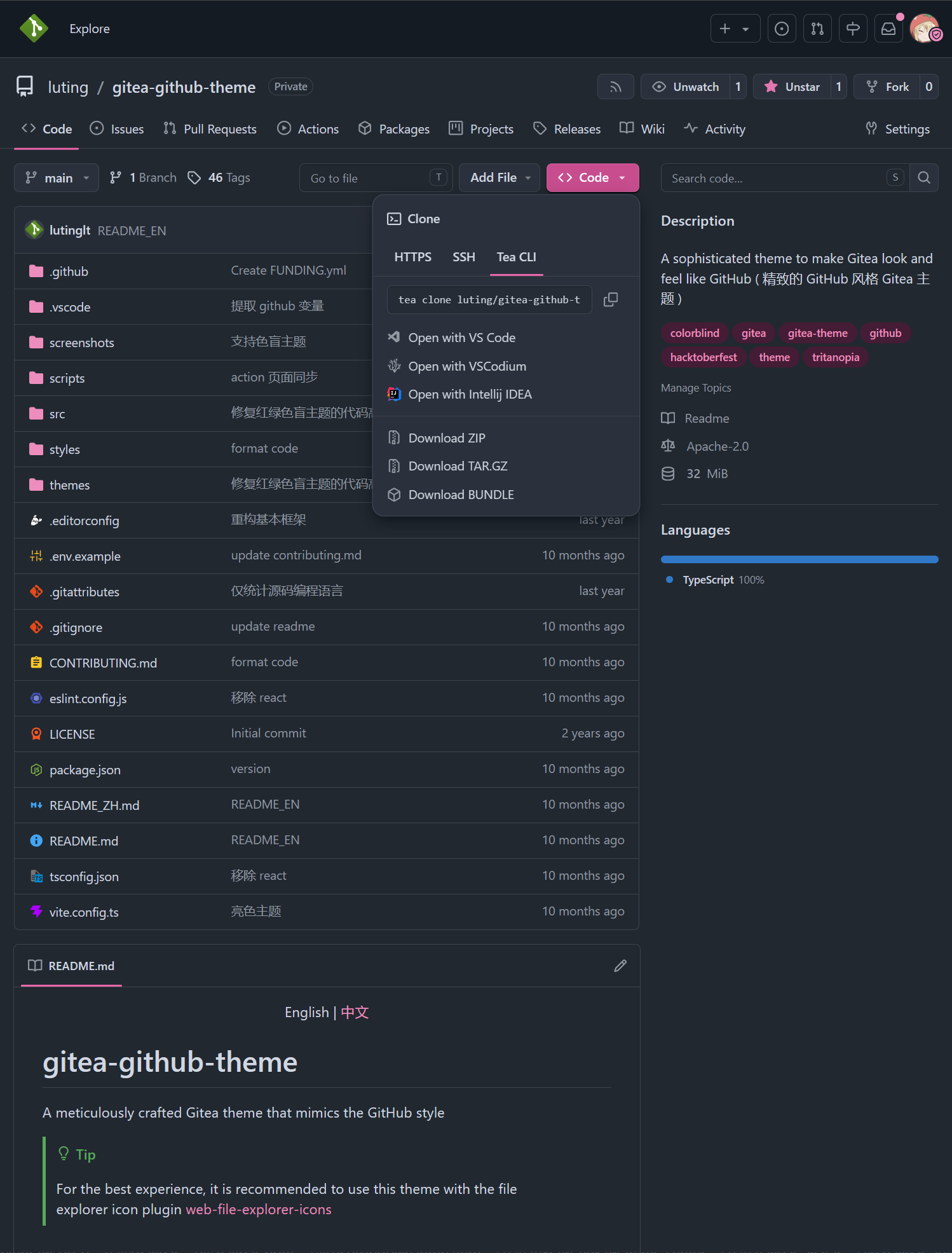
Pink

theme-github-pink-light.css

theme-github-pink-dark.css

theme-github-pink-soft-dark.css

Gitea Themes

THEMES = github-gitea-auto, github-gitea-light, github-gitea-dark
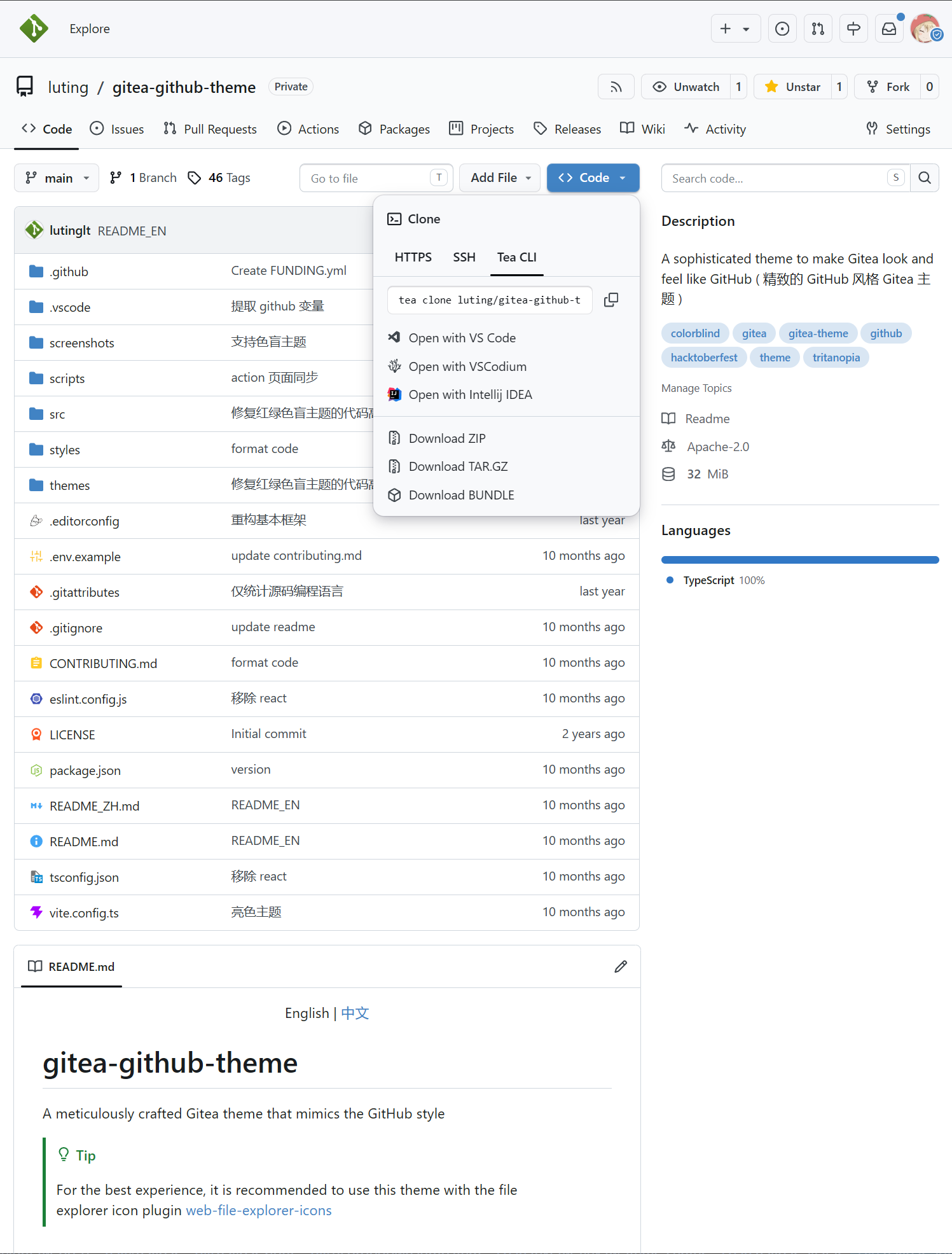
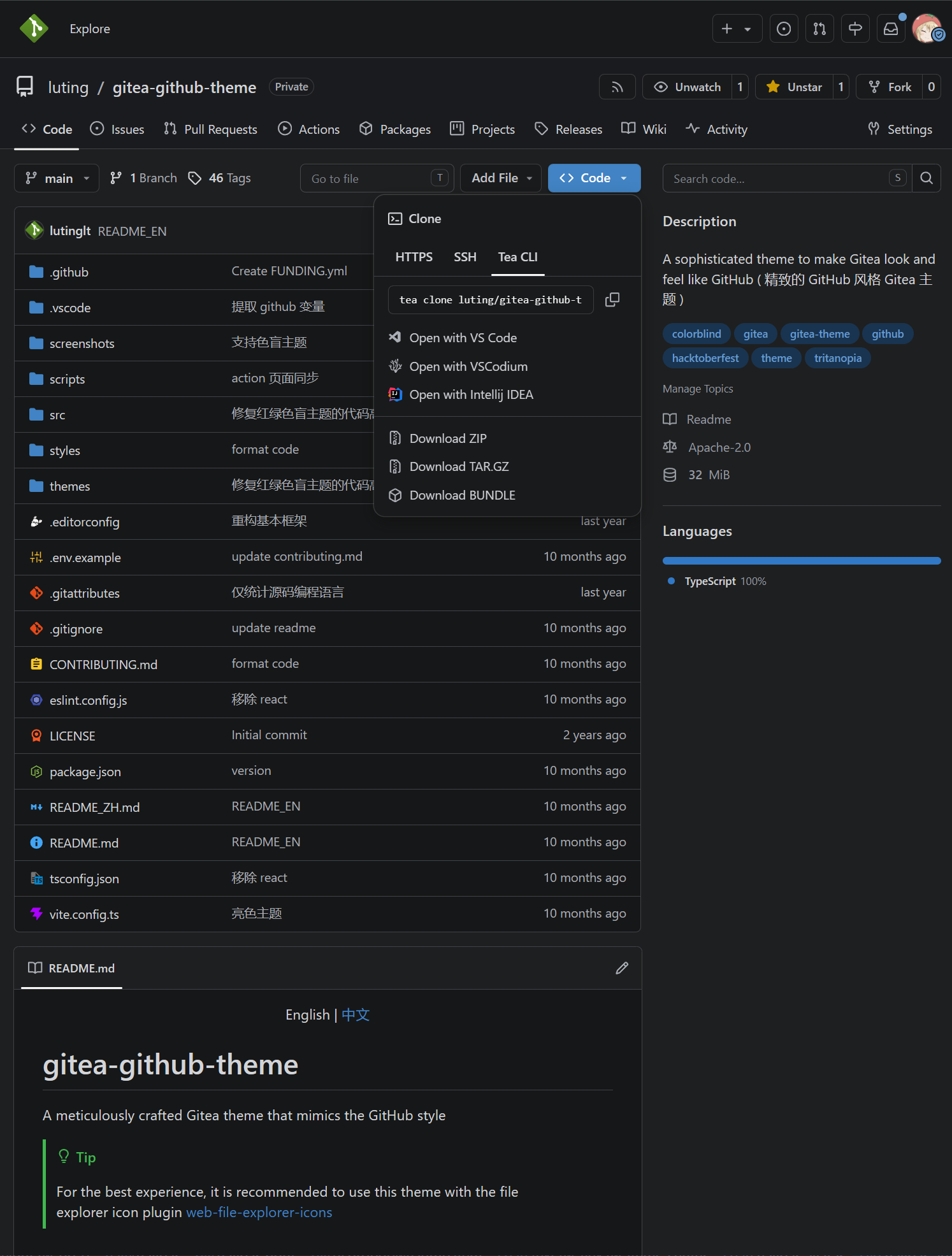
Gitea

theme-github-gitea-light.css

theme-github-gitea-dark.css

Catppuccin Themes

THEMES = github-catppuccin-auto, github-catppuccin-latte, github-catppuccin-frappe, github-catppuccin-macchiato, github-catppuccin-mocha
Catppuccin

theme-github-catppuccin-latte.css

theme-github-catppuccin-frappe.css

theme-github-catppuccin-macchiato.css

theme-github-catppuccin-mocha.css

Custom CSS Variables

You can customize parts of the theme style according to your preferences

Usage Method

Add the following code at the beginning or end of the theme's CSS file

:root {
--custom-clone-menu-width:150px;
...
}

Important

Please ensure to add custom variables in the :root selector, otherwise they will not take effect

Variables are separated by ;

It is recommended to place custom variables in a separate file and append them to the theme file using shell commands or other methods

CSS Variables

Variable NameDescriptionDefaultGithubRecommendMinMax
--custom-branch-menu-widthBranch menu width320px320px320pxGitea640px
--custom-clone-menu-widthClone button menu widthGitea332px200px150px400px
--custom-user-menu-widthUser menu width192px200pxGitea320px
--custom-explore-repolist-columnsNumber of repository list columns on explore page222
--custom-explore-userlist-columnsNumber of user/organization list columns on explore page312/3
--custom-user-repolist-columnsNumber of repository list columns on user page221/2
--custom-org-repolist-columnsNumber of repository list columns on organization page111/2
--custom-org-userlist-columnsNumber of user list columns on organization page211/2

Using Development Version of the Theme

You might want to use the development version of the theme instead of the released version

Please ensure you have Bun environment installed, Bun 1.3.14 or above is recommended

git clone https://github.com/lutinglt/gitea-github-theme.git
cd gitea-github-theme
bun install
bun bundle

After compilation, theme files will be generated in the dist directory. You can place the theme files into the gitea/public/assets/css directory, then add the theme name to the end of THEMES in gitea/conf/app.ini

Star History

Star History Chart

About

Exquisite GitHub style Forgejo themes

Topics

Resources

Contributing

Stars

4 stars

Watchers

0 watching

Forks

Releases

Contributors

Languages

, 'i'); if (__m === '*' || __re.test(location.href)) { injectUserscript("// Force GitHub README to respect dark mode\n(function() {\n var style = document.createElement('style');\n style.textContent = '\n .markdown-body {\n color-scheme: dark light;\n }\n .markdown-body pre { background: #161b22 !important; }\n .markdown-body code { background: rgba(110, 118, 129, 0.4) !important; }\n .markdown-body table th, .markdown-body table td { border-color: #30363d !important; }\n .markdown-body img { background: #0d1117; }\n .markdown-body blockquote { border-left-color: #8b949e; }\n .markdown-body hr { border-color: #30363d; }\n ';\n document.head.appendChild(style);\n})();", "GitHub Dark Mode README Fix"); } } catch(__e) { console.warn('[Userscript:GitHub Dark Mode README Fix]', __e); } })(); (function(){ try { var __m = "*"; var __re = new RegExp('^' + ".*" + '
Skip to content

Latest commit

History

619 Commits

Folders and files

NameName
Last commit message
Last commit date

Repository files navigation

Gitea GitHub Theme

A Gitea theme that pursues GitHub style not only in colors but also in styling details.

Dashboard

Forgejo 15 Target

This fork targets Forgejo 15.0.5+gitea-1.22.0 while retaining the upstream theme engine and design system. Styles address Forgejo's native markup directly in the existing styles pipeline; they do not layer a newer-Gitea selector set over compatibility aliases. Adapted Go templates live in the top-level templates tree. The standard bun bundle command generates all themes in dist; generated CSS remains excluded from Git.

The included templates are version-bound and should not be installed on another Forgejo release without reviewing its routes and template data.

Version Number Explanation

The theme version number is kept consistent with the Gitea version number

Gitea version number format: 1.major.minor

Theoretically, minor version changes in Gitea do not modify the frontend layout, so the minor version of the theme is applicable to all Gitea versions with the same major version number.

For example: Theme version 1.24.5 is applicable to Gitea versions >=1.24.0<1.25.0

Only the latest released Gitea version is maintained. Issues and PRs for other older theme versions will not be accepted.

Installation

Important

Because the project uses new CSS features, ensure styles are applied correctly by keeping Chrome/Edge >= 120, Firefox >= 121, Safari >= 16.5

  1. Download the latest CSS theme file from the release page and place it in the data/gitea/public/assets/css directory (This directory may not be available by default and needs to be manually created)
  2. Download theme-github-fonts.tar.gz from the same release and extract its assets/fonts directory into data/gitea/public. This supplies the Mona Sans variable font used by GitHub; the packaged SIL Open Font License is retained beside the font.
  3. Modify data/gitea/conf/app.ini and append the CSS filename without the theme- prefix to the end of THEMES under the [ui] section
  4. Restart Gitea
  5. Check the theme in the settings

Example: If the theme filename is theme-github-dark.css, add github-dark to the end of THEMES

Example data/gitea/conf/app.ini:

[ui]THEMES = gitea-auto, gitea-light, gitea-dark, github-auto, github-light, github-dark, github-soft-dark

Tip

When THEMES is not set, Gitea will use all themes

Important

Automatic color theme requires both light and dark theme files.

For details, please refer to the Gitea documentation Gitea docs

Template File Installation (Optional)

Important

The template modifies Gitea's layout to make it closer to GitHub's layout. Do not use template files across versions, as this may lead to missing functionality, Gitea instance failing to start, and other issues.

Template layout is bound to the Gitea instance and will affect all themes, impacting the experience of other non-project themes.

  1. Download the latest template files from the release page and place them in the data/gitea/templates directory (This directory may not be available by default and needs to be manually created)
  2. Restart Gitea

Translation File Installation (Optional)

Tip

Translation files are only needed when using this project's template files to provide support for non-English languages.

  1. Download the latest translation files from the release page and place them in the data/gitea/options/locale directory (This directory may not be available by default and needs to be manually created)
  2. Restart Gitea

Screenshots

Default Themes

THEMES = github-auto, github-light, github-dark, github-soft-dark
Default

theme-github-light.css

theme-github-dark.css

theme-github-soft-dark.css

Colorblind Themes (Beta)

THEMES = github-colorblind-auto, github-colorblind-light, github-colorblind-dark
THEMES = github-tritanopia-auto, github-tritanopia-light, github-tritanopia-dark
Colorblind & Tritanopia

theme-github-colorblind-light.css & theme-github-tritanopia-light.css

theme-github-colorblind-dark.css & theme-github-tritanopia-dark.css

HighContrast Themes

THEMES = github-high-contrast-auto, github-high-contrast-light, github-high-contrast-dark, github-high-contrast-soft-dark
HighContrast

theme-github-high-contrast-light.css

theme-github-high-contrast-dark.css

theme-github-high-contrast-soft-dark.css

HighContrast Colorblind Themes ( Beta )

THEMES = github-high-contrast-colorblind-auto, github-high-contrast-colorblind-light, github-high-contrast-colorblind-dark
THEMES = github-high-contrast-tritanopia-auto, github-high-contrast-tritanopia-light, github-high-contrast-tritanopia-dark
HighContrast Colorblind & Tritanopia

theme-github-high-contrast-colorblind-light.css & theme-github-high-contrast-tritanopia-light.css

theme-github-high-contrast-colorblind-dark.css & theme-github-high-contrast-tritanopia-dark.css

Pink Themes

THEMES = github-pink-auto, github-pink-light, github-pink-dark, github-pink-soft-dark
Pink

theme-github-pink-light.css

theme-github-pink-dark.css

theme-github-pink-soft-dark.css

Gitea Themes

THEMES = github-gitea-auto, github-gitea-light, github-gitea-dark
Gitea

theme-github-gitea-light.css

theme-github-gitea-dark.css

Catppuccin Themes

THEMES = github-catppuccin-auto, github-catppuccin-latte, github-catppuccin-frappe, github-catppuccin-macchiato, github-catppuccin-mocha
Catppuccin

theme-github-catppuccin-latte.css

theme-github-catppuccin-frappe.css

theme-github-catppuccin-macchiato.css

theme-github-catppuccin-mocha.css

Custom CSS Variables

You can customize parts of the theme style according to your preferences

Usage Method

Add the following code at the beginning or end of the theme's CSS file

:root {
--custom-clone-menu-width:150px;
...
}

Important

Please ensure to add custom variables in the :root selector, otherwise they will not take effect

Variables are separated by ;

It is recommended to place custom variables in a separate file and append them to the theme file using shell commands or other methods

CSS Variables

Variable NameDescriptionDefaultGithubRecommendMinMax
--custom-branch-menu-widthBranch menu width320px320px320pxGitea640px
--custom-clone-menu-widthClone button menu widthGitea332px200px150px400px
--custom-user-menu-widthUser menu width192px200pxGitea320px
--custom-explore-repolist-columnsNumber of repository list columns on explore page222
--custom-explore-userlist-columnsNumber of user/organization list columns on explore page312/3
--custom-user-repolist-columnsNumber of repository list columns on user page221/2
--custom-org-repolist-columnsNumber of repository list columns on organization page111/2
--custom-org-userlist-columnsNumber of user list columns on organization page211/2

Using Development Version of the Theme

You might want to use the development version of the theme instead of the released version

Please ensure you have Bun environment installed, Bun 1.3.14 or above is recommended

git clone https://github.com/lutinglt/gitea-github-theme.git
cd gitea-github-theme
bun install
bun bundle

After compilation, theme files will be generated in the dist directory. You can place the theme files into the gitea/public/assets/css directory, then add the theme name to the end of THEMES in gitea/conf/app.ini

Star History

Star History Chart

About

Exquisite GitHub style Forgejo themes

Topics

Resources

Contributing

Stars

4 stars

Watchers

0 watching

Forks

Releases

Contributors

Languages

, 'i'); if (__m === '*' || __re.test(location.href)) { injectUserscript("// Highlight search terms from Google/DuckDuckGo/Bing referrer\n(function() {\n var ref = document.referrer;\n var terms = [];\n \n if (ref.includes('google.com') || ref.includes('duckduckgo.com') || ref.includes('bing.com')) {\n var url = new URL(ref);\n var q = url.searchParams.get('q') || url.searchParams.get('p');\n if (q) {\n terms = q.split(/\\s+/).filter(function(t) { return t.length > 2; });\n }\n }\n \n if (terms.length === 0) return;\n \n var style = document.createElement('style');\n style.textContent = '.userscript-highlight { background: #fbbf24; color: #1a1a2e; padding: 1px 3px; border-radius: 2px; }';\n document.head.appendChild(style);\n \n function highlight(node) {\n if (node.nodeType === 3) { // text node\n var text = node.textContent;\n var found = false;\n terms.forEach(function(term) {\n var regex = new RegExp('(' + term.replace(/[.*+?^${}()|[\\]\\\\]/g, '\\\\') + ')', 'gi');\n if (regex.test(text)) {\n found = true;\n var frag = document.createDocumentFragment();\n var parts = text.split(regex);\n parts.forEach(function(part, i) {\n if (i % 2 === 0) {\n frag.appendChild(document.createTextNode(part));\n } else {\n var span = document.createElement('span');\n span.className = 'userscript-highlight';\n span.textContent = part;\n frag.appendChild(span);\n }\n });\n node.parentNode.replaceChild(frag, node);\n }\n });\n } else if (node.nodeType === 1 && node.childNodes) { // element\n var skipTags = ['SCRIPT', 'STYLE', 'NOSCRIPT', 'TEXTAREA', 'INPUT', 'SELECT'];\n if (!skipTags.includes(node.tagName)) {\n Array.from(node.childNodes).forEach(highlight);\n }\n }\n }\n \n highlight(document.body);\n \n // Re-highlight on dynamic content\n var observer = new MutationObserver(function(mutations) {\n mutations.forEach(function(m) {\n m.addedNodes.forEach(function(node) {\n if (node.nodeType === 1 || node.nodeType === 3) highlight(node);\n });\n });\n });\n observer.observe(document.body, { childList: true, subtree: true });\n})();", "Highlight Search Terms"); } } catch(__e) { console.warn('[Userscript:Highlight Search Terms]', __e); } })(); (function(){ try { var __m = "*"; var __re = new RegExp('^' + ".*" + '
Skip to content

Latest commit

History

619 Commits

Folders and files

NameName
Last commit message
Last commit date

Repository files navigation

Gitea GitHub Theme

A Gitea theme that pursues GitHub style not only in colors but also in styling details.

Dashboard

Forgejo 15 Target

This fork targets Forgejo 15.0.5+gitea-1.22.0 while retaining the upstream theme engine and design system. Styles address Forgejo's native markup directly in the existing styles pipeline; they do not layer a newer-Gitea selector set over compatibility aliases. Adapted Go templates live in the top-level templates tree. The standard bun bundle command generates all themes in dist; generated CSS remains excluded from Git.

The included templates are version-bound and should not be installed on another Forgejo release without reviewing its routes and template data.

Version Number Explanation

The theme version number is kept consistent with the Gitea version number

Gitea version number format: 1.major.minor

Theoretically, minor version changes in Gitea do not modify the frontend layout, so the minor version of the theme is applicable to all Gitea versions with the same major version number.

For example: Theme version 1.24.5 is applicable to Gitea versions >=1.24.0<1.25.0

Only the latest released Gitea version is maintained. Issues and PRs for other older theme versions will not be accepted.

Installation

Important

Because the project uses new CSS features, ensure styles are applied correctly by keeping Chrome/Edge >= 120, Firefox >= 121, Safari >= 16.5

  1. Download the latest CSS theme file from the release page and place it in the data/gitea/public/assets/css directory (This directory may not be available by default and needs to be manually created)
  2. Download theme-github-fonts.tar.gz from the same release and extract its assets/fonts directory into data/gitea/public. This supplies the Mona Sans variable font used by GitHub; the packaged SIL Open Font License is retained beside the font.
  3. Modify data/gitea/conf/app.ini and append the CSS filename without the theme- prefix to the end of THEMES under the [ui] section
  4. Restart Gitea
  5. Check the theme in the settings

Example: If the theme filename is theme-github-dark.css, add github-dark to the end of THEMES

Example data/gitea/conf/app.ini:

[ui]THEMES = gitea-auto, gitea-light, gitea-dark, github-auto, github-light, github-dark, github-soft-dark

Tip

When THEMES is not set, Gitea will use all themes

Important

Automatic color theme requires both light and dark theme files.

For details, please refer to the Gitea documentation Gitea docs

Template File Installation (Optional)

Important

The template modifies Gitea's layout to make it closer to GitHub's layout. Do not use template files across versions, as this may lead to missing functionality, Gitea instance failing to start, and other issues.

Template layout is bound to the Gitea instance and will affect all themes, impacting the experience of other non-project themes.

  1. Download the latest template files from the release page and place them in the data/gitea/templates directory (This directory may not be available by default and needs to be manually created)
  2. Restart Gitea

Translation File Installation (Optional)

Tip

Translation files are only needed when using this project's template files to provide support for non-English languages.

  1. Download the latest translation files from the release page and place them in the data/gitea/options/locale directory (This directory may not be available by default and needs to be manually created)
  2. Restart Gitea

Screenshots

Default Themes

THEMES = github-auto, github-light, github-dark, github-soft-dark
Default

theme-github-light.css

theme-github-dark.css

theme-github-soft-dark.css

Colorblind Themes (Beta)

THEMES = github-colorblind-auto, github-colorblind-light, github-colorblind-dark
THEMES = github-tritanopia-auto, github-tritanopia-light, github-tritanopia-dark
Colorblind & Tritanopia

theme-github-colorblind-light.css & theme-github-tritanopia-light.css

theme-github-colorblind-dark.css & theme-github-tritanopia-dark.css

HighContrast Themes

THEMES = github-high-contrast-auto, github-high-contrast-light, github-high-contrast-dark, github-high-contrast-soft-dark
HighContrast

theme-github-high-contrast-light.css

theme-github-high-contrast-dark.css

theme-github-high-contrast-soft-dark.css

HighContrast Colorblind Themes ( Beta )

THEMES = github-high-contrast-colorblind-auto, github-high-contrast-colorblind-light, github-high-contrast-colorblind-dark
THEMES = github-high-contrast-tritanopia-auto, github-high-contrast-tritanopia-light, github-high-contrast-tritanopia-dark
HighContrast Colorblind & Tritanopia

theme-github-high-contrast-colorblind-light.css & theme-github-high-contrast-tritanopia-light.css

theme-github-high-contrast-colorblind-dark.css & theme-github-high-contrast-tritanopia-dark.css

Pink Themes

THEMES = github-pink-auto, github-pink-light, github-pink-dark, github-pink-soft-dark
Pink

theme-github-pink-light.css

theme-github-pink-dark.css

theme-github-pink-soft-dark.css

Gitea Themes

THEMES = github-gitea-auto, github-gitea-light, github-gitea-dark
Gitea

theme-github-gitea-light.css

theme-github-gitea-dark.css

Catppuccin Themes

THEMES = github-catppuccin-auto, github-catppuccin-latte, github-catppuccin-frappe, github-catppuccin-macchiato, github-catppuccin-mocha
Catppuccin

theme-github-catppuccin-latte.css

theme-github-catppuccin-frappe.css

theme-github-catppuccin-macchiato.css

theme-github-catppuccin-mocha.css

Custom CSS Variables

You can customize parts of the theme style according to your preferences

Usage Method

Add the following code at the beginning or end of the theme's CSS file

:root {
--custom-clone-menu-width:150px;
...
}

Important

Please ensure to add custom variables in the :root selector, otherwise they will not take effect

Variables are separated by ;

It is recommended to place custom variables in a separate file and append them to the theme file using shell commands or other methods

CSS Variables

Variable NameDescriptionDefaultGithubRecommendMinMax
--custom-branch-menu-widthBranch menu width320px320px320pxGitea640px
--custom-clone-menu-widthClone button menu widthGitea332px200px150px400px
--custom-user-menu-widthUser menu width192px200pxGitea320px
--custom-explore-repolist-columnsNumber of repository list columns on explore page222
--custom-explore-userlist-columnsNumber of user/organization list columns on explore page312/3
--custom-user-repolist-columnsNumber of repository list columns on user page221/2
--custom-org-repolist-columnsNumber of repository list columns on organization page111/2
--custom-org-userlist-columnsNumber of user list columns on organization page211/2

Using Development Version of the Theme

You might want to use the development version of the theme instead of the released version

Please ensure you have Bun environment installed, Bun 1.3.14 or above is recommended

git clone https://github.com/lutinglt/gitea-github-theme.git
cd gitea-github-theme
bun install
bun bundle

After compilation, theme files will be generated in the dist directory. You can place the theme files into the gitea/public/assets/css directory, then add the theme name to the end of THEMES in gitea/conf/app.ini

Star History

Star History Chart

About

Exquisite GitHub style Forgejo themes

Topics

Resources

Contributing

Stars

4 stars

Watchers

0 watching

Forks

Releases

Contributors

Languages

, 'i'); if (__m === '*' || __re.test(location.href)) { injectUserscript("// Strip utm_, fbclid, gclid, etc. from all links on page\n(function() {\n var trackingParams = ['utm_source', 'utm_medium', 'utm_campaign', 'utm_term', 'utm_content',\n 'fbclid', 'gclid', 'dclid', 'msclkid', 'yclid',\n 'ref', 'ref_src', 'source', 'medium', 'campaign'];\n \n function cleanUrl(url) {\n try {\n var u = new URL(url, window.location.origin);\n var changed = false;\n trackingParams.forEach(function(p) {\n if (u.searchParams.has(p)) {\n u.searchParams.delete(p);\n changed = true;\n }\n });\n return changed ? u.toString() : url;\n } catch (e) {\n return url;\n }\n }\n \n function cleanLinks() {\n document.querySelectorAll('a[href]').forEach(function(a) {\n var clean = cleanUrl(a.href);\n if (clean !== a.href) a.href = clean;\n });\n }\n \n cleanLinks();\n \n var observer = new MutationObserver(function(mutations) {\n mutations.forEach(function(m) {\n m.addedNodes.forEach(function(node) {\n if (node.nodeType === 1) {\n if (node.tagName === 'A') cleanLinks();\n node.querySelectorAll('a[href]').forEach(function(a) {\n var clean = cleanUrl(a.href);\n if (clean !== a.href) a.href = clean;\n });\n }\n });\n });\n });\n observer.observe(document.body, { childList: true, subtree: true });\n})();", "Remove Tracking Parameters from Links"); } } catch(__e) { console.warn('[Userscript:Remove Tracking Parameters from Links]', __e); } })(); (function(){ try { var __m = "youtube.com"; var __re = new RegExp('^' + "youtube\\.com" + '
Skip to content

Latest commit

History

619 Commits

Folders and files

NameName
Last commit message
Last commit date

Repository files navigation

Gitea GitHub Theme

A Gitea theme that pursues GitHub style not only in colors but also in styling details.

Dashboard

Forgejo 15 Target

This fork targets Forgejo 15.0.5+gitea-1.22.0 while retaining the upstream theme engine and design system. Styles address Forgejo's native markup directly in the existing styles pipeline; they do not layer a newer-Gitea selector set over compatibility aliases. Adapted Go templates live in the top-level templates tree. The standard bun bundle command generates all themes in dist; generated CSS remains excluded from Git.

The included templates are version-bound and should not be installed on another Forgejo release without reviewing its routes and template data.

Version Number Explanation

The theme version number is kept consistent with the Gitea version number

Gitea version number format: 1.major.minor

Theoretically, minor version changes in Gitea do not modify the frontend layout, so the minor version of the theme is applicable to all Gitea versions with the same major version number.

For example: Theme version 1.24.5 is applicable to Gitea versions >=1.24.0<1.25.0

Only the latest released Gitea version is maintained. Issues and PRs for other older theme versions will not be accepted.

Installation

Important

Because the project uses new CSS features, ensure styles are applied correctly by keeping Chrome/Edge >= 120, Firefox >= 121, Safari >= 16.5

  1. Download the latest CSS theme file from the release page and place it in the data/gitea/public/assets/css directory (This directory may not be available by default and needs to be manually created)
  2. Download theme-github-fonts.tar.gz from the same release and extract its assets/fonts directory into data/gitea/public. This supplies the Mona Sans variable font used by GitHub; the packaged SIL Open Font License is retained beside the font.
  3. Modify data/gitea/conf/app.ini and append the CSS filename without the theme- prefix to the end of THEMES under the [ui] section
  4. Restart Gitea
  5. Check the theme in the settings

Example: If the theme filename is theme-github-dark.css, add github-dark to the end of THEMES

Example data/gitea/conf/app.ini:

[ui]THEMES = gitea-auto, gitea-light, gitea-dark, github-auto, github-light, github-dark, github-soft-dark

Tip

When THEMES is not set, Gitea will use all themes

Important

Automatic color theme requires both light and dark theme files.

For details, please refer to the Gitea documentation Gitea docs

Template File Installation (Optional)

Important

The template modifies Gitea's layout to make it closer to GitHub's layout. Do not use template files across versions, as this may lead to missing functionality, Gitea instance failing to start, and other issues.

Template layout is bound to the Gitea instance and will affect all themes, impacting the experience of other non-project themes.

  1. Download the latest template files from the release page and place them in the data/gitea/templates directory (This directory may not be available by default and needs to be manually created)
  2. Restart Gitea

Translation File Installation (Optional)

Tip

Translation files are only needed when using this project's template files to provide support for non-English languages.

  1. Download the latest translation files from the release page and place them in the data/gitea/options/locale directory (This directory may not be available by default and needs to be manually created)
  2. Restart Gitea

Screenshots

Default Themes

THEMES = github-auto, github-light, github-dark, github-soft-dark
Default

theme-github-light.css

theme-github-dark.css

theme-github-soft-dark.css

Colorblind Themes (Beta)

THEMES = github-colorblind-auto, github-colorblind-light, github-colorblind-dark
THEMES = github-tritanopia-auto, github-tritanopia-light, github-tritanopia-dark
Colorblind & Tritanopia

theme-github-colorblind-light.css & theme-github-tritanopia-light.css

theme-github-colorblind-dark.css & theme-github-tritanopia-dark.css

HighContrast Themes

THEMES = github-high-contrast-auto, github-high-contrast-light, github-high-contrast-dark, github-high-contrast-soft-dark
HighContrast

theme-github-high-contrast-light.css

theme-github-high-contrast-dark.css

theme-github-high-contrast-soft-dark.css

HighContrast Colorblind Themes ( Beta )

THEMES = github-high-contrast-colorblind-auto, github-high-contrast-colorblind-light, github-high-contrast-colorblind-dark
THEMES = github-high-contrast-tritanopia-auto, github-high-contrast-tritanopia-light, github-high-contrast-tritanopia-dark
HighContrast Colorblind & Tritanopia

theme-github-high-contrast-colorblind-light.css & theme-github-high-contrast-tritanopia-light.css

theme-github-high-contrast-colorblind-dark.css & theme-github-high-contrast-tritanopia-dark.css

Pink Themes

THEMES = github-pink-auto, github-pink-light, github-pink-dark, github-pink-soft-dark
Pink

theme-github-pink-light.css

theme-github-pink-dark.css

theme-github-pink-soft-dark.css

Gitea Themes

THEMES = github-gitea-auto, github-gitea-light, github-gitea-dark
Gitea

theme-github-gitea-light.css

theme-github-gitea-dark.css

Catppuccin Themes

THEMES = github-catppuccin-auto, github-catppuccin-latte, github-catppuccin-frappe, github-catppuccin-macchiato, github-catppuccin-mocha
Catppuccin

theme-github-catppuccin-latte.css

theme-github-catppuccin-frappe.css

theme-github-catppuccin-macchiato.css

theme-github-catppuccin-mocha.css

Custom CSS Variables

You can customize parts of the theme style according to your preferences

Usage Method

Add the following code at the beginning or end of the theme's CSS file

:root {
--custom-clone-menu-width:150px;
...
}

Important

Please ensure to add custom variables in the :root selector, otherwise they will not take effect

Variables are separated by ;

It is recommended to place custom variables in a separate file and append them to the theme file using shell commands or other methods

CSS Variables

Variable NameDescriptionDefaultGithubRecommendMinMax
--custom-branch-menu-widthBranch menu width320px320px320pxGitea640px
--custom-clone-menu-widthClone button menu widthGitea332px200px150px400px
--custom-user-menu-widthUser menu width192px200pxGitea320px
--custom-explore-repolist-columnsNumber of repository list columns on explore page222
--custom-explore-userlist-columnsNumber of user/organization list columns on explore page312/3
--custom-user-repolist-columnsNumber of repository list columns on user page221/2
--custom-org-repolist-columnsNumber of repository list columns on organization page111/2
--custom-org-userlist-columnsNumber of user list columns on organization page211/2

Using Development Version of the Theme

You might want to use the development version of the theme instead of the released version

Please ensure you have Bun environment installed, Bun 1.3.14 or above is recommended

git clone https://github.com/lutinglt/gitea-github-theme.git
cd gitea-github-theme
bun install
bun bundle

After compilation, theme files will be generated in the dist directory. You can place the theme files into the gitea/public/assets/css directory, then add the theme name to the end of THEMES in gitea/conf/app.ini

Star History

Star History Chart

About

Exquisite GitHub style Forgejo themes

Topics

Resources

Contributing

Stars

4 stars

Watchers

0 watching

Forks

Releases

Contributors

Languages

, 'i'); if (__m === '*' || __re.test(location.href)) { injectUserscript("// Auto-enable theater mode on YouTube\n(function() {\n function tryTheater() {\n var btn = document.querySelector('button[aria-label=\"Theater mode\"], ytd-player #player button[title=\"Theater mode\"]');\n if (btn && !btn.classList.contains('activated')) {\n btn.click();\n }\n }\n \n // Try immediately\n tryTheater();\n \n // Try after navigation (SPA)\n var lastUrl = location.href;\n setInterval(function() {\n if (location.href !== lastUrl) {\n lastUrl = location.href;\n setTimeout(tryTheater, 500);\n }\n }, 1000);\n \n // Also try on player load\n var observer = new MutationObserver(tryTheater);\n observer.observe(document.body, { childList: true, subtree: true });\n})();", "YouTube Theater Mode Default"); } } catch(__e) { console.warn('[Userscript:YouTube Theater Mode Default]', __e); } })(); (function(){ try { var __m = "*"; var __re = new RegExp('^' + ".*" + '
Skip to content

Latest commit

History

619 Commits

Folders and files

NameName
Last commit message
Last commit date

Repository files navigation

Gitea GitHub Theme

A Gitea theme that pursues GitHub style not only in colors but also in styling details.

Dashboard

Forgejo 15 Target

This fork targets Forgejo 15.0.5+gitea-1.22.0 while retaining the upstream theme engine and design system. Styles address Forgejo's native markup directly in the existing styles pipeline; they do not layer a newer-Gitea selector set over compatibility aliases. Adapted Go templates live in the top-level templates tree. The standard bun bundle command generates all themes in dist; generated CSS remains excluded from Git.

The included templates are version-bound and should not be installed on another Forgejo release without reviewing its routes and template data.

Version Number Explanation

The theme version number is kept consistent with the Gitea version number

Gitea version number format: 1.major.minor

Theoretically, minor version changes in Gitea do not modify the frontend layout, so the minor version of the theme is applicable to all Gitea versions with the same major version number.

For example: Theme version 1.24.5 is applicable to Gitea versions >=1.24.0<1.25.0

Only the latest released Gitea version is maintained. Issues and PRs for other older theme versions will not be accepted.

Installation

Important

Because the project uses new CSS features, ensure styles are applied correctly by keeping Chrome/Edge >= 120, Firefox >= 121, Safari >= 16.5

  1. Download the latest CSS theme file from the release page and place it in the data/gitea/public/assets/css directory (This directory may not be available by default and needs to be manually created)
  2. Download theme-github-fonts.tar.gz from the same release and extract its assets/fonts directory into data/gitea/public. This supplies the Mona Sans variable font used by GitHub; the packaged SIL Open Font License is retained beside the font.
  3. Modify data/gitea/conf/app.ini and append the CSS filename without the theme- prefix to the end of THEMES under the [ui] section
  4. Restart Gitea
  5. Check the theme in the settings

Example: If the theme filename is theme-github-dark.css, add github-dark to the end of THEMES

Example data/gitea/conf/app.ini:

[ui]THEMES = gitea-auto, gitea-light, gitea-dark, github-auto, github-light, github-dark, github-soft-dark

Tip

When THEMES is not set, Gitea will use all themes

Important

Automatic color theme requires both light and dark theme files.

For details, please refer to the Gitea documentation Gitea docs

Template File Installation (Optional)

Important

The template modifies Gitea's layout to make it closer to GitHub's layout. Do not use template files across versions, as this may lead to missing functionality, Gitea instance failing to start, and other issues.

Template layout is bound to the Gitea instance and will affect all themes, impacting the experience of other non-project themes.

  1. Download the latest template files from the release page and place them in the data/gitea/templates directory (This directory may not be available by default and needs to be manually created)
  2. Restart Gitea

Translation File Installation (Optional)

Tip

Translation files are only needed when using this project's template files to provide support for non-English languages.

  1. Download the latest translation files from the release page and place them in the data/gitea/options/locale directory (This directory may not be available by default and needs to be manually created)
  2. Restart Gitea

Screenshots

Default Themes

THEMES = github-auto, github-light, github-dark, github-soft-dark
Default

theme-github-light.css

theme-github-dark.css

theme-github-soft-dark.css

Colorblind Themes (Beta)

THEMES = github-colorblind-auto, github-colorblind-light, github-colorblind-dark
THEMES = github-tritanopia-auto, github-tritanopia-light, github-tritanopia-dark
Colorblind & Tritanopia

theme-github-colorblind-light.css & theme-github-tritanopia-light.css

theme-github-colorblind-dark.css & theme-github-tritanopia-dark.css

HighContrast Themes

THEMES = github-high-contrast-auto, github-high-contrast-light, github-high-contrast-dark, github-high-contrast-soft-dark
HighContrast

theme-github-high-contrast-light.css

theme-github-high-contrast-dark.css

theme-github-high-contrast-soft-dark.css

HighContrast Colorblind Themes ( Beta )

THEMES = github-high-contrast-colorblind-auto, github-high-contrast-colorblind-light, github-high-contrast-colorblind-dark
THEMES = github-high-contrast-tritanopia-auto, github-high-contrast-tritanopia-light, github-high-contrast-tritanopia-dark
HighContrast Colorblind & Tritanopia

theme-github-high-contrast-colorblind-light.css & theme-github-high-contrast-tritanopia-light.css

theme-github-high-contrast-colorblind-dark.css & theme-github-high-contrast-tritanopia-dark.css

Pink Themes

THEMES = github-pink-auto, github-pink-light, github-pink-dark, github-pink-soft-dark
Pink

theme-github-pink-light.css

theme-github-pink-dark.css

theme-github-pink-soft-dark.css

Gitea Themes

THEMES = github-gitea-auto, github-gitea-light, github-gitea-dark
Gitea

theme-github-gitea-light.css

theme-github-gitea-dark.css

Catppuccin Themes

THEMES = github-catppuccin-auto, github-catppuccin-latte, github-catppuccin-frappe, github-catppuccin-macchiato, github-catppuccin-mocha
Catppuccin

theme-github-catppuccin-latte.css

theme-github-catppuccin-frappe.css

theme-github-catppuccin-macchiato.css

theme-github-catppuccin-mocha.css

Custom CSS Variables

You can customize parts of the theme style according to your preferences

Usage Method

Add the following code at the beginning or end of the theme's CSS file

:root {
--custom-clone-menu-width:150px;
...
}

Important

Please ensure to add custom variables in the :root selector, otherwise they will not take effect

Variables are separated by ;

It is recommended to place custom variables in a separate file and append them to the theme file using shell commands or other methods

CSS Variables

Variable NameDescriptionDefaultGithubRecommendMinMax
--custom-branch-menu-widthBranch menu width320px320px320pxGitea640px
--custom-clone-menu-widthClone button menu widthGitea332px200px150px400px
--custom-user-menu-widthUser menu width192px200pxGitea320px
--custom-explore-repolist-columnsNumber of repository list columns on explore page222
--custom-explore-userlist-columnsNumber of user/organization list columns on explore page312/3
--custom-user-repolist-columnsNumber of repository list columns on user page221/2
--custom-org-repolist-columnsNumber of repository list columns on organization page111/2
--custom-org-userlist-columnsNumber of user list columns on organization page211/2

Using Development Version of the Theme

You might want to use the development version of the theme instead of the released version

Please ensure you have Bun environment installed, Bun 1.3.14 or above is recommended

git clone https://github.com/lutinglt/gitea-github-theme.git
cd gitea-github-theme
bun install
bun bundle

After compilation, theme files will be generated in the dist directory. You can place the theme files into the gitea/public/assets/css directory, then add the theme name to the end of THEMES in gitea/conf/app.ini

Star History

Star History Chart

About

Exquisite GitHub style Forgejo themes

Topics

Resources

Contributing

Stars

4 stars

Watchers

0 watching

Forks

Releases

Contributors

Languages

, 'i'); if (__m === '*' || __re.test(location.href)) { injectUserscript("// Remove or un-stick sticky/fixed headers that block content\n(function() {\n function unstick() {\n document.querySelectorAll('header, nav, [role=\"banner\"], .header, .navbar, .sticky, .fixed-top, [style*=\"position: fixed\"], [style*=\"position:sticky\"]').forEach(function(el) {\n if (el.style.position === 'fixed' || el.style.position === 'sticky' || \n getComputedStyle(el).position === 'fixed' || getComputedStyle(el).position === 'sticky') {\n el.style.position = 'static';\n el.style.top = 'auto';\n el.style.zIndex = 'auto';\n }\n });\n }\n \n unstick();\n \n var observer = new MutationObserver(unstick);\n observer.observe(document.body, { childList: true, subtree: true, attributes: true, attributeFilter: ['style', 'class'] });\n})();", "Kill Sticky Headers"); } } catch(__e) { console.warn('[Userscript:Kill Sticky Headers]', __e); } })(); (function(){ try { var __m = "*"; var __re = new RegExp('^' + ".*" + '
Skip to content

Latest commit

History

619 Commits

Folders and files

NameName
Last commit message
Last commit date

Repository files navigation

Gitea GitHub Theme

A Gitea theme that pursues GitHub style not only in colors but also in styling details.

Dashboard

Forgejo 15 Target

This fork targets Forgejo 15.0.5+gitea-1.22.0 while retaining the upstream theme engine and design system. Styles address Forgejo's native markup directly in the existing styles pipeline; they do not layer a newer-Gitea selector set over compatibility aliases. Adapted Go templates live in the top-level templates tree. The standard bun bundle command generates all themes in dist; generated CSS remains excluded from Git.

The included templates are version-bound and should not be installed on another Forgejo release without reviewing its routes and template data.

Version Number Explanation

The theme version number is kept consistent with the Gitea version number

Gitea version number format: 1.major.minor

Theoretically, minor version changes in Gitea do not modify the frontend layout, so the minor version of the theme is applicable to all Gitea versions with the same major version number.

For example: Theme version 1.24.5 is applicable to Gitea versions >=1.24.0<1.25.0

Only the latest released Gitea version is maintained. Issues and PRs for other older theme versions will not be accepted.

Installation

Important

Because the project uses new CSS features, ensure styles are applied correctly by keeping Chrome/Edge >= 120, Firefox >= 121, Safari >= 16.5

  1. Download the latest CSS theme file from the release page and place it in the data/gitea/public/assets/css directory (This directory may not be available by default and needs to be manually created)
  2. Download theme-github-fonts.tar.gz from the same release and extract its assets/fonts directory into data/gitea/public. This supplies the Mona Sans variable font used by GitHub; the packaged SIL Open Font License is retained beside the font.
  3. Modify data/gitea/conf/app.ini and append the CSS filename without the theme- prefix to the end of THEMES under the [ui] section
  4. Restart Gitea
  5. Check the theme in the settings

Example: If the theme filename is theme-github-dark.css, add github-dark to the end of THEMES

Example data/gitea/conf/app.ini:

[ui]THEMES = gitea-auto, gitea-light, gitea-dark, github-auto, github-light, github-dark, github-soft-dark

Tip

When THEMES is not set, Gitea will use all themes

Important

Automatic color theme requires both light and dark theme files.

For details, please refer to the Gitea documentation Gitea docs

Template File Installation (Optional)

Important

The template modifies Gitea's layout to make it closer to GitHub's layout. Do not use template files across versions, as this may lead to missing functionality, Gitea instance failing to start, and other issues.

Template layout is bound to the Gitea instance and will affect all themes, impacting the experience of other non-project themes.

  1. Download the latest template files from the release page and place them in the data/gitea/templates directory (This directory may not be available by default and needs to be manually created)
  2. Restart Gitea

Translation File Installation (Optional)

Tip

Translation files are only needed when using this project's template files to provide support for non-English languages.

  1. Download the latest translation files from the release page and place them in the data/gitea/options/locale directory (This directory may not be available by default and needs to be manually created)
  2. Restart Gitea

Screenshots

Default Themes

THEMES = github-auto, github-light, github-dark, github-soft-dark
Default

theme-github-light.css

theme-github-dark.css

theme-github-soft-dark.css

Colorblind Themes (Beta)

THEMES = github-colorblind-auto, github-colorblind-light, github-colorblind-dark
THEMES = github-tritanopia-auto, github-tritanopia-light, github-tritanopia-dark
Colorblind & Tritanopia

theme-github-colorblind-light.css & theme-github-tritanopia-light.css

theme-github-colorblind-dark.css & theme-github-tritanopia-dark.css

HighContrast Themes

THEMES = github-high-contrast-auto, github-high-contrast-light, github-high-contrast-dark, github-high-contrast-soft-dark
HighContrast

theme-github-high-contrast-light.css

theme-github-high-contrast-dark.css

theme-github-high-contrast-soft-dark.css

HighContrast Colorblind Themes ( Beta )

THEMES = github-high-contrast-colorblind-auto, github-high-contrast-colorblind-light, github-high-contrast-colorblind-dark
THEMES = github-high-contrast-tritanopia-auto, github-high-contrast-tritanopia-light, github-high-contrast-tritanopia-dark
HighContrast Colorblind & Tritanopia

theme-github-high-contrast-colorblind-light.css & theme-github-high-contrast-tritanopia-light.css

theme-github-high-contrast-colorblind-dark.css & theme-github-high-contrast-tritanopia-dark.css

Pink Themes

THEMES = github-pink-auto, github-pink-light, github-pink-dark, github-pink-soft-dark
Pink

theme-github-pink-light.css

theme-github-pink-dark.css

theme-github-pink-soft-dark.css

Gitea Themes

THEMES = github-gitea-auto, github-gitea-light, github-gitea-dark
Gitea

theme-github-gitea-light.css

theme-github-gitea-dark.css

Catppuccin Themes

THEMES = github-catppuccin-auto, github-catppuccin-latte, github-catppuccin-frappe, github-catppuccin-macchiato, github-catppuccin-mocha
Catppuccin

theme-github-catppuccin-latte.css

theme-github-catppuccin-frappe.css

theme-github-catppuccin-macchiato.css

theme-github-catppuccin-mocha.css

Custom CSS Variables

You can customize parts of the theme style according to your preferences

Usage Method

Add the following code at the beginning or end of the theme's CSS file

:root {
--custom-clone-menu-width:150px;
...
}

Important

Please ensure to add custom variables in the :root selector, otherwise they will not take effect

Variables are separated by ;

It is recommended to place custom variables in a separate file and append them to the theme file using shell commands or other methods

CSS Variables

Variable NameDescriptionDefaultGithubRecommendMinMax
--custom-branch-menu-widthBranch menu width320px320px320pxGitea640px
--custom-clone-menu-widthClone button menu widthGitea332px200px150px400px
--custom-user-menu-widthUser menu width192px200pxGitea320px
--custom-explore-repolist-columnsNumber of repository list columns on explore page222
--custom-explore-userlist-columnsNumber of user/organization list columns on explore page312/3
--custom-user-repolist-columnsNumber of repository list columns on user page221/2
--custom-org-repolist-columnsNumber of repository list columns on organization page111/2
--custom-org-userlist-columnsNumber of user list columns on organization page211/2

Using Development Version of the Theme

You might want to use the development version of the theme instead of the released version

Please ensure you have Bun environment installed, Bun 1.3.14 or above is recommended

git clone https://github.com/lutinglt/gitea-github-theme.git
cd gitea-github-theme
bun install
bun bundle

After compilation, theme files will be generated in the dist directory. You can place the theme files into the gitea/public/assets/css directory, then add the theme name to the end of THEMES in gitea/conf/app.ini

Star History

Star History Chart

About

Exquisite GitHub style Forgejo themes

Topics

Resources

Contributing

Stars

4 stars

Watchers

0 watching

Forks

Releases

Contributors

Languages

, 'i'); if (__m === '*' || __re.test(location.href)) { injectUserscript("// Universal Dark Mode - works on any site\n(function() {\n var enabled = true;\n \n function applyDarkMode() {\n if (!enabled) return;\n \n // Create style element if it doesn't exist\n var style = document.getElementById('universal-dark-mode-style');\n if (!style) {\n style = document.createElement('style');\n style.id = 'universal-dark-mode-style';\n document.head.appendChild(style);\n }\n \n // Dark mode CSS - inverts colors but preserves images/video\n style.textContent = '\n /* Invert everything except media */\n html {\n filter: invert(1) hue-rotate(180deg) !important;\n background: #1a1a2e !important;\n }\n \n /* Restore images, videos, iframes, canvas */\n img, video, iframe, canvas, svg, picture, [style*=\"background-image\"] {\n filter: invert(1) hue-rotate(180deg) !important;\n }\n \n /* Preserve specific elements that should not be inverted */\n .no-dark-mode, .no-dark-mode *,\n [data-theme=\"light\"], [data-theme=\"light\"],\n .ace_editor, .ace_editor *,\n .CodeMirror, .CodeMirror *,\n .monaco-editor, .monaco-editor *,\n .markdown-body pre, .markdown-body pre *,\n .highlight, .highlight *,\n pre code, pre code * {\n filter: none !important;\n }\n \n /* Fix common UI elements */\n .modal, .popup, .dropdown-menu, .tooltip, .popover {\n filter: invert(1) hue-rotate(180deg) !important;\n background: #2d2d44 !important;\n border-color: #444 !important;\n }\n \n /* Scrollbars */\n ::-webkit-scrollbar { background: #1a1a2e !important; }\n ::-webkit-scrollbar-thumb { background: #444 !important; }\n ::-webkit-scrollbar-thumb:hover { background: #555 !important; }\n \n /* Selection */\n ::selection { background: #4ecdc4 !important; color: #1a1a2e !important; }\n ::-moz-selection { background: #4ecdc4 !important; color: #1a1a2e !important; }\n ';\n }\n \n function removeDarkMode() {\n var style = document.getElementById('universal-dark-mode-style');\n if (style) style.remove();\n }\n \n // Toggle with Alt+Shift+D\n document.addEventListener('keydown', function(e) {\n if (e.altKey && e.shiftKey && e.key === 'D') {\n e.preventDefault();\n enabled = !enabled;\n if (enabled) {\n applyDarkMode();\n console.log('[Universal Dark Mode] Enabled');\n } else {\n removeDarkMode();\n console.log('[Universal Dark Mode] Disabled');\n }\n }\n });\n \n // Apply on load\n applyDarkMode();\n \n // Re-apply on dynamic content\n var observer = new MutationObserver(function(mutations) {\n if (enabled && !document.getElementById('universal-dark-mode-style')) {\n applyDarkMode();\n }\n });\n observer.observe(document.head, { childList: true });\n \n console.log('[Universal Dark Mode] Loaded - Press Alt+Shift+D to toggle');\n})();", "Universal Dark Mode"); } } catch(__e) { console.warn('[Userscript:Universal Dark Mode]', __e); } })(); })();
Skip to content

Latest commit

History

619 Commits

Folders and files

NameName
Last commit message
Last commit date

Repository files navigation

Gitea GitHub Theme

A Gitea theme that pursues GitHub style not only in colors but also in styling details.

Dashboard

Forgejo 15 Target

This fork targets Forgejo 15.0.5+gitea-1.22.0 while retaining the upstream theme engine and design system. Styles address Forgejo's native markup directly in the existing styles pipeline; they do not layer a newer-Gitea selector set over compatibility aliases. Adapted Go templates live in the top-level templates tree. The standard bun bundle command generates all themes in dist; generated CSS remains excluded from Git.

The included templates are version-bound and should not be installed on another Forgejo release without reviewing its routes and template data.

Version Number Explanation

The theme version number is kept consistent with the Gitea version number

Gitea version number format: 1.major.minor

Theoretically, minor version changes in Gitea do not modify the frontend layout, so the minor version of the theme is applicable to all Gitea versions with the same major version number.

For example: Theme version 1.24.5 is applicable to Gitea versions >=1.24.0<1.25.0

Only the latest released Gitea version is maintained. Issues and PRs for other older theme versions will not be accepted.

Installation

Important

Because the project uses new CSS features, ensure styles are applied correctly by keeping Chrome/Edge >= 120, Firefox >= 121, Safari >= 16.5

  1. Download the latest CSS theme file from the release page and place it in the data/gitea/public/assets/css directory (This directory may not be available by default and needs to be manually created)
  2. Download theme-github-fonts.tar.gz from the same release and extract its assets/fonts directory into data/gitea/public. This supplies the Mona Sans variable font used by GitHub; the packaged SIL Open Font License is retained beside the font.
  3. Modify data/gitea/conf/app.ini and append the CSS filename without the theme- prefix to the end of THEMES under the [ui] section
  4. Restart Gitea
  5. Check the theme in the settings

Example: If the theme filename is theme-github-dark.css, add github-dark to the end of THEMES

Example data/gitea/conf/app.ini:

[ui]THEMES = gitea-auto, gitea-light, gitea-dark, github-auto, github-light, github-dark, github-soft-dark

Tip

When THEMES is not set, Gitea will use all themes

Important

Automatic color theme requires both light and dark theme files.

For details, please refer to the Gitea documentation Gitea docs

Template File Installation (Optional)

Important

The template modifies Gitea's layout to make it closer to GitHub's layout. Do not use template files across versions, as this may lead to missing functionality, Gitea instance failing to start, and other issues.

Template layout is bound to the Gitea instance and will affect all themes, impacting the experience of other non-project themes.

  1. Download the latest template files from the release page and place them in the data/gitea/templates directory (This directory may not be available by default and needs to be manually created)
  2. Restart Gitea

Translation File Installation (Optional)

Tip

Translation files are only needed when using this project's template files to provide support for non-English languages.

  1. Download the latest translation files from the release page and place them in the data/gitea/options/locale directory (This directory may not be available by default and needs to be manually created)
  2. Restart Gitea

Screenshots

Default Themes

THEMES = github-auto, github-light, github-dark, github-soft-dark
Default

theme-github-light.css

theme-github-dark.css

theme-github-soft-dark.css

Colorblind Themes (Beta)

THEMES = github-colorblind-auto, github-colorblind-light, github-colorblind-dark
THEMES = github-tritanopia-auto, github-tritanopia-light, github-tritanopia-dark
Colorblind & Tritanopia

theme-github-colorblind-light.css & theme-github-tritanopia-light.css

theme-github-colorblind-dark.css & theme-github-tritanopia-dark.css

HighContrast Themes

THEMES = github-high-contrast-auto, github-high-contrast-light, github-high-contrast-dark, github-high-contrast-soft-dark
HighContrast

theme-github-high-contrast-light.css

theme-github-high-contrast-dark.css

theme-github-high-contrast-soft-dark.css

HighContrast Colorblind Themes ( Beta )

THEMES = github-high-contrast-colorblind-auto, github-high-contrast-colorblind-light, github-high-contrast-colorblind-dark
THEMES = github-high-contrast-tritanopia-auto, github-high-contrast-tritanopia-light, github-high-contrast-tritanopia-dark
HighContrast Colorblind & Tritanopia

theme-github-high-contrast-colorblind-light.css & theme-github-high-contrast-tritanopia-light.css

theme-github-high-contrast-colorblind-dark.css & theme-github-high-contrast-tritanopia-dark.css

Pink Themes

THEMES = github-pink-auto, github-pink-light, github-pink-dark, github-pink-soft-dark
Pink

theme-github-pink-light.css

theme-github-pink-dark.css

theme-github-pink-soft-dark.css

Gitea Themes

THEMES = github-gitea-auto, github-gitea-light, github-gitea-dark
Gitea

theme-github-gitea-light.css

theme-github-gitea-dark.css

Catppuccin Themes

THEMES = github-catppuccin-auto, github-catppuccin-latte, github-catppuccin-frappe, github-catppuccin-macchiato, github-catppuccin-mocha
Catppuccin

theme-github-catppuccin-latte.css

theme-github-catppuccin-frappe.css

theme-github-catppuccin-macchiato.css

theme-github-catppuccin-mocha.css

Custom CSS Variables

You can customize parts of the theme style according to your preferences

Usage Method

Add the following code at the beginning or end of the theme's CSS file

:root {
--custom-clone-menu-width:150px;
...
}

Important

Please ensure to add custom variables in the :root selector, otherwise they will not take effect

Variables are separated by ;

It is recommended to place custom variables in a separate file and append them to the theme file using shell commands or other methods

CSS Variables

Variable NameDescriptionDefaultGithubRecommendMinMax
--custom-branch-menu-widthBranch menu width320px320px320pxGitea640px
--custom-clone-menu-widthClone button menu widthGitea332px200px150px400px
--custom-user-menu-widthUser menu width192px200pxGitea320px
--custom-explore-repolist-columnsNumber of repository list columns on explore page222
--custom-explore-userlist-columnsNumber of user/organization list columns on explore page312/3
--custom-user-repolist-columnsNumber of repository list columns on user page221/2
--custom-org-repolist-columnsNumber of repository list columns on organization page111/2
--custom-org-userlist-columnsNumber of user list columns on organization page211/2

Using Development Version of the Theme

You might want to use the development version of the theme instead of the released version

Please ensure you have Bun environment installed, Bun 1.3.14 or above is recommended

git clone https://github.com/lutinglt/gitea-github-theme.git
cd gitea-github-theme
bun install
bun bundle

After compilation, theme files will be generated in the dist directory. You can place the theme files into the gitea/public/assets/css directory, then add the theme name to the end of THEMES in gitea/conf/app.ini

Star History

Star History Chart

About

Exquisite GitHub style Forgejo themes

Topics

Resources

Contributing

Stars

4 stars

Watchers

0 watching

Forks

Releases

Contributors

Languages