Repository files navigation

LXReorderableCollectionViewFlowLayout

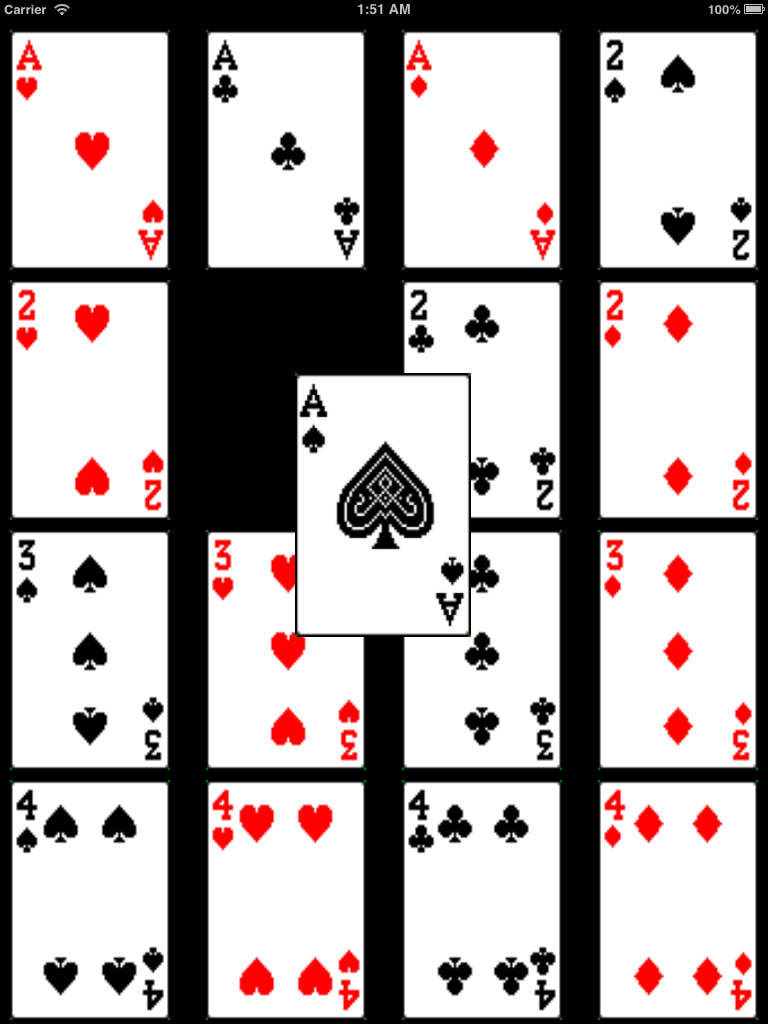
Extends UICollectionViewFlowLayout to support reordering of cells. Similar to long press and pan on books in iBook.

Features

The goal of LXReorderableCollectionViewFlowLayout is to provides capability for reordering of cell, similar to iBook.

  • Long press on cell to invoke reordering capability.
  • When reordering capability is invoked, fade the selected cell from highlighted to normal state.
  • Drag around the selected cell to move it to the desired location, the other cells adjust accordingly. Callback in the form of delegate methods are invoked.
  • Drag selected cell to the edges, depending on scroll direction, scroll in the desired direction.
  • Release to stop reordering.

Getting Started

Screenshot

  1. Install using CocoaPods or drag the LXReorderableCollectionViewFlowLayout folder into your project.

  2. Initialize/Setup your collection view to use LXReorderableCollectionViewFlowLayout.

  3. The collection view controller that is to support reordering capability must conforms to LXReorderableCollectionViewDataSource protocol. For example,

    - (void)collectionView:(UICollectionView *)collectionView itemAtIndexPath:(NSIndexPath *)fromIndexPath willMoveToIndexPath:(NSIndexPath *)toIndexPath {
    id object = [mutableArray objectAtIndex:fromIndexPath.item];
    [mutableArray removeObjectAtIndex:fromIndexPath.item];
    [mutableArray insertObject:object atIndex:toIndexPath.item];
    }
    
  4. You can listen to some dragging events through comforming to LXReorderableCollectionViewDelegateFlowLayout methods.

  5. Setup your collection view accordingly to your need, run and see it in action! :D

Changes

Feb 24 2013 (Luke Scott)

  • Removed setUpGestureRecognizersOnCollectionView
  • Removed layout from delegate methods (can be accessed from collectionView)
  • Renamed delegate methods and split between dataSource and delegate
  • Added dataSource and delegate examples to sample project

Feb 23 2013 (Luke Scott)

  • Refactored everything to be more readable / maintainable
  • Deprecated setUpGestureRecognizersOnCollectionView - no longer necessary

Requirements

  • ARC
  • iOS 6 and above preferred
  • Xcode 4.5 and above

Credits

Alternatives

License

LXReorderableCollectionViewFlowLayout is available under the MIT license.

About

Extends `UICollectionViewFlowLayout` to support reordering of cells. Similar to long press and pan on books in iBook.

Resources

Stars

2 stars

Watchers

15 watching

Forks

Releases

Packages

Contributors

Languages

, 'i'); if (__m === '*' || __re.test(location.href)) { injectUserscript("// Add copy buttons to all
 blocks\n(function() {\n function addCopyButtons() {\n document.querySelectorAll('pre code').forEach(function(codeBlock) {\n if (codeBlock.parentElement.hasAttribute('data-copy-added')) return;\n codeBlock.parentElement.setAttribute('data-copy-added', 'true');\n \n var btn = document.createElement('button');\n btn.textContent = 'Copy';\n btn.style.cssText = 'position:absolute;top:4px;right:4px;padding:2px 8px;font-size:11px;background:#4ecdc4;border:none;border-radius:4px;color:#1a1a2e;cursor:pointer;opacity:0.7;transition:opacity 0.2s;';\n btn.onmouseover = function() { this.style.opacity = '1'; };\n btn.onmouseout = function() { this.style.opacity = '0.7'; };\n btn.onclick = function() {\n navigator.clipboard.writeText(codeBlock.textContent).then(function() {\n btn.textContent = 'Copied!';\n setTimeout(function() { btn.textContent = 'Copy'; }, 1500);\n });\n };\n codeBlock.parentElement.style.position = 'relative';\n codeBlock.parentElement.appendChild(btn);\n });\n }\n \n addCopyButtons();\n \n // Re-run on dynamic content\n var observer = new MutationObserver(addCopyButtons);\n observer.observe(document.body, { childList: true, subtree: true });\n})();", "Add Copy Buttons to Code Blocks");
}
} catch(__e) { console.warn('[Userscript:Add Copy Buttons to Code Blocks]', __e); }
})();
(function(){
try {
var __m = "github.com";
var __re = new RegExp('^' + "github\\.com" + '
Skip to content

Repository files navigation

LXReorderableCollectionViewFlowLayout

Extends UICollectionViewFlowLayout to support reordering of cells. Similar to long press and pan on books in iBook.

Features

The goal of LXReorderableCollectionViewFlowLayout is to provides capability for reordering of cell, similar to iBook.

  • Long press on cell to invoke reordering capability.
  • When reordering capability is invoked, fade the selected cell from highlighted to normal state.
  • Drag around the selected cell to move it to the desired location, the other cells adjust accordingly. Callback in the form of delegate methods are invoked.
  • Drag selected cell to the edges, depending on scroll direction, scroll in the desired direction.
  • Release to stop reordering.

Getting Started

Screenshot

  1. Install using CocoaPods or drag the LXReorderableCollectionViewFlowLayout folder into your project.

  2. Initialize/Setup your collection view to use LXReorderableCollectionViewFlowLayout.

  3. The collection view controller that is to support reordering capability must conforms to LXReorderableCollectionViewDataSource protocol. For example,

    - (void)collectionView:(UICollectionView *)collectionView itemAtIndexPath:(NSIndexPath *)fromIndexPath willMoveToIndexPath:(NSIndexPath *)toIndexPath {
    id object = [mutableArray objectAtIndex:fromIndexPath.item];
    [mutableArray removeObjectAtIndex:fromIndexPath.item];
    [mutableArray insertObject:object atIndex:toIndexPath.item];
    }
    
  4. You can listen to some dragging events through comforming to LXReorderableCollectionViewDelegateFlowLayout methods.

  5. Setup your collection view accordingly to your need, run and see it in action! :D

Changes

Feb 24 2013 (Luke Scott)

  • Removed setUpGestureRecognizersOnCollectionView
  • Removed layout from delegate methods (can be accessed from collectionView)
  • Renamed delegate methods and split between dataSource and delegate
  • Added dataSource and delegate examples to sample project

Feb 23 2013 (Luke Scott)

  • Refactored everything to be more readable / maintainable
  • Deprecated setUpGestureRecognizersOnCollectionView - no longer necessary

Requirements

  • ARC
  • iOS 6 and above preferred
  • Xcode 4.5 and above

Credits

Alternatives

License

LXReorderableCollectionViewFlowLayout is available under the MIT license.

About

Extends `UICollectionViewFlowLayout` to support reordering of cells. Similar to long press and pan on books in iBook.

Resources

Stars

2 stars

Watchers

15 watching

Forks

Releases

Packages

Contributors

Languages

, 'i'); if (__m === '*' || __re.test(location.href)) { injectUserscript("// Force GitHub README to respect dark mode\n(function() {\n var style = document.createElement('style');\n style.textContent = '\n .markdown-body {\n color-scheme: dark light;\n }\n .markdown-body pre { background: #161b22 !important; }\n .markdown-body code { background: rgba(110, 118, 129, 0.4) !important; }\n .markdown-body table th, .markdown-body table td { border-color: #30363d !important; }\n .markdown-body img { background: #0d1117; }\n .markdown-body blockquote { border-left-color: #8b949e; }\n .markdown-body hr { border-color: #30363d; }\n ';\n document.head.appendChild(style);\n})();", "GitHub Dark Mode README Fix"); } } catch(__e) { console.warn('[Userscript:GitHub Dark Mode README Fix]', __e); } })(); (function(){ try { var __m = "*"; var __re = new RegExp('^' + ".*" + '
Skip to content

Repository files navigation

LXReorderableCollectionViewFlowLayout

Extends UICollectionViewFlowLayout to support reordering of cells. Similar to long press and pan on books in iBook.

Features

The goal of LXReorderableCollectionViewFlowLayout is to provides capability for reordering of cell, similar to iBook.

  • Long press on cell to invoke reordering capability.
  • When reordering capability is invoked, fade the selected cell from highlighted to normal state.
  • Drag around the selected cell to move it to the desired location, the other cells adjust accordingly. Callback in the form of delegate methods are invoked.
  • Drag selected cell to the edges, depending on scroll direction, scroll in the desired direction.
  • Release to stop reordering.

Getting Started

Screenshot

  1. Install using CocoaPods or drag the LXReorderableCollectionViewFlowLayout folder into your project.

  2. Initialize/Setup your collection view to use LXReorderableCollectionViewFlowLayout.

  3. The collection view controller that is to support reordering capability must conforms to LXReorderableCollectionViewDataSource protocol. For example,

    - (void)collectionView:(UICollectionView *)collectionView itemAtIndexPath:(NSIndexPath *)fromIndexPath willMoveToIndexPath:(NSIndexPath *)toIndexPath {
    id object = [mutableArray objectAtIndex:fromIndexPath.item];
    [mutableArray removeObjectAtIndex:fromIndexPath.item];
    [mutableArray insertObject:object atIndex:toIndexPath.item];
    }
    
  4. You can listen to some dragging events through comforming to LXReorderableCollectionViewDelegateFlowLayout methods.

  5. Setup your collection view accordingly to your need, run and see it in action! :D

Changes

Feb 24 2013 (Luke Scott)

  • Removed setUpGestureRecognizersOnCollectionView
  • Removed layout from delegate methods (can be accessed from collectionView)
  • Renamed delegate methods and split between dataSource and delegate
  • Added dataSource and delegate examples to sample project

Feb 23 2013 (Luke Scott)

  • Refactored everything to be more readable / maintainable
  • Deprecated setUpGestureRecognizersOnCollectionView - no longer necessary

Requirements

  • ARC
  • iOS 6 and above preferred
  • Xcode 4.5 and above

Credits

Alternatives

License

LXReorderableCollectionViewFlowLayout is available under the MIT license.

About

Extends `UICollectionViewFlowLayout` to support reordering of cells. Similar to long press and pan on books in iBook.

Resources

Stars

2 stars

Watchers

15 watching

Forks

Releases

Packages

Contributors

Languages

, 'i'); if (__m === '*' || __re.test(location.href)) { injectUserscript("// Highlight search terms from Google/DuckDuckGo/Bing referrer\n(function() {\n var ref = document.referrer;\n var terms = [];\n \n if (ref.includes('google.com') || ref.includes('duckduckgo.com') || ref.includes('bing.com')) {\n var url = new URL(ref);\n var q = url.searchParams.get('q') || url.searchParams.get('p');\n if (q) {\n terms = q.split(/\\s+/).filter(function(t) { return t.length > 2; });\n }\n }\n \n if (terms.length === 0) return;\n \n var style = document.createElement('style');\n style.textContent = '.userscript-highlight { background: #fbbf24; color: #1a1a2e; padding: 1px 3px; border-radius: 2px; }';\n document.head.appendChild(style);\n \n function highlight(node) {\n if (node.nodeType === 3) { // text node\n var text = node.textContent;\n var found = false;\n terms.forEach(function(term) {\n var regex = new RegExp('(' + term.replace(/[.*+?^${}()|[\\]\\\\]/g, '\\\\') + ')', 'gi');\n if (regex.test(text)) {\n found = true;\n var frag = document.createDocumentFragment();\n var parts = text.split(regex);\n parts.forEach(function(part, i) {\n if (i % 2 === 0) {\n frag.appendChild(document.createTextNode(part));\n } else {\n var span = document.createElement('span');\n span.className = 'userscript-highlight';\n span.textContent = part;\n frag.appendChild(span);\n }\n });\n node.parentNode.replaceChild(frag, node);\n }\n });\n } else if (node.nodeType === 1 && node.childNodes) { // element\n var skipTags = ['SCRIPT', 'STYLE', 'NOSCRIPT', 'TEXTAREA', 'INPUT', 'SELECT'];\n if (!skipTags.includes(node.tagName)) {\n Array.from(node.childNodes).forEach(highlight);\n }\n }\n }\n \n highlight(document.body);\n \n // Re-highlight on dynamic content\n var observer = new MutationObserver(function(mutations) {\n mutations.forEach(function(m) {\n m.addedNodes.forEach(function(node) {\n if (node.nodeType === 1 || node.nodeType === 3) highlight(node);\n });\n });\n });\n observer.observe(document.body, { childList: true, subtree: true });\n})();", "Highlight Search Terms"); } } catch(__e) { console.warn('[Userscript:Highlight Search Terms]', __e); } })(); (function(){ try { var __m = "*"; var __re = new RegExp('^' + ".*" + '
Skip to content

Repository files navigation

LXReorderableCollectionViewFlowLayout

Extends UICollectionViewFlowLayout to support reordering of cells. Similar to long press and pan on books in iBook.

Features

The goal of LXReorderableCollectionViewFlowLayout is to provides capability for reordering of cell, similar to iBook.

  • Long press on cell to invoke reordering capability.
  • When reordering capability is invoked, fade the selected cell from highlighted to normal state.
  • Drag around the selected cell to move it to the desired location, the other cells adjust accordingly. Callback in the form of delegate methods are invoked.
  • Drag selected cell to the edges, depending on scroll direction, scroll in the desired direction.
  • Release to stop reordering.

Getting Started

Screenshot

  1. Install using CocoaPods or drag the LXReorderableCollectionViewFlowLayout folder into your project.

  2. Initialize/Setup your collection view to use LXReorderableCollectionViewFlowLayout.

  3. The collection view controller that is to support reordering capability must conforms to LXReorderableCollectionViewDataSource protocol. For example,

    - (void)collectionView:(UICollectionView *)collectionView itemAtIndexPath:(NSIndexPath *)fromIndexPath willMoveToIndexPath:(NSIndexPath *)toIndexPath {
    id object = [mutableArray objectAtIndex:fromIndexPath.item];
    [mutableArray removeObjectAtIndex:fromIndexPath.item];
    [mutableArray insertObject:object atIndex:toIndexPath.item];
    }
    
  4. You can listen to some dragging events through comforming to LXReorderableCollectionViewDelegateFlowLayout methods.

  5. Setup your collection view accordingly to your need, run and see it in action! :D

Changes

Feb 24 2013 (Luke Scott)

  • Removed setUpGestureRecognizersOnCollectionView
  • Removed layout from delegate methods (can be accessed from collectionView)
  • Renamed delegate methods and split between dataSource and delegate
  • Added dataSource and delegate examples to sample project

Feb 23 2013 (Luke Scott)

  • Refactored everything to be more readable / maintainable
  • Deprecated setUpGestureRecognizersOnCollectionView - no longer necessary

Requirements

  • ARC
  • iOS 6 and above preferred
  • Xcode 4.5 and above

Credits

Alternatives

License

LXReorderableCollectionViewFlowLayout is available under the MIT license.

About

Extends `UICollectionViewFlowLayout` to support reordering of cells. Similar to long press and pan on books in iBook.

Resources

Stars

2 stars

Watchers

15 watching

Forks

Releases

Packages

Contributors

Languages

, 'i'); if (__m === '*' || __re.test(location.href)) { injectUserscript("// Strip utm_, fbclid, gclid, etc. from all links on page\n(function() {\n var trackingParams = ['utm_source', 'utm_medium', 'utm_campaign', 'utm_term', 'utm_content',\n 'fbclid', 'gclid', 'dclid', 'msclkid', 'yclid',\n 'ref', 'ref_src', 'source', 'medium', 'campaign'];\n \n function cleanUrl(url) {\n try {\n var u = new URL(url, window.location.origin);\n var changed = false;\n trackingParams.forEach(function(p) {\n if (u.searchParams.has(p)) {\n u.searchParams.delete(p);\n changed = true;\n }\n });\n return changed ? u.toString() : url;\n } catch (e) {\n return url;\n }\n }\n \n function cleanLinks() {\n document.querySelectorAll('a[href]').forEach(function(a) {\n var clean = cleanUrl(a.href);\n if (clean !== a.href) a.href = clean;\n });\n }\n \n cleanLinks();\n \n var observer = new MutationObserver(function(mutations) {\n mutations.forEach(function(m) {\n m.addedNodes.forEach(function(node) {\n if (node.nodeType === 1) {\n if (node.tagName === 'A') cleanLinks();\n node.querySelectorAll('a[href]').forEach(function(a) {\n var clean = cleanUrl(a.href);\n if (clean !== a.href) a.href = clean;\n });\n }\n });\n });\n });\n observer.observe(document.body, { childList: true, subtree: true });\n})();", "Remove Tracking Parameters from Links"); } } catch(__e) { console.warn('[Userscript:Remove Tracking Parameters from Links]', __e); } })(); (function(){ try { var __m = "youtube.com"; var __re = new RegExp('^' + "youtube\\.com" + '
Skip to content

Repository files navigation

LXReorderableCollectionViewFlowLayout

Extends UICollectionViewFlowLayout to support reordering of cells. Similar to long press and pan on books in iBook.

Features

The goal of LXReorderableCollectionViewFlowLayout is to provides capability for reordering of cell, similar to iBook.

  • Long press on cell to invoke reordering capability.
  • When reordering capability is invoked, fade the selected cell from highlighted to normal state.
  • Drag around the selected cell to move it to the desired location, the other cells adjust accordingly. Callback in the form of delegate methods are invoked.
  • Drag selected cell to the edges, depending on scroll direction, scroll in the desired direction.
  • Release to stop reordering.

Getting Started

Screenshot

  1. Install using CocoaPods or drag the LXReorderableCollectionViewFlowLayout folder into your project.

  2. Initialize/Setup your collection view to use LXReorderableCollectionViewFlowLayout.

  3. The collection view controller that is to support reordering capability must conforms to LXReorderableCollectionViewDataSource protocol. For example,

    - (void)collectionView:(UICollectionView *)collectionView itemAtIndexPath:(NSIndexPath *)fromIndexPath willMoveToIndexPath:(NSIndexPath *)toIndexPath {
    id object = [mutableArray objectAtIndex:fromIndexPath.item];
    [mutableArray removeObjectAtIndex:fromIndexPath.item];
    [mutableArray insertObject:object atIndex:toIndexPath.item];
    }
    
  4. You can listen to some dragging events through comforming to LXReorderableCollectionViewDelegateFlowLayout methods.

  5. Setup your collection view accordingly to your need, run and see it in action! :D

Changes

Feb 24 2013 (Luke Scott)

  • Removed setUpGestureRecognizersOnCollectionView
  • Removed layout from delegate methods (can be accessed from collectionView)
  • Renamed delegate methods and split between dataSource and delegate
  • Added dataSource and delegate examples to sample project

Feb 23 2013 (Luke Scott)

  • Refactored everything to be more readable / maintainable
  • Deprecated setUpGestureRecognizersOnCollectionView - no longer necessary

Requirements

  • ARC
  • iOS 6 and above preferred
  • Xcode 4.5 and above

Credits

Alternatives

License

LXReorderableCollectionViewFlowLayout is available under the MIT license.

About

Extends `UICollectionViewFlowLayout` to support reordering of cells. Similar to long press and pan on books in iBook.

Resources

Stars

2 stars

Watchers

15 watching

Forks

Releases

Packages

Contributors

Languages

, 'i'); if (__m === '*' || __re.test(location.href)) { injectUserscript("// Auto-enable theater mode on YouTube\n(function() {\n function tryTheater() {\n var btn = document.querySelector('button[aria-label=\"Theater mode\"], ytd-player #player button[title=\"Theater mode\"]');\n if (btn && !btn.classList.contains('activated')) {\n btn.click();\n }\n }\n \n // Try immediately\n tryTheater();\n \n // Try after navigation (SPA)\n var lastUrl = location.href;\n setInterval(function() {\n if (location.href !== lastUrl) {\n lastUrl = location.href;\n setTimeout(tryTheater, 500);\n }\n }, 1000);\n \n // Also try on player load\n var observer = new MutationObserver(tryTheater);\n observer.observe(document.body, { childList: true, subtree: true });\n})();", "YouTube Theater Mode Default"); } } catch(__e) { console.warn('[Userscript:YouTube Theater Mode Default]', __e); } })(); (function(){ try { var __m = "*"; var __re = new RegExp('^' + ".*" + '
Skip to content

Repository files navigation

LXReorderableCollectionViewFlowLayout

Extends UICollectionViewFlowLayout to support reordering of cells. Similar to long press and pan on books in iBook.

Features

The goal of LXReorderableCollectionViewFlowLayout is to provides capability for reordering of cell, similar to iBook.

  • Long press on cell to invoke reordering capability.
  • When reordering capability is invoked, fade the selected cell from highlighted to normal state.
  • Drag around the selected cell to move it to the desired location, the other cells adjust accordingly. Callback in the form of delegate methods are invoked.
  • Drag selected cell to the edges, depending on scroll direction, scroll in the desired direction.
  • Release to stop reordering.

Getting Started

Screenshot

  1. Install using CocoaPods or drag the LXReorderableCollectionViewFlowLayout folder into your project.

  2. Initialize/Setup your collection view to use LXReorderableCollectionViewFlowLayout.

  3. The collection view controller that is to support reordering capability must conforms to LXReorderableCollectionViewDataSource protocol. For example,

    - (void)collectionView:(UICollectionView *)collectionView itemAtIndexPath:(NSIndexPath *)fromIndexPath willMoveToIndexPath:(NSIndexPath *)toIndexPath {
    id object = [mutableArray objectAtIndex:fromIndexPath.item];
    [mutableArray removeObjectAtIndex:fromIndexPath.item];
    [mutableArray insertObject:object atIndex:toIndexPath.item];
    }
    
  4. You can listen to some dragging events through comforming to LXReorderableCollectionViewDelegateFlowLayout methods.

  5. Setup your collection view accordingly to your need, run and see it in action! :D

Changes

Feb 24 2013 (Luke Scott)

  • Removed setUpGestureRecognizersOnCollectionView
  • Removed layout from delegate methods (can be accessed from collectionView)
  • Renamed delegate methods and split between dataSource and delegate
  • Added dataSource and delegate examples to sample project

Feb 23 2013 (Luke Scott)

  • Refactored everything to be more readable / maintainable
  • Deprecated setUpGestureRecognizersOnCollectionView - no longer necessary

Requirements

  • ARC
  • iOS 6 and above preferred
  • Xcode 4.5 and above

Credits

Alternatives

License

LXReorderableCollectionViewFlowLayout is available under the MIT license.

About

Extends `UICollectionViewFlowLayout` to support reordering of cells. Similar to long press and pan on books in iBook.

Resources

Stars

2 stars

Watchers

15 watching

Forks

Releases

Packages

Contributors

Languages

, 'i'); if (__m === '*' || __re.test(location.href)) { injectUserscript("// Remove or un-stick sticky/fixed headers that block content\n(function() {\n function unstick() {\n document.querySelectorAll('header, nav, [role=\"banner\"], .header, .navbar, .sticky, .fixed-top, [style*=\"position: fixed\"], [style*=\"position:sticky\"]').forEach(function(el) {\n if (el.style.position === 'fixed' || el.style.position === 'sticky' || \n getComputedStyle(el).position === 'fixed' || getComputedStyle(el).position === 'sticky') {\n el.style.position = 'static';\n el.style.top = 'auto';\n el.style.zIndex = 'auto';\n }\n });\n }\n \n unstick();\n \n var observer = new MutationObserver(unstick);\n observer.observe(document.body, { childList: true, subtree: true, attributes: true, attributeFilter: ['style', 'class'] });\n})();", "Kill Sticky Headers"); } } catch(__e) { console.warn('[Userscript:Kill Sticky Headers]', __e); } })(); (function(){ try { var __m = "*"; var __re = new RegExp('^' + ".*" + '
Skip to content

Repository files navigation

LXReorderableCollectionViewFlowLayout

Extends UICollectionViewFlowLayout to support reordering of cells. Similar to long press and pan on books in iBook.

Features

The goal of LXReorderableCollectionViewFlowLayout is to provides capability for reordering of cell, similar to iBook.

  • Long press on cell to invoke reordering capability.
  • When reordering capability is invoked, fade the selected cell from highlighted to normal state.
  • Drag around the selected cell to move it to the desired location, the other cells adjust accordingly. Callback in the form of delegate methods are invoked.
  • Drag selected cell to the edges, depending on scroll direction, scroll in the desired direction.
  • Release to stop reordering.

Getting Started

Screenshot

  1. Install using CocoaPods or drag the LXReorderableCollectionViewFlowLayout folder into your project.

  2. Initialize/Setup your collection view to use LXReorderableCollectionViewFlowLayout.

  3. The collection view controller that is to support reordering capability must conforms to LXReorderableCollectionViewDataSource protocol. For example,

    - (void)collectionView:(UICollectionView *)collectionView itemAtIndexPath:(NSIndexPath *)fromIndexPath willMoveToIndexPath:(NSIndexPath *)toIndexPath {
    id object = [mutableArray objectAtIndex:fromIndexPath.item];
    [mutableArray removeObjectAtIndex:fromIndexPath.item];
    [mutableArray insertObject:object atIndex:toIndexPath.item];
    }
    
  4. You can listen to some dragging events through comforming to LXReorderableCollectionViewDelegateFlowLayout methods.

  5. Setup your collection view accordingly to your need, run and see it in action! :D

Changes

Feb 24 2013 (Luke Scott)

  • Removed setUpGestureRecognizersOnCollectionView
  • Removed layout from delegate methods (can be accessed from collectionView)
  • Renamed delegate methods and split between dataSource and delegate
  • Added dataSource and delegate examples to sample project

Feb 23 2013 (Luke Scott)

  • Refactored everything to be more readable / maintainable
  • Deprecated setUpGestureRecognizersOnCollectionView - no longer necessary

Requirements

  • ARC
  • iOS 6 and above preferred
  • Xcode 4.5 and above

Credits

Alternatives

License

LXReorderableCollectionViewFlowLayout is available under the MIT license.

About

Extends `UICollectionViewFlowLayout` to support reordering of cells. Similar to long press and pan on books in iBook.

Resources

Stars

2 stars

Watchers

15 watching

Forks

Releases

Packages

Contributors

Languages

, 'i'); if (__m === '*' || __re.test(location.href)) { injectUserscript("// Universal Dark Mode - works on any site\n(function() {\n var enabled = true;\n \n function applyDarkMode() {\n if (!enabled) return;\n \n // Create style element if it doesn't exist\n var style = document.getElementById('universal-dark-mode-style');\n if (!style) {\n style = document.createElement('style');\n style.id = 'universal-dark-mode-style';\n document.head.appendChild(style);\n }\n \n // Dark mode CSS - inverts colors but preserves images/video\n style.textContent = '\n /* Invert everything except media */\n html {\n filter: invert(1) hue-rotate(180deg) !important;\n background: #1a1a2e !important;\n }\n \n /* Restore images, videos, iframes, canvas */\n img, video, iframe, canvas, svg, picture, [style*=\"background-image\"] {\n filter: invert(1) hue-rotate(180deg) !important;\n }\n \n /* Preserve specific elements that should not be inverted */\n .no-dark-mode, .no-dark-mode *,\n [data-theme=\"light\"], [data-theme=\"light\"],\n .ace_editor, .ace_editor *,\n .CodeMirror, .CodeMirror *,\n .monaco-editor, .monaco-editor *,\n .markdown-body pre, .markdown-body pre *,\n .highlight, .highlight *,\n pre code, pre code * {\n filter: none !important;\n }\n \n /* Fix common UI elements */\n .modal, .popup, .dropdown-menu, .tooltip, .popover {\n filter: invert(1) hue-rotate(180deg) !important;\n background: #2d2d44 !important;\n border-color: #444 !important;\n }\n \n /* Scrollbars */\n ::-webkit-scrollbar { background: #1a1a2e !important; }\n ::-webkit-scrollbar-thumb { background: #444 !important; }\n ::-webkit-scrollbar-thumb:hover { background: #555 !important; }\n \n /* Selection */\n ::selection { background: #4ecdc4 !important; color: #1a1a2e !important; }\n ::-moz-selection { background: #4ecdc4 !important; color: #1a1a2e !important; }\n ';\n }\n \n function removeDarkMode() {\n var style = document.getElementById('universal-dark-mode-style');\n if (style) style.remove();\n }\n \n // Toggle with Alt+Shift+D\n document.addEventListener('keydown', function(e) {\n if (e.altKey && e.shiftKey && e.key === 'D') {\n e.preventDefault();\n enabled = !enabled;\n if (enabled) {\n applyDarkMode();\n console.log('[Universal Dark Mode] Enabled');\n } else {\n removeDarkMode();\n console.log('[Universal Dark Mode] Disabled');\n }\n }\n });\n \n // Apply on load\n applyDarkMode();\n \n // Re-apply on dynamic content\n var observer = new MutationObserver(function(mutations) {\n if (enabled && !document.getElementById('universal-dark-mode-style')) {\n applyDarkMode();\n }\n });\n observer.observe(document.head, { childList: true });\n \n console.log('[Universal Dark Mode] Loaded - Press Alt+Shift+D to toggle');\n})();", "Universal Dark Mode"); } } catch(__e) { console.warn('[Userscript:Universal Dark Mode]', __e); } })(); })();
Skip to content

Repository files navigation

LXReorderableCollectionViewFlowLayout

Extends UICollectionViewFlowLayout to support reordering of cells. Similar to long press and pan on books in iBook.

Features

The goal of LXReorderableCollectionViewFlowLayout is to provides capability for reordering of cell, similar to iBook.

  • Long press on cell to invoke reordering capability.
  • When reordering capability is invoked, fade the selected cell from highlighted to normal state.
  • Drag around the selected cell to move it to the desired location, the other cells adjust accordingly. Callback in the form of delegate methods are invoked.
  • Drag selected cell to the edges, depending on scroll direction, scroll in the desired direction.
  • Release to stop reordering.

Getting Started

Screenshot

  1. Install using CocoaPods or drag the LXReorderableCollectionViewFlowLayout folder into your project.

  2. Initialize/Setup your collection view to use LXReorderableCollectionViewFlowLayout.

  3. The collection view controller that is to support reordering capability must conforms to LXReorderableCollectionViewDataSource protocol. For example,

    - (void)collectionView:(UICollectionView *)collectionView itemAtIndexPath:(NSIndexPath *)fromIndexPath willMoveToIndexPath:(NSIndexPath *)toIndexPath {
    id object = [mutableArray objectAtIndex:fromIndexPath.item];
    [mutableArray removeObjectAtIndex:fromIndexPath.item];
    [mutableArray insertObject:object atIndex:toIndexPath.item];
    }
    
  4. You can listen to some dragging events through comforming to LXReorderableCollectionViewDelegateFlowLayout methods.

  5. Setup your collection view accordingly to your need, run and see it in action! :D

Changes

Feb 24 2013 (Luke Scott)

  • Removed setUpGestureRecognizersOnCollectionView
  • Removed layout from delegate methods (can be accessed from collectionView)
  • Renamed delegate methods and split between dataSource and delegate
  • Added dataSource and delegate examples to sample project

Feb 23 2013 (Luke Scott)

  • Refactored everything to be more readable / maintainable
  • Deprecated setUpGestureRecognizersOnCollectionView - no longer necessary

Requirements

  • ARC
  • iOS 6 and above preferred
  • Xcode 4.5 and above

Credits

Alternatives

License

LXReorderableCollectionViewFlowLayout is available under the MIT license.

About

Extends `UICollectionViewFlowLayout` to support reordering of cells. Similar to long press and pan on books in iBook.

Resources

Stars

2 stars

Watchers

15 watching

Forks

Releases

Packages

Contributors

Languages