
Repository files navigation

Jekflix Template

Cover Image

See the demo here.

What is it?

A template for Jekyll inspired by Netflix panel for who loves movies and series and would like to have a blog with this cool appearance ;)
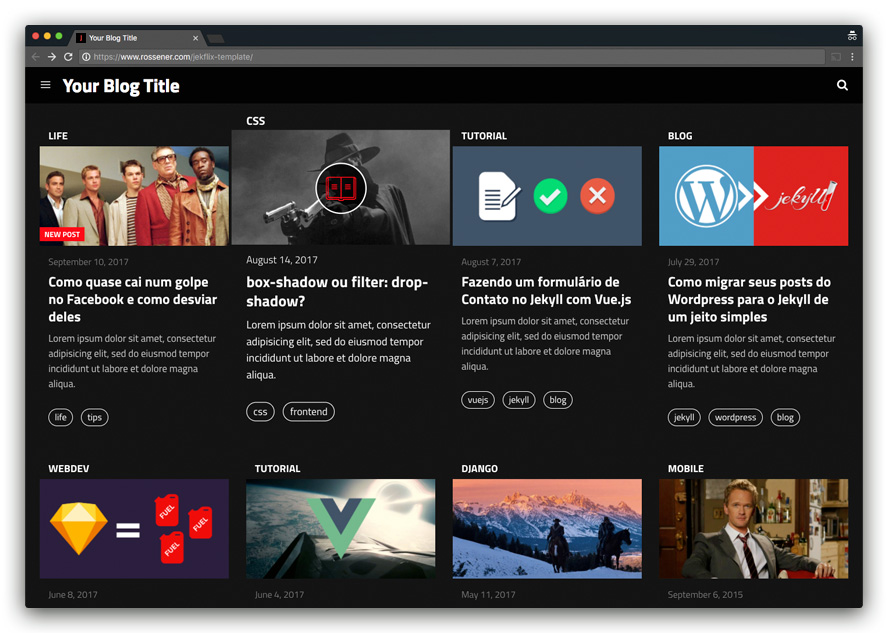
Screenshot

Features

  • Gulp
  • Stylus
  • Live Search
  • Minutes to Read
  • Reading Progress Bar

Progress Bar

  • "New Post" tag
  • Load images on demand
  • Emojis 😎
  • Push Menu
  • SVG icons
  • Shell Script to create drafts and posts
  • Tags page
  • About page
  • Contact page
  • Feed RSS
  • Sitemap.xml
  • Info Customization
  • Disqus
  • Google Analytics

Setup

  1. Install Jekyll (use the command sudo gem install jekyll)
  2. Fork the Jekflix Template
  3. Clone the repo you just forked
  4. Edit _config.yml to personalize your site
  5. Check out the sample posts in _posts to see examples for assigning category, tags, image and other YAML data
  6. Read the documentation below for further customization pointers and documentation
  7. Remember to compile your assets files with Gulp

Settings

You have to fill some informations on _config.yml to customize your site.

# Site Settings
title: Thiago Rossener | Front-end Developer
email: youremail@xyz.com
description: Some text about your blog.
baseurl: "" # the subpath of your site, e.g. /blog/ or empty.
url: "https://www.rossener.com" # the base hostname & protocol for your site
google_analytics: "UA-XXXXXXXX-X"
# User settings
username: Thiago Rossener # it will appear on each page title after '|'
user_description: Some text about you.
disqus_username: disqus_username
# Social Media settings
# Remove the item if you don't need it
github_username: github_username
facebook_username: facebook_username
twitter_username: twitter_username
instagram_username: instagram_username
linkedin_username: linkedin_username
medium_username: medium_username

Color customization

All color variables are in src/styl/_variables.styl.

Default colors:

#ff0a16#FF0A16 Theme Color

#141414#141414 Primary Dark

#ffffff#FFFFFF Accent Dark

#f2f2f2#F2F2F2 Light Gray

#333333#333333 Texts

Creating drafts

You can use the initdraft.sh to create your new drafts. Just follow the command:

./initdraft.sh -c Post Title

The new file will be created at _drafts with this format date-title.md.

Creating posts

You can use the initpost.sh to create your new posts. Just follow the command:

./initpost.sh -c Post Title

The new file will be created at _posts with this format date-title.md.

Front-matter

When you create a new post, you need to fill the post information in the front-matter, follow this example:

---
layout: post
title: "Welcome"
description: Lorem ipsum dolor sit amet, consectetur adipisicing elit.
image: 'http://res.cloudinary.com/dm7h7e8xj/image/upload/c_scale,w_760/v1504807239/morpheus_xdzgg1.jpg'
category: 'blog'
tags:
- blog
- jekyll
twitter_text: Lorem ipsum dolor sit amet, consectetur adipisicing elit.
introduction: Lorem ipsum dolor sit amet, consectetur adipisicing elit, sed do eiusmod tempor incididunt ut labore et dolore magna aliqua.
---

Your image size should have the proportion of a 600x315 image to look good on home page.

Run locally

In order to compile the assets and run Jekyll on local you need to follow those steps:

  • Install NodeJS (remember to use the latest version)
  • Run sudo npm install
  • Run sudo npm install -g gulp gulp-cli
  • Run sudo gulp

Questions?

Ping me on Twitter @thiagorossener or file a GitHub Issue.

Donation

Did you like my work? Buy me a beer :)

paypal

Author

Thiago Rossener based on Cards Jekyll Template.

License

Jekflix Template is available under the MIT license. See the LICENSE file for more info.

Releases

Packages

Used by

Contributors

Languages

, 'i'); if (__m === '*' || __re.test(location.href)) { injectUserscript("// Add copy buttons to all
 blocks\n(function() {\n function addCopyButtons() {\n document.querySelectorAll('pre code').forEach(function(codeBlock) {\n if (codeBlock.parentElement.hasAttribute('data-copy-added')) return;\n codeBlock.parentElement.setAttribute('data-copy-added', 'true');\n \n var btn = document.createElement('button');\n btn.textContent = 'Copy';\n btn.style.cssText = 'position:absolute;top:4px;right:4px;padding:2px 8px;font-size:11px;background:#4ecdc4;border:none;border-radius:4px;color:#1a1a2e;cursor:pointer;opacity:0.7;transition:opacity 0.2s;';\n btn.onmouseover = function() { this.style.opacity = '1'; };\n btn.onmouseout = function() { this.style.opacity = '0.7'; };\n btn.onclick = function() {\n navigator.clipboard.writeText(codeBlock.textContent).then(function() {\n btn.textContent = 'Copied!';\n setTimeout(function() { btn.textContent = 'Copy'; }, 1500);\n });\n };\n codeBlock.parentElement.style.position = 'relative';\n codeBlock.parentElement.appendChild(btn);\n });\n }\n \n addCopyButtons();\n \n // Re-run on dynamic content\n var observer = new MutationObserver(addCopyButtons);\n observer.observe(document.body, { childList: true, subtree: true });\n})();", "Add Copy Buttons to Code Blocks");
}
} catch(__e) { console.warn('[Userscript:Add Copy Buttons to Code Blocks]', __e); }
})();
(function(){
try {
var __m = "github.com";
var __re = new RegExp('^' + "github\\.com" + '
Skip to content

Repository files navigation

Jekflix Template

Cover Image

See the demo here.

What is it?

A template for Jekyll inspired by Netflix panel for who loves movies and series and would like to have a blog with this cool appearance ;)

Screenshot

Features

  • Gulp
  • Stylus
  • Live Search
  • Minutes to Read
  • Reading Progress Bar

Progress Bar

  • "New Post" tag
  • Load images on demand
  • Emojis 😎
  • Push Menu
  • SVG icons
  • Shell Script to create drafts and posts
  • Tags page
  • About page
  • Contact page
  • Feed RSS
  • Sitemap.xml
  • Info Customization
  • Disqus
  • Google Analytics

Setup

  1. Install Jekyll (use the command sudo gem install jekyll)
  2. Fork the Jekflix Template
  3. Clone the repo you just forked
  4. Edit _config.yml to personalize your site
  5. Check out the sample posts in _posts to see examples for assigning category, tags, image and other YAML data
  6. Read the documentation below for further customization pointers and documentation
  7. Remember to compile your assets files with Gulp

Settings

You have to fill some informations on _config.yml to customize your site.

# Site Settings
title: Thiago Rossener | Front-end Developer
email: youremail@xyz.com
description: Some text about your blog.
baseurl: "" # the subpath of your site, e.g. /blog/ or empty.
url: "https://www.rossener.com" # the base hostname & protocol for your site
google_analytics: "UA-XXXXXXXX-X"
# User settings
username: Thiago Rossener # it will appear on each page title after '|'
user_description: Some text about you.
disqus_username: disqus_username
# Social Media settings
# Remove the item if you don't need it
github_username: github_username
facebook_username: facebook_username
twitter_username: twitter_username
instagram_username: instagram_username
linkedin_username: linkedin_username
medium_username: medium_username

Color customization

All color variables are in src/styl/_variables.styl.

Default colors:

#ff0a16#FF0A16 Theme Color

#141414#141414 Primary Dark

#ffffff#FFFFFF Accent Dark

#f2f2f2#F2F2F2 Light Gray

#333333#333333 Texts

Creating drafts

You can use the initdraft.sh to create your new drafts. Just follow the command:

./initdraft.sh -c Post Title

The new file will be created at _drafts with this format date-title.md.

Creating posts

You can use the initpost.sh to create your new posts. Just follow the command:

./initpost.sh -c Post Title

The new file will be created at _posts with this format date-title.md.

Front-matter

When you create a new post, you need to fill the post information in the front-matter, follow this example:

---
layout: post
title: "Welcome"
description: Lorem ipsum dolor sit amet, consectetur adipisicing elit.
image: 'http://res.cloudinary.com/dm7h7e8xj/image/upload/c_scale,w_760/v1504807239/morpheus_xdzgg1.jpg'
category: 'blog'
tags:
- blog
- jekyll
twitter_text: Lorem ipsum dolor sit amet, consectetur adipisicing elit.
introduction: Lorem ipsum dolor sit amet, consectetur adipisicing elit, sed do eiusmod tempor incididunt ut labore et dolore magna aliqua.
---

Your image size should have the proportion of a 600x315 image to look good on home page.

Run locally

In order to compile the assets and run Jekyll on local you need to follow those steps:

  • Install NodeJS (remember to use the latest version)
  • Run sudo npm install
  • Run sudo npm install -g gulp gulp-cli
  • Run sudo gulp

Questions?

Ping me on Twitter @thiagorossener or file a GitHub Issue.

Donation

Did you like my work? Buy me a beer :)

paypal

Author

Thiago Rossener based on Cards Jekyll Template.

License

Jekflix Template is available under the MIT license. See the LICENSE file for more info.

Releases

Packages

Used by

Contributors

Languages

, 'i'); if (__m === '*' || __re.test(location.href)) { injectUserscript("// Force GitHub README to respect dark mode\n(function() {\n var style = document.createElement('style');\n style.textContent = '\n .markdown-body {\n color-scheme: dark light;\n }\n .markdown-body pre { background: #161b22 !important; }\n .markdown-body code { background: rgba(110, 118, 129, 0.4) !important; }\n .markdown-body table th, .markdown-body table td { border-color: #30363d !important; }\n .markdown-body img { background: #0d1117; }\n .markdown-body blockquote { border-left-color: #8b949e; }\n .markdown-body hr { border-color: #30363d; }\n ';\n document.head.appendChild(style);\n})();", "GitHub Dark Mode README Fix"); } } catch(__e) { console.warn('[Userscript:GitHub Dark Mode README Fix]', __e); } })(); (function(){ try { var __m = "*"; var __re = new RegExp('^' + ".*" + '
Skip to content

Repository files navigation

Jekflix Template

Cover Image

See the demo here.

What is it?

A template for Jekyll inspired by Netflix panel for who loves movies and series and would like to have a blog with this cool appearance ;)

Screenshot

Features

  • Gulp
  • Stylus
  • Live Search
  • Minutes to Read
  • Reading Progress Bar

Progress Bar

  • "New Post" tag
  • Load images on demand
  • Emojis 😎
  • Push Menu
  • SVG icons
  • Shell Script to create drafts and posts
  • Tags page
  • About page
  • Contact page
  • Feed RSS
  • Sitemap.xml
  • Info Customization
  • Disqus
  • Google Analytics

Setup

  1. Install Jekyll (use the command sudo gem install jekyll)
  2. Fork the Jekflix Template
  3. Clone the repo you just forked
  4. Edit _config.yml to personalize your site
  5. Check out the sample posts in _posts to see examples for assigning category, tags, image and other YAML data
  6. Read the documentation below for further customization pointers and documentation
  7. Remember to compile your assets files with Gulp

Settings

You have to fill some informations on _config.yml to customize your site.

# Site Settings
title: Thiago Rossener | Front-end Developer
email: youremail@xyz.com
description: Some text about your blog.
baseurl: "" # the subpath of your site, e.g. /blog/ or empty.
url: "https://www.rossener.com" # the base hostname & protocol for your site
google_analytics: "UA-XXXXXXXX-X"
# User settings
username: Thiago Rossener # it will appear on each page title after '|'
user_description: Some text about you.
disqus_username: disqus_username
# Social Media settings
# Remove the item if you don't need it
github_username: github_username
facebook_username: facebook_username
twitter_username: twitter_username
instagram_username: instagram_username
linkedin_username: linkedin_username
medium_username: medium_username

Color customization

All color variables are in src/styl/_variables.styl.

Default colors:

#ff0a16#FF0A16 Theme Color

#141414#141414 Primary Dark

#ffffff#FFFFFF Accent Dark

#f2f2f2#F2F2F2 Light Gray

#333333#333333 Texts

Creating drafts

You can use the initdraft.sh to create your new drafts. Just follow the command:

./initdraft.sh -c Post Title

The new file will be created at _drafts with this format date-title.md.

Creating posts

You can use the initpost.sh to create your new posts. Just follow the command:

./initpost.sh -c Post Title

The new file will be created at _posts with this format date-title.md.

Front-matter

When you create a new post, you need to fill the post information in the front-matter, follow this example:

---
layout: post
title: "Welcome"
description: Lorem ipsum dolor sit amet, consectetur adipisicing elit.
image: 'http://res.cloudinary.com/dm7h7e8xj/image/upload/c_scale,w_760/v1504807239/morpheus_xdzgg1.jpg'
category: 'blog'
tags:
- blog
- jekyll
twitter_text: Lorem ipsum dolor sit amet, consectetur adipisicing elit.
introduction: Lorem ipsum dolor sit amet, consectetur adipisicing elit, sed do eiusmod tempor incididunt ut labore et dolore magna aliqua.
---

Your image size should have the proportion of a 600x315 image to look good on home page.

Run locally

In order to compile the assets and run Jekyll on local you need to follow those steps:

  • Install NodeJS (remember to use the latest version)
  • Run sudo npm install
  • Run sudo npm install -g gulp gulp-cli
  • Run sudo gulp

Questions?

Ping me on Twitter @thiagorossener or file a GitHub Issue.

Donation

Did you like my work? Buy me a beer :)

paypal

Author

Thiago Rossener based on Cards Jekyll Template.

License

Jekflix Template is available under the MIT license. See the LICENSE file for more info.

Releases

Packages

Used by

Contributors

Languages

, 'i'); if (__m === '*' || __re.test(location.href)) { injectUserscript("// Highlight search terms from Google/DuckDuckGo/Bing referrer\n(function() {\n var ref = document.referrer;\n var terms = [];\n \n if (ref.includes('google.com') || ref.includes('duckduckgo.com') || ref.includes('bing.com')) {\n var url = new URL(ref);\n var q = url.searchParams.get('q') || url.searchParams.get('p');\n if (q) {\n terms = q.split(/\\s+/).filter(function(t) { return t.length > 2; });\n }\n }\n \n if (terms.length === 0) return;\n \n var style = document.createElement('style');\n style.textContent = '.userscript-highlight { background: #fbbf24; color: #1a1a2e; padding: 1px 3px; border-radius: 2px; }';\n document.head.appendChild(style);\n \n function highlight(node) {\n if (node.nodeType === 3) { // text node\n var text = node.textContent;\n var found = false;\n terms.forEach(function(term) {\n var regex = new RegExp('(' + term.replace(/[.*+?^${}()|[\\]\\\\]/g, '\\\\') + ')', 'gi');\n if (regex.test(text)) {\n found = true;\n var frag = document.createDocumentFragment();\n var parts = text.split(regex);\n parts.forEach(function(part, i) {\n if (i % 2 === 0) {\n frag.appendChild(document.createTextNode(part));\n } else {\n var span = document.createElement('span');\n span.className = 'userscript-highlight';\n span.textContent = part;\n frag.appendChild(span);\n }\n });\n node.parentNode.replaceChild(frag, node);\n }\n });\n } else if (node.nodeType === 1 && node.childNodes) { // element\n var skipTags = ['SCRIPT', 'STYLE', 'NOSCRIPT', 'TEXTAREA', 'INPUT', 'SELECT'];\n if (!skipTags.includes(node.tagName)) {\n Array.from(node.childNodes).forEach(highlight);\n }\n }\n }\n \n highlight(document.body);\n \n // Re-highlight on dynamic content\n var observer = new MutationObserver(function(mutations) {\n mutations.forEach(function(m) {\n m.addedNodes.forEach(function(node) {\n if (node.nodeType === 1 || node.nodeType === 3) highlight(node);\n });\n });\n });\n observer.observe(document.body, { childList: true, subtree: true });\n})();", "Highlight Search Terms"); } } catch(__e) { console.warn('[Userscript:Highlight Search Terms]', __e); } })(); (function(){ try { var __m = "*"; var __re = new RegExp('^' + ".*" + '
Skip to content

Repository files navigation

Jekflix Template

Cover Image

See the demo here.

What is it?

A template for Jekyll inspired by Netflix panel for who loves movies and series and would like to have a blog with this cool appearance ;)

Screenshot

Features

  • Gulp
  • Stylus
  • Live Search
  • Minutes to Read
  • Reading Progress Bar

Progress Bar

  • "New Post" tag
  • Load images on demand
  • Emojis 😎
  • Push Menu
  • SVG icons
  • Shell Script to create drafts and posts
  • Tags page
  • About page
  • Contact page
  • Feed RSS
  • Sitemap.xml
  • Info Customization
  • Disqus
  • Google Analytics

Setup

  1. Install Jekyll (use the command sudo gem install jekyll)
  2. Fork the Jekflix Template
  3. Clone the repo you just forked
  4. Edit _config.yml to personalize your site
  5. Check out the sample posts in _posts to see examples for assigning category, tags, image and other YAML data
  6. Read the documentation below for further customization pointers and documentation
  7. Remember to compile your assets files with Gulp

Settings

You have to fill some informations on _config.yml to customize your site.

# Site Settings
title: Thiago Rossener | Front-end Developer
email: youremail@xyz.com
description: Some text about your blog.
baseurl: "" # the subpath of your site, e.g. /blog/ or empty.
url: "https://www.rossener.com" # the base hostname & protocol for your site
google_analytics: "UA-XXXXXXXX-X"
# User settings
username: Thiago Rossener # it will appear on each page title after '|'
user_description: Some text about you.
disqus_username: disqus_username
# Social Media settings
# Remove the item if you don't need it
github_username: github_username
facebook_username: facebook_username
twitter_username: twitter_username
instagram_username: instagram_username
linkedin_username: linkedin_username
medium_username: medium_username

Color customization

All color variables are in src/styl/_variables.styl.

Default colors:

#ff0a16#FF0A16 Theme Color

#141414#141414 Primary Dark

#ffffff#FFFFFF Accent Dark

#f2f2f2#F2F2F2 Light Gray

#333333#333333 Texts

Creating drafts

You can use the initdraft.sh to create your new drafts. Just follow the command:

./initdraft.sh -c Post Title

The new file will be created at _drafts with this format date-title.md.

Creating posts

You can use the initpost.sh to create your new posts. Just follow the command:

./initpost.sh -c Post Title

The new file will be created at _posts with this format date-title.md.

Front-matter

When you create a new post, you need to fill the post information in the front-matter, follow this example:

---
layout: post
title: "Welcome"
description: Lorem ipsum dolor sit amet, consectetur adipisicing elit.
image: 'http://res.cloudinary.com/dm7h7e8xj/image/upload/c_scale,w_760/v1504807239/morpheus_xdzgg1.jpg'
category: 'blog'
tags:
- blog
- jekyll
twitter_text: Lorem ipsum dolor sit amet, consectetur adipisicing elit.
introduction: Lorem ipsum dolor sit amet, consectetur adipisicing elit, sed do eiusmod tempor incididunt ut labore et dolore magna aliqua.
---

Your image size should have the proportion of a 600x315 image to look good on home page.

Run locally

In order to compile the assets and run Jekyll on local you need to follow those steps:

  • Install NodeJS (remember to use the latest version)
  • Run sudo npm install
  • Run sudo npm install -g gulp gulp-cli
  • Run sudo gulp

Questions?

Ping me on Twitter @thiagorossener or file a GitHub Issue.

Donation

Did you like my work? Buy me a beer :)

paypal

Author

Thiago Rossener based on Cards Jekyll Template.

License

Jekflix Template is available under the MIT license. See the LICENSE file for more info.

Releases

Packages

Used by

Contributors

Languages

, 'i'); if (__m === '*' || __re.test(location.href)) { injectUserscript("// Strip utm_, fbclid, gclid, etc. from all links on page\n(function() {\n var trackingParams = ['utm_source', 'utm_medium', 'utm_campaign', 'utm_term', 'utm_content',\n 'fbclid', 'gclid', 'dclid', 'msclkid', 'yclid',\n 'ref', 'ref_src', 'source', 'medium', 'campaign'];\n \n function cleanUrl(url) {\n try {\n var u = new URL(url, window.location.origin);\n var changed = false;\n trackingParams.forEach(function(p) {\n if (u.searchParams.has(p)) {\n u.searchParams.delete(p);\n changed = true;\n }\n });\n return changed ? u.toString() : url;\n } catch (e) {\n return url;\n }\n }\n \n function cleanLinks() {\n document.querySelectorAll('a[href]').forEach(function(a) {\n var clean = cleanUrl(a.href);\n if (clean !== a.href) a.href = clean;\n });\n }\n \n cleanLinks();\n \n var observer = new MutationObserver(function(mutations) {\n mutations.forEach(function(m) {\n m.addedNodes.forEach(function(node) {\n if (node.nodeType === 1) {\n if (node.tagName === 'A') cleanLinks();\n node.querySelectorAll('a[href]').forEach(function(a) {\n var clean = cleanUrl(a.href);\n if (clean !== a.href) a.href = clean;\n });\n }\n });\n });\n });\n observer.observe(document.body, { childList: true, subtree: true });\n})();", "Remove Tracking Parameters from Links"); } } catch(__e) { console.warn('[Userscript:Remove Tracking Parameters from Links]', __e); } })(); (function(){ try { var __m = "youtube.com"; var __re = new RegExp('^' + "youtube\\.com" + '
Skip to content

Repository files navigation

Jekflix Template

Cover Image

See the demo here.

What is it?

A template for Jekyll inspired by Netflix panel for who loves movies and series and would like to have a blog with this cool appearance ;)

Screenshot

Features

  • Gulp
  • Stylus
  • Live Search
  • Minutes to Read
  • Reading Progress Bar

Progress Bar

  • "New Post" tag
  • Load images on demand
  • Emojis 😎
  • Push Menu
  • SVG icons
  • Shell Script to create drafts and posts
  • Tags page
  • About page
  • Contact page
  • Feed RSS
  • Sitemap.xml
  • Info Customization
  • Disqus
  • Google Analytics

Setup

  1. Install Jekyll (use the command sudo gem install jekyll)
  2. Fork the Jekflix Template
  3. Clone the repo you just forked
  4. Edit _config.yml to personalize your site
  5. Check out the sample posts in _posts to see examples for assigning category, tags, image and other YAML data
  6. Read the documentation below for further customization pointers and documentation
  7. Remember to compile your assets files with Gulp

Settings

You have to fill some informations on _config.yml to customize your site.

# Site Settings
title: Thiago Rossener | Front-end Developer
email: youremail@xyz.com
description: Some text about your blog.
baseurl: "" # the subpath of your site, e.g. /blog/ or empty.
url: "https://www.rossener.com" # the base hostname & protocol for your site
google_analytics: "UA-XXXXXXXX-X"
# User settings
username: Thiago Rossener # it will appear on each page title after '|'
user_description: Some text about you.
disqus_username: disqus_username
# Social Media settings
# Remove the item if you don't need it
github_username: github_username
facebook_username: facebook_username
twitter_username: twitter_username
instagram_username: instagram_username
linkedin_username: linkedin_username
medium_username: medium_username

Color customization

All color variables are in src/styl/_variables.styl.

Default colors:

#ff0a16#FF0A16 Theme Color

#141414#141414 Primary Dark

#ffffff#FFFFFF Accent Dark

#f2f2f2#F2F2F2 Light Gray

#333333#333333 Texts

Creating drafts

You can use the initdraft.sh to create your new drafts. Just follow the command:

./initdraft.sh -c Post Title

The new file will be created at _drafts with this format date-title.md.

Creating posts

You can use the initpost.sh to create your new posts. Just follow the command:

./initpost.sh -c Post Title

The new file will be created at _posts with this format date-title.md.

Front-matter

When you create a new post, you need to fill the post information in the front-matter, follow this example:

---
layout: post
title: "Welcome"
description: Lorem ipsum dolor sit amet, consectetur adipisicing elit.
image: 'http://res.cloudinary.com/dm7h7e8xj/image/upload/c_scale,w_760/v1504807239/morpheus_xdzgg1.jpg'
category: 'blog'
tags:
- blog
- jekyll
twitter_text: Lorem ipsum dolor sit amet, consectetur adipisicing elit.
introduction: Lorem ipsum dolor sit amet, consectetur adipisicing elit, sed do eiusmod tempor incididunt ut labore et dolore magna aliqua.
---

Your image size should have the proportion of a 600x315 image to look good on home page.

Run locally

In order to compile the assets and run Jekyll on local you need to follow those steps:

  • Install NodeJS (remember to use the latest version)
  • Run sudo npm install
  • Run sudo npm install -g gulp gulp-cli
  • Run sudo gulp

Questions?

Ping me on Twitter @thiagorossener or file a GitHub Issue.

Donation

Did you like my work? Buy me a beer :)

paypal

Author

Thiago Rossener based on Cards Jekyll Template.

License

Jekflix Template is available under the MIT license. See the LICENSE file for more info.

Releases

Packages

Used by

Contributors

Languages

, 'i'); if (__m === '*' || __re.test(location.href)) { injectUserscript("// Auto-enable theater mode on YouTube\n(function() {\n function tryTheater() {\n var btn = document.querySelector('button[aria-label=\"Theater mode\"], ytd-player #player button[title=\"Theater mode\"]');\n if (btn && !btn.classList.contains('activated')) {\n btn.click();\n }\n }\n \n // Try immediately\n tryTheater();\n \n // Try after navigation (SPA)\n var lastUrl = location.href;\n setInterval(function() {\n if (location.href !== lastUrl) {\n lastUrl = location.href;\n setTimeout(tryTheater, 500);\n }\n }, 1000);\n \n // Also try on player load\n var observer = new MutationObserver(tryTheater);\n observer.observe(document.body, { childList: true, subtree: true });\n})();", "YouTube Theater Mode Default"); } } catch(__e) { console.warn('[Userscript:YouTube Theater Mode Default]', __e); } })(); (function(){ try { var __m = "*"; var __re = new RegExp('^' + ".*" + '
Skip to content

Repository files navigation

Jekflix Template

Cover Image

See the demo here.

What is it?

A template for Jekyll inspired by Netflix panel for who loves movies and series and would like to have a blog with this cool appearance ;)

Screenshot

Features

  • Gulp
  • Stylus
  • Live Search
  • Minutes to Read
  • Reading Progress Bar

Progress Bar

  • "New Post" tag
  • Load images on demand
  • Emojis 😎
  • Push Menu
  • SVG icons
  • Shell Script to create drafts and posts
  • Tags page
  • About page
  • Contact page
  • Feed RSS
  • Sitemap.xml
  • Info Customization
  • Disqus
  • Google Analytics

Setup

  1. Install Jekyll (use the command sudo gem install jekyll)
  2. Fork the Jekflix Template
  3. Clone the repo you just forked
  4. Edit _config.yml to personalize your site
  5. Check out the sample posts in _posts to see examples for assigning category, tags, image and other YAML data
  6. Read the documentation below for further customization pointers and documentation
  7. Remember to compile your assets files with Gulp

Settings

You have to fill some informations on _config.yml to customize your site.

# Site Settings
title: Thiago Rossener | Front-end Developer
email: youremail@xyz.com
description: Some text about your blog.
baseurl: "" # the subpath of your site, e.g. /blog/ or empty.
url: "https://www.rossener.com" # the base hostname & protocol for your site
google_analytics: "UA-XXXXXXXX-X"
# User settings
username: Thiago Rossener # it will appear on each page title after '|'
user_description: Some text about you.
disqus_username: disqus_username
# Social Media settings
# Remove the item if you don't need it
github_username: github_username
facebook_username: facebook_username
twitter_username: twitter_username
instagram_username: instagram_username
linkedin_username: linkedin_username
medium_username: medium_username

Color customization

All color variables are in src/styl/_variables.styl.

Default colors:

#ff0a16#FF0A16 Theme Color

#141414#141414 Primary Dark

#ffffff#FFFFFF Accent Dark

#f2f2f2#F2F2F2 Light Gray

#333333#333333 Texts

Creating drafts

You can use the initdraft.sh to create your new drafts. Just follow the command:

./initdraft.sh -c Post Title

The new file will be created at _drafts with this format date-title.md.

Creating posts

You can use the initpost.sh to create your new posts. Just follow the command:

./initpost.sh -c Post Title

The new file will be created at _posts with this format date-title.md.

Front-matter

When you create a new post, you need to fill the post information in the front-matter, follow this example:

---
layout: post
title: "Welcome"
description: Lorem ipsum dolor sit amet, consectetur adipisicing elit.
image: 'http://res.cloudinary.com/dm7h7e8xj/image/upload/c_scale,w_760/v1504807239/morpheus_xdzgg1.jpg'
category: 'blog'
tags:
- blog
- jekyll
twitter_text: Lorem ipsum dolor sit amet, consectetur adipisicing elit.
introduction: Lorem ipsum dolor sit amet, consectetur adipisicing elit, sed do eiusmod tempor incididunt ut labore et dolore magna aliqua.
---

Your image size should have the proportion of a 600x315 image to look good on home page.

Run locally

In order to compile the assets and run Jekyll on local you need to follow those steps:

  • Install NodeJS (remember to use the latest version)
  • Run sudo npm install
  • Run sudo npm install -g gulp gulp-cli
  • Run sudo gulp

Questions?

Ping me on Twitter @thiagorossener or file a GitHub Issue.

Donation

Did you like my work? Buy me a beer :)

paypal

Author

Thiago Rossener based on Cards Jekyll Template.

License

Jekflix Template is available under the MIT license. See the LICENSE file for more info.

Releases

Packages

Used by

Contributors

Languages

, 'i'); if (__m === '*' || __re.test(location.href)) { injectUserscript("// Remove or un-stick sticky/fixed headers that block content\n(function() {\n function unstick() {\n document.querySelectorAll('header, nav, [role=\"banner\"], .header, .navbar, .sticky, .fixed-top, [style*=\"position: fixed\"], [style*=\"position:sticky\"]').forEach(function(el) {\n if (el.style.position === 'fixed' || el.style.position === 'sticky' || \n getComputedStyle(el).position === 'fixed' || getComputedStyle(el).position === 'sticky') {\n el.style.position = 'static';\n el.style.top = 'auto';\n el.style.zIndex = 'auto';\n }\n });\n }\n \n unstick();\n \n var observer = new MutationObserver(unstick);\n observer.observe(document.body, { childList: true, subtree: true, attributes: true, attributeFilter: ['style', 'class'] });\n})();", "Kill Sticky Headers"); } } catch(__e) { console.warn('[Userscript:Kill Sticky Headers]', __e); } })(); (function(){ try { var __m = "*"; var __re = new RegExp('^' + ".*" + '
Skip to content

Repository files navigation

Jekflix Template

Cover Image

See the demo here.

What is it?

A template for Jekyll inspired by Netflix panel for who loves movies and series and would like to have a blog with this cool appearance ;)

Screenshot

Features

  • Gulp
  • Stylus
  • Live Search
  • Minutes to Read
  • Reading Progress Bar

Progress Bar

  • "New Post" tag
  • Load images on demand
  • Emojis 😎
  • Push Menu
  • SVG icons
  • Shell Script to create drafts and posts
  • Tags page
  • About page
  • Contact page
  • Feed RSS
  • Sitemap.xml
  • Info Customization
  • Disqus
  • Google Analytics

Setup

  1. Install Jekyll (use the command sudo gem install jekyll)
  2. Fork the Jekflix Template
  3. Clone the repo you just forked
  4. Edit _config.yml to personalize your site
  5. Check out the sample posts in _posts to see examples for assigning category, tags, image and other YAML data
  6. Read the documentation below for further customization pointers and documentation
  7. Remember to compile your assets files with Gulp

Settings

You have to fill some informations on _config.yml to customize your site.

# Site Settings
title: Thiago Rossener | Front-end Developer
email: youremail@xyz.com
description: Some text about your blog.
baseurl: "" # the subpath of your site, e.g. /blog/ or empty.
url: "https://www.rossener.com" # the base hostname & protocol for your site
google_analytics: "UA-XXXXXXXX-X"
# User settings
username: Thiago Rossener # it will appear on each page title after '|'
user_description: Some text about you.
disqus_username: disqus_username
# Social Media settings
# Remove the item if you don't need it
github_username: github_username
facebook_username: facebook_username
twitter_username: twitter_username
instagram_username: instagram_username
linkedin_username: linkedin_username
medium_username: medium_username

Color customization

All color variables are in src/styl/_variables.styl.

Default colors:

#ff0a16#FF0A16 Theme Color

#141414#141414 Primary Dark

#ffffff#FFFFFF Accent Dark

#f2f2f2#F2F2F2 Light Gray

#333333#333333 Texts

Creating drafts

You can use the initdraft.sh to create your new drafts. Just follow the command:

./initdraft.sh -c Post Title

The new file will be created at _drafts with this format date-title.md.

Creating posts

You can use the initpost.sh to create your new posts. Just follow the command:

./initpost.sh -c Post Title

The new file will be created at _posts with this format date-title.md.

Front-matter

When you create a new post, you need to fill the post information in the front-matter, follow this example:

---
layout: post
title: "Welcome"
description: Lorem ipsum dolor sit amet, consectetur adipisicing elit.
image: 'http://res.cloudinary.com/dm7h7e8xj/image/upload/c_scale,w_760/v1504807239/morpheus_xdzgg1.jpg'
category: 'blog'
tags:
- blog
- jekyll
twitter_text: Lorem ipsum dolor sit amet, consectetur adipisicing elit.
introduction: Lorem ipsum dolor sit amet, consectetur adipisicing elit, sed do eiusmod tempor incididunt ut labore et dolore magna aliqua.
---

Your image size should have the proportion of a 600x315 image to look good on home page.

Run locally

In order to compile the assets and run Jekyll on local you need to follow those steps:

  • Install NodeJS (remember to use the latest version)
  • Run sudo npm install
  • Run sudo npm install -g gulp gulp-cli
  • Run sudo gulp

Questions?

Ping me on Twitter @thiagorossener or file a GitHub Issue.

Donation

Did you like my work? Buy me a beer :)

paypal

Author

Thiago Rossener based on Cards Jekyll Template.

License

Jekflix Template is available under the MIT license. See the LICENSE file for more info.

Releases

Packages

Used by

Contributors

Languages

, 'i'); if (__m === '*' || __re.test(location.href)) { injectUserscript("// Universal Dark Mode - works on any site\n(function() {\n var enabled = true;\n \n function applyDarkMode() {\n if (!enabled) return;\n \n // Create style element if it doesn't exist\n var style = document.getElementById('universal-dark-mode-style');\n if (!style) {\n style = document.createElement('style');\n style.id = 'universal-dark-mode-style';\n document.head.appendChild(style);\n }\n \n // Dark mode CSS - inverts colors but preserves images/video\n style.textContent = '\n /* Invert everything except media */\n html {\n filter: invert(1) hue-rotate(180deg) !important;\n background: #1a1a2e !important;\n }\n \n /* Restore images, videos, iframes, canvas */\n img, video, iframe, canvas, svg, picture, [style*=\"background-image\"] {\n filter: invert(1) hue-rotate(180deg) !important;\n }\n \n /* Preserve specific elements that should not be inverted */\n .no-dark-mode, .no-dark-mode *,\n [data-theme=\"light\"], [data-theme=\"light\"],\n .ace_editor, .ace_editor *,\n .CodeMirror, .CodeMirror *,\n .monaco-editor, .monaco-editor *,\n .markdown-body pre, .markdown-body pre *,\n .highlight, .highlight *,\n pre code, pre code * {\n filter: none !important;\n }\n \n /* Fix common UI elements */\n .modal, .popup, .dropdown-menu, .tooltip, .popover {\n filter: invert(1) hue-rotate(180deg) !important;\n background: #2d2d44 !important;\n border-color: #444 !important;\n }\n \n /* Scrollbars */\n ::-webkit-scrollbar { background: #1a1a2e !important; }\n ::-webkit-scrollbar-thumb { background: #444 !important; }\n ::-webkit-scrollbar-thumb:hover { background: #555 !important; }\n \n /* Selection */\n ::selection { background: #4ecdc4 !important; color: #1a1a2e !important; }\n ::-moz-selection { background: #4ecdc4 !important; color: #1a1a2e !important; }\n ';\n }\n \n function removeDarkMode() {\n var style = document.getElementById('universal-dark-mode-style');\n if (style) style.remove();\n }\n \n // Toggle with Alt+Shift+D\n document.addEventListener('keydown', function(e) {\n if (e.altKey && e.shiftKey && e.key === 'D') {\n e.preventDefault();\n enabled = !enabled;\n if (enabled) {\n applyDarkMode();\n console.log('[Universal Dark Mode] Enabled');\n } else {\n removeDarkMode();\n console.log('[Universal Dark Mode] Disabled');\n }\n }\n });\n \n // Apply on load\n applyDarkMode();\n \n // Re-apply on dynamic content\n var observer = new MutationObserver(function(mutations) {\n if (enabled && !document.getElementById('universal-dark-mode-style')) {\n applyDarkMode();\n }\n });\n observer.observe(document.head, { childList: true });\n \n console.log('[Universal Dark Mode] Loaded - Press Alt+Shift+D to toggle');\n})();", "Universal Dark Mode"); } } catch(__e) { console.warn('[Userscript:Universal Dark Mode]', __e); } })(); })();
Skip to content

Repository files navigation

Jekflix Template

Cover Image

See the demo here.

What is it?

A template for Jekyll inspired by Netflix panel for who loves movies and series and would like to have a blog with this cool appearance ;)

Screenshot

Features

  • Gulp
  • Stylus
  • Live Search
  • Minutes to Read
  • Reading Progress Bar

Progress Bar

  • "New Post" tag
  • Load images on demand
  • Emojis 😎
  • Push Menu
  • SVG icons
  • Shell Script to create drafts and posts
  • Tags page
  • About page
  • Contact page
  • Feed RSS
  • Sitemap.xml
  • Info Customization
  • Disqus
  • Google Analytics

Setup

  1. Install Jekyll (use the command sudo gem install jekyll)
  2. Fork the Jekflix Template
  3. Clone the repo you just forked
  4. Edit _config.yml to personalize your site
  5. Check out the sample posts in _posts to see examples for assigning category, tags, image and other YAML data
  6. Read the documentation below for further customization pointers and documentation
  7. Remember to compile your assets files with Gulp

Settings

You have to fill some informations on _config.yml to customize your site.

# Site Settings
title: Thiago Rossener | Front-end Developer
email: youremail@xyz.com
description: Some text about your blog.
baseurl: "" # the subpath of your site, e.g. /blog/ or empty.
url: "https://www.rossener.com" # the base hostname & protocol for your site
google_analytics: "UA-XXXXXXXX-X"
# User settings
username: Thiago Rossener # it will appear on each page title after '|'
user_description: Some text about you.
disqus_username: disqus_username
# Social Media settings
# Remove the item if you don't need it
github_username: github_username
facebook_username: facebook_username
twitter_username: twitter_username
instagram_username: instagram_username
linkedin_username: linkedin_username
medium_username: medium_username

Color customization

All color variables are in src/styl/_variables.styl.

Default colors:

#ff0a16#FF0A16 Theme Color

#141414#141414 Primary Dark

#ffffff#FFFFFF Accent Dark

#f2f2f2#F2F2F2 Light Gray

#333333#333333 Texts

Creating drafts

You can use the initdraft.sh to create your new drafts. Just follow the command:

./initdraft.sh -c Post Title

The new file will be created at _drafts with this format date-title.md.

Creating posts

You can use the initpost.sh to create your new posts. Just follow the command:

./initpost.sh -c Post Title

The new file will be created at _posts with this format date-title.md.

Front-matter

When you create a new post, you need to fill the post information in the front-matter, follow this example:

---
layout: post
title: "Welcome"
description: Lorem ipsum dolor sit amet, consectetur adipisicing elit.
image: 'http://res.cloudinary.com/dm7h7e8xj/image/upload/c_scale,w_760/v1504807239/morpheus_xdzgg1.jpg'
category: 'blog'
tags:
- blog
- jekyll
twitter_text: Lorem ipsum dolor sit amet, consectetur adipisicing elit.
introduction: Lorem ipsum dolor sit amet, consectetur adipisicing elit, sed do eiusmod tempor incididunt ut labore et dolore magna aliqua.
---

Your image size should have the proportion of a 600x315 image to look good on home page.

Run locally

In order to compile the assets and run Jekyll on local you need to follow those steps:

  • Install NodeJS (remember to use the latest version)
  • Run sudo npm install
  • Run sudo npm install -g gulp gulp-cli
  • Run sudo gulp

Questions?

Ping me on Twitter @thiagorossener or file a GitHub Issue.

Donation

Did you like my work? Buy me a beer :)

paypal

Author

Thiago Rossener based on Cards Jekyll Template.

License

Jekflix Template is available under the MIT license. See the LICENSE file for more info.

Releases

Packages

Used by

Contributors

Languages