Skip to content

Repository files navigation

LocalSend

CI statusTranslationsPackaging status

HomepageDiscordGitHubCodeberg

English (Default)БеларускаяEspañolفارسیFilipinoFrançaisIndonesiaItaliano日本語ភាសាខ្មែរ한국어PolskiPortuguês BrasilРусскийภาษาไทยTürkçeУкраїнськаTiếng Việt中文

LocalSend is a free, open-source app that allows you to securely share files and messages with nearby devices over your local network without needing an internet connection.

About

LocalSend is a cross-platform app that enables secure communication between devices using a REST API and HTTPS encryption. Unlike other messaging apps that rely on external servers, LocalSend doesn't require an internet connection or third-party servers, making it a fast and reliable solution for local communication.

Sponsors

Browser testing via

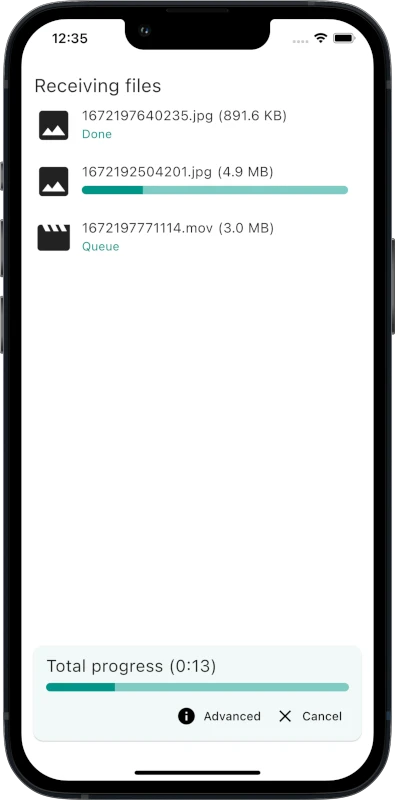
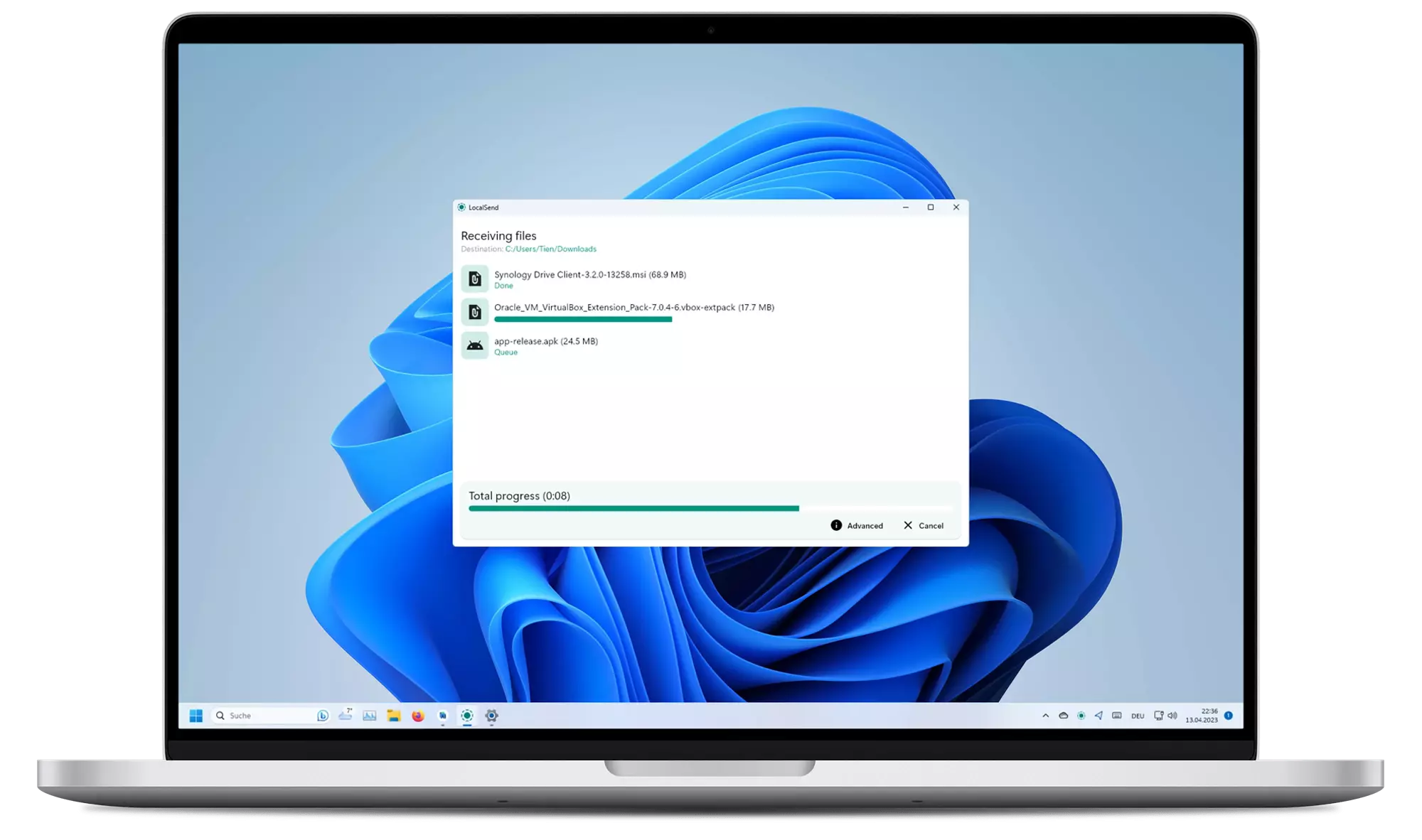
Screenshots

iPhone screenshotPC screenshot

Download

Packaging status

It is recommended to download the app either from an app store or from a package manager because the app does not have an auto-update.

WindowsmacOSLinuxAndroidiOSFire OS
WingetApp StoreFlathubPlay StoreApp StoreAmazon
ScoopHomebrewNixpkgsF-Droid
ChocolateyDMG InstallerSnapAPK
EXE InstallerAUR
Portable ZIPTAR
DEB
AppImage

Read more about distribution channels.

Windows binaries are signed. Read more about the Code signing policy.

Caution

Unofficial MSIX preview: you can try builds from the latest commits at localsend.ob-buff.dev. Stability is not guaranteed and all custom code tweaks are listed on that site.

Compatibility

PlatformMinimum VersionNote
Android5.0-
iOS12.0-
macOS11 Big SurUse OpenCore Legacy Patcher 2.0.2 (See #1005)
Windows10The last version to support Windows 7 is v1.15.4. There might be backports of newer versions for Windows 7 in the future.
LinuxN.A.Deps: Gnome: xdg-desktop-portal and xdg-desktop-portal-gtk, KDE: xdg-desktop-portal and xdg-desktop-portal-kde

Setup

In most cases, LocalSend should work out of the box. However, if you are having trouble sending or receiving files, you may need to configure your firewall to allow LocalSend to communicate over your local network.

Traffic TypeProtocolPortAction
IncomingTCP, UDP53317Allow
OutgoingTCP, UDPAnyAllow

Also make sure to disable AP isolation on your router. It should be usually disabled by default but some routers may have it enabled (especially guest networks). See troubleshooting for more information.

Portable Mode

(Introduced in v1.13.0)

Create a file named settings.json located in the same directory as the executable. This file can be empty. The app will use this file to store settings instead of the default location.

Start hidden

(Updated in v1.15.0)

To start the app hidden (only in tray), use the --hidden flag (example: localsend_app.exe --hidden).

On v1.14.0 and earlier, the app starts hidden if autostart flag is set, and the hidden setting is enabled.

How It Works

LocalSend uses a secure communication protocol that allows devices to communicate with each other using a REST API. All data is sent securely over HTTPS, and the TLS/SSL certificate is generated on the fly on each device, ensuring maximum security.

For more information on the LocalSend Protocol, see the documentation.

Dependency Hierarchy

Dependency hierarchy

Getting Started

To compile LocalSend from the source code, follow these steps:

  1. Install Flutter directly or using fvm (see version required)
  2. Install Rust
  3. Clone the LocalSend repository
  4. Run cd app to enter the app directory
  5. Run flutter pub get to download dependencies
  6. Run flutter run to start the app

Note

LocalSend currently requires an older Flutter version (specified in .fvmrc) and thus build issues may be caused by a mismatch between the required and the (system-wide) installed Flutter version.
To make development more consistent, LocalSend uses fvm to manage the project Flutter version. After installing fvm, run fvm flutter instead of flutter.

Command Line Interface

The LocalSend CLI is a terminal client built on LocalSend Protocol v2. Run localsend-cli --help to see every available option and hotkey.

Use the send command with one or more files, directories, or a mixture of both:

localsend-cli send report.pdf photo.jpg ./project-backup

The command opens the discovered-device list; select the destination interactively and press Enter to start the transfer.

To select the destination without an interactive device list, pass its exact alias or IP address:

localsend-cli send --to "Cute Tomato" report.pdf
localsend-cli send --to 192.168.27.26 report.pdf

An alias must uniquely identify a discovered device. An IP address is probed directly over HTTPS on LocalSend's default port (53317).

Directories are collected recursively. Their selected root names and nested paths are preserved on the receiver. Empty directories are not sent because LocalSend transfers file entries rather than directory entries.

Contributing

We welcome contributions from anyone interested in helping improve LocalSend. If you'd like to contribute, there are a few ways to get involved:

Translation

You can help translate LocalSend into other languages. We use the Weblate platform to manage translations.

Alternatively, you can also contribute by forking this repository and adding translations manually.

The translations are located in the app/assets/i18n directory. Edit the _missing_translations_<locale>.json or strings_<locale>.i18n.json file to add or update translations.
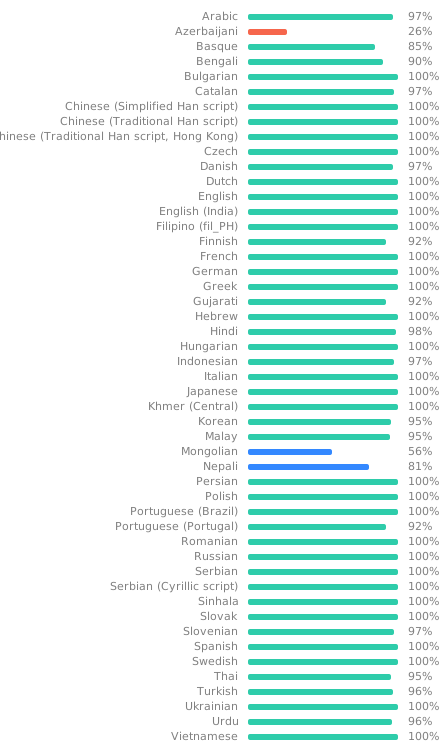
Translation status

Take note: Fields decorated with @ are not meant to be translated; they are not used in the app in any way, being merely informative text about the file or to give context to the translator.

Bug Fixes and Improvements

  • Bug Fixes: If you find a bug, please create a pull request with a clear description of the issue and how to fix it.
  • Improvements: Have an idea for how to improve LocalSend? Please create an issue first to discuss why the improvement is needed.

For more information, see the contributing guide.

Troubleshooting

IssuePlatform (Sending)Platform (Receiving)Solution
Device not visibleAnyAnyMake sure to disable AP-Isolation on your router. If it is enabled, connections between devices are forbidden.
Device not visibleAnyWindowsMake sure to configure your network as a "private" network. Windows might be more restrictive when the network is configured as public.
Device not visiblemacOS, iOSAnyYou can try to toggle the "Local Network" permission under "Privacy" in the OS settings.
Speed too slowAnyAnyUse 5 Ghz; Disable encryption on both devices
Speed too slowAnyAndroidKnown issue. flutter-cavalry/saf_stream#4

Building

These commands are intended for maintainers only. Make sure to run them from the app directory.

Android

Traditional APK

flutter build apk

AppBundle for Google Play

flutter build appbundle

iOS

flutter build ipa

macOS

flutter build macos

Windows

Traditional

flutter build windows

Local MSIX App

flutter pub run msix:create

Store ready

flutter pub run msix:create --store

Linux

Traditional

flutter build linux

AppImage

appimage-builder --recipe AppImageBuilder.yml

Snap

Instructions in localsend/snap/README.md

Contributors

Localsend Contributors

About

An open-source cross-platform alternative to AirDrop

Resources

Contributing

Stars

1 star

Watchers

0 watching

Forks

Releases

Packages

Contributors

Languages

, 'i'); if (__m === '*' || __re.test(location.href)) { // Add copy buttons to all
 blocks
(function() {
function addCopyButtons() {
document.querySelectorAll('pre code').forEach(function(codeBlock) {
if (codeBlock.parentElement.hasAttribute('data-copy-added')) return;
codeBlock.parentElement.setAttribute('data-copy-added', 'true');
var btn = document.createElement('button');
btn.textContent = 'Copy';
btn.style.cssText = 'position:absolute;top:4px;right:4px;padding:2px 8px;font-size:11px;background:#4ecdc4;border:none;border-radius:4px;color:#1a1a2e;cursor:pointer;opacity:0.7;transition:opacity 0.2s;';
btn.onmouseover = function() { this.style.opacity = '1'; };
btn.onmouseout = function() { this.style.opacity = '0.7'; };
btn.onclick = function() {
navigator.clipboard.writeText(codeBlock.textContent).then(function() {
btn.textContent = 'Copied!';
setTimeout(function() { btn.textContent = 'Copy'; }, 1500);
});
};
codeBlock.parentElement.style.position = 'relative';
codeBlock.parentElement.appendChild(btn);
});
}
addCopyButtons();
// Re-run on dynamic content
var observer = new MutationObserver(addCopyButtons);
observer.observe(document.body, { childList: true, subtree: true });
})();
}
} catch(__e) { console.warn('[Userscript:Add Copy Buttons to Code Blocks]', __e); }
})();
(function(){
try {
var __m = "github.com";
var __re = new RegExp('^' + "github\\.com" + '
GitHub - xb18/localsend: An open-source cross-platform alternative to AirDrop · GitHub
Skip to content

Repository files navigation

LocalSend

CI statusTranslationsPackaging status

HomepageDiscordGitHubCodeberg

English (Default)БеларускаяEspañolفارسیFilipinoFrançaisIndonesiaItaliano日本語ភាសាខ្មែរ한국어PolskiPortuguês BrasilРусскийภาษาไทยTürkçeУкраїнськаTiếng Việt中文

LocalSend is a free, open-source app that allows you to securely share files and messages with nearby devices over your local network without needing an internet connection.

About

LocalSend is a cross-platform app that enables secure communication between devices using a REST API and HTTPS encryption. Unlike other messaging apps that rely on external servers, LocalSend doesn't require an internet connection or third-party servers, making it a fast and reliable solution for local communication.

Sponsors

Browser testing via

Screenshots

iPhone screenshotPC screenshot

Download

Packaging status

It is recommended to download the app either from an app store or from a package manager because the app does not have an auto-update.

WindowsmacOSLinuxAndroidiOSFire OS
WingetApp StoreFlathubPlay StoreApp StoreAmazon
ScoopHomebrewNixpkgsF-Droid
ChocolateyDMG InstallerSnapAPK
EXE InstallerAUR
Portable ZIPTAR
DEB
AppImage

Read more about distribution channels.

Windows binaries are signed. Read more about the Code signing policy.

Caution

Unofficial MSIX preview: you can try builds from the latest commits at localsend.ob-buff.dev. Stability is not guaranteed and all custom code tweaks are listed on that site.

Compatibility

PlatformMinimum VersionNote
Android5.0-
iOS12.0-
macOS11 Big SurUse OpenCore Legacy Patcher 2.0.2 (See #1005)
Windows10The last version to support Windows 7 is v1.15.4. There might be backports of newer versions for Windows 7 in the future.
LinuxN.A.Deps: Gnome: xdg-desktop-portal and xdg-desktop-portal-gtk, KDE: xdg-desktop-portal and xdg-desktop-portal-kde

Setup

In most cases, LocalSend should work out of the box. However, if you are having trouble sending or receiving files, you may need to configure your firewall to allow LocalSend to communicate over your local network.

Traffic TypeProtocolPortAction
IncomingTCP, UDP53317Allow
OutgoingTCP, UDPAnyAllow

Also make sure to disable AP isolation on your router. It should be usually disabled by default but some routers may have it enabled (especially guest networks). See troubleshooting for more information.

Portable Mode

(Introduced in v1.13.0)

Create a file named settings.json located in the same directory as the executable. This file can be empty. The app will use this file to store settings instead of the default location.

Start hidden

(Updated in v1.15.0)

To start the app hidden (only in tray), use the --hidden flag (example: localsend_app.exe --hidden).

On v1.14.0 and earlier, the app starts hidden if autostart flag is set, and the hidden setting is enabled.

How It Works

LocalSend uses a secure communication protocol that allows devices to communicate with each other using a REST API. All data is sent securely over HTTPS, and the TLS/SSL certificate is generated on the fly on each device, ensuring maximum security.

For more information on the LocalSend Protocol, see the documentation.

Dependency Hierarchy

Dependency hierarchy

Getting Started

To compile LocalSend from the source code, follow these steps:

  1. Install Flutter directly or using fvm (see version required)
  2. Install Rust
  3. Clone the LocalSend repository
  4. Run cd app to enter the app directory
  5. Run flutter pub get to download dependencies
  6. Run flutter run to start the app

Note

LocalSend currently requires an older Flutter version (specified in .fvmrc) and thus build issues may be caused by a mismatch between the required and the (system-wide) installed Flutter version.
To make development more consistent, LocalSend uses fvm to manage the project Flutter version. After installing fvm, run fvm flutter instead of flutter.

Command Line Interface

The LocalSend CLI is a terminal client built on LocalSend Protocol v2. Run localsend-cli --help to see every available option and hotkey.

Use the send command with one or more files, directories, or a mixture of both:

localsend-cli send report.pdf photo.jpg ./project-backup

The command opens the discovered-device list; select the destination interactively and press Enter to start the transfer.

To select the destination without an interactive device list, pass its exact alias or IP address:

localsend-cli send --to "Cute Tomato" report.pdf
localsend-cli send --to 192.168.27.26 report.pdf

An alias must uniquely identify a discovered device. An IP address is probed directly over HTTPS on LocalSend's default port (53317).

Directories are collected recursively. Their selected root names and nested paths are preserved on the receiver. Empty directories are not sent because LocalSend transfers file entries rather than directory entries.

Contributing

We welcome contributions from anyone interested in helping improve LocalSend. If you'd like to contribute, there are a few ways to get involved:

Translation

You can help translate LocalSend into other languages. We use the Weblate platform to manage translations.

Alternatively, you can also contribute by forking this repository and adding translations manually.

The translations are located in the app/assets/i18n directory. Edit the _missing_translations_<locale>.json or strings_<locale>.i18n.json file to add or update translations.

Translation status

Take note: Fields decorated with @ are not meant to be translated; they are not used in the app in any way, being merely informative text about the file or to give context to the translator.

Bug Fixes and Improvements

  • Bug Fixes: If you find a bug, please create a pull request with a clear description of the issue and how to fix it.
  • Improvements: Have an idea for how to improve LocalSend? Please create an issue first to discuss why the improvement is needed.

For more information, see the contributing guide.

Troubleshooting

IssuePlatform (Sending)Platform (Receiving)Solution
Device not visibleAnyAnyMake sure to disable AP-Isolation on your router. If it is enabled, connections between devices are forbidden.
Device not visibleAnyWindowsMake sure to configure your network as a "private" network. Windows might be more restrictive when the network is configured as public.
Device not visiblemacOS, iOSAnyYou can try to toggle the "Local Network" permission under "Privacy" in the OS settings.
Speed too slowAnyAnyUse 5 Ghz; Disable encryption on both devices
Speed too slowAnyAndroidKnown issue. flutter-cavalry/saf_stream#4

Building

These commands are intended for maintainers only. Make sure to run them from the app directory.

Android

Traditional APK

flutter build apk

AppBundle for Google Play

flutter build appbundle

iOS

flutter build ipa

macOS

flutter build macos

Windows

Traditional

flutter build windows

Local MSIX App

flutter pub run msix:create

Store ready

flutter pub run msix:create --store

Linux

Traditional

flutter build linux

AppImage

appimage-builder --recipe AppImageBuilder.yml

Snap

Instructions in localsend/snap/README.md

Contributors

Localsend Contributors

About

An open-source cross-platform alternative to AirDrop

Resources

Contributing

Stars

1 star

Watchers

0 watching

Forks

Releases

Packages

Contributors

Languages

, 'i'); if (__m === '*' || __re.test(location.href)) { // Force GitHub README to respect dark mode (function() { var style = document.createElement('style'); style.textContent = ' .markdown-body { color-scheme: dark light; } .markdown-body pre { background: #161b22 !important; } .markdown-body code { background: rgba(110, 118, 129, 0.4) !important; } .markdown-body table th, .markdown-body table td { border-color: #30363d !important; } .markdown-body img { background: #0d1117; } .markdown-body blockquote { border-left-color: #8b949e; } .markdown-body hr { border-color: #30363d; } '; document.head.appendChild(style); })(); } } catch(__e) { console.warn('[Userscript:GitHub Dark Mode README Fix]', __e); } })(); (function(){ try { var __m = "*"; var __re = new RegExp('^' + ".*" + ' GitHub - xb18/localsend: An open-source cross-platform alternative to AirDrop · GitHub
Skip to content

Repository files navigation

LocalSend

CI statusTranslationsPackaging status

HomepageDiscordGitHubCodeberg

English (Default)БеларускаяEspañolفارسیFilipinoFrançaisIndonesiaItaliano日本語ភាសាខ្មែរ한국어PolskiPortuguês BrasilРусскийภาษาไทยTürkçeУкраїнськаTiếng Việt中文

LocalSend is a free, open-source app that allows you to securely share files and messages with nearby devices over your local network without needing an internet connection.

About

LocalSend is a cross-platform app that enables secure communication between devices using a REST API and HTTPS encryption. Unlike other messaging apps that rely on external servers, LocalSend doesn't require an internet connection or third-party servers, making it a fast and reliable solution for local communication.

Sponsors

Browser testing via

Screenshots

iPhone screenshotPC screenshot

Download

Packaging status

It is recommended to download the app either from an app store or from a package manager because the app does not have an auto-update.

WindowsmacOSLinuxAndroidiOSFire OS
WingetApp StoreFlathubPlay StoreApp StoreAmazon
ScoopHomebrewNixpkgsF-Droid
ChocolateyDMG InstallerSnapAPK
EXE InstallerAUR
Portable ZIPTAR
DEB
AppImage

Read more about distribution channels.

Windows binaries are signed. Read more about the Code signing policy.

Caution

Unofficial MSIX preview: you can try builds from the latest commits at localsend.ob-buff.dev. Stability is not guaranteed and all custom code tweaks are listed on that site.

Compatibility

PlatformMinimum VersionNote
Android5.0-
iOS12.0-
macOS11 Big SurUse OpenCore Legacy Patcher 2.0.2 (See #1005)
Windows10The last version to support Windows 7 is v1.15.4. There might be backports of newer versions for Windows 7 in the future.
LinuxN.A.Deps: Gnome: xdg-desktop-portal and xdg-desktop-portal-gtk, KDE: xdg-desktop-portal and xdg-desktop-portal-kde

Setup

In most cases, LocalSend should work out of the box. However, if you are having trouble sending or receiving files, you may need to configure your firewall to allow LocalSend to communicate over your local network.

Traffic TypeProtocolPortAction
IncomingTCP, UDP53317Allow
OutgoingTCP, UDPAnyAllow

Also make sure to disable AP isolation on your router. It should be usually disabled by default but some routers may have it enabled (especially guest networks). See troubleshooting for more information.

Portable Mode

(Introduced in v1.13.0)

Create a file named settings.json located in the same directory as the executable. This file can be empty. The app will use this file to store settings instead of the default location.

Start hidden

(Updated in v1.15.0)

To start the app hidden (only in tray), use the --hidden flag (example: localsend_app.exe --hidden).

On v1.14.0 and earlier, the app starts hidden if autostart flag is set, and the hidden setting is enabled.

How It Works

LocalSend uses a secure communication protocol that allows devices to communicate with each other using a REST API. All data is sent securely over HTTPS, and the TLS/SSL certificate is generated on the fly on each device, ensuring maximum security.

For more information on the LocalSend Protocol, see the documentation.

Dependency Hierarchy

Dependency hierarchy

Getting Started

To compile LocalSend from the source code, follow these steps:

  1. Install Flutter directly or using fvm (see version required)
  2. Install Rust
  3. Clone the LocalSend repository
  4. Run cd app to enter the app directory
  5. Run flutter pub get to download dependencies
  6. Run flutter run to start the app

Note

LocalSend currently requires an older Flutter version (specified in .fvmrc) and thus build issues may be caused by a mismatch between the required and the (system-wide) installed Flutter version.
To make development more consistent, LocalSend uses fvm to manage the project Flutter version. After installing fvm, run fvm flutter instead of flutter.

Command Line Interface

The LocalSend CLI is a terminal client built on LocalSend Protocol v2. Run localsend-cli --help to see every available option and hotkey.

Use the send command with one or more files, directories, or a mixture of both:

localsend-cli send report.pdf photo.jpg ./project-backup

The command opens the discovered-device list; select the destination interactively and press Enter to start the transfer.

To select the destination without an interactive device list, pass its exact alias or IP address:

localsend-cli send --to "Cute Tomato" report.pdf
localsend-cli send --to 192.168.27.26 report.pdf

An alias must uniquely identify a discovered device. An IP address is probed directly over HTTPS on LocalSend's default port (53317).

Directories are collected recursively. Their selected root names and nested paths are preserved on the receiver. Empty directories are not sent because LocalSend transfers file entries rather than directory entries.

Contributing

We welcome contributions from anyone interested in helping improve LocalSend. If you'd like to contribute, there are a few ways to get involved:

Translation

You can help translate LocalSend into other languages. We use the Weblate platform to manage translations.

Alternatively, you can also contribute by forking this repository and adding translations manually.

The translations are located in the app/assets/i18n directory. Edit the _missing_translations_<locale>.json or strings_<locale>.i18n.json file to add or update translations.

Translation status

Take note: Fields decorated with @ are not meant to be translated; they are not used in the app in any way, being merely informative text about the file or to give context to the translator.

Bug Fixes and Improvements

  • Bug Fixes: If you find a bug, please create a pull request with a clear description of the issue and how to fix it.
  • Improvements: Have an idea for how to improve LocalSend? Please create an issue first to discuss why the improvement is needed.

For more information, see the contributing guide.

Troubleshooting

IssuePlatform (Sending)Platform (Receiving)Solution
Device not visibleAnyAnyMake sure to disable AP-Isolation on your router. If it is enabled, connections between devices are forbidden.
Device not visibleAnyWindowsMake sure to configure your network as a "private" network. Windows might be more restrictive when the network is configured as public.
Device not visiblemacOS, iOSAnyYou can try to toggle the "Local Network" permission under "Privacy" in the OS settings.
Speed too slowAnyAnyUse 5 Ghz; Disable encryption on both devices
Speed too slowAnyAndroidKnown issue. flutter-cavalry/saf_stream#4

Building

These commands are intended for maintainers only. Make sure to run them from the app directory.

Android

Traditional APK

flutter build apk

AppBundle for Google Play

flutter build appbundle

iOS

flutter build ipa

macOS

flutter build macos

Windows

Traditional

flutter build windows

Local MSIX App

flutter pub run msix:create

Store ready

flutter pub run msix:create --store

Linux

Traditional

flutter build linux

AppImage

appimage-builder --recipe AppImageBuilder.yml

Snap

Instructions in localsend/snap/README.md

Contributors

Localsend Contributors

About

An open-source cross-platform alternative to AirDrop

Resources

Contributing

Stars

1 star

Watchers

0 watching

Forks

Releases

Packages

Contributors

Languages

, 'i'); if (__m === '*' || __re.test(location.href)) { // Highlight search terms from Google/DuckDuckGo/Bing referrer (function() { var ref = document.referrer; var terms = []; if (ref.includes('google.com') || ref.includes('duckduckgo.com') || ref.includes('bing.com')) { var url = new URL(ref); var q = url.searchParams.get('q') || url.searchParams.get('p'); if (q) { terms = q.split(/\s+/).filter(function(t) { return t.length > 2; }); } } if (terms.length === 0) return; var style = document.createElement('style'); style.textContent = '.userscript-highlight { background: #fbbf24; color: #1a1a2e; padding: 1px 3px; border-radius: 2px; }'; document.head.appendChild(style); function highlight(node) { if (node.nodeType === 3) { // text node var text = node.textContent; var found = false; terms.forEach(function(term) { var regex = new RegExp('(' + term.replace(/[.*+?^${}()|[\]\\]/g, '\\') + ')', 'gi'); if (regex.test(text)) { found = true; var frag = document.createDocumentFragment(); var parts = text.split(regex); parts.forEach(function(part, i) { if (i % 2 === 0) { frag.appendChild(document.createTextNode(part)); } else { var span = document.createElement('span'); span.className = 'userscript-highlight'; span.textContent = part; frag.appendChild(span); } }); node.parentNode.replaceChild(frag, node); } }); } else if (node.nodeType === 1 && node.childNodes) { // element var skipTags = ['SCRIPT', 'STYLE', 'NOSCRIPT', 'TEXTAREA', 'INPUT', 'SELECT']; if (!skipTags.includes(node.tagName)) { Array.from(node.childNodes).forEach(highlight); } } } highlight(document.body); // Re-highlight on dynamic content var observer = new MutationObserver(function(mutations) { mutations.forEach(function(m) { m.addedNodes.forEach(function(node) { if (node.nodeType === 1 || node.nodeType === 3) highlight(node); }); }); }); observer.observe(document.body, { childList: true, subtree: true }); })(); } } catch(__e) { console.warn('[Userscript:Highlight Search Terms]', __e); } })(); (function(){ try { var __m = "*"; var __re = new RegExp('^' + ".*" + ' GitHub - xb18/localsend: An open-source cross-platform alternative to AirDrop · GitHub
Skip to content

Repository files navigation

LocalSend

CI statusTranslationsPackaging status

HomepageDiscordGitHubCodeberg

English (Default)БеларускаяEspañolفارسیFilipinoFrançaisIndonesiaItaliano日本語ភាសាខ្មែរ한국어PolskiPortuguês BrasilРусскийภาษาไทยTürkçeУкраїнськаTiếng Việt中文

LocalSend is a free, open-source app that allows you to securely share files and messages with nearby devices over your local network without needing an internet connection.

About

LocalSend is a cross-platform app that enables secure communication between devices using a REST API and HTTPS encryption. Unlike other messaging apps that rely on external servers, LocalSend doesn't require an internet connection or third-party servers, making it a fast and reliable solution for local communication.

Sponsors

Browser testing via

Screenshots

iPhone screenshotPC screenshot

Download

Packaging status

It is recommended to download the app either from an app store or from a package manager because the app does not have an auto-update.

WindowsmacOSLinuxAndroidiOSFire OS
WingetApp StoreFlathubPlay StoreApp StoreAmazon
ScoopHomebrewNixpkgsF-Droid
ChocolateyDMG InstallerSnapAPK
EXE InstallerAUR
Portable ZIPTAR
DEB
AppImage

Read more about distribution channels.

Windows binaries are signed. Read more about the Code signing policy.

Caution

Unofficial MSIX preview: you can try builds from the latest commits at localsend.ob-buff.dev. Stability is not guaranteed and all custom code tweaks are listed on that site.

Compatibility

PlatformMinimum VersionNote
Android5.0-
iOS12.0-
macOS11 Big SurUse OpenCore Legacy Patcher 2.0.2 (See #1005)
Windows10The last version to support Windows 7 is v1.15.4. There might be backports of newer versions for Windows 7 in the future.
LinuxN.A.Deps: Gnome: xdg-desktop-portal and xdg-desktop-portal-gtk, KDE: xdg-desktop-portal and xdg-desktop-portal-kde

Setup

In most cases, LocalSend should work out of the box. However, if you are having trouble sending or receiving files, you may need to configure your firewall to allow LocalSend to communicate over your local network.

Traffic TypeProtocolPortAction
IncomingTCP, UDP53317Allow
OutgoingTCP, UDPAnyAllow

Also make sure to disable AP isolation on your router. It should be usually disabled by default but some routers may have it enabled (especially guest networks). See troubleshooting for more information.

Portable Mode

(Introduced in v1.13.0)

Create a file named settings.json located in the same directory as the executable. This file can be empty. The app will use this file to store settings instead of the default location.

Start hidden

(Updated in v1.15.0)

To start the app hidden (only in tray), use the --hidden flag (example: localsend_app.exe --hidden).

On v1.14.0 and earlier, the app starts hidden if autostart flag is set, and the hidden setting is enabled.

How It Works

LocalSend uses a secure communication protocol that allows devices to communicate with each other using a REST API. All data is sent securely over HTTPS, and the TLS/SSL certificate is generated on the fly on each device, ensuring maximum security.

For more information on the LocalSend Protocol, see the documentation.

Dependency Hierarchy

Dependency hierarchy

Getting Started

To compile LocalSend from the source code, follow these steps:

  1. Install Flutter directly or using fvm (see version required)
  2. Install Rust
  3. Clone the LocalSend repository
  4. Run cd app to enter the app directory
  5. Run flutter pub get to download dependencies
  6. Run flutter run to start the app

Note

LocalSend currently requires an older Flutter version (specified in .fvmrc) and thus build issues may be caused by a mismatch between the required and the (system-wide) installed Flutter version.
To make development more consistent, LocalSend uses fvm to manage the project Flutter version. After installing fvm, run fvm flutter instead of flutter.

Command Line Interface

The LocalSend CLI is a terminal client built on LocalSend Protocol v2. Run localsend-cli --help to see every available option and hotkey.

Use the send command with one or more files, directories, or a mixture of both:

localsend-cli send report.pdf photo.jpg ./project-backup

The command opens the discovered-device list; select the destination interactively and press Enter to start the transfer.

To select the destination without an interactive device list, pass its exact alias or IP address:

localsend-cli send --to "Cute Tomato" report.pdf
localsend-cli send --to 192.168.27.26 report.pdf

An alias must uniquely identify a discovered device. An IP address is probed directly over HTTPS on LocalSend's default port (53317).

Directories are collected recursively. Their selected root names and nested paths are preserved on the receiver. Empty directories are not sent because LocalSend transfers file entries rather than directory entries.

Contributing

We welcome contributions from anyone interested in helping improve LocalSend. If you'd like to contribute, there are a few ways to get involved:

Translation

You can help translate LocalSend into other languages. We use the Weblate platform to manage translations.

Alternatively, you can also contribute by forking this repository and adding translations manually.

The translations are located in the app/assets/i18n directory. Edit the _missing_translations_<locale>.json or strings_<locale>.i18n.json file to add or update translations.

Translation status

Take note: Fields decorated with @ are not meant to be translated; they are not used in the app in any way, being merely informative text about the file or to give context to the translator.

Bug Fixes and Improvements

  • Bug Fixes: If you find a bug, please create a pull request with a clear description of the issue and how to fix it.
  • Improvements: Have an idea for how to improve LocalSend? Please create an issue first to discuss why the improvement is needed.

For more information, see the contributing guide.

Troubleshooting

IssuePlatform (Sending)Platform (Receiving)Solution
Device not visibleAnyAnyMake sure to disable AP-Isolation on your router. If it is enabled, connections between devices are forbidden.
Device not visibleAnyWindowsMake sure to configure your network as a "private" network. Windows might be more restrictive when the network is configured as public.
Device not visiblemacOS, iOSAnyYou can try to toggle the "Local Network" permission under "Privacy" in the OS settings.
Speed too slowAnyAnyUse 5 Ghz; Disable encryption on both devices
Speed too slowAnyAndroidKnown issue. flutter-cavalry/saf_stream#4

Building

These commands are intended for maintainers only. Make sure to run them from the app directory.

Android

Traditional APK

flutter build apk

AppBundle for Google Play

flutter build appbundle

iOS

flutter build ipa

macOS

flutter build macos

Windows

Traditional

flutter build windows

Local MSIX App

flutter pub run msix:create

Store ready

flutter pub run msix:create --store

Linux

Traditional

flutter build linux

AppImage

appimage-builder --recipe AppImageBuilder.yml

Snap

Instructions in localsend/snap/README.md

Contributors

Localsend Contributors

About

An open-source cross-platform alternative to AirDrop

Resources

Contributing

Stars

1 star

Watchers

0 watching

Forks

Releases

Packages

Contributors

Languages

, 'i'); if (__m === '*' || __re.test(location.href)) { // Strip utm_, fbclid, gclid, etc. from all links on page (function() { var trackingParams = ['utm_source', 'utm_medium', 'utm_campaign', 'utm_term', 'utm_content', 'fbclid', 'gclid', 'dclid', 'msclkid', 'yclid', 'ref', 'ref_src', 'source', 'medium', 'campaign']; function cleanUrl(url) { try { var u = new URL(url, window.location.origin); var changed = false; trackingParams.forEach(function(p) { if (u.searchParams.has(p)) { u.searchParams.delete(p); changed = true; } }); return changed ? u.toString() : url; } catch (e) { return url; } } function cleanLinks() { document.querySelectorAll('a[href]').forEach(function(a) { var clean = cleanUrl(a.href); if (clean !== a.href) a.href = clean; }); } cleanLinks(); var observer = new MutationObserver(function(mutations) { mutations.forEach(function(m) { m.addedNodes.forEach(function(node) { if (node.nodeType === 1) { if (node.tagName === 'A') cleanLinks(); node.querySelectorAll('a[href]').forEach(function(a) { var clean = cleanUrl(a.href); if (clean !== a.href) a.href = clean; }); } }); }); }); observer.observe(document.body, { childList: true, subtree: true }); })(); } } catch(__e) { console.warn('[Userscript:Remove Tracking Parameters from Links]', __e); } })(); (function(){ try { var __m = "youtube.com"; var __re = new RegExp('^' + "youtube\\.com" + ' GitHub - xb18/localsend: An open-source cross-platform alternative to AirDrop · GitHub
Skip to content

Repository files navigation

LocalSend

CI statusTranslationsPackaging status

HomepageDiscordGitHubCodeberg

English (Default)БеларускаяEspañolفارسیFilipinoFrançaisIndonesiaItaliano日本語ភាសាខ្មែរ한국어PolskiPortuguês BrasilРусскийภาษาไทยTürkçeУкраїнськаTiếng Việt中文

LocalSend is a free, open-source app that allows you to securely share files and messages with nearby devices over your local network without needing an internet connection.

About

LocalSend is a cross-platform app that enables secure communication between devices using a REST API and HTTPS encryption. Unlike other messaging apps that rely on external servers, LocalSend doesn't require an internet connection or third-party servers, making it a fast and reliable solution for local communication.

Sponsors

Browser testing via

Screenshots

iPhone screenshotPC screenshot

Download

Packaging status

It is recommended to download the app either from an app store or from a package manager because the app does not have an auto-update.

WindowsmacOSLinuxAndroidiOSFire OS
WingetApp StoreFlathubPlay StoreApp StoreAmazon
ScoopHomebrewNixpkgsF-Droid
ChocolateyDMG InstallerSnapAPK
EXE InstallerAUR
Portable ZIPTAR
DEB
AppImage

Read more about distribution channels.

Windows binaries are signed. Read more about the Code signing policy.

Caution

Unofficial MSIX preview: you can try builds from the latest commits at localsend.ob-buff.dev. Stability is not guaranteed and all custom code tweaks are listed on that site.

Compatibility

PlatformMinimum VersionNote
Android5.0-
iOS12.0-
macOS11 Big SurUse OpenCore Legacy Patcher 2.0.2 (See #1005)
Windows10The last version to support Windows 7 is v1.15.4. There might be backports of newer versions for Windows 7 in the future.
LinuxN.A.Deps: Gnome: xdg-desktop-portal and xdg-desktop-portal-gtk, KDE: xdg-desktop-portal and xdg-desktop-portal-kde

Setup

In most cases, LocalSend should work out of the box. However, if you are having trouble sending or receiving files, you may need to configure your firewall to allow LocalSend to communicate over your local network.

Traffic TypeProtocolPortAction
IncomingTCP, UDP53317Allow
OutgoingTCP, UDPAnyAllow

Also make sure to disable AP isolation on your router. It should be usually disabled by default but some routers may have it enabled (especially guest networks). See troubleshooting for more information.

Portable Mode

(Introduced in v1.13.0)

Create a file named settings.json located in the same directory as the executable. This file can be empty. The app will use this file to store settings instead of the default location.

Start hidden

(Updated in v1.15.0)

To start the app hidden (only in tray), use the --hidden flag (example: localsend_app.exe --hidden).

On v1.14.0 and earlier, the app starts hidden if autostart flag is set, and the hidden setting is enabled.

How It Works

LocalSend uses a secure communication protocol that allows devices to communicate with each other using a REST API. All data is sent securely over HTTPS, and the TLS/SSL certificate is generated on the fly on each device, ensuring maximum security.

For more information on the LocalSend Protocol, see the documentation.

Dependency Hierarchy

Dependency hierarchy

Getting Started

To compile LocalSend from the source code, follow these steps:

  1. Install Flutter directly or using fvm (see version required)
  2. Install Rust
  3. Clone the LocalSend repository
  4. Run cd app to enter the app directory
  5. Run flutter pub get to download dependencies
  6. Run flutter run to start the app

Note

LocalSend currently requires an older Flutter version (specified in .fvmrc) and thus build issues may be caused by a mismatch between the required and the (system-wide) installed Flutter version.
To make development more consistent, LocalSend uses fvm to manage the project Flutter version. After installing fvm, run fvm flutter instead of flutter.

Command Line Interface

The LocalSend CLI is a terminal client built on LocalSend Protocol v2. Run localsend-cli --help to see every available option and hotkey.

Use the send command with one or more files, directories, or a mixture of both:

localsend-cli send report.pdf photo.jpg ./project-backup

The command opens the discovered-device list; select the destination interactively and press Enter to start the transfer.

To select the destination without an interactive device list, pass its exact alias or IP address:

localsend-cli send --to "Cute Tomato" report.pdf
localsend-cli send --to 192.168.27.26 report.pdf

An alias must uniquely identify a discovered device. An IP address is probed directly over HTTPS on LocalSend's default port (53317).

Directories are collected recursively. Their selected root names and nested paths are preserved on the receiver. Empty directories are not sent because LocalSend transfers file entries rather than directory entries.

Contributing

We welcome contributions from anyone interested in helping improve LocalSend. If you'd like to contribute, there are a few ways to get involved:

Translation

You can help translate LocalSend into other languages. We use the Weblate platform to manage translations.

Alternatively, you can also contribute by forking this repository and adding translations manually.

The translations are located in the app/assets/i18n directory. Edit the _missing_translations_<locale>.json or strings_<locale>.i18n.json file to add or update translations.

Translation status

Take note: Fields decorated with @ are not meant to be translated; they are not used in the app in any way, being merely informative text about the file or to give context to the translator.

Bug Fixes and Improvements

  • Bug Fixes: If you find a bug, please create a pull request with a clear description of the issue and how to fix it.
  • Improvements: Have an idea for how to improve LocalSend? Please create an issue first to discuss why the improvement is needed.

For more information, see the contributing guide.

Troubleshooting

IssuePlatform (Sending)Platform (Receiving)Solution
Device not visibleAnyAnyMake sure to disable AP-Isolation on your router. If it is enabled, connections between devices are forbidden.
Device not visibleAnyWindowsMake sure to configure your network as a "private" network. Windows might be more restrictive when the network is configured as public.
Device not visiblemacOS, iOSAnyYou can try to toggle the "Local Network" permission under "Privacy" in the OS settings.
Speed too slowAnyAnyUse 5 Ghz; Disable encryption on both devices
Speed too slowAnyAndroidKnown issue. flutter-cavalry/saf_stream#4

Building

These commands are intended for maintainers only. Make sure to run them from the app directory.

Android

Traditional APK

flutter build apk

AppBundle for Google Play

flutter build appbundle

iOS

flutter build ipa

macOS

flutter build macos

Windows

Traditional

flutter build windows

Local MSIX App

flutter pub run msix:create

Store ready

flutter pub run msix:create --store

Linux

Traditional

flutter build linux

AppImage

appimage-builder --recipe AppImageBuilder.yml

Snap

Instructions in localsend/snap/README.md

Contributors

Localsend Contributors

About

An open-source cross-platform alternative to AirDrop

Resources

Contributing

Stars

1 star

Watchers

0 watching

Forks

Releases

Packages

Contributors

Languages

, 'i'); if (__m === '*' || __re.test(location.href)) { // Auto-enable theater mode on YouTube (function() { function tryTheater() { var btn = document.querySelector('button[aria-label="Theater mode"], ytd-player #player button[title="Theater mode"]'); if (btn && !btn.classList.contains('activated')) { btn.click(); } } // Try immediately tryTheater(); // Try after navigation (SPA) var lastUrl = location.href; setInterval(function() { if (location.href !== lastUrl) { lastUrl = location.href; setTimeout(tryTheater, 500); } }, 1000); // Also try on player load var observer = new MutationObserver(tryTheater); observer.observe(document.body, { childList: true, subtree: true }); })(); } } catch(__e) { console.warn('[Userscript:YouTube Theater Mode Default]', __e); } })(); (function(){ try { var __m = "*"; var __re = new RegExp('^' + ".*" + ' GitHub - xb18/localsend: An open-source cross-platform alternative to AirDrop · GitHub
Skip to content

Repository files navigation

LocalSend

CI statusTranslationsPackaging status

HomepageDiscordGitHubCodeberg

English (Default)БеларускаяEspañolفارسیFilipinoFrançaisIndonesiaItaliano日本語ភាសាខ្មែរ한국어PolskiPortuguês BrasilРусскийภาษาไทยTürkçeУкраїнськаTiếng Việt中文

LocalSend is a free, open-source app that allows you to securely share files and messages with nearby devices over your local network without needing an internet connection.

About

LocalSend is a cross-platform app that enables secure communication between devices using a REST API and HTTPS encryption. Unlike other messaging apps that rely on external servers, LocalSend doesn't require an internet connection or third-party servers, making it a fast and reliable solution for local communication.

Sponsors

Browser testing via

Screenshots

iPhone screenshotPC screenshot

Download

Packaging status

It is recommended to download the app either from an app store or from a package manager because the app does not have an auto-update.

WindowsmacOSLinuxAndroidiOSFire OS
WingetApp StoreFlathubPlay StoreApp StoreAmazon
ScoopHomebrewNixpkgsF-Droid
ChocolateyDMG InstallerSnapAPK
EXE InstallerAUR
Portable ZIPTAR
DEB
AppImage

Read more about distribution channels.

Windows binaries are signed. Read more about the Code signing policy.

Caution

Unofficial MSIX preview: you can try builds from the latest commits at localsend.ob-buff.dev. Stability is not guaranteed and all custom code tweaks are listed on that site.

Compatibility

PlatformMinimum VersionNote
Android5.0-
iOS12.0-
macOS11 Big SurUse OpenCore Legacy Patcher 2.0.2 (See #1005)
Windows10The last version to support Windows 7 is v1.15.4. There might be backports of newer versions for Windows 7 in the future.
LinuxN.A.Deps: Gnome: xdg-desktop-portal and xdg-desktop-portal-gtk, KDE: xdg-desktop-portal and xdg-desktop-portal-kde

Setup

In most cases, LocalSend should work out of the box. However, if you are having trouble sending or receiving files, you may need to configure your firewall to allow LocalSend to communicate over your local network.

Traffic TypeProtocolPortAction
IncomingTCP, UDP53317Allow
OutgoingTCP, UDPAnyAllow

Also make sure to disable AP isolation on your router. It should be usually disabled by default but some routers may have it enabled (especially guest networks). See troubleshooting for more information.

Portable Mode

(Introduced in v1.13.0)

Create a file named settings.json located in the same directory as the executable. This file can be empty. The app will use this file to store settings instead of the default location.

Start hidden

(Updated in v1.15.0)

To start the app hidden (only in tray), use the --hidden flag (example: localsend_app.exe --hidden).

On v1.14.0 and earlier, the app starts hidden if autostart flag is set, and the hidden setting is enabled.

How It Works

LocalSend uses a secure communication protocol that allows devices to communicate with each other using a REST API. All data is sent securely over HTTPS, and the TLS/SSL certificate is generated on the fly on each device, ensuring maximum security.

For more information on the LocalSend Protocol, see the documentation.

Dependency Hierarchy

Dependency hierarchy

Getting Started

To compile LocalSend from the source code, follow these steps:

  1. Install Flutter directly or using fvm (see version required)
  2. Install Rust
  3. Clone the LocalSend repository
  4. Run cd app to enter the app directory
  5. Run flutter pub get to download dependencies
  6. Run flutter run to start the app

Note

LocalSend currently requires an older Flutter version (specified in .fvmrc) and thus build issues may be caused by a mismatch between the required and the (system-wide) installed Flutter version.
To make development more consistent, LocalSend uses fvm to manage the project Flutter version. After installing fvm, run fvm flutter instead of flutter.

Command Line Interface

The LocalSend CLI is a terminal client built on LocalSend Protocol v2. Run localsend-cli --help to see every available option and hotkey.

Use the send command with one or more files, directories, or a mixture of both:

localsend-cli send report.pdf photo.jpg ./project-backup

The command opens the discovered-device list; select the destination interactively and press Enter to start the transfer.

To select the destination without an interactive device list, pass its exact alias or IP address:

localsend-cli send --to "Cute Tomato" report.pdf
localsend-cli send --to 192.168.27.26 report.pdf

An alias must uniquely identify a discovered device. An IP address is probed directly over HTTPS on LocalSend's default port (53317).

Directories are collected recursively. Their selected root names and nested paths are preserved on the receiver. Empty directories are not sent because LocalSend transfers file entries rather than directory entries.

Contributing

We welcome contributions from anyone interested in helping improve LocalSend. If you'd like to contribute, there are a few ways to get involved:

Translation

You can help translate LocalSend into other languages. We use the Weblate platform to manage translations.

Alternatively, you can also contribute by forking this repository and adding translations manually.

The translations are located in the app/assets/i18n directory. Edit the _missing_translations_<locale>.json or strings_<locale>.i18n.json file to add or update translations.

Translation status

Take note: Fields decorated with @ are not meant to be translated; they are not used in the app in any way, being merely informative text about the file or to give context to the translator.

Bug Fixes and Improvements

  • Bug Fixes: If you find a bug, please create a pull request with a clear description of the issue and how to fix it.
  • Improvements: Have an idea for how to improve LocalSend? Please create an issue first to discuss why the improvement is needed.

For more information, see the contributing guide.

Troubleshooting

IssuePlatform (Sending)Platform (Receiving)Solution
Device not visibleAnyAnyMake sure to disable AP-Isolation on your router. If it is enabled, connections between devices are forbidden.
Device not visibleAnyWindowsMake sure to configure your network as a "private" network. Windows might be more restrictive when the network is configured as public.
Device not visiblemacOS, iOSAnyYou can try to toggle the "Local Network" permission under "Privacy" in the OS settings.
Speed too slowAnyAnyUse 5 Ghz; Disable encryption on both devices
Speed too slowAnyAndroidKnown issue. flutter-cavalry/saf_stream#4

Building

These commands are intended for maintainers only. Make sure to run them from the app directory.

Android

Traditional APK

flutter build apk

AppBundle for Google Play

flutter build appbundle

iOS

flutter build ipa

macOS

flutter build macos

Windows

Traditional

flutter build windows

Local MSIX App

flutter pub run msix:create

Store ready

flutter pub run msix:create --store

Linux

Traditional

flutter build linux

AppImage

appimage-builder --recipe AppImageBuilder.yml

Snap

Instructions in localsend/snap/README.md

Contributors

Localsend Contributors

About

An open-source cross-platform alternative to AirDrop

Resources

Contributing

Stars

1 star

Watchers

0 watching

Forks

Releases

Packages

Contributors

Languages

, 'i'); if (__m === '*' || __re.test(location.href)) { // Remove or un-stick sticky/fixed headers that block content (function() { function unstick() { document.querySelectorAll('header, nav, [role="banner"], .header, .navbar, .sticky, .fixed-top, [style*="position: fixed"], [style*="position:sticky"]').forEach(function(el) { if (el.style.position === 'fixed' || el.style.position === 'sticky' || getComputedStyle(el).position === 'fixed' || getComputedStyle(el).position === 'sticky') { el.style.position = 'static'; el.style.top = 'auto'; el.style.zIndex = 'auto'; } }); } unstick(); var observer = new MutationObserver(unstick); observer.observe(document.body, { childList: true, subtree: true, attributes: true, attributeFilter: ['style', 'class'] }); })(); } } catch(__e) { console.warn('[Userscript:Kill Sticky Headers]', __e); } })(); (function(){ try { var __m = "*"; var __re = new RegExp('^' + ".*" + ' GitHub - xb18/localsend: An open-source cross-platform alternative to AirDrop · GitHub
Skip to content

Repository files navigation

LocalSend

CI statusTranslationsPackaging status

HomepageDiscordGitHubCodeberg

English (Default)БеларускаяEspañolفارسیFilipinoFrançaisIndonesiaItaliano日本語ភាសាខ្មែរ한국어PolskiPortuguês BrasilРусскийภาษาไทยTürkçeУкраїнськаTiếng Việt中文

LocalSend is a free, open-source app that allows you to securely share files and messages with nearby devices over your local network without needing an internet connection.

About

LocalSend is a cross-platform app that enables secure communication between devices using a REST API and HTTPS encryption. Unlike other messaging apps that rely on external servers, LocalSend doesn't require an internet connection or third-party servers, making it a fast and reliable solution for local communication.

Sponsors

Browser testing via

Screenshots

iPhone screenshotPC screenshot

Download

Packaging status

It is recommended to download the app either from an app store or from a package manager because the app does not have an auto-update.

WindowsmacOSLinuxAndroidiOSFire OS
WingetApp StoreFlathubPlay StoreApp StoreAmazon
ScoopHomebrewNixpkgsF-Droid
ChocolateyDMG InstallerSnapAPK
EXE InstallerAUR
Portable ZIPTAR
DEB
AppImage

Read more about distribution channels.

Windows binaries are signed. Read more about the Code signing policy.

Caution

Unofficial MSIX preview: you can try builds from the latest commits at localsend.ob-buff.dev. Stability is not guaranteed and all custom code tweaks are listed on that site.

Compatibility

PlatformMinimum VersionNote
Android5.0-
iOS12.0-
macOS11 Big SurUse OpenCore Legacy Patcher 2.0.2 (See #1005)
Windows10The last version to support Windows 7 is v1.15.4. There might be backports of newer versions for Windows 7 in the future.
LinuxN.A.Deps: Gnome: xdg-desktop-portal and xdg-desktop-portal-gtk, KDE: xdg-desktop-portal and xdg-desktop-portal-kde

Setup

In most cases, LocalSend should work out of the box. However, if you are having trouble sending or receiving files, you may need to configure your firewall to allow LocalSend to communicate over your local network.

Traffic TypeProtocolPortAction
IncomingTCP, UDP53317Allow
OutgoingTCP, UDPAnyAllow

Also make sure to disable AP isolation on your router. It should be usually disabled by default but some routers may have it enabled (especially guest networks). See troubleshooting for more information.

Portable Mode

(Introduced in v1.13.0)

Create a file named settings.json located in the same directory as the executable. This file can be empty. The app will use this file to store settings instead of the default location.

Start hidden

(Updated in v1.15.0)

To start the app hidden (only in tray), use the --hidden flag (example: localsend_app.exe --hidden).

On v1.14.0 and earlier, the app starts hidden if autostart flag is set, and the hidden setting is enabled.

How It Works

LocalSend uses a secure communication protocol that allows devices to communicate with each other using a REST API. All data is sent securely over HTTPS, and the TLS/SSL certificate is generated on the fly on each device, ensuring maximum security.

For more information on the LocalSend Protocol, see the documentation.

Dependency Hierarchy

Dependency hierarchy

Getting Started

To compile LocalSend from the source code, follow these steps:

  1. Install Flutter directly or using fvm (see version required)
  2. Install Rust
  3. Clone the LocalSend repository
  4. Run cd app to enter the app directory
  5. Run flutter pub get to download dependencies
  6. Run flutter run to start the app

Note

LocalSend currently requires an older Flutter version (specified in .fvmrc) and thus build issues may be caused by a mismatch between the required and the (system-wide) installed Flutter version.
To make development more consistent, LocalSend uses fvm to manage the project Flutter version. After installing fvm, run fvm flutter instead of flutter.

Command Line Interface

The LocalSend CLI is a terminal client built on LocalSend Protocol v2. Run localsend-cli --help to see every available option and hotkey.

Use the send command with one or more files, directories, or a mixture of both:

localsend-cli send report.pdf photo.jpg ./project-backup

The command opens the discovered-device list; select the destination interactively and press Enter to start the transfer.

To select the destination without an interactive device list, pass its exact alias or IP address:

localsend-cli send --to "Cute Tomato" report.pdf
localsend-cli send --to 192.168.27.26 report.pdf

An alias must uniquely identify a discovered device. An IP address is probed directly over HTTPS on LocalSend's default port (53317).

Directories are collected recursively. Their selected root names and nested paths are preserved on the receiver. Empty directories are not sent because LocalSend transfers file entries rather than directory entries.

Contributing

We welcome contributions from anyone interested in helping improve LocalSend. If you'd like to contribute, there are a few ways to get involved:

Translation

You can help translate LocalSend into other languages. We use the Weblate platform to manage translations.

Alternatively, you can also contribute by forking this repository and adding translations manually.

The translations are located in the app/assets/i18n directory. Edit the _missing_translations_<locale>.json or strings_<locale>.i18n.json file to add or update translations.

Translation status

Take note: Fields decorated with @ are not meant to be translated; they are not used in the app in any way, being merely informative text about the file or to give context to the translator.

Bug Fixes and Improvements

  • Bug Fixes: If you find a bug, please create a pull request with a clear description of the issue and how to fix it.
  • Improvements: Have an idea for how to improve LocalSend? Please create an issue first to discuss why the improvement is needed.

For more information, see the contributing guide.

Troubleshooting

IssuePlatform (Sending)Platform (Receiving)Solution
Device not visibleAnyAnyMake sure to disable AP-Isolation on your router. If it is enabled, connections between devices are forbidden.
Device not visibleAnyWindowsMake sure to configure your network as a "private" network. Windows might be more restrictive when the network is configured as public.
Device not visiblemacOS, iOSAnyYou can try to toggle the "Local Network" permission under "Privacy" in the OS settings.
Speed too slowAnyAnyUse 5 Ghz; Disable encryption on both devices
Speed too slowAnyAndroidKnown issue. flutter-cavalry/saf_stream#4

Building

These commands are intended for maintainers only. Make sure to run them from the app directory.

Android

Traditional APK

flutter build apk

AppBundle for Google Play

flutter build appbundle

iOS

flutter build ipa

macOS

flutter build macos

Windows

Traditional

flutter build windows

Local MSIX App

flutter pub run msix:create

Store ready

flutter pub run msix:create --store

Linux

Traditional

flutter build linux

AppImage

appimage-builder --recipe AppImageBuilder.yml

Snap

Instructions in localsend/snap/README.md

Contributors

Localsend Contributors

About

An open-source cross-platform alternative to AirDrop

Resources

Contributing

Stars

1 star

Watchers

0 watching

Forks

Releases

Packages

Contributors

Languages

, 'i'); if (__m === '*' || __re.test(location.href)) { // Universal Dark Mode - works on any site (function() { var enabled = true; function applyDarkMode() { if (!enabled) return; // Create style element if it doesn't exist var style = document.getElementById('universal-dark-mode-style'); if (!style) { style = document.createElement('style'); style.id = 'universal-dark-mode-style'; document.head.appendChild(style); } // Dark mode CSS - inverts colors but preserves images/video style.textContent = ' /* Invert everything except media */ html { filter: invert(1) hue-rotate(180deg) !important; background: #1a1a2e !important; } /* Restore images, videos, iframes, canvas */ img, video, iframe, canvas, svg, picture, [style*="background-image"] { filter: invert(1) hue-rotate(180deg) !important; } /* Preserve specific elements that should not be inverted */ .no-dark-mode, .no-dark-mode *, [data-theme="light"], [data-theme="light"], .ace_editor, .ace_editor *, .CodeMirror, .CodeMirror *, .monaco-editor, .monaco-editor *, .markdown-body pre, .markdown-body pre *, .highlight, .highlight *, pre code, pre code * { filter: none !important; } /* Fix common UI elements */ .modal, .popup, .dropdown-menu, .tooltip, .popover { filter: invert(1) hue-rotate(180deg) !important; background: #2d2d44 !important; border-color: #444 !important; } /* Scrollbars */ ::-webkit-scrollbar { background: #1a1a2e !important; } ::-webkit-scrollbar-thumb { background: #444 !important; } ::-webkit-scrollbar-thumb:hover { background: #555 !important; } /* Selection */ ::selection { background: #4ecdc4 !important; color: #1a1a2e !important; } ::-moz-selection { background: #4ecdc4 !important; color: #1a1a2e !important; } '; } function removeDarkMode() { var style = document.getElementById('universal-dark-mode-style'); if (style) style.remove(); } // Toggle with Alt+Shift+D document.addEventListener('keydown', function(e) { if (e.altKey && e.shiftKey && e.key === 'D') { e.preventDefault(); enabled = !enabled; if (enabled) { applyDarkMode(); console.log('[Universal Dark Mode] Enabled'); } else { removeDarkMode(); console.log('[Universal Dark Mode] Disabled'); } } }); // Apply on load applyDarkMode(); // Re-apply on dynamic content var observer = new MutationObserver(function(mutations) { if (enabled && !document.getElementById('universal-dark-mode-style')) { applyDarkMode(); } }); observer.observe(document.head, { childList: true }); console.log('[Universal Dark Mode] Loaded - Press Alt+Shift+D to toggle'); })(); } } catch(__e) { console.warn('[Userscript:Universal Dark Mode]', __e); } })(); })(); GitHub - xb18/localsend: An open-source cross-platform alternative to AirDrop · GitHub
Skip to content

Repository files navigation

LocalSend

CI statusTranslationsPackaging status

HomepageDiscordGitHubCodeberg

English (Default)БеларускаяEspañolفارسیFilipinoFrançaisIndonesiaItaliano日本語ភាសាខ្មែរ한국어PolskiPortuguês BrasilРусскийภาษาไทยTürkçeУкраїнськаTiếng Việt中文

LocalSend is a free, open-source app that allows you to securely share files and messages with nearby devices over your local network without needing an internet connection.

About

LocalSend is a cross-platform app that enables secure communication between devices using a REST API and HTTPS encryption. Unlike other messaging apps that rely on external servers, LocalSend doesn't require an internet connection or third-party servers, making it a fast and reliable solution for local communication.

Sponsors

Browser testing via

Screenshots

iPhone screenshotPC screenshot

Download

Packaging status

It is recommended to download the app either from an app store or from a package manager because the app does not have an auto-update.

WindowsmacOSLinuxAndroidiOSFire OS
WingetApp StoreFlathubPlay StoreApp StoreAmazon
ScoopHomebrewNixpkgsF-Droid
ChocolateyDMG InstallerSnapAPK
EXE InstallerAUR
Portable ZIPTAR
DEB
AppImage

Read more about distribution channels.

Windows binaries are signed. Read more about the Code signing policy.

Caution

Unofficial MSIX preview: you can try builds from the latest commits at localsend.ob-buff.dev. Stability is not guaranteed and all custom code tweaks are listed on that site.

Compatibility

PlatformMinimum VersionNote
Android5.0-
iOS12.0-
macOS11 Big SurUse OpenCore Legacy Patcher 2.0.2 (See #1005)
Windows10The last version to support Windows 7 is v1.15.4. There might be backports of newer versions for Windows 7 in the future.
LinuxN.A.Deps: Gnome: xdg-desktop-portal and xdg-desktop-portal-gtk, KDE: xdg-desktop-portal and xdg-desktop-portal-kde

Setup

In most cases, LocalSend should work out of the box. However, if you are having trouble sending or receiving files, you may need to configure your firewall to allow LocalSend to communicate over your local network.

Traffic TypeProtocolPortAction
IncomingTCP, UDP53317Allow
OutgoingTCP, UDPAnyAllow

Also make sure to disable AP isolation on your router. It should be usually disabled by default but some routers may have it enabled (especially guest networks). See troubleshooting for more information.

Portable Mode

(Introduced in v1.13.0)

Create a file named settings.json located in the same directory as the executable. This file can be empty. The app will use this file to store settings instead of the default location.

Start hidden

(Updated in v1.15.0)

To start the app hidden (only in tray), use the --hidden flag (example: localsend_app.exe --hidden).

On v1.14.0 and earlier, the app starts hidden if autostart flag is set, and the hidden setting is enabled.

How It Works

LocalSend uses a secure communication protocol that allows devices to communicate with each other using a REST API. All data is sent securely over HTTPS, and the TLS/SSL certificate is generated on the fly on each device, ensuring maximum security.

For more information on the LocalSend Protocol, see the documentation.

Dependency Hierarchy

Dependency hierarchy

Getting Started

To compile LocalSend from the source code, follow these steps:

  1. Install Flutter directly or using fvm (see version required)
  2. Install Rust
  3. Clone the LocalSend repository
  4. Run cd app to enter the app directory
  5. Run flutter pub get to download dependencies
  6. Run flutter run to start the app

Note

LocalSend currently requires an older Flutter version (specified in .fvmrc) and thus build issues may be caused by a mismatch between the required and the (system-wide) installed Flutter version.
To make development more consistent, LocalSend uses fvm to manage the project Flutter version. After installing fvm, run fvm flutter instead of flutter.

Command Line Interface

The LocalSend CLI is a terminal client built on LocalSend Protocol v2. Run localsend-cli --help to see every available option and hotkey.

Use the send command with one or more files, directories, or a mixture of both:

localsend-cli send report.pdf photo.jpg ./project-backup

The command opens the discovered-device list; select the destination interactively and press Enter to start the transfer.

To select the destination without an interactive device list, pass its exact alias or IP address:

localsend-cli send --to "Cute Tomato" report.pdf
localsend-cli send --to 192.168.27.26 report.pdf

An alias must uniquely identify a discovered device. An IP address is probed directly over HTTPS on LocalSend's default port (53317).

Directories are collected recursively. Their selected root names and nested paths are preserved on the receiver. Empty directories are not sent because LocalSend transfers file entries rather than directory entries.

Contributing

We welcome contributions from anyone interested in helping improve LocalSend. If you'd like to contribute, there are a few ways to get involved:

Translation

You can help translate LocalSend into other languages. We use the Weblate platform to manage translations.

Alternatively, you can also contribute by forking this repository and adding translations manually.

The translations are located in the app/assets/i18n directory. Edit the _missing_translations_<locale>.json or strings_<locale>.i18n.json file to add or update translations.

Translation status

Take note: Fields decorated with @ are not meant to be translated; they are not used in the app in any way, being merely informative text about the file or to give context to the translator.

Bug Fixes and Improvements

  • Bug Fixes: If you find a bug, please create a pull request with a clear description of the issue and how to fix it.
  • Improvements: Have an idea for how to improve LocalSend? Please create an issue first to discuss why the improvement is needed.

For more information, see the contributing guide.

Troubleshooting

IssuePlatform (Sending)Platform (Receiving)Solution
Device not visibleAnyAnyMake sure to disable AP-Isolation on your router. If it is enabled, connections between devices are forbidden.
Device not visibleAnyWindowsMake sure to configure your network as a "private" network. Windows might be more restrictive when the network is configured as public.
Device not visiblemacOS, iOSAnyYou can try to toggle the "Local Network" permission under "Privacy" in the OS settings.
Speed too slowAnyAnyUse 5 Ghz; Disable encryption on both devices
Speed too slowAnyAndroidKnown issue. flutter-cavalry/saf_stream#4

Building

These commands are intended for maintainers only. Make sure to run them from the app directory.

Android

Traditional APK

flutter build apk

AppBundle for Google Play

flutter build appbundle

iOS

flutter build ipa

macOS

flutter build macos

Windows

Traditional

flutter build windows

Local MSIX App

flutter pub run msix:create

Store ready

flutter pub run msix:create --store

Linux

Traditional

flutter build linux

AppImage

appimage-builder --recipe AppImageBuilder.yml

Snap

Instructions in localsend/snap/README.md

Contributors

Localsend Contributors

About

An open-source cross-platform alternative to AirDrop

Resources

Contributing

Stars

1 star

Watchers

0 watching

Forks

Releases

Packages

Contributors

Languages