

The RecyclerView is one of the most used widgets in the Android world, and with it you have to implement an Adapter which provides the items for the view. Most use cases require the same base logic, but require you to write everything again and again.
The FastAdapter is here to simplify this process. You don't have to worry about the adapter anymore. Just write the logic for how your view/item should look like, and you are done. This library has a fast and highly optimized core which provides core functionality, most apps require. It also prevents common mistakes by taking away those steps from the devs. Beside being blazing fast, minimizing the code you need to write, it is also really easy to extend. Just provide another adapter implementation, hook into the adapter chain, custom select / deselection behaviors. Everything is possible.
- Click / Long-Click listeners
- Selection / Multi-Selection (MultiselectSample, CheckBoxSample, RadioButtonSample)
- Expandable items (ExpandableSample, IconGridSample ,AdvancedSample)
- Write less code, get better results
- Highly optimized code
- Simple Drag & Drop (SimpleItemListSample)
- Headers (StickyHeaderSample, AdvancedSample)
- Footers
- Filter (SimpleItemListSample)
- Includes suggestions from the Android Team
- Easily extensible
- Endless Scroll (EndlessScrollSample)
- "Leave-Behind"-Pattern (SwipeListSample)
- Split item view and model (ModelItem, MultiTypeModelItem)
- Chain other Adapters (SimpleItemListSample, StickyHeaderSample)
- Comes with useful Helpers
- ActionModeHelper (MultiselectSample)
- UndoHelper (MultiselectSample)
- More to come...
- FastScroller (external lib) (SimpleItemListSample)
You can try it out here Google Play (or download the latest release from GitHub)
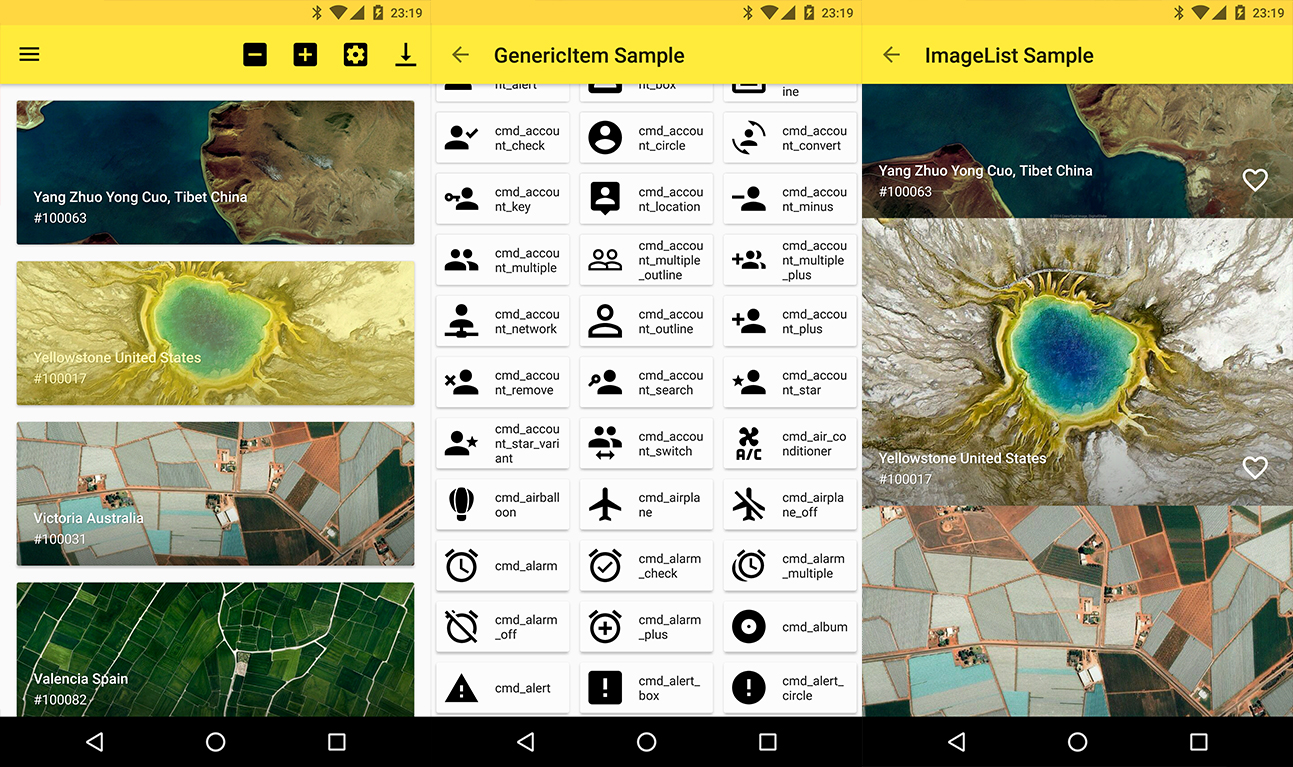
The library is split up into core, commons, and extensions. The core functions are included in the following dependency.
implementation 'com.mikepenz:fastadapter:3.3.1'
implementation "androidx.appcompat:appcompat:${androidX}"
implementation "androidx.recyclerview:recyclerview:${androidX}"
The commons package comes with some useful helpers (which are not needed in all cases) This one for example includes the FastItemAdapter
implementation 'com.mikepenz:fastadapter-commons:3.3.1'Expandable support is included and can be added via this
implementation 'com.mikepenz:fastadapter-extensions-expandable:3.3.1'//The tiny Materialize library used for its useful helper classes
implementation 'com.mikepenz:materialize:${latestVersion}'// at least 1.2.0
Many helper classes are included in the following dependency. (This functionality also needs the Expandable extension
implementation 'com.mikepenz:fastadapter-extensions:3.3.1'
implementation "com.google.android.material:material:${androidX}"//The tiny Materialize library used for its useful helper classes
implementation 'com.mikepenz:materialize:${latestVersion}'// at least 1.2.0Upgrades to use androidX dependencies. Use a version smaller than 3.3.x to use with appCompat dependencies.
v3 is a huge new release and comes with a big set of new changes. If you previously used the
FastAdapterand head over to the MIGRATION GUIDE on how to get started with v3. In case you are searching v2.x head over here to it here.
Just create a class which extends the AbstractItem as shown below. Implement the methods, and your item is ready.
publicclassSimpleItemextendsAbstractItem<SimpleItem, SimpleItem.ViewHolder> {
publicStringname;
publicStringdescription;
//The unique ID for this type of item@OverridepublicintgetType() {
returnR.id.fastadapter_sampleitem_id;
}
//The layout to be used for this type of item@OverridepublicintgetLayoutRes() {
returnR.layout.sample_item;
}
@OverridepublicViewHoldergetViewHolder(@NonNullViewv) {
returnnewViewHolder(v);
}
/** * our ViewHolder */protectedstaticclassViewHolderextendsFastAdapter.ViewHolder<SimpleItem> {
@BindView(R.id.material_drawer_name)
TextViewname;
@BindView(R.id.material_drawer_description)
TextViewdescription;
publicViewHolder(Viewview) {
super(view);
ButterKnife.bind(this, view);
}
@OverridepublicvoidbindView(SimpleItemitem, List<Object> payloads) {
StringHolder.applyTo(item.name, name);
StringHolder.applyToOrHide(item.description, description);
}
@OverridepublicvoidunbindView(SimpleItemitem) {
name.setText(null);
description.setText(null);
}
}
}//create the ItemAdapter holding your ItemsItemAdapteritemAdapter = newItemAdapter();
//create the managing FastAdapter, by passing in the itemAdapterFastAdapterfastAdapter = FastAdapter.with(itemAdapter);
//set our adapters to the RecyclerViewrecyclerView.setAdapter(fastAdapter);
//set the items to your ItemAdapteritemAdapter.add(ITEMS);fastAdapter.withSelectable(true);
fastAdapter.withOnClickListener(newOnClickListener<Item>() {
@OverridepublicbooleanonClick(Viewv, IAdapter<Item> adapter, Itemitem, intposition) {
// Handle click herereturntrue;
}
});//just add an `EventHook` to your `FastAdapter` by implementing either a `ClickEventHook`, `LongClickEventHook`, `TouchEventHook`, `CustomEventHook`fastItemAdapter.withEventHook(newClickEventHook<SampleItem>() {
@Nullable@OverridepublicViewonBind(@NonNullRecyclerView.ViewHolderviewHolder) {
//return the views on which you want to bind this eventif (viewHolderinstanceofSampleItem.ViewHolder) {
return ((ViewHolder) viewHolder).view;
}
returnnull;
}
@OverridepublicvoidonClick(Viewv, intposition, FastAdapter<SampleItem> fastAdapter, SampleItemitem) {
//react on the click event
}
});// Call this in onQueryTextSubmit() & onQueryTextChange() when using SearchViewitemAdapter.filter("yourSearchTerm");
itemAdapter.getItemFilter().withFilterPredicate(newIItemAdapter.Predicate<Item>() {
@Overridepublicbooleanfilter(Itemitem, CharSequenceconstraint) {
returnitem.getName().startsWith(String.valueOf(constraint));
}
});filter() should return true for items to be retained and false for items to be removed.
First, attach ItemTouchHelper to RecyclerView.
SimpleDragCallbackdragCallback = newSimpleDragCallback(this);
ItemTouchHelpertouchHelper = newItemTouchHelper(dragCallback);
touchHelper.attachToRecyclerView(recyclerView);
Implement ItemTouchCallback interface in your Activity, and override the itemTouchOnMove() method.
@OverridepublicbooleanitemTouchOnMove(intoldPosition, intnewPosition) {
Collections.swap(fastAdapter.getAdapterItems(), oldPosition, newPosition); // change positionfastAdapter.notifyAdapterItemMoved(oldPosition, newPosition);
returntrue;
}Start by initializing your adapters:
// Head is a model class for your headerItemAdapter<Header> headerAdapter = newItemAdapter<>();Initialize a Model FastAdapter:
ItemAdapter<IItem> itemAdapter = newItemAdapter<>();Finally, set the adapter:
FastAdapterfastAdapter = FastAdapter.with(headerAdapter, itemAdapter); //the order defines in which order the items will show uprecyclerView.setAdapter(fastAdapter);Create a FooterAdapter. We need this to display a loading ProgressBar at the end of our list. (Don't forget to pass it into FastAdapter.with(..))
ItemAdapter<ProgressItem> footerAdapter = newItemAdapter<>();Keep in mind that ProgressItem is provided by FastAdapter’s extensions.
recyclerView.addOnScrollListener(newEndlessRecyclerOnScrollListener(footerAdapter) {
@OverridepublicvoidonLoadMore(intcurrentPage) {
footerAdapter.clear();
footerAdapter.add(newProgressItem().withEnabled(false));
// Load your items here and add it to FastAdapterfastAdapter.add(NEWITEMS);
}
});
For the complete tutorial and more features such as multi-select and CAB check out the sample app.
- As of v2.5.0 there are no more known requirements to use the
FastAdapterwith Proguard
The FastAdapter comes with support for expandable items. After adding the dependency set up the Expandable extension via:
expandableExtension = newExpandableExtension<>();
fastAdapter.addExtension(expandableExtension);
Expandable items have to implement the IExpandable interface, and the sub items the ISubItem interface. This allows better support.
The sample app provides sample implementations of those. (Those in the sample are kept Model which allows them to be used with different parent / subitems)
As of the way how SubItems and their state are handled it is highly recommended to use the identifier based StateManagement. Just add withPositionBasedStateManagement(false) to your FastAdapter setup.
A simple item just needs to extend from the AbstractExpandableItem and provide the Parent, the ViewHolder and the SubItems it will contain as type.
publicclassSimpleSubExpandableItemextendsAbstractExpandableItem<SimpleSubExpandableItem, SimpleSubExpandableItem.ViewHolder, SubItem> {
/** * BASIC ITEM IMPLEMENTATION */
}- RecyclerView Adapter made easy (FastAdapter v2.x)
Mike Penz:
- AboutLibraries https://github.com/mikepenz/AboutLibraries
- Android-Iconics https://github.com/mikepenz/Android-Iconics
- ItemAnimators https://github.com/mikepenz/ItemAnimators
- MaterialDrawer https://github.com/mikepenz/MaterialDrawer
Other Libs:
- Butterknife https://github.com/JakeWharton/butterknife
- Glide https://github.com/bumptech/glide
- MaterialScrollBar https://github.com/krimin-killr21/MaterialScrollBar
- StickyRecyclerHeadersAdapter https://github.com/timehop/sticky-headers-recyclerview
Mike Penz
Fabian Terhorst
This free, open source software was also made possible by a group of volunteers that put many hours of hard work into it. See the CONTRIBUTORS.md file for details.
I want to give say thanks to some special contributors who provided some huge PRs and many changes to improve this great library.
Copyright 2017 Mike Penz
Licensed under the Apache License, Version 2.0 (the "License");
you may not use this file except in compliance with the License.
You may obtain a copy of the License at
http://www.apache.org/licenses/LICENSE-2.0
Unless required by applicable law or agreed to in writing, software
distributed under the License is distributed on an "AS IS" BASIS,
WITHOUT WARRANTIES OR CONDITIONS OF ANY KIND, either express or implied.
See the License for the specific language governing permissions and
limitations under the License.