db.py is an easier way to interact with your databases. It makes it easier to explore tables, columns, views, etc. It puts the emphasis on user interaction, information display, and providing easy to use helper functions.
db.py uses pandas to manage data, so if you're already using pandas, db.py should feel pretty natural. It's also fully compatible with the IPython Notebook, so not only is db.py extremely functional, it's also pretty.
- PostgreSQL
- MySQL
- SQLite
- Redshift
- MS SQL Server
- Oracle
Execute queries
>>>db.query_from_file("myscript.sql")
_iddatetimeuser_idn0129000010/Jun/2014:18:21:27+00000000015b37cd096411912000923/Jun/2014:02:11:21+000000006e01a641982212168387423/Jun/2014:02:11:48+000000006e01a641982223256215323/Jun/2014:02:12:57+000000006e01a64198223439301914/Jun/2014:16:05:18+0000000099d569e3a21615354256814/Jun/2014:16:06:02+0000000099d569e3a2162
Fully compatible with predictive type
>>>db.tables.
db.tables.Albumdb.tables.Customerdb.tables.Genredb.tables.InvoiceLinedb.tables.Playlistdb.tables.Trackdb.tables.Artistdb.tables.Employeedb.tables.Invoicedb.tables.MediaTypedb.tables.PlaylistTrackdb.tables.tables
Friendly displays
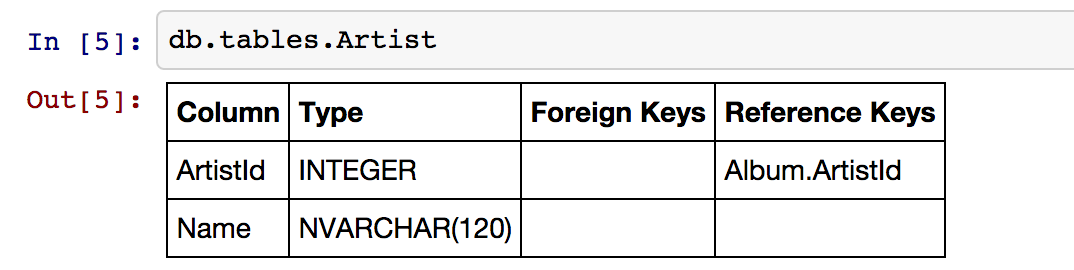
>>>db.tables.Track+-------------------------------------------------------------+|Album|+----------+---------------+-----------------+----------------+|Column|Type|ForeignKeys|ReferenceKeys|+----------+---------------+-----------------+----------------+|AlbumId|INTEGER||Track.AlbumId||Title|NVARCHAR(160) ||||ArtistId|INTEGER|Artist.ArtistId||+----------+---------------+-----------------+----------------+Directly integrated with pandas
>>>db.tables.Track.head()
TrackIdNameAlbumIdMediaTypeId \
01ForThoseAboutToRock (WeSaluteYou) 1112BallstotheWall2223FastAsaShark3234RestlessandWild3245PrincessoftheDawn3256PutTheFingerOnYou11GenreIdComposerMilliseconds \
01AngusYoung, MalcolmYoung, BrianJohnson34371911None34256221F. Baltes, S. Kaufman, U. Dirkscneider&W. Ho... 23061931F. Baltes, R.A. Smith-Diesel, S. Kaufman, U. D... 25205141Deaffy&R.A. Smith-Diesel37541851AngusYoung, MalcolmYoung, BrianJohnson205662BytesUnitPrice0111703340.99155104240.99239909940.99343317790.99462905210.99567134510.99
Create queries using Handlebars style templates
q="""SELECT '{{ name }}' as table_name, sum(1) as cntFROM {{ name }}GROUP BY table_name"""data= [
{"name": "Album"},
{"name": "Artist"},
{"name": "Track"}
]
db.query(q, data=data)
table_namecnt0Album3471Artist2752Track3503
Search your schema
>>>db.find_column("*Id*")
+---------------+---------------+---------+|Table|ColumnName|Type|+---------------+---------------+---------+|Album|AlbumId|INTEGER||Album|ArtistId|INTEGER||Artist|ArtistId|INTEGER||Customer|SupportRepId|INTEGER||Customer|CustomerId|INTEGER||Employee|EmployeeId|INTEGER||Genre|GenreId|INTEGER||Invoice|InvoiceId|INTEGER||Invoice|CustomerId|INTEGER||InvoiceLine|InvoiceId|INTEGER||InvoiceLine|TrackId|INTEGER||InvoiceLine|InvoiceLineId|INTEGER||MediaType|MediaTypeId|INTEGER||Playlist|PlaylistId|INTEGER||PlaylistTrack|TrackId|INTEGER||PlaylistTrack|PlaylistId|INTEGER||Track|MediaTypeId|INTEGER||Track|TrackId|INTEGER||Track|AlbumId|INTEGER||Track|GenreId|INTEGER|+---------------+---------------+---------+
IPython Notebook friendly
db.py is on PyPi.
$ pip install db.pyThe database libraries being used under the hood are optional dependencies (if you use mysql, you probably don't care about installing psycopg2). Based on the databases you're using, you'll need one (or many) of the following:
- PostgreSQL: psycopg2. Windows
- Redshift: psycopg2. Redshift is a flavor of PostgreSQL.
- MySQL: MySQLdb
- SQLite: sqlite3. Should be installed already.
- MS SQL: TBD. Suggestions welcome! https://github.com/yhat/db.py/issues
>>>fromdbimportDemoDB# or connect to your own using DB. see below>>>db=DemoDB() # comes from: http://chinookdatabase.codeplex.com/>>>db.tables+---------------+----------------------------------------------------------------------------------+|Table|Columns|+---------------+----------------------------------------------------------------------------------+|Album|AlbumId, Title, ArtistId||Artist|ArtistId, Name||Customer|CustomerId, FirstName, LastName, Company, Address, City, State, Country, PostalC|||ode, Phone, Fax, Email, SupportRepId||Employee|EmployeeId, LastName, FirstName, Title, ReportsTo, BirthDate, HireDate, Address, |||City, State, Country, PostalCode, Phone, Fax, Email||Genre|GenreId, Name||Invoice|InvoiceId, CustomerId, InvoiceDate, BillingAddress, BillingCity, BillingState, B|||illingCountry, BillingPostalCode, Total||InvoiceLine|InvoiceLineId, InvoiceId, TrackId, UnitPrice, Quantity||MediaType|MediaTypeId, Name||Playlist|PlaylistId, Name||PlaylistTrack|PlaylistId, TrackId||Track|TrackId, Name, AlbumId, MediaTypeId, GenreId, Composer, Milliseconds, Bytes, Uni|||tPrice|+---------------+----------------------------------------------------------------------------------+>>>db.tables.Customer+------------------------------------------------------------------------+|Customer|+--------------+--------------+---------------------+--------------------+|Column|Type|ForeignKeys|ReferenceKeys|+--------------+--------------+---------------------+--------------------+|CustomerId|INTEGER||Invoice.CustomerId||FirstName|NVARCHAR(40) ||||LastName|NVARCHAR(20) ||||Company|NVARCHAR(80) ||||Address|NVARCHAR(70) ||||City|NVARCHAR(40) ||||State|NVARCHAR(40) ||||Country|NVARCHAR(40) ||||PostalCode|NVARCHAR(10) ||||Phone|NVARCHAR(24) ||||Fax|NVARCHAR(24) ||||Email|NVARCHAR(60) ||||SupportRepId|INTEGER|Employee.EmployeeId||+--------------+--------------+---------------------+--------------------+>>>db.tables.Customer.sample()
CustomerIdFirstNameLastName \
04BjørnHansen126RichardCunningham21LuísGonçalves321KathyChase46HelenaHolý514MarkPhilips649StanisławWójcik719TimGoyer845LadislavKovács98DaanPeetersCompany \
0None1None2Embraer-EmpresaBrasileiradeAeronáuticaS.A.
3None4None5Telus6None7AppleInc.
8None9NoneAddressCityStateCountry \
0Ullevålsveien14OsloNoneNorway12211WBerryStreetFortWorthTXUSA2Av. BrigadeiroFariaLima, 2170SãoJosédosCamposSPBrazil3801W4thStreetRenoNVUSA4Rilská3174/6PragueNoneCzechRepublic58210111STNWEdmontonABCanada6Ordynacka10WarsawNonePoland71InfiniteLoopCupertinoCAUSA8Erzsébetkrt. 58.BudapestNoneHungary9Grétrystraat63BrusselsNoneBelgiumPostalCodePhoneFax \
00171+4722442222None176110+1 (817) 924-7272None212227-000+55 (12) 3923-5555+55 (12) 3923-5566389503+1 (775) 223-7665None414300+420241770449None5T6G2C7+1 (780) 434-4554+1 (780) 434-5565600-358+48228283739None795014+1 (408) 996-1010+1 (408) 996-10118H-1073NoneNone91000+32022190303NoneEmailSupportRepId0bjorn.hansen@yahoo.no41ricunningham@hotmail.com42luisg@embraer.com.br33kachase@hotmail.com54hholy@gmail.com55mphilips12@shaw.ca56stanisław.wójcik@wp.pl47tgoyer@apple.com38ladislav_kovacs@apple.hu39daan_peeters@apple.be4>>>db.find_column("*Name*")
+-----------+-------------+---------------+|Table|ColumnName|Type|+-----------+-------------+---------------+|Artist|Name|NVARCHAR(120) ||Customer|FirstName|NVARCHAR(40) ||Customer|LastName|NVARCHAR(20) ||Employee|FirstName|NVARCHAR(20) ||Employee|LastName|NVARCHAR(20) ||Genre|Name|NVARCHAR(120) ||MediaType|Name|NVARCHAR(120) ||Playlist|Name|NVARCHAR(120) ||Track|Name|NVARCHAR(200) |+-----------+-------------+---------------+>>>db.find_table("A*")
+--------+--------------------------+|Table|Columns|+--------+--------------------------+|Album|AlbumId, Title, ArtistId||Artist|ArtistId, Name|+--------+--------------------------+>>>db.query("select * from Artist limit 10;")
ArtistIdName01AC/DC12Accept23Aerosmith34AlanisMorissette45AliceInChains56AntônioCarlosJobim67Apocalyptica78Audioslave89BackBeat910BillyCobhamArguments
- username: your username
- password: your password
- hostname: hostname of the database (i.e.
localhost,dw.mardukas.com,ec2-54-191-289-254.us-west-2.compute.amazonaws.com) - port: port the database is running on (i.e. 5432)
- dbname: name of the database (i.e.
hanksdb) - filename: path to sqlite database (i.e.
baseball-archive-2012.sqlite,employees.db) - dbtype: type of database you're connecting to (postgres, mysql, sqlite, redshift)
- profile: name of the profile you want to use to connect. using this negates the need to specify any other arguments
- exclude_system_tables: whether or not to load schema information for internal tables. for example, postgres has a bunch of tables prefixed with
pg_that you probably don't actually care about. on the other had if you're administrating a database, you might want to query these tables - limit: default number of records to return in a query. This is used by the DB.query method. You can override it by adding limit={X} to the
querymethod, or by passing an argument toDB(). None indicates that there will be no limit (That's right, you'll be limitless. Bradley Cooper style.)
>>>fromdbimportDB>>>db=DB(username="greg", password="secret", hostname="localhost",
dbtype="postgres")>>>fromdbimportDB>>>db=DB(username="greg", password="secret", hostname="localhost",
dbtype="postgres")
>>>db.save_credentials() # this will save to "default">>>db.save_credentials(profile="local_pg")>>>fromdbimportDB>>>db=DB() # this loads "default" profile>>>db=DB(profile="local_pg")>>>fromdbimportlist_profiles>>>list_profiles()
{'demo': {u'dbname': None,
u'dbtype': u'sqlite',
u'filename': u'/Users/glamp/repos/yhat/opensource/db.py/db/data/chinook.sqlite',
u'hostname': u'localhost',
u'password': None,
u'port': 5432,
u'username': None},
'muppets': {u'dbname': u'muppetdb',
u'dbtype': u'postgres',
u'filename': None,
u'hostname': u'muppets.yhathq.com',
u'password': None,
u'port': 5432,
u'username': u'kermit'}}>>>remove_profile('demo')>>>df1=db.query("select * from Artist;")
>>>df2=db.query("select * from Album;")>>>db.query_from_file("myscript.sql")
>>>df=db.query_from_file("myscript.sql")>>>db.find_table("A*")
+--------+--------------------------+|Table|Columns|+--------+--------------------------+|Album|AlbumId, Title, ArtistId||Artist|ArtistId, Name|+--------+--------------------------+>>>results=db.find_table("tmp*") # returns all tables prefixed w/ tmp>>>results=db.find_table("prod_*") # returns all tables prefixed w/ prod_>>>results=db.find_table("*Invoice*") # returns all tables containing trans>>>results=db.find_table("*") # returns everything>>>db.find_column("Name") # returns all columns named "Name"+-----------+-------------+---------------+|Table|ColumnName|Type|+-----------+-------------+---------------+|Artist|Name|NVARCHAR(120) ||Genre|Name|NVARCHAR(120) ||MediaType|Name|NVARCHAR(120) ||Playlist|Name|NVARCHAR(120) ||Track|Name|NVARCHAR(200) |+-----------+-------------+---------------+>>>db.find_column("*Id") # returns all columns ending w/ Id+---------------+---------------+---------+|Table|ColumnName|Type|+---------------+---------------+---------+|Album|AlbumId|INTEGER||Album|ArtistId|INTEGER||Artist|ArtistId|INTEGER||Customer|SupportRepId|INTEGER||Customer|CustomerId|INTEGER||Employee|EmployeeId|INTEGER||Genre|GenreId|INTEGER||Invoice|InvoiceId|INTEGER||Invoice|CustomerId|INTEGER||InvoiceLine|InvoiceId|INTEGER||InvoiceLine|TrackId|INTEGER||InvoiceLine|InvoiceLineId|INTEGER||MediaType|MediaTypeId|INTEGER||Playlist|PlaylistId|INTEGER||PlaylistTrack|TrackId|INTEGER||PlaylistTrack|PlaylistId|INTEGER||Track|MediaTypeId|INTEGER||Track|TrackId|INTEGER||Track|AlbumId|INTEGER||Track|GenreId|INTEGER|+---------------+---------------+---------+>>>db.find_column("*Address*") # returns all columns containing Address+----------+----------------+--------------+|Table|ColumnName|Type|+----------+----------------+--------------+|Customer|Address|NVARCHAR(70) ||Employee|Address|NVARCHAR(70) ||Invoice|BillingAddress|NVARCHAR(70) |+----------+----------------+--------------+# returns all columns containing Address that are varchars>>>db.find_column("*Address*", data_type="NVARCHAR(70)")
# returns all columns have an "e" and are NVARCHAR/INTEGERS>>>db.find_column("*e*", data_type=["NVARCHAR(70)", "INTEGER"]) To run individual tests:
$ python -m unittest test_module.TestClass.test_method
To run all the tests:
$ python -m unittest discover <path_to_tests_folder> -v
See either the TODO below or Adding a Database.
- Switch to newer version of pandas sql api
- Add database support
- postgres
- sqlite
- redshift
- mysql
- mssql (going to be a little trickier since i don't have one)
- publish examples to nbviewer
- improve documentation and readme
- add sample database to distrobution
- push to Redshift
- "joins to" for columns
- postgres
- sqlite
- redshift
- mysql
- mssql
- intelligent display of number/size returned in query
- patsy formulas
- profile w/ limit