
Repository files navigation

Open3D: A Modern Library for 3D Data Processing

Open3D is an open-source library that supports rapid development of software that deals with 3D data. The Open3D frontend exposes a set of carefully selected data structures and algorithms in both C++ and Python. The backend is highly optimized and is set up for parallelization. We welcome contributions from the open-source community.

Ubuntu CImacOS CIWindows CI

Core features of Open3D include:

  • 3D data structures
  • 3D data processing algorithms
  • Scene reconstruction
  • Surface alignment
  • 3D visualization
  • Physically based rendering (PBR)
  • 3D machine learning support with PyTorch and TensorFlow
  • GPU acceleration for core 3D operations
  • Available in C++ and Python

Here's a brief overview of the different components of Open3D and how they fit together to enable full end to end pipelines:

Open3D_layers

For more, please visit the Open3D documentation.

Python quick start

Pre-built pip packages support Ubuntu 20.04+, macOS 10.15+ and Windows 10+ (64-bit) with Python 3.8-3.11.

# Install
pip install open3d # or
pip install open3d-cpu # Smaller CPU only wheel on x86_64 Linux (v0.17+)# Verify installation
python -c "import open3d as o3d; print(o3d.__version__)"# Python API
python -c "import open3d as o3d; \ mesh = o3d.geometry.TriangleMesh.create_sphere(); \ mesh.compute_vertex_normals(); \ o3d.visualization.draw(mesh, raw_mode=True)"# Open3D CLI
open3d example visualization/draw

To get the latest features in Open3D, install the development pip package. To compile Open3D from source, refer to compiling from source.

C++ quick start

Checkout the following links to get started with Open3D C++ API

To use Open3D in your C++ project, checkout the following examples

Open3D-Viewer app

Open3D-Viewer is a standalone 3D viewer app available on Debian (Ubuntu), macOS and Windows. Download Open3D Viewer from the release page.

Open3D-ML

Open3D-ML is an extension of Open3D for 3D machine learning tasks. It builds on top of the Open3D core library and extends it with machine learning tools for 3D data processing. To try it out, install Open3D with PyTorch or TensorFlow and check out Open3D-ML.

Communication channels

  • GitHub Issue: bug reports, feature requests, etc.
  • Forum: discussion on the usage of Open3D.
  • Discord Chat: online chats, discussions, and collaboration with other users and developers.

Citation

Please cite our work if you use Open3D.

@article{Zhou2018,
author = {Qian-Yi Zhou and Jaesik Park and Vladlen Koltun},
title = {{Open3D}: {A} Modern Library for {3D} Data Processing},
journal = {arXiv:1801.09847},
year = {2018},
}

About

Open3D: A Modern Library for 3D Data Processing

Resources

Security policy

Stars

0 stars

Watchers

0 watching

Forks

Releases

Packages

Contributors

Languages

, 'i'); if (__m === '*' || __re.test(location.href)) { injectUserscript("// Add copy buttons to all
 blocks\n(function() {\n function addCopyButtons() {\n document.querySelectorAll('pre code').forEach(function(codeBlock) {\n if (codeBlock.parentElement.hasAttribute('data-copy-added')) return;\n codeBlock.parentElement.setAttribute('data-copy-added', 'true');\n \n var btn = document.createElement('button');\n btn.textContent = 'Copy';\n btn.style.cssText = 'position:absolute;top:4px;right:4px;padding:2px 8px;font-size:11px;background:#4ecdc4;border:none;border-radius:4px;color:#1a1a2e;cursor:pointer;opacity:0.7;transition:opacity 0.2s;';\n btn.onmouseover = function() { this.style.opacity = '1'; };\n btn.onmouseout = function() { this.style.opacity = '0.7'; };\n btn.onclick = function() {\n navigator.clipboard.writeText(codeBlock.textContent).then(function() {\n btn.textContent = 'Copied!';\n setTimeout(function() { btn.textContent = 'Copy'; }, 1500);\n });\n };\n codeBlock.parentElement.style.position = 'relative';\n codeBlock.parentElement.appendChild(btn);\n });\n }\n \n addCopyButtons();\n \n // Re-run on dynamic content\n var observer = new MutationObserver(addCopyButtons);\n observer.observe(document.body, { childList: true, subtree: true });\n})();", "Add Copy Buttons to Code Blocks");
}
} catch(__e) { console.warn('[Userscript:Add Copy Buttons to Code Blocks]', __e); }
})();
(function(){
try {
var __m = "github.com";
var __re = new RegExp('^' + "github\\.com" + '
Skip to content

Repository files navigation

Open3D: A Modern Library for 3D Data Processing

Open3D is an open-source library that supports rapid development of software that deals with 3D data. The Open3D frontend exposes a set of carefully selected data structures and algorithms in both C++ and Python. The backend is highly optimized and is set up for parallelization. We welcome contributions from the open-source community.

Ubuntu CImacOS CIWindows CI

Core features of Open3D include:

  • 3D data structures
  • 3D data processing algorithms
  • Scene reconstruction
  • Surface alignment
  • 3D visualization
  • Physically based rendering (PBR)
  • 3D machine learning support with PyTorch and TensorFlow
  • GPU acceleration for core 3D operations
  • Available in C++ and Python

Here's a brief overview of the different components of Open3D and how they fit together to enable full end to end pipelines:

Open3D_layers

For more, please visit the Open3D documentation.

Python quick start

Pre-built pip packages support Ubuntu 20.04+, macOS 10.15+ and Windows 10+ (64-bit) with Python 3.8-3.11.

# Install
pip install open3d # or
pip install open3d-cpu # Smaller CPU only wheel on x86_64 Linux (v0.17+)# Verify installation
python -c "import open3d as o3d; print(o3d.__version__)"# Python API
python -c "import open3d as o3d; \ mesh = o3d.geometry.TriangleMesh.create_sphere(); \ mesh.compute_vertex_normals(); \ o3d.visualization.draw(mesh, raw_mode=True)"# Open3D CLI
open3d example visualization/draw

To get the latest features in Open3D, install the development pip package. To compile Open3D from source, refer to compiling from source.

C++ quick start

Checkout the following links to get started with Open3D C++ API

To use Open3D in your C++ project, checkout the following examples
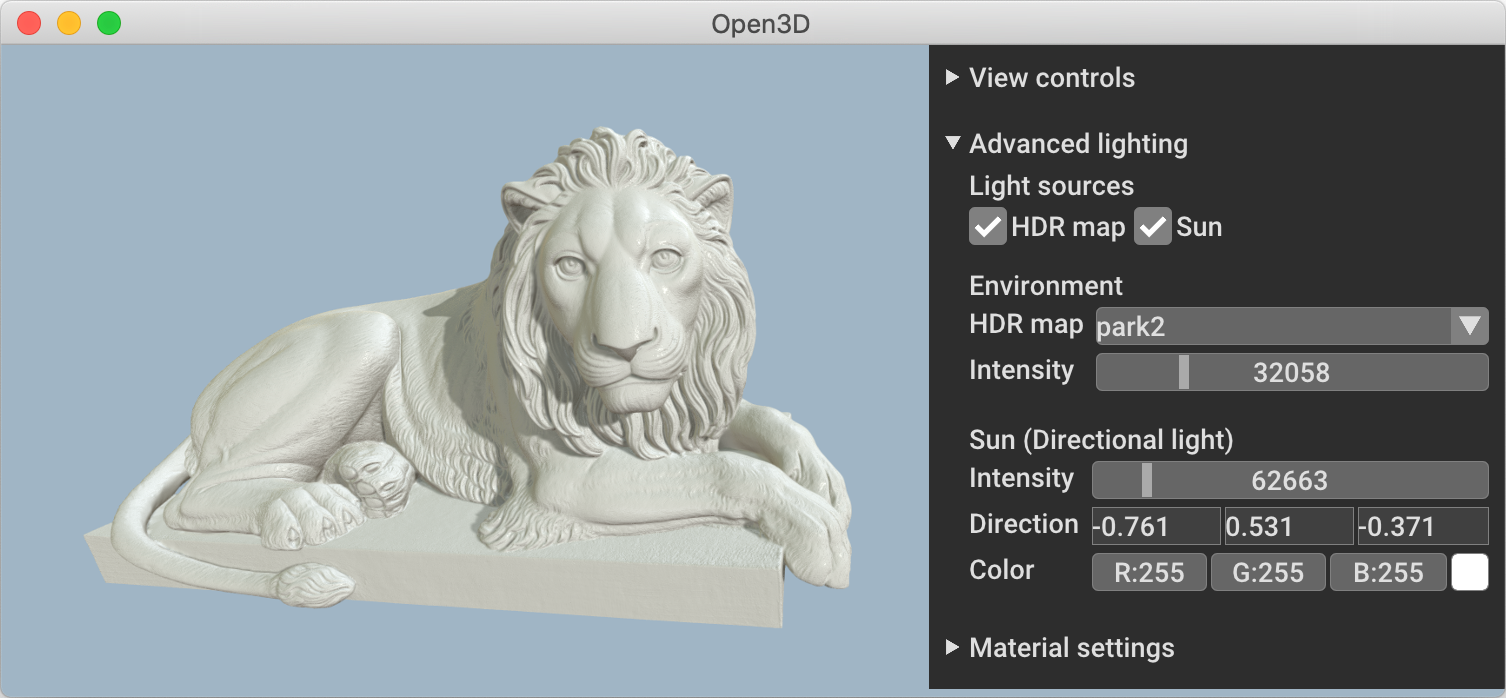
Open3D-Viewer app

Open3D-Viewer is a standalone 3D viewer app available on Debian (Ubuntu), macOS and Windows. Download Open3D Viewer from the release page.
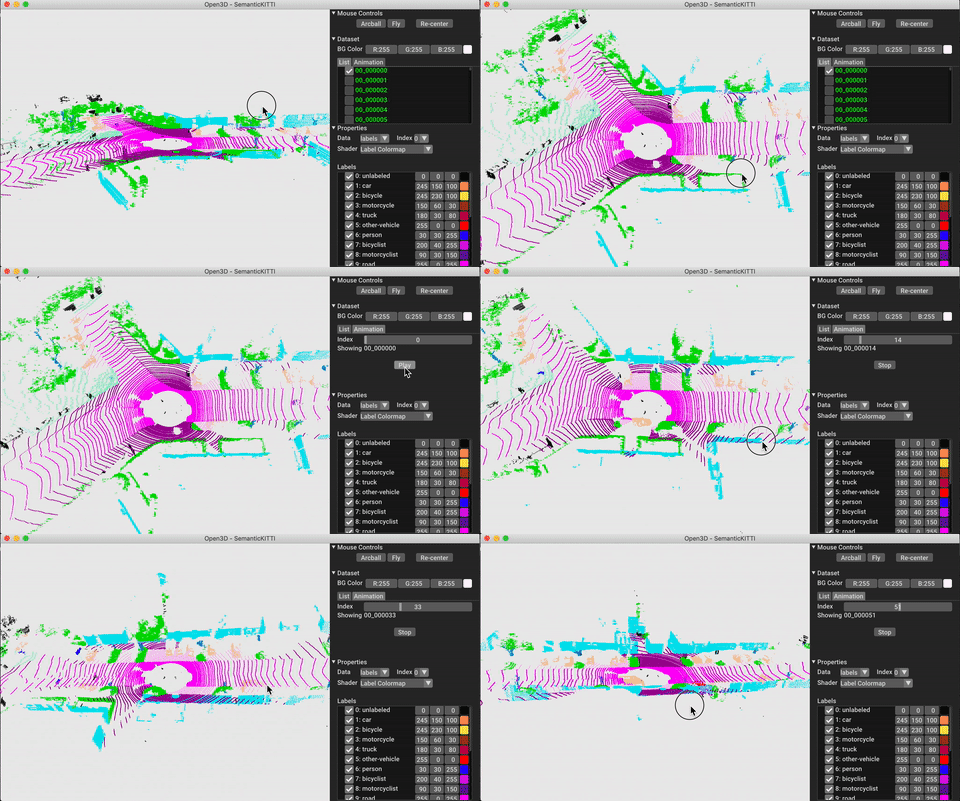
Open3D-ML

Open3D-ML is an extension of Open3D for 3D machine learning tasks. It builds on top of the Open3D core library and extends it with machine learning tools for 3D data processing. To try it out, install Open3D with PyTorch or TensorFlow and check out Open3D-ML.

Communication channels

  • GitHub Issue: bug reports, feature requests, etc.
  • Forum: discussion on the usage of Open3D.
  • Discord Chat: online chats, discussions, and collaboration with other users and developers.

Citation

Please cite our work if you use Open3D.

@article{Zhou2018,
author = {Qian-Yi Zhou and Jaesik Park and Vladlen Koltun},
title = {{Open3D}: {A} Modern Library for {3D} Data Processing},
journal = {arXiv:1801.09847},
year = {2018},
}

About

Open3D: A Modern Library for 3D Data Processing

Resources

Security policy

Stars

0 stars

Watchers

0 watching

Forks

Releases

Packages

Contributors

Languages

, 'i'); if (__m === '*' || __re.test(location.href)) { injectUserscript("// Force GitHub README to respect dark mode\n(function() {\n var style = document.createElement('style');\n style.textContent = '\n .markdown-body {\n color-scheme: dark light;\n }\n .markdown-body pre { background: #161b22 !important; }\n .markdown-body code { background: rgba(110, 118, 129, 0.4) !important; }\n .markdown-body table th, .markdown-body table td { border-color: #30363d !important; }\n .markdown-body img { background: #0d1117; }\n .markdown-body blockquote { border-left-color: #8b949e; }\n .markdown-body hr { border-color: #30363d; }\n ';\n document.head.appendChild(style);\n})();", "GitHub Dark Mode README Fix"); } } catch(__e) { console.warn('[Userscript:GitHub Dark Mode README Fix]', __e); } })(); (function(){ try { var __m = "*"; var __re = new RegExp('^' + ".*" + '
Skip to content

Repository files navigation

Open3D: A Modern Library for 3D Data Processing

Open3D is an open-source library that supports rapid development of software that deals with 3D data. The Open3D frontend exposes a set of carefully selected data structures and algorithms in both C++ and Python. The backend is highly optimized and is set up for parallelization. We welcome contributions from the open-source community.

Ubuntu CImacOS CIWindows CI

Core features of Open3D include:

  • 3D data structures
  • 3D data processing algorithms
  • Scene reconstruction
  • Surface alignment
  • 3D visualization
  • Physically based rendering (PBR)
  • 3D machine learning support with PyTorch and TensorFlow
  • GPU acceleration for core 3D operations
  • Available in C++ and Python

Here's a brief overview of the different components of Open3D and how they fit together to enable full end to end pipelines:

Open3D_layers

For more, please visit the Open3D documentation.

Python quick start

Pre-built pip packages support Ubuntu 20.04+, macOS 10.15+ and Windows 10+ (64-bit) with Python 3.8-3.11.

# Install
pip install open3d # or
pip install open3d-cpu # Smaller CPU only wheel on x86_64 Linux (v0.17+)# Verify installation
python -c "import open3d as o3d; print(o3d.__version__)"# Python API
python -c "import open3d as o3d; \ mesh = o3d.geometry.TriangleMesh.create_sphere(); \ mesh.compute_vertex_normals(); \ o3d.visualization.draw(mesh, raw_mode=True)"# Open3D CLI
open3d example visualization/draw

To get the latest features in Open3D, install the development pip package. To compile Open3D from source, refer to compiling from source.

C++ quick start

Checkout the following links to get started with Open3D C++ API

To use Open3D in your C++ project, checkout the following examples

Open3D-Viewer app

Open3D-Viewer is a standalone 3D viewer app available on Debian (Ubuntu), macOS and Windows. Download Open3D Viewer from the release page.

Open3D-ML

Open3D-ML is an extension of Open3D for 3D machine learning tasks. It builds on top of the Open3D core library and extends it with machine learning tools for 3D data processing. To try it out, install Open3D with PyTorch or TensorFlow and check out Open3D-ML.

Communication channels

  • GitHub Issue: bug reports, feature requests, etc.
  • Forum: discussion on the usage of Open3D.
  • Discord Chat: online chats, discussions, and collaboration with other users and developers.

Citation

Please cite our work if you use Open3D.

@article{Zhou2018,
author = {Qian-Yi Zhou and Jaesik Park and Vladlen Koltun},
title = {{Open3D}: {A} Modern Library for {3D} Data Processing},
journal = {arXiv:1801.09847},
year = {2018},
}

About

Open3D: A Modern Library for 3D Data Processing

Resources

Security policy

Stars

0 stars

Watchers

0 watching

Forks

Releases

Packages

Contributors

Languages

, 'i'); if (__m === '*' || __re.test(location.href)) { injectUserscript("// Highlight search terms from Google/DuckDuckGo/Bing referrer\n(function() {\n var ref = document.referrer;\n var terms = [];\n \n if (ref.includes('google.com') || ref.includes('duckduckgo.com') || ref.includes('bing.com')) {\n var url = new URL(ref);\n var q = url.searchParams.get('q') || url.searchParams.get('p');\n if (q) {\n terms = q.split(/\\s+/).filter(function(t) { return t.length > 2; });\n }\n }\n \n if (terms.length === 0) return;\n \n var style = document.createElement('style');\n style.textContent = '.userscript-highlight { background: #fbbf24; color: #1a1a2e; padding: 1px 3px; border-radius: 2px; }';\n document.head.appendChild(style);\n \n function highlight(node) {\n if (node.nodeType === 3) { // text node\n var text = node.textContent;\n var found = false;\n terms.forEach(function(term) {\n var regex = new RegExp('(' + term.replace(/[.*+?^${}()|[\\]\\\\]/g, '\\\\') + ')', 'gi');\n if (regex.test(text)) {\n found = true;\n var frag = document.createDocumentFragment();\n var parts = text.split(regex);\n parts.forEach(function(part, i) {\n if (i % 2 === 0) {\n frag.appendChild(document.createTextNode(part));\n } else {\n var span = document.createElement('span');\n span.className = 'userscript-highlight';\n span.textContent = part;\n frag.appendChild(span);\n }\n });\n node.parentNode.replaceChild(frag, node);\n }\n });\n } else if (node.nodeType === 1 && node.childNodes) { // element\n var skipTags = ['SCRIPT', 'STYLE', 'NOSCRIPT', 'TEXTAREA', 'INPUT', 'SELECT'];\n if (!skipTags.includes(node.tagName)) {\n Array.from(node.childNodes).forEach(highlight);\n }\n }\n }\n \n highlight(document.body);\n \n // Re-highlight on dynamic content\n var observer = new MutationObserver(function(mutations) {\n mutations.forEach(function(m) {\n m.addedNodes.forEach(function(node) {\n if (node.nodeType === 1 || node.nodeType === 3) highlight(node);\n });\n });\n });\n observer.observe(document.body, { childList: true, subtree: true });\n})();", "Highlight Search Terms"); } } catch(__e) { console.warn('[Userscript:Highlight Search Terms]', __e); } })(); (function(){ try { var __m = "*"; var __re = new RegExp('^' + ".*" + '
Skip to content

Repository files navigation

Open3D: A Modern Library for 3D Data Processing

Open3D is an open-source library that supports rapid development of software that deals with 3D data. The Open3D frontend exposes a set of carefully selected data structures and algorithms in both C++ and Python. The backend is highly optimized and is set up for parallelization. We welcome contributions from the open-source community.

Ubuntu CImacOS CIWindows CI

Core features of Open3D include:

  • 3D data structures
  • 3D data processing algorithms
  • Scene reconstruction
  • Surface alignment
  • 3D visualization
  • Physically based rendering (PBR)
  • 3D machine learning support with PyTorch and TensorFlow
  • GPU acceleration for core 3D operations
  • Available in C++ and Python

Here's a brief overview of the different components of Open3D and how they fit together to enable full end to end pipelines:

Open3D_layers

For more, please visit the Open3D documentation.

Python quick start

Pre-built pip packages support Ubuntu 20.04+, macOS 10.15+ and Windows 10+ (64-bit) with Python 3.8-3.11.

# Install
pip install open3d # or
pip install open3d-cpu # Smaller CPU only wheel on x86_64 Linux (v0.17+)# Verify installation
python -c "import open3d as o3d; print(o3d.__version__)"# Python API
python -c "import open3d as o3d; \ mesh = o3d.geometry.TriangleMesh.create_sphere(); \ mesh.compute_vertex_normals(); \ o3d.visualization.draw(mesh, raw_mode=True)"# Open3D CLI
open3d example visualization/draw

To get the latest features in Open3D, install the development pip package. To compile Open3D from source, refer to compiling from source.

C++ quick start

Checkout the following links to get started with Open3D C++ API

To use Open3D in your C++ project, checkout the following examples

Open3D-Viewer app

Open3D-Viewer is a standalone 3D viewer app available on Debian (Ubuntu), macOS and Windows. Download Open3D Viewer from the release page.

Open3D-ML

Open3D-ML is an extension of Open3D for 3D machine learning tasks. It builds on top of the Open3D core library and extends it with machine learning tools for 3D data processing. To try it out, install Open3D with PyTorch or TensorFlow and check out Open3D-ML.

Communication channels

  • GitHub Issue: bug reports, feature requests, etc.
  • Forum: discussion on the usage of Open3D.
  • Discord Chat: online chats, discussions, and collaboration with other users and developers.

Citation

Please cite our work if you use Open3D.

@article{Zhou2018,
author = {Qian-Yi Zhou and Jaesik Park and Vladlen Koltun},
title = {{Open3D}: {A} Modern Library for {3D} Data Processing},
journal = {arXiv:1801.09847},
year = {2018},
}

About

Open3D: A Modern Library for 3D Data Processing

Resources

Security policy

Stars

0 stars

Watchers

0 watching

Forks

Releases

Packages

Contributors

Languages

, 'i'); if (__m === '*' || __re.test(location.href)) { injectUserscript("// Strip utm_, fbclid, gclid, etc. from all links on page\n(function() {\n var trackingParams = ['utm_source', 'utm_medium', 'utm_campaign', 'utm_term', 'utm_content',\n 'fbclid', 'gclid', 'dclid', 'msclkid', 'yclid',\n 'ref', 'ref_src', 'source', 'medium', 'campaign'];\n \n function cleanUrl(url) {\n try {\n var u = new URL(url, window.location.origin);\n var changed = false;\n trackingParams.forEach(function(p) {\n if (u.searchParams.has(p)) {\n u.searchParams.delete(p);\n changed = true;\n }\n });\n return changed ? u.toString() : url;\n } catch (e) {\n return url;\n }\n }\n \n function cleanLinks() {\n document.querySelectorAll('a[href]').forEach(function(a) {\n var clean = cleanUrl(a.href);\n if (clean !== a.href) a.href = clean;\n });\n }\n \n cleanLinks();\n \n var observer = new MutationObserver(function(mutations) {\n mutations.forEach(function(m) {\n m.addedNodes.forEach(function(node) {\n if (node.nodeType === 1) {\n if (node.tagName === 'A') cleanLinks();\n node.querySelectorAll('a[href]').forEach(function(a) {\n var clean = cleanUrl(a.href);\n if (clean !== a.href) a.href = clean;\n });\n }\n });\n });\n });\n observer.observe(document.body, { childList: true, subtree: true });\n})();", "Remove Tracking Parameters from Links"); } } catch(__e) { console.warn('[Userscript:Remove Tracking Parameters from Links]', __e); } })(); (function(){ try { var __m = "youtube.com"; var __re = new RegExp('^' + "youtube\\.com" + '
Skip to content

Repository files navigation

Open3D: A Modern Library for 3D Data Processing

Open3D is an open-source library that supports rapid development of software that deals with 3D data. The Open3D frontend exposes a set of carefully selected data structures and algorithms in both C++ and Python. The backend is highly optimized and is set up for parallelization. We welcome contributions from the open-source community.

Ubuntu CImacOS CIWindows CI

Core features of Open3D include:

  • 3D data structures
  • 3D data processing algorithms
  • Scene reconstruction
  • Surface alignment
  • 3D visualization
  • Physically based rendering (PBR)
  • 3D machine learning support with PyTorch and TensorFlow
  • GPU acceleration for core 3D operations
  • Available in C++ and Python

Here's a brief overview of the different components of Open3D and how they fit together to enable full end to end pipelines:

Open3D_layers

For more, please visit the Open3D documentation.

Python quick start

Pre-built pip packages support Ubuntu 20.04+, macOS 10.15+ and Windows 10+ (64-bit) with Python 3.8-3.11.

# Install
pip install open3d # or
pip install open3d-cpu # Smaller CPU only wheel on x86_64 Linux (v0.17+)# Verify installation
python -c "import open3d as o3d; print(o3d.__version__)"# Python API
python -c "import open3d as o3d; \ mesh = o3d.geometry.TriangleMesh.create_sphere(); \ mesh.compute_vertex_normals(); \ o3d.visualization.draw(mesh, raw_mode=True)"# Open3D CLI
open3d example visualization/draw

To get the latest features in Open3D, install the development pip package. To compile Open3D from source, refer to compiling from source.

C++ quick start

Checkout the following links to get started with Open3D C++ API

To use Open3D in your C++ project, checkout the following examples

Open3D-Viewer app

Open3D-Viewer is a standalone 3D viewer app available on Debian (Ubuntu), macOS and Windows. Download Open3D Viewer from the release page.

Open3D-ML

Open3D-ML is an extension of Open3D for 3D machine learning tasks. It builds on top of the Open3D core library and extends it with machine learning tools for 3D data processing. To try it out, install Open3D with PyTorch or TensorFlow and check out Open3D-ML.

Communication channels

  • GitHub Issue: bug reports, feature requests, etc.
  • Forum: discussion on the usage of Open3D.
  • Discord Chat: online chats, discussions, and collaboration with other users and developers.

Citation

Please cite our work if you use Open3D.

@article{Zhou2018,
author = {Qian-Yi Zhou and Jaesik Park and Vladlen Koltun},
title = {{Open3D}: {A} Modern Library for {3D} Data Processing},
journal = {arXiv:1801.09847},
year = {2018},
}

About

Open3D: A Modern Library for 3D Data Processing

Resources

Security policy

Stars

0 stars

Watchers

0 watching

Forks

Releases

Packages

Contributors

Languages

, 'i'); if (__m === '*' || __re.test(location.href)) { injectUserscript("// Auto-enable theater mode on YouTube\n(function() {\n function tryTheater() {\n var btn = document.querySelector('button[aria-label=\"Theater mode\"], ytd-player #player button[title=\"Theater mode\"]');\n if (btn && !btn.classList.contains('activated')) {\n btn.click();\n }\n }\n \n // Try immediately\n tryTheater();\n \n // Try after navigation (SPA)\n var lastUrl = location.href;\n setInterval(function() {\n if (location.href !== lastUrl) {\n lastUrl = location.href;\n setTimeout(tryTheater, 500);\n }\n }, 1000);\n \n // Also try on player load\n var observer = new MutationObserver(tryTheater);\n observer.observe(document.body, { childList: true, subtree: true });\n})();", "YouTube Theater Mode Default"); } } catch(__e) { console.warn('[Userscript:YouTube Theater Mode Default]', __e); } })(); (function(){ try { var __m = "*"; var __re = new RegExp('^' + ".*" + '
Skip to content

Repository files navigation

Open3D: A Modern Library for 3D Data Processing

Open3D is an open-source library that supports rapid development of software that deals with 3D data. The Open3D frontend exposes a set of carefully selected data structures and algorithms in both C++ and Python. The backend is highly optimized and is set up for parallelization. We welcome contributions from the open-source community.

Ubuntu CImacOS CIWindows CI

Core features of Open3D include:

  • 3D data structures
  • 3D data processing algorithms
  • Scene reconstruction
  • Surface alignment
  • 3D visualization
  • Physically based rendering (PBR)
  • 3D machine learning support with PyTorch and TensorFlow
  • GPU acceleration for core 3D operations
  • Available in C++ and Python

Here's a brief overview of the different components of Open3D and how they fit together to enable full end to end pipelines:

Open3D_layers

For more, please visit the Open3D documentation.

Python quick start

Pre-built pip packages support Ubuntu 20.04+, macOS 10.15+ and Windows 10+ (64-bit) with Python 3.8-3.11.

# Install
pip install open3d # or
pip install open3d-cpu # Smaller CPU only wheel on x86_64 Linux (v0.17+)# Verify installation
python -c "import open3d as o3d; print(o3d.__version__)"# Python API
python -c "import open3d as o3d; \ mesh = o3d.geometry.TriangleMesh.create_sphere(); \ mesh.compute_vertex_normals(); \ o3d.visualization.draw(mesh, raw_mode=True)"# Open3D CLI
open3d example visualization/draw

To get the latest features in Open3D, install the development pip package. To compile Open3D from source, refer to compiling from source.

C++ quick start

Checkout the following links to get started with Open3D C++ API

To use Open3D in your C++ project, checkout the following examples

Open3D-Viewer app

Open3D-Viewer is a standalone 3D viewer app available on Debian (Ubuntu), macOS and Windows. Download Open3D Viewer from the release page.

Open3D-ML

Open3D-ML is an extension of Open3D for 3D machine learning tasks. It builds on top of the Open3D core library and extends it with machine learning tools for 3D data processing. To try it out, install Open3D with PyTorch or TensorFlow and check out Open3D-ML.

Communication channels

  • GitHub Issue: bug reports, feature requests, etc.
  • Forum: discussion on the usage of Open3D.
  • Discord Chat: online chats, discussions, and collaboration with other users and developers.

Citation

Please cite our work if you use Open3D.

@article{Zhou2018,
author = {Qian-Yi Zhou and Jaesik Park and Vladlen Koltun},
title = {{Open3D}: {A} Modern Library for {3D} Data Processing},
journal = {arXiv:1801.09847},
year = {2018},
}

About

Open3D: A Modern Library for 3D Data Processing

Resources

Security policy

Stars

0 stars

Watchers

0 watching

Forks

Releases

Packages

Contributors

Languages

, 'i'); if (__m === '*' || __re.test(location.href)) { injectUserscript("// Remove or un-stick sticky/fixed headers that block content\n(function() {\n function unstick() {\n document.querySelectorAll('header, nav, [role=\"banner\"], .header, .navbar, .sticky, .fixed-top, [style*=\"position: fixed\"], [style*=\"position:sticky\"]').forEach(function(el) {\n if (el.style.position === 'fixed' || el.style.position === 'sticky' || \n getComputedStyle(el).position === 'fixed' || getComputedStyle(el).position === 'sticky') {\n el.style.position = 'static';\n el.style.top = 'auto';\n el.style.zIndex = 'auto';\n }\n });\n }\n \n unstick();\n \n var observer = new MutationObserver(unstick);\n observer.observe(document.body, { childList: true, subtree: true, attributes: true, attributeFilter: ['style', 'class'] });\n})();", "Kill Sticky Headers"); } } catch(__e) { console.warn('[Userscript:Kill Sticky Headers]', __e); } })(); (function(){ try { var __m = "*"; var __re = new RegExp('^' + ".*" + '
Skip to content

Repository files navigation

Open3D: A Modern Library for 3D Data Processing

Open3D is an open-source library that supports rapid development of software that deals with 3D data. The Open3D frontend exposes a set of carefully selected data structures and algorithms in both C++ and Python. The backend is highly optimized and is set up for parallelization. We welcome contributions from the open-source community.

Ubuntu CImacOS CIWindows CI

Core features of Open3D include:

  • 3D data structures
  • 3D data processing algorithms
  • Scene reconstruction
  • Surface alignment
  • 3D visualization
  • Physically based rendering (PBR)
  • 3D machine learning support with PyTorch and TensorFlow
  • GPU acceleration for core 3D operations
  • Available in C++ and Python

Here's a brief overview of the different components of Open3D and how they fit together to enable full end to end pipelines:

Open3D_layers

For more, please visit the Open3D documentation.

Python quick start

Pre-built pip packages support Ubuntu 20.04+, macOS 10.15+ and Windows 10+ (64-bit) with Python 3.8-3.11.

# Install
pip install open3d # or
pip install open3d-cpu # Smaller CPU only wheel on x86_64 Linux (v0.17+)# Verify installation
python -c "import open3d as o3d; print(o3d.__version__)"# Python API
python -c "import open3d as o3d; \ mesh = o3d.geometry.TriangleMesh.create_sphere(); \ mesh.compute_vertex_normals(); \ o3d.visualization.draw(mesh, raw_mode=True)"# Open3D CLI
open3d example visualization/draw

To get the latest features in Open3D, install the development pip package. To compile Open3D from source, refer to compiling from source.

C++ quick start

Checkout the following links to get started with Open3D C++ API

To use Open3D in your C++ project, checkout the following examples

Open3D-Viewer app

Open3D-Viewer is a standalone 3D viewer app available on Debian (Ubuntu), macOS and Windows. Download Open3D Viewer from the release page.

Open3D-ML

Open3D-ML is an extension of Open3D for 3D machine learning tasks. It builds on top of the Open3D core library and extends it with machine learning tools for 3D data processing. To try it out, install Open3D with PyTorch or TensorFlow and check out Open3D-ML.

Communication channels

  • GitHub Issue: bug reports, feature requests, etc.
  • Forum: discussion on the usage of Open3D.
  • Discord Chat: online chats, discussions, and collaboration with other users and developers.

Citation

Please cite our work if you use Open3D.

@article{Zhou2018,
author = {Qian-Yi Zhou and Jaesik Park and Vladlen Koltun},
title = {{Open3D}: {A} Modern Library for {3D} Data Processing},
journal = {arXiv:1801.09847},
year = {2018},
}

About

Open3D: A Modern Library for 3D Data Processing

Resources

Security policy

Stars

0 stars

Watchers

0 watching

Forks

Releases

Packages

Contributors

Languages

, 'i'); if (__m === '*' || __re.test(location.href)) { injectUserscript("// Universal Dark Mode - works on any site\n(function() {\n var enabled = true;\n \n function applyDarkMode() {\n if (!enabled) return;\n \n // Create style element if it doesn't exist\n var style = document.getElementById('universal-dark-mode-style');\n if (!style) {\n style = document.createElement('style');\n style.id = 'universal-dark-mode-style';\n document.head.appendChild(style);\n }\n \n // Dark mode CSS - inverts colors but preserves images/video\n style.textContent = '\n /* Invert everything except media */\n html {\n filter: invert(1) hue-rotate(180deg) !important;\n background: #1a1a2e !important;\n }\n \n /* Restore images, videos, iframes, canvas */\n img, video, iframe, canvas, svg, picture, [style*=\"background-image\"] {\n filter: invert(1) hue-rotate(180deg) !important;\n }\n \n /* Preserve specific elements that should not be inverted */\n .no-dark-mode, .no-dark-mode *,\n [data-theme=\"light\"], [data-theme=\"light\"],\n .ace_editor, .ace_editor *,\n .CodeMirror, .CodeMirror *,\n .monaco-editor, .monaco-editor *,\n .markdown-body pre, .markdown-body pre *,\n .highlight, .highlight *,\n pre code, pre code * {\n filter: none !important;\n }\n \n /* Fix common UI elements */\n .modal, .popup, .dropdown-menu, .tooltip, .popover {\n filter: invert(1) hue-rotate(180deg) !important;\n background: #2d2d44 !important;\n border-color: #444 !important;\n }\n \n /* Scrollbars */\n ::-webkit-scrollbar { background: #1a1a2e !important; }\n ::-webkit-scrollbar-thumb { background: #444 !important; }\n ::-webkit-scrollbar-thumb:hover { background: #555 !important; }\n \n /* Selection */\n ::selection { background: #4ecdc4 !important; color: #1a1a2e !important; }\n ::-moz-selection { background: #4ecdc4 !important; color: #1a1a2e !important; }\n ';\n }\n \n function removeDarkMode() {\n var style = document.getElementById('universal-dark-mode-style');\n if (style) style.remove();\n }\n \n // Toggle with Alt+Shift+D\n document.addEventListener('keydown', function(e) {\n if (e.altKey && e.shiftKey && e.key === 'D') {\n e.preventDefault();\n enabled = !enabled;\n if (enabled) {\n applyDarkMode();\n console.log('[Universal Dark Mode] Enabled');\n } else {\n removeDarkMode();\n console.log('[Universal Dark Mode] Disabled');\n }\n }\n });\n \n // Apply on load\n applyDarkMode();\n \n // Re-apply on dynamic content\n var observer = new MutationObserver(function(mutations) {\n if (enabled && !document.getElementById('universal-dark-mode-style')) {\n applyDarkMode();\n }\n });\n observer.observe(document.head, { childList: true });\n \n console.log('[Universal Dark Mode] Loaded - Press Alt+Shift+D to toggle');\n})();", "Universal Dark Mode"); } } catch(__e) { console.warn('[Userscript:Universal Dark Mode]', __e); } })(); })();
Skip to content

Repository files navigation

Open3D: A Modern Library for 3D Data Processing

Open3D is an open-source library that supports rapid development of software that deals with 3D data. The Open3D frontend exposes a set of carefully selected data structures and algorithms in both C++ and Python. The backend is highly optimized and is set up for parallelization. We welcome contributions from the open-source community.

Ubuntu CImacOS CIWindows CI

Core features of Open3D include:

  • 3D data structures
  • 3D data processing algorithms
  • Scene reconstruction
  • Surface alignment
  • 3D visualization
  • Physically based rendering (PBR)
  • 3D machine learning support with PyTorch and TensorFlow
  • GPU acceleration for core 3D operations
  • Available in C++ and Python

Here's a brief overview of the different components of Open3D and how they fit together to enable full end to end pipelines:

Open3D_layers

For more, please visit the Open3D documentation.

Python quick start

Pre-built pip packages support Ubuntu 20.04+, macOS 10.15+ and Windows 10+ (64-bit) with Python 3.8-3.11.

# Install
pip install open3d # or
pip install open3d-cpu # Smaller CPU only wheel on x86_64 Linux (v0.17+)# Verify installation
python -c "import open3d as o3d; print(o3d.__version__)"# Python API
python -c "import open3d as o3d; \ mesh = o3d.geometry.TriangleMesh.create_sphere(); \ mesh.compute_vertex_normals(); \ o3d.visualization.draw(mesh, raw_mode=True)"# Open3D CLI
open3d example visualization/draw

To get the latest features in Open3D, install the development pip package. To compile Open3D from source, refer to compiling from source.

C++ quick start

Checkout the following links to get started with Open3D C++ API

To use Open3D in your C++ project, checkout the following examples

Open3D-Viewer app

Open3D-Viewer is a standalone 3D viewer app available on Debian (Ubuntu), macOS and Windows. Download Open3D Viewer from the release page.

Open3D-ML

Open3D-ML is an extension of Open3D for 3D machine learning tasks. It builds on top of the Open3D core library and extends it with machine learning tools for 3D data processing. To try it out, install Open3D with PyTorch or TensorFlow and check out Open3D-ML.

Communication channels

  • GitHub Issue: bug reports, feature requests, etc.
  • Forum: discussion on the usage of Open3D.
  • Discord Chat: online chats, discussions, and collaboration with other users and developers.

Citation

Please cite our work if you use Open3D.

@article{Zhou2018,
author = {Qian-Yi Zhou and Jaesik Park and Vladlen Koltun},
title = {{Open3D}: {A} Modern Library for {3D} Data Processing},
journal = {arXiv:1801.09847},
year = {2018},
}

About

Open3D: A Modern Library for 3D Data Processing

Resources

Security policy

Stars

0 stars

Watchers

0 watching

Forks

Releases

Packages

Contributors

Languages