






-> Disclaimer: Please refer to our General Support Statement before proceeding with the use of this provider. You can also refer to our troubleshooting guide for guidance on typical problems.
A new, data-driven version of the Zscaler Python SDK — generated directly from the official Zscaler OpenAPI specifications — is now available as a pre-release (
2.0.0bN) on PyPI.
- v1.x (this README) is the current GA release and remains the recommended choice for production workloads.
- v2.x is OneAPI-only. Legacy per-product authentication (ZIA
username/password/api_key, ZPAclient_id/client_secret, etc.) is not supported and will not be added.- Limited product coverage in v2.x today: ZIA, ZDX, and ZIdentity. Other products are still being migrated.
- Migrating existing v1.x code to v2.x will introduce breaking changes — import paths, method signatures, and models all change.
- Install the beta with
pip install --pre --upgrade "zscaler-sdk-python>=2.0.0b1"(the defaultpip install zscaler-sdk-pythoncontinues to install the latest v1.x GA release).Get started with v2.x:Zscaler Automation Hub – Python SDK · Migrate from v1.x:
UPGRADE_GUIDE.md
- Release status
- Migrating to v2.x (Beta)
- Breaking Changes & Migration Guide to Multi-Client SDK
- Need help?
- Getting Started
- Usage guide
- Authentication
- Zscaler OneAPI New Framework
- Zscaler Legacy API Framework
- Configuration reference
- Pagination
- Client-Side Filtering with JMESPath
- Contributing
The Zscaler SDK for Python includes functionality to accelerate development via Python. This SDK can be used in your server-side code to interact with the Zscaler API platform across multiple products such as:
- ZPA API
- ZIA API
- ZDX API
- ZCC API
- ZIdentity (zid)
- ZTW API
- ZTB API (Zero Trust Branch)
- ZWA API
- EASM API
- Z-Insights - ZINS — GraphQL Analytics API
- ZMS - Zscaler Microsegmentation — GraphQL Microsegmentation API
- Business Insights
- Zscaler Cellular API (ZCell)
This SDK is designed to support the new Zscaler API framework OneAPI via a single OAuth2 HTTP client. The SDK is also backwards compatible with the previous Zscaler API framework, and each package is supported by an individual and robust HTTP client designed to handle failures on different levels by performing intelligent retries.
This library uses semantic versioning and updates are posted in (release notes) |
| Version | Status |
|---|---|
| 0.x | |
| 1.x | ✔️ General Availability (recommended for production) |
| 2.x | 🧪 Public Preview / Beta — OneAPI only, limited product coverage |
The latest release can always be found on the (releases page)
Requires Python version 3.10 or higher. Zscaler SDK for Python is compatible with Python 3.10, 3.11, and 3.12.
The next major version of this SDK — zscaler-sdk-python2.x — is a complete redesign and is now available as a public preview / beta pre-release on PyPI. v2.x is data-driven: every model, request, and response is generated from the official Zscaler OpenAPI specifications, so the SDK stays in lock-step with the public API contract.
⚠️ Important — please read before adopting v2.x:
- v2.x is in public preview / beta. APIs, models, and import paths may change before GA. Do not use v2.x for production workloads.
- v2.x supports OneAPI exclusively. Legacy per-product authentication helpers (
LegacyZIAClient,LegacyZPAClient,LegacyZCCClient,LegacyZDXClient,LegacyZIdentityClient,LegacyZTWClient, etc.) are not available in v2.x and will not be added. Your tenant must be on Zidentity before you can adopt v2.x.- Limited product coverage today. The v2.x beta currently supports ZIA, ZDX, and ZIdentity. Other Zscaler products (ZPA, ZCC, ZTW, ZTB, ZWA, …) remain available on v1.x and will be migrated to v2.x progressively.
- Breaking changes. Migrating existing v1.x code to v2.x will require code changes — import paths, method signatures, models, and error classes all change.
Install the v2.x beta
pip install --pre --upgrade "zscaler-sdk-python>=2.0.0b1"The default
pip install zscaler-sdk-pythoncontinues to install the latest v1.x GA release. Pre-releases (2.0.0bN) must be requested explicitly with--preor by pinning a specific beta version.
Where to go next
- 📖 Full v2.x documentation, getting-started, and per-product API reference:Zscaler Automation Hub – Python SDK
- 🔁 Migration guide from v1.x to v2.x:
UPGRADE_GUIDE.md - 🔐 OneAPI / Zidentity onboarding:OneAPI Getting Started
If your code depends on a product that is not yet in the v2.x beta — or if your tenant has not been migrated to Zidentity — continue to use the v1.x documentation in the rest of this README. v1.x will keep receiving bug fixes and security updates until v2.x reaches General Availability with full product parity.
If you run into problems, please refer to our General Support Statement before proceeding with the use of this SDK. You can also refer to our troubleshooting guide for guidance on typical problems. You can also raise an issue via (github issues page)
- Ask questions on the Zenith Community
- Post issues on GitHub (for code errors)
- Support customer support portal
This SDK is a complete redesign from the older zscaler-sdk-python or pyzscaler packages. If you've used either of those, please review the following before upgrading:
| Feature | Legacy SDK (Restfly + Box) | New SDK (OneAPI + Pythonic Dict) |
|---|---|---|
| Data Structure | Used Python-Box objects (dot notation) | Uses native Python dict with snake_case |
| HTTP Engine | Restfly | Custom HTTP executor with retries, caching, etc. |
| Auth Model | One set of credentials per service | Unified OAuth2 (Zidentity) with scoped access |
| Multi-Service Support | Separate SDKs or config per service | Unified client with .zia, .zpa, .zcc |
| Pagination | Inconsistent or manual | Built-in with resp.has_next() and resp.next() |
| Error Handling | Raw HTTP exceptions | Returns (result, response, error) tuples |
| Models | Custom models + .attribute access | Plain Python dict access: object["field"] |
| Return Types | Box-style nested objects | Pure JSON-serializable dict responses |
# Old SDK (Pyzscaler / Restfly)client=ZIAClientHelper(api_key="...", cloud="...")
users=client.users.list()
print(users[0].name) # Box-style accessfromzscalerimportZscalerClientconfig= {
"clientId": "...",
"clientSecret": "...",
"vanityDomain": "...",
"cloud": "beta", # (Optional)
}
withZscalerClient(config) asclient:
users, _, err=client.zia.user_management.list_users()
iferr:
print("Error:", err)
else:
print(users[0]["name"]) # Pythonic dict accessIf you're upgrading from a previous version:
- Refactor any
.attributeaccess to dictionary access:user["name"]instead ofuser.name - Update authentication to use OAuth2 via OneAPI: Choose either:
client=ZscalerClient({
"client_id": "...",
"client_secret": "...",
"vanity_domain": "..."
})
or (for JWT private key auth):
client=ZscalerClient({
"client_id": "...",
"private_key": "...",
"vanity_domain": "..."
})- If your tenant is still
NOTmigrated to Zidentity: You can still use this SDK by instantiating the respective legacy API client directly. See section: Zscaler Legacy API Framework
fromzscaler.oneapi_clientimportLegacyZIAClientdefmain():
withLegacyZIAClient(config) asclient:
users, _, _=client.user_management.list_users()
...- All data returned from the SDK is pure
dict— no Box, no attribute-style access — just native, Pythonic, serializable output.
To install the Zscaler Python SDK in your project:
pip install zscaler-sdk-pythonIn most cases, you won't need to build the SDK from source. If you want to build it yourself, you'll need these prerequisites:
- Clone the repo
- Install
poetry - Run
poetry buildfrom the root of the project - Run
pip install dist/zscalerdist/zscaler_sdk_python-x.x.x.tar.gz
An administrator account in the Zscaler products you want to interact with.
OneAPI: If you are using the OneAPI entrypoint you must have a API Client created in the Zidentity platform
Legacy Framework: If using the legacy API framework you must have API Keys credentials in the the respective Zscaler cloud products.
For more information on getting started with Zscaler APIs visit one of the following links:
Z-Insights - ZINS — GraphQL Analytics API
ZMS - Zscaler Microsegmentation — GraphQL Microsegmentation API
These examples will help you understand how to use this library.
Once you initialize a specific service client, you can call methods to make requests to the Zscaler API. Each Zscaler Service has its own package and is grouped by the API endpoint they belong to. For example, ZPA methods that call the [Application Segment API][application-segment-api-docs] are organized under [the zscaler/zpa resource (zscaler.zpa.application_segment.py)][application_segment]. The same logic applies to all other services.
NOTE: Zscaler APIs DO NOT support Asynchronous I/O calls, which made its debut in Python 3.5 and is powered by the asyncio library which provides avenues to produce concurrent code.
The latest versions => 0.20.0 of this SDK provides dual API client capability and can be used to interact both with new Zscaler OneAPI framework and the legacy API platform.
If your Zscaler tenant has not been migrated to the new Zscaler Zidentity platform, you must use the respective Legacy API client described in the following section: Zscaler Legacy API Framework
As of the publication of SDK version => 1.7.x, OneAPI is available for programmatic interaction with the following products:
- ZPA API
- ZIA API
- ZDX API
- ZCC API
- ZIdentity (zid)
- ZTW API
- ZTB API (Zero Trust Branch)
- ZWA API
- EASM API
- Z-Insights - ZINS — GraphQL Analytics API
- ZMS - Zscaler Microsegmentation — GraphQL Microsegmentation API
- Zscaler AI Guard API
- Business Insights
- Zscaler Cellular API (ZCell)
NOTE All other products such as Zscaler Cloud Connector (ZTW) and Zscaler Digital Experience (ZDX) are supported only via the legacy authentication method described in this README.
OneAPI Resources are automatically created within the ZIdentity Admin UI based on the RBAC Roles
applicable to APIs within the various products. For example, in ZIA, navigate to Administration -> Role Management and select Add API Role.
Once this role has been saved, return to the ZIdentity Admin UI and from the Integration menu
select API Resources. Click the View icon to the right of Zscaler APIs and under the ZIA
dropdown you will see the newly created Role. In the event a newly created role is not seen in the
ZIdentity Admin UI a Sync Now button is provided in the API Resources menu which will initiate an
on-demand sync of newly created roles.
NOTE: Attention Government customers. OneAPI and Zidentity now support the government (FedRAMP) clouds via the unified cloud=gov and cloud=govus values. See the OneAPI Government (FedRAMP) Cloud Environments section below for details.
You can provide credentials via the ZSCALER_CLIENT_ID, ZSCALER_CLIENT_SECRET, ZSCALER_VANITY_DOMAIN, ZSCALER_CLOUD, ZSCALER_PARTNER_ID environment variables, representing your Zidentity OneAPI credentials clientId, clientSecret, vanityDomain, cloud and partnerId respectively.
| Argument | Description | Environment variable |
|---|---|---|
clientId | (String) Zscaler API Client ID, used with clientSecret or PrivateKey OAuth auth mode. | ZSCALER_CLIENT_ID |
clientSecret | (String) A string that contains the password for the API admin. | ZSCALER_CLIENT_SECRET |
privateKey | (String) A string Private key value. | ZSCALER_PRIVATE_KEY |
vanityDomain | (String) Refers to the domain name used by your organization https://<vanity_domain>.zslogin.net/oauth2/v1/token | ZSCALER_VANITY_DOMAIN |
cloud | (String) The host and basePath for the cloud services API is $api.<cloud_name>.zsapi.net. | ZSCALER_CLOUD |
partnerId | (String) Optional partner ID. When provided, the SDK automatically includes the x-partner-id header in all API requests. | ZSCALER_PARTNER_ID |
sandboxToken | (String) The Zscaler Internet Access Sandbox Token | ZSCALER_SANDBOX_TOKEN |
sandboxCloud | (String) The Zscaler Internet Access Sandbox cloud name | ZSCALER_SANDBOX_CLOUD |
OneAPI supports authentication and can interact with alternative Zscaler enviornments i.e beta, alpha etc. To authenticate to these environments you must provide the following values:
| Argument | Description | Environment variable |
|---|---|---|
vanityDomain | (String) Refers to the domain name used by your organization https://<vanity_domain>.zslogin.net/oauth2/v1/token | ZSCALER_VANITY_DOMAIN |
cloud | (String) The host and basePath for the cloud services API is $api.<cloud_name>.zsapi.net. | ZSCALER_CLOUD |
For example: Authenticating to Zscaler Beta environment:
export ZSCALER_VANITY_DOMAIN="acme"export ZSCALER_CLOUD="beta"Note 1: The attribute cloud or environment variable ZSCALER_CLOUD is optional and only required when authenticating to an alternative Zidentity cloud environment.
Note 2: By default this SDK will send the authentication request and subsequent API calls to the default base URL.
OneAPI supports the Zscaler government (FedRAMP) clouds. These are FedRAMP-isolated environments served by a dedicated Zidentity identity provider and API gateway. To authenticate, set the cloud attribute (or ZSCALER_CLOUD environment variable) to one of the supported government values:
cloud value | OAuth token endpoint | API base URL |
|---|---|---|
gov | https://<vanity_domain>.zidentitygov.net/oauth2/v1/token | https://api.zscalergov.net |
govus | https://<vanity_domain>.zidentitygov.us/oauth2/v1/token | https://api.zscalergov.us |
For example, authenticating to the GOV environment:
export ZSCALER_VANITY_DOMAIN="acme"export ZSCALER_CLOUD="gov"Or inline in the client configuration:
fromzscalerimportZscalerClientconfig= {
"clientId": '{yourClientId}',
"clientSecret": '{yourClientSecret}',
"vanityDomain": '{yourvanityDomain}',
"cloud": "gov", # or "govus""customerId": "", # Optional parameter. Required only when using ZPA"logging": {"enabled": False, "verbose": False},
}Note: The cloud value is case-insensitive (gov, GOV, govus, GOVUS are all accepted). The vanityDomain is still required and is used as the host prefix for the government identity provider.
Note 3: Authentication to Zscaler Sandbox requires the attribute/parameter sandboxCloud.The following cloud environments are supported:
zscalerzscaleronezscalertwozscalerthreezscloudzscalerbetazscalergovzscalertenzspreview
The authentication to Zscaler Private Access (ZPA) via the OneAPI framework, requires the extra attribute called customerId and optionally the attributes microtenantId and partnerId.
| Argument | Description | Environment variable |
|---|---|---|
clientId | (String) Zscaler API Client ID, used with clientSecret or PrivateKey OAuth auth mode. | ZSCALER_CLIENT_ID |
clientSecret | (String) A string that contains the password for the API admin. | ZSCALER_CLIENT_SECRET |
privateKey | (String) A string Private key value. | ZSCALER_PRIVATE_KEY |
customerId | (String) The ZPA tenant ID found under Configuration & Control > Public API > API Keys menu in the ZPA console. | ZPA_CUSTOMER_ID |
microtenantId | (String) The ZPA microtenant ID found in the respective microtenant instance under Configuration & Control > Public API > API Keys menu in the ZPA console. | ZPA_MICROTENANT_ID |
partnerId | (String) Optional partner ID. When provided, the SDK automatically includes the x-partner-id header in all API requests. | ZSCALER_PARTNER_ID |
vanityDomain | (String) Refers to the domain name used by your organization https://<vanity_domain>.zslogin.net/oauth2/v1/token | ZSCALER_VANITY_DOMAIN |
cloud |
The authentication to Zscaler Cellular (ZCell) via the OneAPI framework uses the same Zidentity OAuth2 credentials (clientId, clientSecret/privateKey, vanityDomain, cloud) as the other products. ZCell API endpoints are scoped to a specific customer (/customers/{id}), so the SDK provides a dedicated zcellCustomerId attribute — and the ZCELL_CUSTOMER_ID environment variable — which is automatically injected into the request path. This value is completely independent from ZPA's customerId.
You can supply the ZCell customer id in any of three ways (highest precedence first):
- Explicitly, as the
idargument on any ZCell method call. - Via the
zcellCustomerIdattribute in the client configuration. - Via the
ZCELL_CUSTOMER_IDenvironment variable.
| Argument | Description | Environment variable |
|---|---|---|
clientId | (String) Zscaler API Client ID, used with clientSecret or privateKey OAuth auth mode. | ZSCALER_CLIENT_ID |
clientSecret | (String) A string that contains the password for the API admin. | ZSCALER_CLIENT_SECRET |
privateKey | (String) A string Private key value. | ZSCALER_PRIVATE_KEY |
vanityDomain | (String) Refers to the domain name used by your organization https://<vanity_domain>.zslogin.net/oauth2/v1/token | ZSCALER_VANITY_DOMAIN |
cloud | (String) The host and basePath for the cloud services API is $api.<cloud_name>.zsapi.net. | ZSCALER_CLOUD |
zcellCustomerId | (String) The ZCell customer ID automatically scoped into the /customers/{id} request path. Independent from ZPA's customerId. | ZCELL_CUSTOMER_ID |
Initialize the client with zcellCustomerId and call any ZCell service without repeating the customer id on every method:
fromzscalerimportZscalerClientconfig= {
"clientId": '{yourClientId}',
"clientSecret": '{yourClientSecret}',
"vanityDomain": '{yourvanityDomain}',
"cloud": "beta", # Optional when authenticating to an alternative cloud environment"zcellCustomerId": "72058304855015424", # ZCell customer id (independent from ZPA's customerId)"logging": {"enabled": False, "verbose": False},
}
defmain():
withZscalerClient(config) asclient:
# zcellCustomerId is injected automatically — no id argument neededtags, resp, err=client.zcell.tag_handling.list_tag()
iferr:
print(f"Error listing ZCell tags: {err}")
returnfortagintags:
print(tag)
# You can still override the customer id explicitly per calltags, resp, err=client.zcell.tag_handling.list_tag(id="another-customer-id")
if__name__=="__main__":
main()Construct a client instance by passing your Zidentity clientId, clientSecret and vanityDomain:
fromzscalerimportZscalerClientconfig= {
"clientId": '{yourClientId}',
"clientSecret": '{yourClientSecret}',
"vanityDomain": '{yourvanityDomain}',
"cloud": "beta", # Optional when authenticating to an alternative cloud environment"customerId": "", # Optional parameter. Required only when using ZPA"microtenantId": "", # Optional parameter. Required only when using ZPA with Microtenant"partnerId": "", # Optional parameter. When provided, automatically includes x-partner-id header in all requests"logging": {"enabled": False, "verbose": False},
}
defmain():
withZscalerClient(config) asclient:
idp_id="72058304855015574"query_params= {'page': '1', 'page_size': '100'}
groups, resp, err=client.zpa.scim_groups.list_scim_groups(idp_id=idp_id, query_params=query_params)
iferr:
print(f"Error listing SCIM groups: {err}")
returnifgroups:
print(f"Processing {len(groups)} groups:")
forgroupingroups:
print(group)
try:
resp.next()
exceptStopIteration:
print("No more groups to retrieve.")
if__name__=="__main__":
main()fromzscalerimportZscalerClientconfig= {
"clientId": '{yourClientId}',
"privateKey": '{yourPrivateKey}',
"vanityDomain": '{yourvanityDomain}',
"cloud": "beta", # Optional when authenticating to an alternative cloud environment"customerId": "", # Optional parameter. Required only when using ZPA"microtenantId": "", # Optional parameter. Required only when using ZPA with Microtenant"partnerId": "", # Optional parameter. When provided, automatically includes x-partner-id header in all requests"logging": {"enabled": False, "verbose": False},
}
defmain():
withZscalerClient(config) asclient:
idp_id="72058304855015574"query_params= {'page': '1', 'page_size': '100'}
groups, resp, err=client.zpa.scim_groups.list_scim_groups(idp_id=idp_id, query_params=query_params)
iferr:
print(f"Error listing SCIM groups: {err}")
returnifgroups:
print(f"Processing {len(groups)} groups:")
forgroupingroups:
print(group)
try:
resp.next()
exceptStopIteration:
print("No more groups to retrieve.")
if__name__=="__main__":
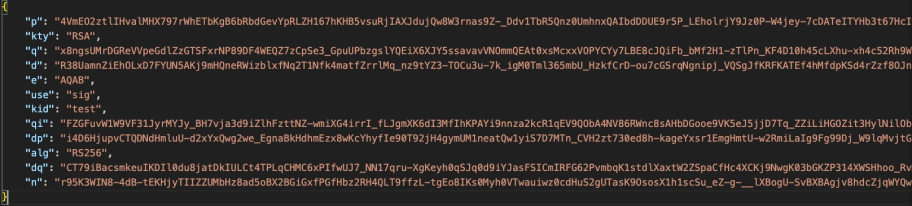
main()Note, that privateKey can be passed in JWK format or in PEM format, i.e. (examples generated with https://mkjwk.org):
Using a Python dictionary to hard-code the Zscaler API credentials is encouraged for development ONLY; In production, you should use a more secure way of storing these values. This library supports a few different configuration sources, covered in the configuration reference section.
NOTE: THIS IS NOT A PRODUCTION KEY AND IS DISPLAYED FOR EXAMPLE PURPOSES ONLY
or
NOTE: THIS IS NOT A PRODUCTION KEY AND IS DISPLAYED FOR EXAMPLE PURPOSES ONLY
-----BEGIN PRIVATE KEY-----
# Example private key (not a real key)
MIIEvQIBADANBgkqhkiG9w0BAQEFAASCBKcwggSjAgEAAoIBAQCv3krdYg3z7h0H
60QoePJMghllQxsfPxp3mgFfYEaIbF88Z8dvPZEfhAtP19/Mv62ASjwgqzQzKHRV
-----END PRIVATE KEY-----
It is possible to set custom headers, which will be sent with each request. This feature is only supported when instantiating the OneAPI Client ZscalerClient.
fromzscalerimportZscalerClientdefmain():
withZscalerClient(config) asclient:
client.set_custom_headers({'Custom-Header': 'custom value'})
groups, resp, err=client.zpa.segment_groups.list_groups()
forgroupingroups:
print(group.name, group.description)
# clear all custom headersclient.clear_custom_headers()
# output should be: {}print(client.get_custom_headers())
Note, that custom headers will be overwritten with default headers with the same name. This doesn't allow breaking the client. Get default headers:
The SDK automatically includes the x-partner-id header in all API requests when partnerId is provided in the configuration. This feature works seamlessly across all services (ZIA, ZPA, ZTW, ZCC, ZDX, ZWA) and both OneAPI and Legacy clients.
How it works:
- When
partnerIdis provided via config dictionary orZSCALER_PARTNER_IDenvironment variable, the SDK automatically addsx-partner-id: <partnerId>to all request headers - If
partnerIdis not provided, the header is not included - No additional code is required - the header injection is handled automatically by the SDK
Example:
fromzscalerimportZscalerClientconfig= {
"clientId": '{yourClientId}',
"clientSecret": '{yourClientSecret}',
"vanityDomain": '{yourvanityDomain}',
"partnerId": "542585sdsdw", # Automatically adds x-partner-id header to all requests"logging": {"enabled": False, "verbose": False},
}
defmain():
withZscalerClient(config) asclient:
# All API requests will automatically include: x-partner-id: 542585sdsdwgroups, resp, err=client.zpa.segment_groups.list_groups()
# ... rest of your code
Note: This feature is also supported in Legacy clients. When using LegacyZPAClient, LegacyZIAClient, etc., you can provide partnerId in the config dictionary and the header will be automatically included in all requests.
The Zscaler SDK provides a context manager pattern that automatically handles authentication and session cleanup for both ZIA and ZTW services. This pattern ensures that all configuration changes are properly activated when the context manager exits.
When you use the with statement with a Zscaler client, the following happens automatically:
- Authentication: The client authenticates when entering the context
- Session Management: A session is established and maintained throughout the context
- Automatic Deauthentication: When exiting the context, the client automatically deauthenticates, which activates all staged configuration changes
The context manager implements an "implicit activation" approach where:
- All changes are final: Configuration changes are automatically activated when the context exits
- No manual activation required: You don't need to remember to call activation endpoints
- Deterministic behavior: You always know that exiting the context will activate changes
- Automation-friendly: Perfect for scripts and automation scenarios
fromzscalerimportZscalerClientconfig= {
"clientId": '{yourClientId}',
"clientSecret": '{yourClientSecret}',
"vanityDomain": '{yourvanityDomain}',
"cloud": "beta", # Optional when authenticating to an alternative cloud environment"customerId": "", # Optional parameter. Required only when using ZPA"microtenantId": "", # Optional parameter. Required only when using ZPA with Microtenant"partnerId": "", # Optional parameter. When provided, automatically includes x-partner-id header in all requests"logging": {"enabled": False, "verbose": False},
}
defmain():
withZscalerClient(config) asclient:
# Make ZIA configuration changesadded_role, response, error=client.zia.admin_roles.add_role(
name="New API Role",
description="Role created via API",
feature_permissions={"ZIA_ADMIN_ROLE": "READ"}
)
iferror:
print(f"Error adding role: {error}")
return# Make ZTW configuration changesadded_group, response, error=client.ztw.ip_destination_groups.add_group(
name="New IP Group",
description="IP group created via API"
)
iferror:
print(f"Error adding IP group: {error}")
returnprint("All changes made successfully")
# Context manager automatically deauthenticates here# All staged changes are activated automatically for both ZIA and ZTWprint("Context exited - all changes have been activated")
if__name__=="__main__":
main()- Automatic cleanup: No need to manually deauthenticate
- Error handling: Even if an exception occurs, the context manager ensures proper cleanup
- Staged configuration activation: All changes are activated when the context exits
- Simplified code: No need to remember activation steps
- Multi-service support: Works seamlessly with both ZIA and ZTW services
Zscaler OneAPI provides unique rate limiting numbers for each individual product. Regardless of the product, a 429 response will be returned if too many requests are made within a given time.
This SDK uses a built-in retry strategy to automatically retry on 429 errors based on the response headers returned by each respective API service.
The header x-ratelimit-reset is returned in the API response for each API call, which indicates the time in seconds until the rate limit resets. The SDK uses the returned value in this header to calculate the retry time for the following services:
- ZCC Rate Limiting for rate limiting requirements.
- ZIA Rate Limiting for rate limiting requirements.
- ZPA Rate Limiting for rate limiting requirements.
The pagination system in this SDK is unified across ZCC, ZTW, ZDX, ZIA, ZPA, ZWA, ZCell
and is applied transparently whether you're using the Legacy API Client or the new OneAPI OAuth2 Client.
✅ This means no code changes are needed when transitioning from the legacy API framework to OneAPI framework.
When calling a method that supports pagination (e.g., list_users, list_groups, list_app_segments), only the first page of results is returned initially. The SDK returns a response tuple:
items, response, error=client.zia.user_management.list_groups()You can then use the response.has_next() and response.next() methods to retrieve subsequent pages.
query_parameters= {'page_size': 100}
groups, resp, err=client.zia.user_management.list_groups(query_parameters)
whileresp.has_next():
more_groups, resp, err=resp.next() # Unpack all 3 return valuesiferr:
breakifmore_groups:
groups.extend(more_groups)The ZPA API uses a filtering/query parameter format for search operations. Search strings must follow the format: fieldName operator fieldValue. The SDK provides automatic conversion for simple name searches while allowing full control for advanced filtering.
For convenience, you can provide a simple search string when searching by name. The SDK automatically converts it to the name+EQ+<search_string> format for exact name matching:
# Simple string search - automatically converted to name+EQ+CDE Segment Groupquery_parameters= {'search': 'CDE Segment Group'}
groups, resp, err=client.zpa.segment_groups.list_groups(query_parameters)To search by other fields or use different operators, you must provide the complete filter format: fieldName+operator+fieldValue. Common operators include:
EQ- EqualsNE- Not equalsGT- Greater thanLT- Less thanGE- Greater than or equalLE- Less than or equalCONTAINS- Contains substringSTARTSWITH- Starts withENDSWITH- Ends with
Examples:
# Search by enabled statusquery_parameters= {'search': 'enabled+EQ+true'}
groups, resp, err=client.zpa.segment_groups.list_groups(query_parameters)
# Search by description with CONTAINS operatorquery_parameters= {'search': 'description+CONTAINS+test'}
groups, resp, err=client.zpa.segment_groups.list_groups(query_parameters)
# Search by name with STARTSWITH operatorquery_parameters= {'search': 'name+STARTSWITH+CDE'}
groups, resp, err=client.zpa.segment_groups.list_groups(query_parameters)
Note: If your search string already contains a filter operator pattern (like +EQ+ or +CONTAINS+), the SDK will use it as-is without modification. This allows full control over filtering criteria while maintaining convenience for simple name searches.
You can combine search filters with pagination parameters:
query_parameters= {
'search': 'name+EQ+CDE Segment Group',
'page': 1,
'pagesize': 20
}
groups, resp, err=client.zpa.segment_groups.list_groups(query_parameters)
# Pagination works seamlessly with filtered searcheswhileresp.has_next():
more_groups, resp, err=resp.next()
iferr:
breakifmore_groups:
groups.extend(more_groups)defmain():
withZscalerClient(config) asclient:
query_parameters= {}
groups, resp, err=client.zia.user_management.list_groups(query_parameters)
iferr:
print(f"Error: {err}")
returnprint(f"Processing {len(groups)} groups:")
forgroupingroups:
print(group)
whileresp.has_next():
next_page, resp, err=resp.next() # Unpack all 3 return valuesiferr:
print(f"Error fetching next page: {err}")
breakifnext_page:
forgroupinnext_page:
print(group)
try:
resp.next() # Will raise StopIteration if no more dataexceptStopIteration:
print("✅ No more groups to retrieve.")
if__name__=="__main__":
main()Each Zscaler service has its own pagination requirements and limits. The SDK automatically respects these API defaults when no page_size is provided:
| Service | API Default Page Size | Max Page Size | Pagination Parameters |
|---|---|---|---|
| ZCC | Varies by endpoint | Varies | Uses page, pageSize |
| ZDX | 10 | Varies | Uses limit + offset (cursor-based) |
| ZIA | 100 | 1000 | Uses page, pageSize |
| ZPA | 20 | 500 | Uses page, pagesize |
| ZTW | 100 | Varies | Uses page, pageSize |
| ZWA | Varies by endpoint | Varies | Uses page, pageSize |
| ZCell | 10 | 100 | Uses page (0-based) + pageSize |
Important Notes:
- ✅ The SDK automatically uses each API's default page size when no
page_sizeis specified - ✅ Always use
snake_casefor parameter names (e.g.,page_size). The SDK handles conversion internally - ✅ Pagination stops automatically when fewer results than the page size are returned
You can control how many total items or pages the SDK will fetch even if more data is available.
The ZscalerAPIResponse object returned as resp handles:
- Tracking the current page
- Automatically applying proper pagination parameters per service
- Mapping pagination fields like page, pagesize, limit, offset, next_offset, etc.
- Fallback handling when the API doesn't indicate the total count
You don’t need to worry about API quirks—just use resp.has_next() and resp.next() safely.
next() is called and no more pages are available:
try:
resp.next()
exceptStopIteration:
print("All data fetched.")The SDK supports client-side filtering and projection of API results using JMESPath expressions. After any list call, you can use resp.search(expression) to filter, project, or reshape the response data without making additional API calls.
JMESPath is a query language for JSON that lets you declaratively extract and transform elements from JSON documents. The .search() method applies a JMESPath expression to the current page of results and returns a list of matching items.
# Fetch users and filter admin users client-sideusers, resp, err=client.zia.user_management.list_users()
admin_users=resp.search("[?adminUser==`true`]")
print(f"Found {len(admin_users)} admin users")# Extract only names and emailsusers, resp, err=client.zia.user_management.list_users()
names_emails=resp.search("[*].{name: name, email: email}")
foriteminnames_emails:
print(f"{item['name']}: {item['email']}")# Filter by role and project specific fieldsusers, resp, err=client.zia.user_management.list_users()
result=resp.search("[?adminUser==`true`].{name: name, id: id}")# Filter users by department nameusers, resp, err=client.zia.user_management.list_users()
eng_users=resp.search("[?department.name=='Engineering'].name").search() operates on the current page. To filter across all pages, apply it to each page as you paginate:
users, resp, err=client.zia.user_management.list_users(
query_params={"page_size": 1000}
)
all_admins=resp.search("[?adminUser==`true`]")
whileresp.has_next():
next_page, resp, err=resp.next()
iferr:
breakifnext_page:
all_admins.extend(resp.search("[?adminUser==`true`]"))
print(f"Total admins across all pages: {len(all_admins)}")For APIs that wrap results in a named key (e.g., ZDX items, ZBI reports), reference the key in the expression:
# ZDX software inventoryitems, resp, err=client.zdx.software.list_inventory()
zscaler_sw=resp.search(
"items[?vendor=='Zscaler'].{name: software_name, devices: device_total}"
)
# ZBI reportsreports, resp, err=client.zbi.reports.list_reports(report_type="APPLICATION")
completed=resp.search("reports[?status=='COMPLETED']")
JMESPath supports built-in functions like length(), sort_by(), max_by(), and more:
# Users with at least one group assignedusers, resp, err=client.zia.user_management.list_users()
with_groups=resp.search("[?length(groups || `[]`) > `0`]")
For the full JMESPath specification and function reference, see jmespath.org.
The Zscaler SDK Python, provides robust logging for debug purposes. Logs are disabled by default and should be enabled explicitly via client configuration or via a configuration file:
fromzscalerimportZscalerClientconfig= {"logging": {"enabled": True}}
client=ZscalerClient(config)
You can also enable debug logging via the following environment variables:
ZSCALER_SDK_LOG- Turn on loggingZSCALER_SDK_VERBOSE- Turn on logging in verbose mode
export ZSCALER_SDK_LOG=true
export ZSCALER_SDK_VERBOSE=true
This SDK utilizes the standard Python library logging. By default, log level INFO is set. You can set another log level by setting the argument verbose to True.
NOTE: DO NOT SET DEBUG LEVEL IN PRODUCTION!
fromzscalerimportZscalerClientconfig= {
"clientId": '{yourClientId}',
"clientSecret": '{yourClientSecret}',
"vanityDomain": '{yourvanityDomain}',
"cloud": "beta", # Optional when authenticating to an alternative cloud environment"customerId": "", # Optional parameter. Required only when using ZPA"microtenantId": "", # Optional parameter. Required only when using ZPA with Microtenant"logging": {"enabled": True, "verbose": True},
}
defmain():
withZscalerClient(config) asclient:
groups, resp, err=client.zpa.segment_groups.list_groups()
forgroupingroups:
print(group.name, group.description)
if__name__=="__main__":
main()
You should now see logs in your console. Notice that API Credentials i.e clientId and clientSecret are NOT logged to the console; however, Bearer tokens are still visible. We still advise to use caution and never use verbose level logging in production.
What it being logged? requests, responses, http errors, caching responses.
If your script defines its own logging configuration (e.g., for file or custom formatting), the SDK will not interfere with it. You can continue using your own logger like this:
importloggingmy_logger=logging.getLogger("my_app_logger")
my_logger.setLevel(logging.INFO)
handler=logging.StreamHandler()
handler.setFormatter(logging.Formatter("%(asctime)s - %(name)s - %(levelname)s - %(message)s"))
my_logger.addHandler(handler)
my_logger.info("This is your app-level log, independent from the SDK.")
To control SDK logging separately, use:
logging.getLogger("zscaler-sdk-python").setLevel(logging.WARNING) # or .ERROR to silence SDK logsThe SDK will never globally disable logging or interfere with your existing logging configuration.
This library looks for configuration in the following sources:
- An
zscaler.yamlfile in a.zscalerfolder in the current user's home directory (~/.zscaler/zscaler.yamlor%userprofile%\.zscaler\zscaler.yaml). See a sample YAML Configuration - A
zscaler.yamlfile in the application or project's root directory. See a sample YAML Configuration - Environment variables
- Configuration explicitly passed to the constructor (see the example in Getting started)
Only ONE source needs to be provided!
Higher numbers win. In other words, configuration passed via the constructor will OVERRIDE configuration found in environment variables, which will override configuration in the designated zscaler.yaml files.
NOTE: This option is only supported for OneAPI Zidentity credentials at the moment.
When you use an API Token instead of OAuth 2.0 the full YAML configuration looks like:
zscaler:
client:
clientId: { yourClientId }clientSecret: { yourClientSecret }vanityDomain: { yourVanityDomain }customerId: { yourCustomerId}proxy:
port: { proxy_port }host: { proxy_host }username: { proxy_username }password: { proxy_password }logging:
enabled: trueverbose: trueNOTE: THIS IS NOT A PRODUCTION KEY AND IS DISPLAYED FOR EXAMPLE PURPOSES ONLY
When you use OAuth 2.0 the full YAML configuration looks like:
zscaler:
client:
clientId: "YOUR_CLIENT_ID"privateKey: | -----BEGIN RSA PRIVATE KEY----- MIIEogIBAAKCAQEAl4F5CrP6Wu2kKwH1Z+CNBdo0iteHhVRIXeHdeoqIB1iXvuv4 THQdM5PIlot6XmeV1KUKuzw2ewDeb5zcasA4QHPcSVh2+KzbttPQ+RUXCUAr5t+r 0r6gBc5Dy1IPjCFsqsPJXFwqe3RzUb... -----END RSA PRIVATE KEY-----vanityDomain: { yourVanityDomain }customerId: { yourCustomerId}proxy:
port: { proxy_port }host: { proxy_host }username: { proxy_username }password: { proxy_password }logging:
enabled: trueverbose: trueEach one of the configuration values above can be turned into an environment variable name with the _ (underscore) character and UPPERCASE characters. The following are accepted:
| Argument | Description | Environment variable |
|---|---|---|
clientId | (String) Zscaler API Client ID, used with clientSecret or PrivateKey OAuth auth mode. | ZSCALER_CLIENT_ID |
clientSecret | (String) A string that contains the password for the API admin. | ZSCALER_CLIENT_SECRET |
privateKey | (String) A string Private key value. | ZSCALER_CLIENT_PRIVATEKEY |
vanityDomain | (String) Refers to the domain name used by your organization https://<vanity_domain>.zslogin.net/oauth2/v1/token | ZSCALER_VANITY_DOMAIN |
cloud | (String) The host and basePath for the cloud services API is $api.<cloud_name>.zsapi.net. | ZSCALER_CLOUD |
userAgent | (String) Append additional information to the HTTP User-Agent | ZSCALER_CLIENT_USERAGENT |
cache.enabled | (String) Use request memory cache | ZSCALER_CLIENT_CACHE_ENABLED |
cache.defaultTti | (String) Cache clean up interval in seconds | ZSCALER_CLIENT_CACHE_DEFAULTTTI |
cache.defaultTtl | (String) Cache time to live in seconds | ZSCALER_CLIENT_CACHE_DEFAULTTTL |
proxyPort | (String) HTTP proxy port | ZSCALER_CLIENT_PROXY_PORT |
proxyHost | (String) HTTP proxy host | ZSCALER_CLIENT_PROXY_HOST |
proxyUsername | (String) HTTP proxy username | ZSCALER_CLIENT_PROXY_USERNAME |
proxyPassword | (String) HTTP proxy password | ZSCALER_CLIENT_PROXY_PASSWORD |
disableHttpsCheck | (String) Disable SSL checks | ZSCALER_TESTING_TESTINGDISABLEHTTPSCHECK |
sandboxToken | (String) The Zscaler Internet Access Sandbox Token | ZSCALER_SANDBOX_TOKEN |
sandboxCloud | (String) The Zscaler Internet Access Sandbox cloud name | ZSCALER_SANDBOX_CLOUD |
This SDK supports programmatic integration with the Zscaler ZIdentity API service.
The authentication to Zscaler ZIdentity service via the OneAPI framework, requires uses the API client ZscalerClient
Access via client.zid (primary) or client.zidentity (backward-compatible alias).
ZIdentity API supports pagination with a maximum page size of 100 records per request. The SDK automatically handles pagination for ZIdentity endpoints.
Key Features:
- Maximum Page Size: 100 records per page (enforced by API)
- Automatic Pagination: SDK handles pagination transparently
- Response Format: Returns data in
recordsfield with pagination metadata
Example Usage:
fromzscalerimportZscalerClientconfig= {
"clientId": '{yourClientId}',
"clientSecret": '{yourClientSecret}',
"vanityDomain": '{yourvanityDomain}',
"cloud": "beta",
}
defmain():
withZscalerClient(config) asclient:
# Request 300 groups (will automatically fetch 3 pages)groups_response, response, error=client.zid.groups.list_groups(
query_params={'page_size': 300}
)
iferror:
print(f"Error listing groups: {error}")
returnprint(f"Total groups in response: {len(groups_response.records)}")
print(f"Total available: {groups_response.results_total}")
print(f"Page offset: {groups_response.page_offset}")
print(f"Page size: {groups_response.page_size}")
# Access individual groupsforgroupingroups_response.records:
print(f"Group: {group.name} (ID: {group.id})")
# Manual pagination using response objectwhileresponse.has_next():
next_results, error=response.next()
iferror:
print(f"Error fetching next page: {error}")
breakprint(f"Next page: {len(next_results)} groups")
forgroupinnext_results:
print(f"Group: {group['name']} (ID: {group['id']})")
if__name__=="__main__":
main()
Pagination Metadata:
results_total: Total number of records availablepage_offset: Current page offsetpage_size: Number of records per page (max 100)next_link: URL for next page (if available)prev_link: URL for previous page (if available)
| Argument | Description | Environment variable |
|---|---|---|
clientId | (String) Zscaler API Client ID, used with clientSecret or PrivateKey OAuth auth mode. | ZSCALER_CLIENT_ID |
clientSecret | (String) A string that contains the password for the API admin. | ZSCALER_CLIENT_SECRET |
privateKey | (String) A string Private key value. | ZSCALER_PRIVATE_KEY |
vanityDomain | (String) Refers to the domain name used by your organization https://<vanity_domain>.zslogin.net/oauth2/v1/token | ZSCALER_VANITY_DOMAIN |
cloud |
Construct a client instance by passing your ZIdentity clientId, clientSecret and vanityDomain:
fromzscalerimportZscalerClientconfig= {
"clientId": '{yourClientId}',
"clientSecret": '{yourClientSecret}',
"vanityDomain": '{yourvanityDomain}',
"cloud": "beta", # Optional when authenticating to an alternative cloud environment"logging": {"enabled": False, "verbose": False},
}
defmain():
withZscalerClient(config) asclient:
users, _, error=client.zid.groups.list_groups()
iferror:
print(f"Error listing users: {error}")
returnprint(f"Total users found: {len(users)}")
if__name__=="__main__":
main()fromzscalerimportZscalerClientconfig= {
"clientId": '{yourClientId}',
"privateKey": '{yourPrivateKey}',
"vanityDomain": '{yourvanityDomain}',
"cloud": "beta", # Optional when authenticating to an alternative cloud environment"logging": {"enabled": False, "verbose": False},
}
defmain():
withZscalerClient(config) asclient:
users, _, error=client.zid.groups.list_groups()
iferror:
print(f"Error listing users: {error}")
returnprint(f"Total users found: {len(users)}")
if__name__=="__main__":
main()To authenticate to the Zscaler Sandbox service you must authenticate by instantiating the ZscalerClient.
Authentication to Zscaler Sandbox requires the attribute/parameter sandboxCloud. The following cloud environments are supported:
zscalerzscaleronezscalertwozscalerthreezscloudzscalerbetazscalergovzscalertenzspreview
You can provide credentials via the ZSCALER_SANDBOX_TOKEN, ZSCALER_SANDBOX_CLOUD environment variables, representing your Zscaler Sandbox authentication paraemters respectively sandboxToken, sandboxCloud
| Argument | Description | Environment variable |
|---|---|---|
sandboxToken | (String) The Zscaler Internet Access Sandbox Token | ZSCALER_SANDBOX_TOKEN |
sandboxCloud | (String) The Zscaler Internet Access Sandbox cloud name | ZSCALER_SANDBOX_CLOUD |
fromzscalerimportZscalerClientconfig= {
"sandboxToken": '{yourSandboxToken}',
"sandboxCloud": '{yourSandboxCloud}',
"logging": {"enabled": False, "verbose": False},
}
defmain():
script_dir=os.path.dirname(os.path.abspath(__file__))
file_path=os.path.join(script_dir, "test-pe-file.exe")
force_analysis=TruewithZscalerClient(config) asclient:
submit, _, err=client.zia.sandbox.submit_file(file_path=file_path, force=force_analysis)
iferr:
print(f"Error submitting file: {err}")
else:
print("File submitted successfully!")
print(f"Response: {submit}")
if__name__=="__main__":
main()importrandomfromzscalerimportZscalerClientconfig= {
"sandboxToken": '{yourSandboxToken}',
"sandboxCloud": '{yourSandboxCloud}',
"logging": {"enabled": False, "verbose": False},
}
defmain():
script_dir=os.path.dirname(os.path.abspath(__file__))
file_path=os.path.join(script_dir, "test-pe-file.exe")
force_analysis=TruewithZscalerClient(config) asclient:
submit, _, err=client.zia.sandbox.submit_file(file_path=file_path, force=force_analysis)
iferr:
print(f"Error submitting file: {err}")
else:
print("File submitted successfully!")
print(f"Response: {submit}")
if__name__=="__main__":
main()Z-Insights provides visibility and analytics across web traffic, firewall, IoT, SaaS security, shadow IT, and cyber security domains via a GraphQL API.
Note: Z-Insights only supports OneAPI authentication. Legacy client authentication is not supported.
fromzscalerimportZscalerClientconfig= {
"clientId": '{yourClientId}',
"clientSecret": '{yourClientSecret}',
"vanityDomain": '{yourvanityDomain}',
"cloud": "beta",
}
defmain():
withZscalerClient(config) asclient:
entries, _, err=client.zins.web_traffic.get_traffic_by_location(
start_time=start_time, end_time=end_time,
traffic_unit="TRANSACTIONS", limit=10
)
iferr:
print(f"Error: {err}")
returnprint(f"Entries: {len(entries) ifentrieselse0}")
if__name__=="__main__":
main()
Available Resources (via client.zins.<resource>):
web_traffic— Traffic by location, protocols, threat categories, no-groupingfirewall— Traffic by action, location, network servicescyber_security— Incidentssaas_security— CASB app reportsshadow_it— Shadow IT app discoveryiot— IoT device statistics
Note:client.zinsights is available as a backward-compatible alias for client.zins.
ZMS provides microsegmentation management for agents, resources, policy rules, app zones, and tagging via a GraphQL API.
Note: ZMS only supports OneAPI authentication. Legacy client authentication is not supported.
fromzscalerimportZscalerClientconfig= {
"clientId": '{yourClientId}',
"clientSecret": '{yourClientSecret}',
"vanityDomain": '{yourvanityDomain}',
"cloud": "beta",
}
defmain():
withZscalerClient(config) asclient:
result, _, err=client.zms.agents.list_agents(
customer_id="123456789", page=1, page_size=20
)
iferr:
print(f"Error: {err}")
returnforagentinresult.get("nodes", []):
print(agent.get("name"))
if__name__=="__main__":
main()
Available Resources (via client.zms.<resource>):
agents— List agents, connection status statistics, version statisticsagent_groups— List agent groups, get TOTP secretsnonces— List nonces (provisioning keys), get nonce by IDresources— List resources, protection status, event metadataresource_groups— List resource groups, get members, protection statuspolicy_rules— List policy rules, list default policy rulesapp_zones— List app zones with filtering and paginationapp_catalog— List app catalog entries with filtering and orderingtags— List tag namespaces, tag keys, and tag values
Note:client.zmicroseg is available as an alias for client.zms.
AI Guard provides configuration and detection APIs to secure the use of generative AI — detection policies, policy match rules, LLM providers, LLM applications, and their credentials.
AI Guard is split across two authentication paths:
| Resource | Client | Endpoint |
|---|---|---|
| Detection policies, policy match rules, LLM providers/applications and their credentials | ZscalerClient (OneAPI) | /aiguard/v1/* |
policy_detection — execute_policy, resolve_and_execute_policy | LegacyAIGuardClient | /v1/detection/* |
Important: the policy detection endpoints are not exposed through OneAPI. They must be
called with LegacyAIGuardClient, which authenticates with an AI Guard API key against
https://api.<cloud>.zseclipse.net. Every other AI Guard resource is OneAPI only.
fromzscalerimportZscalerClientconfig= {
"clientId": '{yourClientId}',
"clientSecret": '{yourClientSecret}',
"vanityDomain": '{yourvanityDomain}',
"cloud": "beta",
}
defmain():
withZscalerClient(config) asclient:
policies, _, err=client.aiguard.policies.list_policies()
iferr:
print(f"Error: {err}")
returnforpolicyinpolicies:
print(policy.as_dict())
if__name__=="__main__":
main()
Available Resources (via client.aiguard.<resource>):
policies— List, get (by ID or name), create, update, and delete detection policiespolicy_match_rules— List, get (by ID or name), create, update, and delete policy match rulesllm_providers— Manage LLM providers, list provider types, and run referential checksllm_provider_credentials— Manage LLM provider credentials and run referential checksllm_applications— Manage LLM applications and run referential checksllm_application_credentials— Manage LLM application credentials
Policy detection (legacy client only):
fromzscaler.oneapi_clientimportLegacyAIGuardClientconfig= {
"api_key": '{yourAIGuardApiKey}', # or the AIGUARD_API_KEY environment variable"cloud": "us1", # or AIGUARD_CLOUD
}
defmain():
withLegacyAIGuardClient(config) asclient:
result, _, err=client.aiguard.policy_detection.resolve_and_execute_policy(
content="User prompt or AI response to scan",
direction="IN",
)
iferr:
print(f"Error: {err}")
returnprint(result.as_dict())
if__name__=="__main__":
main()policy_detection— Execute a detection policy (execute_policy) or resolve-and-execute (resolve_and_execute_policy) against content. RequiresLegacyAIGuardClient.
Note:client.zguard is available as a deprecated alias for client.aiguard.
The legacy Zscaler API is still utilized by several customers, and will remain in place for the foreseeable future with no specific announced deprecation date.
Organizations whose tenant is still not migrated to Zidentity must continue using their previous ZIA API credentials.
This SDK provides a dedicated API client LegacyZIAClient compatible with the legacy framework, which must be used in this scenario.
- For authentication via Zscaler Internet Access, you must provide
username,password,api_keyandcloud
The ZIA Cloud is identified by several cloud name prefixes, which determines which API endpoint the requests should be sent to. The following cloud environments are supported:
zscalerzscaleronezscalertwozscalerthreezscloudzscalerbetazscalergovzscalertenzspreview
You can provide credentials via the ZIA_USERNAME, ZIA_PASSWORD, ZIA_API_KEY, ZIA_CLOUD environment variables, representing your ZIA username, password, api_key and cloud respectively.
| Argument | Description | Environment variable |
|---|---|---|
username | (String) A string that contains the email ID of the API admin. | ZIA_USERNAME |
password | (String) A string that contains the password for the API admin. | ZIA_PASSWORD |
api_key | (String) A string that contains the obfuscated API key (i.e., the return value of the obfuscateApiKey() method). | ZIA_API_KEY |
cloud | (String) The host and basePath for the cloud services API is $zsapi.<Zscaler Cloud Name>/api/v1. | ZIA_CLOUD |
sandboxToken | (String) The Zscaler Internet Access Sandbox Token | ZSCALER_SANDBOX_TOKEN |
sandboxCloud | (String) The Zscaler Internet Access Sandbox cloud name | ZSCALER_SANDBOX_CLOUD |
importrandomfromzscaler.oneapi_clientimportLegacyZIAClientconfig= {
"username": '{yourUsername}',
"password": '{yourPassword}',
"api_key": '{yourApiKey}',
"cloud": '{yourCloud}',
"logging": {"enabled": False, "verbose": False},
}
defmain():
withLegacyZIAClient(config) asclient:
added_label, response, error=client.zia.rule_labels.add_label(
name=f"NewLabel_{random.randint(1000, 10000)}",
description=f"NewLabel_{random.randint(1000, 10000)}",
)
iferr:
print(f"Error adding label: {err}")
returnprint(f"Label added successfully: {added_label.as_dict()}")
if__name__=="__main__":
main()The Zscaler SDK provides a context manager pattern that automatically handles authentication and session cleanup for both ZIA and ZTW services. This pattern ensures that all configuration changes are properly activated when the context manager exits.
When you use the with statement with a Zscaler client, the following happens automatically:
- Authentication: The client authenticates when entering the context
- Session Management: A session is established and maintained throughout the context
- Automatic Deauthentication: When exiting the context, the client automatically deauthenticates, which activates all staged configuration changes
The context manager implements an "implicit activation" approach where:
- All changes are final: Configuration changes are automatically activated when the context exits
- No manual activation required: You don't need to remember to call activation endpoints
- Deterministic behavior: You always know that exiting the context will activate changes
- Automation-friendly: Perfect for scripts and automation scenarios
importrandomfromzscaler.oneapi_clientimportLegacyZIAClientconfig= {
"username": '{yourUsername}',
"password": '{yourPassword}',
"api_key": '{yourApiKey}',
"cloud": '{yourCloud}',
"logging": {"enabled": False, "verbose": False},
}
defmain():
withLegacyZIAClient(config) asclient:
# Make configuration changesadded_label, response, error=client.zia.rule_labels.add_label(
name=f"NewLabel_{random.randint(1000, 10000)}",
description=f"NewLabel_{random.randint(1000, 10000)}",
)
iferror:
print(f"Error adding label: {error}")
return# Make more changesupdated_role, response, error=client.zia.admin_roles.update_role(
role_id="12345",
name="Updated Role Name"
)
iferror:
print(f"Error updating role: {error}")
returnprint("All changes made successfully")
# Context manager automatically deauthenticates here# All staged changes are activated automaticallyprint("Context exited - all changes have been activated")
if__name__=="__main__":
main()- Automatic cleanup: No need to manually deauthenticate
- Error handling: Even if an exception occurs, the context manager ensures proper cleanup
- Staged configuration activation: All changes are activated when the context exits
- Simplified code: No need to remember activation steps
Organizations whose tenant is still not migrated to Zidentity must continue using their previous ZTW API credentials.
This SDK provides a dedicated API client LegacyZTWClient compatible with the legacy framework, which must be used in this scenario.
- For authentication via Zscaler Internet Access, you must provide
username,password,api_keyandcloud
The ZTW Cloud is identified by several cloud name prefixes, which determines which API endpoint the requests should be sent to. The following cloud environments are supported:
zscalerzscaleronezscalertwozscalerthreezscloudzscalerbetazscalergovzscalertenzspreview
You can provide credentials via the ZTW_USERNAME, ZTW_PASSWORD, ZTW_API_KEY, ZTW_CLOUD environment variables, representing your ZTW username, password, api_key and cloud respectively.
| Argument | Description | Environment variable |
|---|---|---|
username | (String) A string that contains the email ID of the API admin. | ZTW_USERNAME |
password | (String) A string that contains the password for the API admin. | ZTW_PASSWORD |
api_key | (String) A string that contains the obfuscated API key (i.e., the return value of the obfuscateApiKey() method). | ZTW_API_KEY |
cloud | (String) The host and basePath for the cloud services API is $zsapi.<Zscaler Cloud Name>/api/v1. | ZTW_CLOUD |
importrandomfromzscaler.oneapi_clientimportLegacyZTWClientconfig= {
"username": '{yourUsername}',
"password": '{yourPassword}',
"api_key": '{yourApiKey}',
"cloud": '{yourCloud}',
"logging": {"enabled": False, "verbose": False},
}
defmain():
withLegacyZTWClient(config) asclient:
fetched_prov_url, response, error=client.ZTW.provisioning_url.list_provisioning_url()
iferror:
print(f"Error fetching prov url by ID: {error}")
returnprint(f"Fetched prov url by ID: {fetched_prov_url.as_dict()}")
if__name__=="__main__":
main()Organizations whose tenant is still not migrated to Zidentity must continue using their previous ZPA API credentials.
This SDK provides a dedicated API client LegacyZPAClient compatible with the legacy framework, which must be used in this scenario.
- For authentication via Zscaler Private Access, you must provide
client_id,client_secret,customer_idandcloud
The ZPA Cloud is identified by several cloud name prefixes, which determines which API endpoint the requests should be sent to. The following cloud environments are supported:
PRODUCTIONZPATWOBETAGOVGOVUS
You can provide credentials via the ZPA_CLIENT_ID, ZPA_CLIENT_SECRET, ZPA_CUSTOMER_ID, ZPA_CLOUD, ZSCALER_PARTNER_ID environment variables, representing your ZPA clientId, clientSecret, customerId, cloud and partnerId of your ZPA account, respectively.
~> NOTEZPA_CLOUD environment variable is required, and is used to identify the correct API gateway where the API requests should be forwarded to.
| Argument | Description | Environment variable |
|---|---|---|
clientId | (String) The ZPA API client ID generated from the ZPA console. | ZPA_CLIENT_ID |
clientSecret | (String) The ZPA API client secret generated from the ZPA console. | ZPA_CLIENT_SECRET |
customerId | (String) The ZPA tenant ID found in the Administration > Company menu in the ZPA console. | ZPA_CUSTOMER_ID |
microtenantId | (String) The ZPA microtenant ID found in the respective microtenant instance under Configuration & Control > Public API > API Keys menu in the ZPA console. | ZPA_MICROTENANT_ID |
partnerId | (String) Optional partner ID. When provided, the SDK automatically includes the x-partner-id header in all API requests. | ZSCALER_PARTNER_ID |
cloud | (String) The Zscaler cloud for your tenancy. | ZPA_CLOUD |
importrandomfromzscaler.oneapi_clientimportLegacyZPAClientconfig= {
"clientId": '{yourClientId}',
"clientSecret": '{yourClientSecret}',
"customerId": '{yourCustomerId}',
"microtenantId": '{yourMicrotenantId}',
"partnerId": "", # Optional parameter. When provided, automatically includes x-partner-id header in all requests"cloud": '{yourCloud}',
"logging": {"enabled": False, "verbose": False},
}
defmain():
withLegacyZPAClient(config) asclient:
added_label, response, error=client.zpa.segment_groups.add_group(
name=f"NewGroup_{random.randint(1000, 10000)}",
description=f"NewGroup_{random.randint(1000, 10000)}",
enabled=True
)
iferr:
print(f"Error adding segment group: {err}")
returnprint(f"Segment Group added successfully: {added_label.as_dict()}")
if__name__=="__main__":
main()Organizations whose tenant is still not migrated to Zidentity must continue using their previous ZCC API credentials.
This SDK provides a dedicated API client LegacyZCCClient compatible with the legacy framework, which must be used in this scenario.
- For authentication via Zscaler Client Connector (ZCC), you must provide
api_key,secret_key, andcloud
The ZCC Cloud is identified by several cloud name prefixes, which determines which API endpoint the requests should be sent to. The following cloud environments are supported:
zscalerzscaleronezscalertwozscalerthreezscloudzscalerbetazscalergovzscalertenzspreview
You can provide credentials via the ZCC_CLIENT_ID, ZCC_CLIENT_SECRET, ZCC_CLOUD environment variables, representing your ZIA api_key, secret_key, and cloud respectively.
~> NOTEZCC_CLOUD environment variable is required, and is used to identify the correct API gateway where the API requests should be forwarded to.
| Argument | Description | Environment variable |
|---|---|---|
api_key | (String) A string that contains the apiKey for the Mobile Portal. | ZCC_CLIENT_ID |
secret_key | (String) A string that contains the secret key for the Mobile Portal. | ZCC_CLIENT_SECRET |
cloud | (String) The host and basePath for the ZCC cloud services API is $mobileadmin.<Zscaler Cloud Name>/papi. | ZCC_CLOUD |
importrandomfromzscaler.oneapi_clientimportLegacyZCCClientconfig= {
"api_key": '{yourApiKey}',
"secret_key": '{yourSecreKey}',
"cloud": '{yourCloud}',
"logging": {"enabled": False, "verbose": False},
}
withLegacyZCCClient(config) asclient:
forgroupinclient.zcc.devices.list_devices():
print(group)
if__name__=="__main__":
main()This SDK provides a dedicated API client LegacyZDXClient compatible with the legacy framework, which must be used in this scenario.
- For authentication via Zscaler Digital Experience (ZDX), you must provide
key_id,key_secret
The ZDX cloud attribute identifies the cloud name prefix, which determines which API endpoint the requests should be sent to. By default the ZDX API client will always send the request to the following cloud: zdxcloud
zdxcloudzdxbeta
You can provide credentials via the ZDX_CLIENT_ID, ZDX_CLIENT_SECRET environment variables, representing your ZDX key_id, key_secret of your ZDX account, respectively.
| Argument | Description | Environment variable |
|---|---|---|
key_id | (String) A string that contains the key_id for the ZDX Portal. | ZDX_CLIENT_ID |
key_secret | (String) A string that contains the key_secret key for the ZDX Portal. | ZDX_CLIENT_SECRET |
cloud | (String) The cloud name prefix that identifies the correct API endpoint. | ZDX_CLOUD |
importrandomfromzscaler.oneapi_clientimportLegacyZDXClientconfig= {
"key_id": '{yourKeyId}',
"key_secret": '{yourKeySecret}',
"cloud": '{yourCloud}',
"logging": {"enabled": False, "verbose": False},
}
defmain():
withLegacyZDXClient(config) asclient:
app_list, _, err=client.zdx.apps.list_apps(query_params{"since": 2})
iferr:
print(f"Error listing applications: {err}")
returnforappinapp_list:
print(app.as_dict())
if__name__=="__main__":
main()This SDK provides a dedicated API client LegacyZWAClient compatible with the legacy framework, which must be used in this scenario.
- For authentication via Zscaler Workflow Automation (ZWA), you must provide
key_id,key_secret
The ZWA cloud attribute identifies the cloud name prefix, which determines which API endpoint the requests should be sent to. By default the ZDX API client will always send the request to the following cloud: us1
us1
For authentication via Zscaler Workflow Automation (ZWA), you must provide key_id, key_secret
You can provide credentials via the ZWA_CLIENT_ID, ZWA_CLIENT_SECRET environment variables, representing your ZDX key_id, key_secret of your ZWA account, respectively.
| Argument | Description | Environment variable |
|---|---|---|
key_id | (String) The ZWA string that contains the API key ID. | ZWA_CLIENT_ID |
key_secret | (String) The ZWA string that contains the key secret. | ZWA_CLIENT_SECRET |
cloud | (String) The ZWA string containing cloud provisioned for your organization. | ZWA_CLOUD |
importrandomfromzscaler.oneapi_clientimportLegacyZWAClientconfig= {
"key_id": '{yourKeyId}',
"key_secret": '{yourKeySecret}',
"cloud": '{yourCloud}',
"logging": {"enabled": False, "verbose": False},
}
defmain():
withLegacyZWAClient(config) asclient:
transactions, _, err=client.zwa.dlp_incidents.get_incident_transactions('SVDP-17410643229970491392')
iferr:
print(f"Error listing transactions: {err}")
returnforincidentintransactions:
print(incident.as_dict())
if__name__=="__main__":
main()ZTB (Zero Trust Branch) authenticates via API key. The client calls
POST /api/v3/api-key-auth/login with {"api_key": "..."} and receives a
delegate_token used as Authorization: Bearer <token> for all subsequent requests.
Unlike ZIA/ZTW, ZTB does not use JSESSIONID session cookies.
Environment Variables:
| Variable | Required | Description |
|---|---|---|
ZTB_API_KEY | Yes (or pass api_key) | ZTB API key created in the ZTB UI |
ZTB_CLOUD | Yes* (or pass cloud) | Cloud subdomain for your tenancy (e.g. zscalerbd-api). Used to build base URL: https://{cloud}.goairgap.com |
ZTB_OVERRIDE_URL | No (or pass override_url) | Full base URL override (e.g. https://zscalerbd-api.goairgap.com). If set, cloud is not required. Use for non-standard or test URLs. |
ZSCALER_PARTNER_ID | No | Partner ID for x-partner-id header |
* Either ZTB_CLOUD or ZTB_OVERRIDE_URL must be provided.
Configuration Options:
| Option | Default | Description |
|---|---|---|
api_key | (required) | ZTB API key from the ZTB console |
cloud | (required if no override_url) | Cloud subdomain (e.g. zscalerbd-api) |
override_url | None | Full base URL override. When set, cloud is ignored. Include protocol (https://). |
partner_id | None | Partner ID for x-partner-id header |
timeout | 240 | Request timeout in seconds |
max_retries | 5 | Max retry attempts for 429/5xx/network errors |
Important Notes:
- On 401 Unauthorized, the client automatically re-authenticates and retries once.
- On 429 (rate limit) or 5xx (502/503/504), the SDK retries with exponential backoff.
- ZTB is available only via the Legacy client (
LegacyZTBClient). OneAPI/OAuth2 is not supported for ZTB.
Available Resources (via client.ztb.<resource>):
alarms— Alarms APIapi_keys— API key authapp_connector_config— App connector configurationdevices— Active devices, device tags, OS list, device details, DHCP history, filter valuesgroups_router— Groups routerlogs— Logs and visibility chartspolicy_comments— Policy commentsransomware_kill— Ransomware killsite— Site managementsite2site_vpn— Site-to-site VPN (Cloud Gateway)template_router— Template router
Usage Example (Legacy Client):
fromzscaler.oneapi_clientimportLegacyZTBClientconfig= {
"api_key": "{yourZTBAPIKey}",
"cloud": "zscalerbd-api", # or use override_url for full URL"logging": {"enabled": False, "verbose": False},
}
defmain():
withLegacyZTBClient(config) asclient:
alarms, response, error=client.ztb.alarms.list_alarms()
iferror:
print(f"Error listing alarms: {error}")
returnprint(f"Alarms: {alarms}")
devices, _, err=client.ztb.devices.list_active_devices(
query_params={"page": 1, "limit": 25}
)
ifnoterr:
fordindevices:
print(d.hostname)
if__name__=="__main__":
main()
Using override_url (e.g. for test or custom tenant):
config= {
"api_key": "{yourZTBAPIKey}",
"override_url": "https://{yourSubdomain}.goairgap.com",
}
Zscaler provides unique rate limiting numbers for each individual product. Regardless of the product, a 429 response will be returned if too many requests are made within a given time. Please see:
The header X-Rate-Limit-Remaining is returned in the API response for each API call. This header indicates the time in seconds until the rate limit resets. The SDK uses the returned value to calculate the retry time for the following services:
- ZCC Rate Limiting for rate limiting requirements.
The header RateLimit-Reset is returned in the API response for each API call. This header indicates the time in seconds until the rate limit resets. The SDK uses the returned value to calculate the retry time for the following services:
- ZDX Rate Limiting for rate limiting requirements.
- ZWA Rate Limiting for rate limiting requirements.
When a 429 error is received, the Retry-After header is returned in the API response. The SDK uses the returned value to calculate the retry time. The following services are rate limited based on its respective endpoint.
- ZTW Rate Limiting for a complete list of which endpoints are rate limited.
- ZIA Rate Limiting for a complete list of which endpoints are rate limited.
When a 429 error is received, the retry-after header will tell you the time at which you can retry. The SDK uses the returned value to calculate the retry time.
- ZPA Rate Limiting for rate limiting requirements.
This SDK uses the built-in retry strategy to automatically retry on 429 errors based on the response headers returned by each respective API service.
| Configuration Option | Description |
|---|---|
| client.rateLimit.maxRetries | The number of times to retry (on retryable errors) |
| client.rateLimit.maxRetrySeconds | Max wait duration allowed for a retry backoff |
At this moment we are not accepting contributions, but we welcome suggestions on how to improve this SDK or feature requests, which can then be added in future releases.
Thank you to Mitch Kelly, creator of the PyZscaler SDK, which this SDK was inspired on.
=======
Copyright (c) 2023 Zscaler
Permission is hereby granted, free of charge, to any person obtaining a copy of this software and associated documentation files (the "Software"), to deal in the Software without restriction, including without limitation the rights to use, copy, modify, merge, publish, distribute, sublicense, and/or sell copies of the Software, and to permit persons to whom the Software is furnished to do so, subject to the following conditions:
The above copyright notice and this permission notice shall be included in all copies or substantial portions of the Software.
THE SOFTWARE IS PROVIDED "AS IS", WITHOUT WARRANTY OF ANY KIND, EXPRESS OR IMPLIED, INCLUDING BUT NOT LIMITED TO THE WARRANTIES OF MERCHANTABILITY, FITNESS FOR A PARTICULAR PURPOSE AND NONINFRINGEMENT. IN NO EVENT SHALL THE AUTHORS OR COPYRIGHT HOLDERS BE LIABLE FOR ANY CLAIM, DAMAGES OR OTHER LIABILITY, WHETHER IN AN ACTION OF CONTRACT, TORT OR OTHERWISE, ARISING FROM, OUT OF OR IN CONNECTION WITH THE SOFTWARE OR THE USE OR OTHER DEALINGS IN THE SOFTWARE.