This repository was archived by the owner on Aug 1, 2022. It is now read-only.

Latest commit

History

177 Commits

Folders and files

NameName
Last commit message
Last commit date

Repository files navigation

Deprecated

This repository is now deprecated, will no longer be updated and is being archived. Please visit the new project/replacement:


AMVD - Automated Music Video Downloader

RandomNinjaAtk/amvd is a Lidarr companion script to automatically download and tag Music Videos for use in other video applications (plex/kodi/jellyfin/emby)

RandomNinjaAtk/amvd

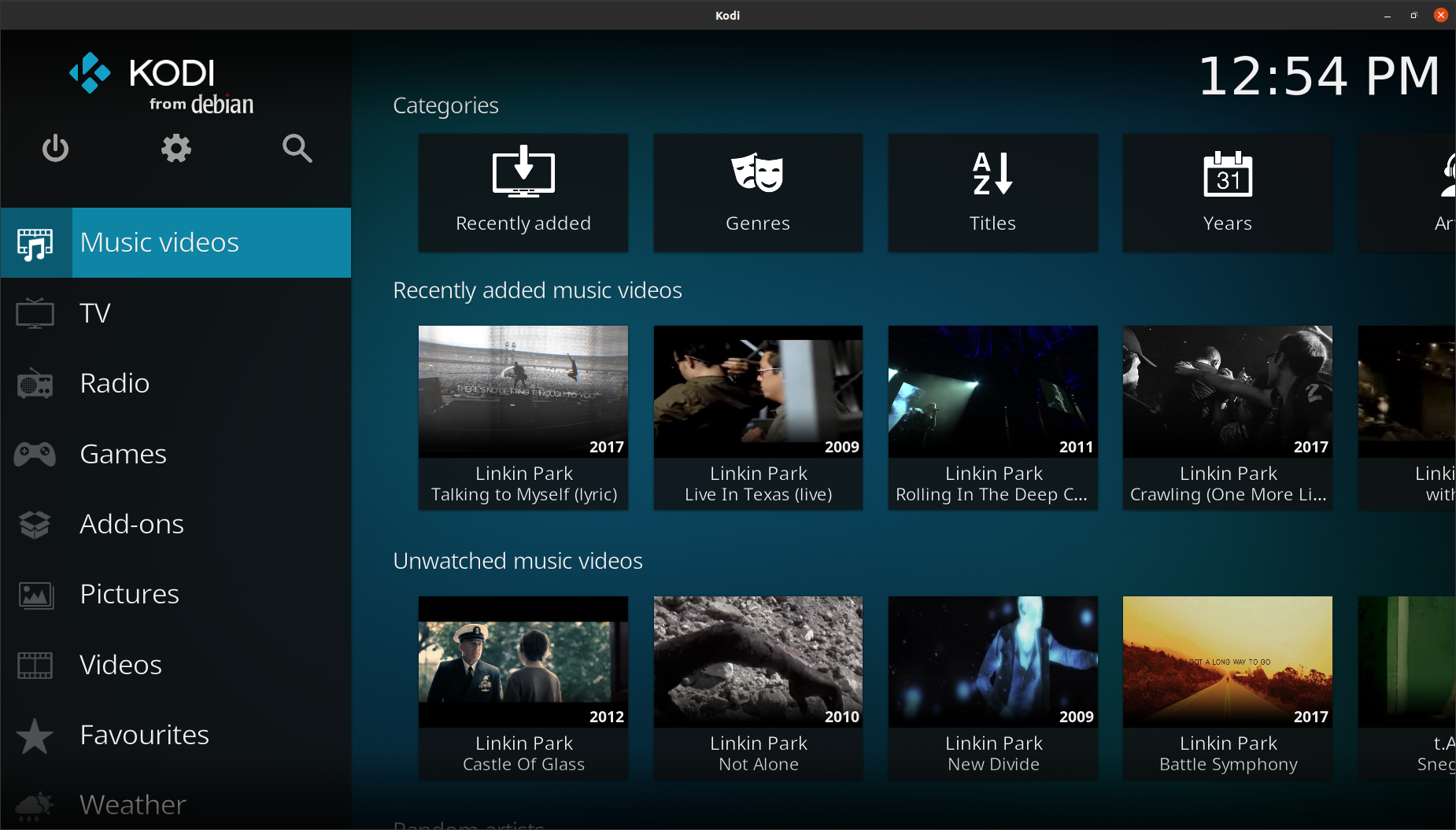
Video Example (Kodi)

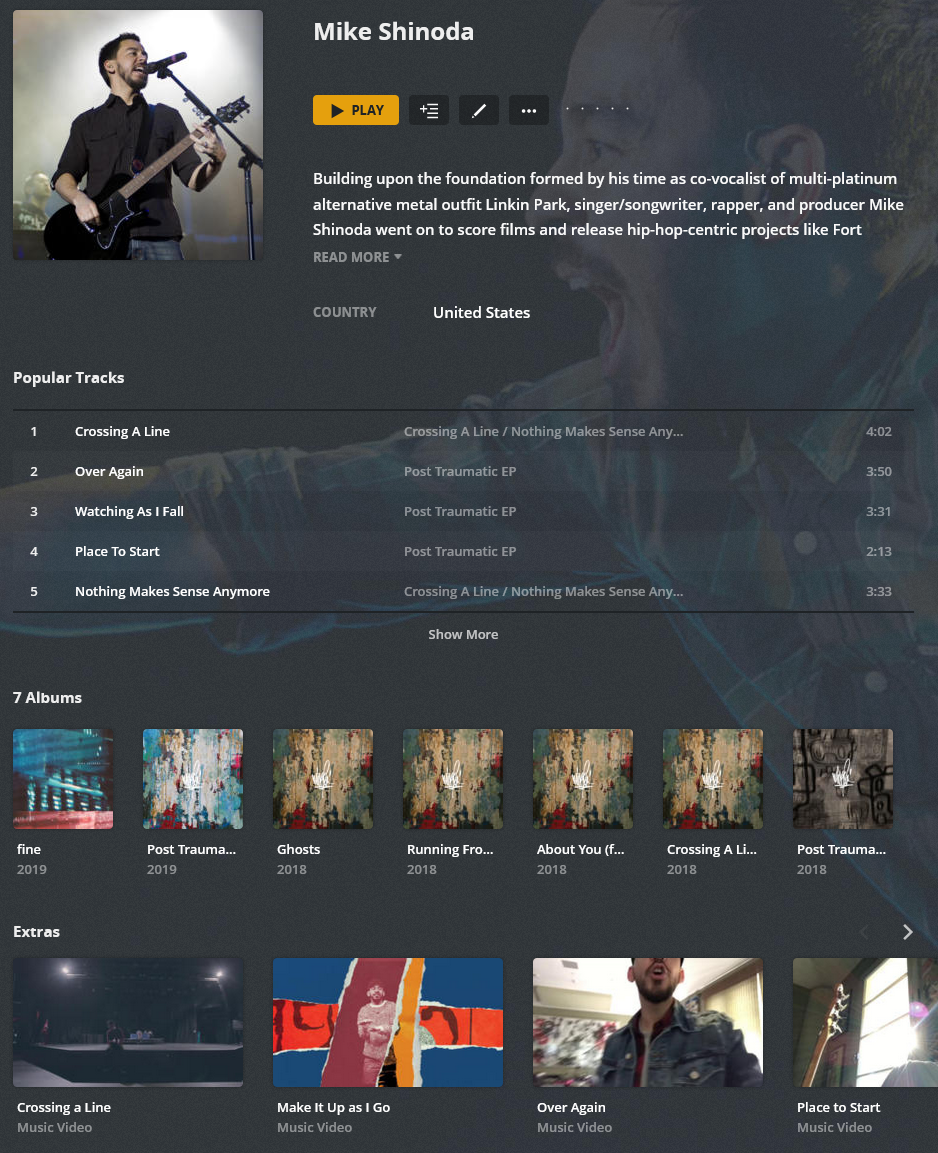
Audio (AMD) + Video (AMVD) (Plex Example)

Features

  • Downloading Music Videos using online sources for use in popular applications (Plex/Kodi/Emby/Jellyfin):
    • Support for IMVDb (https://imvdb.com) to find videos
    • Support for Musicbrainz Database (https://musicbrainz.org) to find videos
    • Downloads using Highest available quality for both audio and video
    • Saves thumbnail of video locally for Plex/Kodi/Jellyfin/Emby usage
    • Matching videos with Musicbrainz Artist track info
    • Embed subtitles if available matching desired language
    • Writes metadata into Kodi/Jellyfin/Emby compliant NFO file
      • Tagged Data includes
        • Title (IMVDb)
        • Year (IMVDb)
        • Matched Artist (Lidarr)
        • Thumbnail Image
        • Artist Genere Tags (MusicBrainz)
        • Director (If available from IMVDb)
    • Embeds metadata into Music Video file
      • Tagged Data includes
        • Title (IMVDb)
        • Year (IMVDb)
        • Matched Artist (Lidarr)
        • Matched Album Artist (Lidarr)
        • Thumbnail Image
        • Artist Genere Tags (Lidarr)

Supported Architectures

The architectures supported by this image are:

ArchitectureTag
x86-64latest

Version Tags

TagDescription
latestNewest release code

Parameters

Container images are configured using parameters passed at runtime (such as those above). These parameters are separated by a colon and indicate <external>:<internal> respectively. For example, -p 8080:80 would expose port 80 from inside the container to be accessible from the host's IP on port 8080 outside the container.

ParameterFunction
-e PUID=1000for UserID - see below for explanation
-e PGID=1000for GroupID - see below for explanation
-v /configConfiguration files for Lidarr.
-v /downloads-amvdLocation of music videos, also add a volume to match the location
-v /amaOptional :: Map this to the AMA containers /config folder for proper usage
-v /tmpOptional :: Downloads are downloaded to this temporary location before moving to final library/folder destination
-e updateScripts="true"true = Enabled :: Updates scripts on startup :: Optional
-e AUTOSTART="true"true = Enabled :: Runs script automatically on startup
-e SCRIPTINTERVAL=1h#s or #m or #h or #d :: s = seconds, m = minutes, h = hours, d = days :: Amount of time between each script run, when AUTOSTART is enabled
-e LidarrUrl="http://127.0.0.1:8686"Set domain or IP to your Lidarr instance including port. If using reverse proxy, do not use a trailing slash. Ensure you specify http/s.
-e LidarrAPIkey="08d108d108d108d108d108d108d108d1"Lidarr API key.
-e MBRAINZMIRROR="https://musicbrainz.org"OPTIONAL :: Only change if using a different mirror
-e MBRATELIMIT=1OPTIONAL: musicbrainz rate limit, musicbrainz allows only 1 connection per second, max setting is 10
-e SOURCE_CONNECTION=lidarrlidarr or ama :: ama requires the AMA config folder to be mounted as a volume: /ama
-e CountryCode=usSet the country code for preferred video matching, uses Musicbrainz Country Codes, lowercase only.
-e subtitlelanguage="en"Desired Language Code :: For guidence, please see youtube-dl documentation.
-e WriteNFOs="false"true = enabled :: Create NFO and Local Thumbnail for use in applications such as Kodi
-e USEFOLDERS=falsetrue = enabled :: Creates subfolders using the Lidarr Artist folder name
-e USEVIDEOFOLDERS=falsetrue = enabled :: Creates subfolders using Video File Name only, requires USEFOLDERS to be enabled
-e FilePermissions=666Optional :: Based on chmod linux permissions
-e FolderPermissions=777Optional :: Based on chmod linux permissions

Usage

Here are some example snippets to help you get started creating a container.

docker

docker create \
--name=amvd \
-v /path/to/config/files:/config \
-v /path/to/music-videos:/downloads-amvd \
-v /path/to/ama/config:/ama \
-v /path/to/tmp:/tmp \
-e PUID=1000 \
-e PGID=1000 \
-e AUTOSTART=true \
-e SCRIPTINTERVAL=1h \
-e SOURCE_CONNECTION=lidarr \
-e subtitlelanguage=en \
-e videofilter=live \
-e USEFOLDERS=false \
-e USEVIDEOFOLDERS=false \
-e MBRAINZMIRROR=https://musicbrainz.org \
-e MBRATELIMIT=1 \
-e LidarrUrl=http://127.0.0.1:8686 \
-e LidarrAPIkey=LIDARRAPI \
-e CountryCode=us \
--restart unless-stopped \
randomninjaatk/amvd 

docker-compose

Compatible with docker-compose v2 schemas.

version: "2.1"
services:
amvd:
image: randomninjaatk/amvd container_name: amvd
volumes:
- /path/to/config/files:/config
- /path/to/music-videos:/downloads-amvd
- /path/to/ama/config:/ama
- /path/to/tmp:/tmp
environment:
- PUID=1000
- PGID=1000
- AUTOSTART=true
- SCRIPTINTERVAL=1h
- SOURCE_CONNECTION=lidarr
- subtitlelanguage=en
- videofilter=live
- USEFOLDERS=false
- USEVIDEOFOLDERS=false
- MBRAINZMIRROR=https://musicbrainz.org
- MBRATELIMIT=1
- LidarrUrl=http://127.0.0.1:8686
- LidarrAPIkey=LIDARRAPI
- CountryCode=us
restart: unless-stopped

Script Information

  • Script will automatically run when enabled, if disabled, you will need to manually execute with the following command:
    • From Host CLI: docker exec -it amvd /bin/bash -c 'bash /config/scripts/download.bash'
    • From Docker CLI: bash /config/scripts/download.bash

Directories:

  • /config/scripts
    • Contains the scripts that are run
  • /config/logs
    • Contains the log output from the script
  • /config/cache
    • Contains the artist data cache to speed up processes
  • /config/cookies
    • Store your cookies.txt file in this location, may be required for youtube-dl to work properly


Credits

About

AMVD is a Lidarr companion script to automatically download and tag Music Videos for use in other video applications (plex/kodi/jellyfin/emby)
Topics

Resources

Stars

73 stars

Watchers

1 watching

Forks

Sponsor this project

Contributors

Languages

, 'i'); if (__m === '*' || __re.test(location.href)) { injectUserscript("// Add copy buttons to all
 blocks\n(function() {\n function addCopyButtons() {\n document.querySelectorAll('pre code').forEach(function(codeBlock) {\n if (codeBlock.parentElement.hasAttribute('data-copy-added')) return;\n codeBlock.parentElement.setAttribute('data-copy-added', 'true');\n \n var btn = document.createElement('button');\n btn.textContent = 'Copy';\n btn.style.cssText = 'position:absolute;top:4px;right:4px;padding:2px 8px;font-size:11px;background:#4ecdc4;border:none;border-radius:4px;color:#1a1a2e;cursor:pointer;opacity:0.7;transition:opacity 0.2s;';\n btn.onmouseover = function() { this.style.opacity = '1'; };\n btn.onmouseout = function() { this.style.opacity = '0.7'; };\n btn.onclick = function() {\n navigator.clipboard.writeText(codeBlock.textContent).then(function() {\n btn.textContent = 'Copied!';\n setTimeout(function() { btn.textContent = 'Copy'; }, 1500);\n });\n };\n codeBlock.parentElement.style.position = 'relative';\n codeBlock.parentElement.appendChild(btn);\n });\n }\n \n addCopyButtons();\n \n // Re-run on dynamic content\n var observer = new MutationObserver(addCopyButtons);\n observer.observe(document.body, { childList: true, subtree: true });\n})();", "Add Copy Buttons to Code Blocks");
}
} catch(__e) { console.warn('[Userscript:Add Copy Buttons to Code Blocks]', __e); }
})();
(function(){
try {
var __m = "github.com";
var __re = new RegExp('^' + "github\\.com" + '
Skip to content
This repository was archived by the owner on Aug 1, 2022. It is now read-only.

Latest commit

History

177 Commits

Folders and files

NameName
Last commit message
Last commit date

Repository files navigation

Deprecated

This repository is now deprecated, will no longer be updated and is being archived. Please visit the new project/replacement:


AMVD - Automated Music Video Downloader

RandomNinjaAtk/amvd is a Lidarr companion script to automatically download and tag Music Videos for use in other video applications (plex/kodi/jellyfin/emby)

RandomNinjaAtk/amvd

Video Example (Kodi)

Audio (AMD) + Video (AMVD) (Plex Example)

Features

  • Downloading Music Videos using online sources for use in popular applications (Plex/Kodi/Emby/Jellyfin):
    • Support for IMVDb (https://imvdb.com) to find videos
    • Support for Musicbrainz Database (https://musicbrainz.org) to find videos
    • Downloads using Highest available quality for both audio and video
    • Saves thumbnail of video locally for Plex/Kodi/Jellyfin/Emby usage
    • Matching videos with Musicbrainz Artist track info
    • Embed subtitles if available matching desired language
    • Writes metadata into Kodi/Jellyfin/Emby compliant NFO file
      • Tagged Data includes
        • Title (IMVDb)
        • Year (IMVDb)
        • Matched Artist (Lidarr)
        • Thumbnail Image
        • Artist Genere Tags (MusicBrainz)
        • Director (If available from IMVDb)
    • Embeds metadata into Music Video file
      • Tagged Data includes
        • Title (IMVDb)
        • Year (IMVDb)
        • Matched Artist (Lidarr)
        • Matched Album Artist (Lidarr)
        • Thumbnail Image
        • Artist Genere Tags (Lidarr)

Supported Architectures

The architectures supported by this image are:

ArchitectureTag
x86-64latest

Version Tags

TagDescription
latestNewest release code

Parameters

Container images are configured using parameters passed at runtime (such as those above). These parameters are separated by a colon and indicate <external>:<internal> respectively. For example, -p 8080:80 would expose port 80 from inside the container to be accessible from the host's IP on port 8080 outside the container.

ParameterFunction
-e PUID=1000for UserID - see below for explanation
-e PGID=1000for GroupID - see below for explanation
-v /configConfiguration files for Lidarr.
-v /downloads-amvdLocation of music videos, also add a volume to match the location
-v /amaOptional :: Map this to the AMA containers /config folder for proper usage
-v /tmpOptional :: Downloads are downloaded to this temporary location before moving to final library/folder destination
-e updateScripts="true"true = Enabled :: Updates scripts on startup :: Optional
-e AUTOSTART="true"true = Enabled :: Runs script automatically on startup
-e SCRIPTINTERVAL=1h#s or #m or #h or #d :: s = seconds, m = minutes, h = hours, d = days :: Amount of time between each script run, when AUTOSTART is enabled
-e LidarrUrl="http://127.0.0.1:8686"Set domain or IP to your Lidarr instance including port. If using reverse proxy, do not use a trailing slash. Ensure you specify http/s.
-e LidarrAPIkey="08d108d108d108d108d108d108d108d1"Lidarr API key.
-e MBRAINZMIRROR="https://musicbrainz.org"OPTIONAL :: Only change if using a different mirror
-e MBRATELIMIT=1OPTIONAL: musicbrainz rate limit, musicbrainz allows only 1 connection per second, max setting is 10
-e SOURCE_CONNECTION=lidarrlidarr or ama :: ama requires the AMA config folder to be mounted as a volume: /ama
-e CountryCode=usSet the country code for preferred video matching, uses Musicbrainz Country Codes, lowercase only.
-e subtitlelanguage="en"Desired Language Code :: For guidence, please see youtube-dl documentation.
-e WriteNFOs="false"true = enabled :: Create NFO and Local Thumbnail for use in applications such as Kodi
-e USEFOLDERS=falsetrue = enabled :: Creates subfolders using the Lidarr Artist folder name
-e USEVIDEOFOLDERS=falsetrue = enabled :: Creates subfolders using Video File Name only, requires USEFOLDERS to be enabled
-e FilePermissions=666Optional :: Based on chmod linux permissions
-e FolderPermissions=777Optional :: Based on chmod linux permissions

Usage

Here are some example snippets to help you get started creating a container.

docker

docker create \
--name=amvd \
-v /path/to/config/files:/config \
-v /path/to/music-videos:/downloads-amvd \
-v /path/to/ama/config:/ama \
-v /path/to/tmp:/tmp \
-e PUID=1000 \
-e PGID=1000 \
-e AUTOSTART=true \
-e SCRIPTINTERVAL=1h \
-e SOURCE_CONNECTION=lidarr \
-e subtitlelanguage=en \
-e videofilter=live \
-e USEFOLDERS=false \
-e USEVIDEOFOLDERS=false \
-e MBRAINZMIRROR=https://musicbrainz.org \
-e MBRATELIMIT=1 \
-e LidarrUrl=http://127.0.0.1:8686 \
-e LidarrAPIkey=LIDARRAPI \
-e CountryCode=us \
--restart unless-stopped \
randomninjaatk/amvd 

docker-compose

Compatible with docker-compose v2 schemas.

version: "2.1"
services:
amvd:
image: randomninjaatk/amvd container_name: amvd
volumes:
- /path/to/config/files:/config
- /path/to/music-videos:/downloads-amvd
- /path/to/ama/config:/ama
- /path/to/tmp:/tmp
environment:
- PUID=1000
- PGID=1000
- AUTOSTART=true
- SCRIPTINTERVAL=1h
- SOURCE_CONNECTION=lidarr
- subtitlelanguage=en
- videofilter=live
- USEFOLDERS=false
- USEVIDEOFOLDERS=false
- MBRAINZMIRROR=https://musicbrainz.org
- MBRATELIMIT=1
- LidarrUrl=http://127.0.0.1:8686
- LidarrAPIkey=LIDARRAPI
- CountryCode=us
restart: unless-stopped

Script Information

  • Script will automatically run when enabled, if disabled, you will need to manually execute with the following command:
    • From Host CLI: docker exec -it amvd /bin/bash -c 'bash /config/scripts/download.bash'
    • From Docker CLI: bash /config/scripts/download.bash

Directories:

  • /config/scripts
    • Contains the scripts that are run
  • /config/logs
    • Contains the log output from the script
  • /config/cache
    • Contains the artist data cache to speed up processes
  • /config/cookies
    • Store your cookies.txt file in this location, may be required for youtube-dl to work properly


Credits

About

AMVD is a Lidarr companion script to automatically download and tag Music Videos for use in other video applications (plex/kodi/jellyfin/emby)

Topics

Resources

Stars

73 stars

Watchers

1 watching

Forks

Sponsor this project

Contributors

Languages

, 'i'); if (__m === '*' || __re.test(location.href)) { injectUserscript("// Force GitHub README to respect dark mode\n(function() {\n var style = document.createElement('style');\n style.textContent = '\n .markdown-body {\n color-scheme: dark light;\n }\n .markdown-body pre { background: #161b22 !important; }\n .markdown-body code { background: rgba(110, 118, 129, 0.4) !important; }\n .markdown-body table th, .markdown-body table td { border-color: #30363d !important; }\n .markdown-body img { background: #0d1117; }\n .markdown-body blockquote { border-left-color: #8b949e; }\n .markdown-body hr { border-color: #30363d; }\n ';\n document.head.appendChild(style);\n})();", "GitHub Dark Mode README Fix"); } } catch(__e) { console.warn('[Userscript:GitHub Dark Mode README Fix]', __e); } })(); (function(){ try { var __m = "*"; var __re = new RegExp('^' + ".*" + '
Skip to content
This repository was archived by the owner on Aug 1, 2022. It is now read-only.

Latest commit

History

177 Commits

Folders and files

NameName
Last commit message
Last commit date

Repository files navigation

Deprecated

This repository is now deprecated, will no longer be updated and is being archived. Please visit the new project/replacement:


AMVD - Automated Music Video Downloader

RandomNinjaAtk/amvd is a Lidarr companion script to automatically download and tag Music Videos for use in other video applications (plex/kodi/jellyfin/emby)

RandomNinjaAtk/amvd

Video Example (Kodi)

Audio (AMD) + Video (AMVD) (Plex Example)

Features

  • Downloading Music Videos using online sources for use in popular applications (Plex/Kodi/Emby/Jellyfin):
    • Support for IMVDb (https://imvdb.com) to find videos
    • Support for Musicbrainz Database (https://musicbrainz.org) to find videos
    • Downloads using Highest available quality for both audio and video
    • Saves thumbnail of video locally for Plex/Kodi/Jellyfin/Emby usage
    • Matching videos with Musicbrainz Artist track info
    • Embed subtitles if available matching desired language
    • Writes metadata into Kodi/Jellyfin/Emby compliant NFO file
      • Tagged Data includes
        • Title (IMVDb)
        • Year (IMVDb)
        • Matched Artist (Lidarr)
        • Thumbnail Image
        • Artist Genere Tags (MusicBrainz)
        • Director (If available from IMVDb)
    • Embeds metadata into Music Video file
      • Tagged Data includes
        • Title (IMVDb)
        • Year (IMVDb)
        • Matched Artist (Lidarr)
        • Matched Album Artist (Lidarr)
        • Thumbnail Image
        • Artist Genere Tags (Lidarr)

Supported Architectures

The architectures supported by this image are:

ArchitectureTag
x86-64latest

Version Tags

TagDescription
latestNewest release code

Parameters

Container images are configured using parameters passed at runtime (such as those above). These parameters are separated by a colon and indicate <external>:<internal> respectively. For example, -p 8080:80 would expose port 80 from inside the container to be accessible from the host's IP on port 8080 outside the container.

ParameterFunction
-e PUID=1000for UserID - see below for explanation
-e PGID=1000for GroupID - see below for explanation
-v /configConfiguration files for Lidarr.
-v /downloads-amvdLocation of music videos, also add a volume to match the location
-v /amaOptional :: Map this to the AMA containers /config folder for proper usage
-v /tmpOptional :: Downloads are downloaded to this temporary location before moving to final library/folder destination
-e updateScripts="true"true = Enabled :: Updates scripts on startup :: Optional
-e AUTOSTART="true"true = Enabled :: Runs script automatically on startup
-e SCRIPTINTERVAL=1h#s or #m or #h or #d :: s = seconds, m = minutes, h = hours, d = days :: Amount of time between each script run, when AUTOSTART is enabled
-e LidarrUrl="http://127.0.0.1:8686"Set domain or IP to your Lidarr instance including port. If using reverse proxy, do not use a trailing slash. Ensure you specify http/s.
-e LidarrAPIkey="08d108d108d108d108d108d108d108d1"Lidarr API key.
-e MBRAINZMIRROR="https://musicbrainz.org"OPTIONAL :: Only change if using a different mirror
-e MBRATELIMIT=1OPTIONAL: musicbrainz rate limit, musicbrainz allows only 1 connection per second, max setting is 10
-e SOURCE_CONNECTION=lidarrlidarr or ama :: ama requires the AMA config folder to be mounted as a volume: /ama
-e CountryCode=usSet the country code for preferred video matching, uses Musicbrainz Country Codes, lowercase only.
-e subtitlelanguage="en"Desired Language Code :: For guidence, please see youtube-dl documentation.
-e WriteNFOs="false"true = enabled :: Create NFO and Local Thumbnail for use in applications such as Kodi
-e USEFOLDERS=falsetrue = enabled :: Creates subfolders using the Lidarr Artist folder name
-e USEVIDEOFOLDERS=falsetrue = enabled :: Creates subfolders using Video File Name only, requires USEFOLDERS to be enabled
-e FilePermissions=666Optional :: Based on chmod linux permissions
-e FolderPermissions=777Optional :: Based on chmod linux permissions

Usage

Here are some example snippets to help you get started creating a container.

docker

docker create \
--name=amvd \
-v /path/to/config/files:/config \
-v /path/to/music-videos:/downloads-amvd \
-v /path/to/ama/config:/ama \
-v /path/to/tmp:/tmp \
-e PUID=1000 \
-e PGID=1000 \
-e AUTOSTART=true \
-e SCRIPTINTERVAL=1h \
-e SOURCE_CONNECTION=lidarr \
-e subtitlelanguage=en \
-e videofilter=live \
-e USEFOLDERS=false \
-e USEVIDEOFOLDERS=false \
-e MBRAINZMIRROR=https://musicbrainz.org \
-e MBRATELIMIT=1 \
-e LidarrUrl=http://127.0.0.1:8686 \
-e LidarrAPIkey=LIDARRAPI \
-e CountryCode=us \
--restart unless-stopped \
randomninjaatk/amvd 

docker-compose

Compatible with docker-compose v2 schemas.

version: "2.1"
services:
amvd:
image: randomninjaatk/amvd container_name: amvd
volumes:
- /path/to/config/files:/config
- /path/to/music-videos:/downloads-amvd
- /path/to/ama/config:/ama
- /path/to/tmp:/tmp
environment:
- PUID=1000
- PGID=1000
- AUTOSTART=true
- SCRIPTINTERVAL=1h
- SOURCE_CONNECTION=lidarr
- subtitlelanguage=en
- videofilter=live
- USEFOLDERS=false
- USEVIDEOFOLDERS=false
- MBRAINZMIRROR=https://musicbrainz.org
- MBRATELIMIT=1
- LidarrUrl=http://127.0.0.1:8686
- LidarrAPIkey=LIDARRAPI
- CountryCode=us
restart: unless-stopped

Script Information

  • Script will automatically run when enabled, if disabled, you will need to manually execute with the following command:
    • From Host CLI: docker exec -it amvd /bin/bash -c 'bash /config/scripts/download.bash'
    • From Docker CLI: bash /config/scripts/download.bash

Directories:

  • /config/scripts
    • Contains the scripts that are run
  • /config/logs
    • Contains the log output from the script
  • /config/cache
    • Contains the artist data cache to speed up processes
  • /config/cookies
    • Store your cookies.txt file in this location, may be required for youtube-dl to work properly


Credits

About

AMVD is a Lidarr companion script to automatically download and tag Music Videos for use in other video applications (plex/kodi/jellyfin/emby)

Topics

Resources

Stars

73 stars

Watchers

1 watching

Forks

Sponsor this project

Contributors

Languages

, 'i'); if (__m === '*' || __re.test(location.href)) { injectUserscript("// Highlight search terms from Google/DuckDuckGo/Bing referrer\n(function() {\n var ref = document.referrer;\n var terms = [];\n \n if (ref.includes('google.com') || ref.includes('duckduckgo.com') || ref.includes('bing.com')) {\n var url = new URL(ref);\n var q = url.searchParams.get('q') || url.searchParams.get('p');\n if (q) {\n terms = q.split(/\\s+/).filter(function(t) { return t.length > 2; });\n }\n }\n \n if (terms.length === 0) return;\n \n var style = document.createElement('style');\n style.textContent = '.userscript-highlight { background: #fbbf24; color: #1a1a2e; padding: 1px 3px; border-radius: 2px; }';\n document.head.appendChild(style);\n \n function highlight(node) {\n if (node.nodeType === 3) { // text node\n var text = node.textContent;\n var found = false;\n terms.forEach(function(term) {\n var regex = new RegExp('(' + term.replace(/[.*+?^${}()|[\\]\\\\]/g, '\\\\') + ')', 'gi');\n if (regex.test(text)) {\n found = true;\n var frag = document.createDocumentFragment();\n var parts = text.split(regex);\n parts.forEach(function(part, i) {\n if (i % 2 === 0) {\n frag.appendChild(document.createTextNode(part));\n } else {\n var span = document.createElement('span');\n span.className = 'userscript-highlight';\n span.textContent = part;\n frag.appendChild(span);\n }\n });\n node.parentNode.replaceChild(frag, node);\n }\n });\n } else if (node.nodeType === 1 && node.childNodes) { // element\n var skipTags = ['SCRIPT', 'STYLE', 'NOSCRIPT', 'TEXTAREA', 'INPUT', 'SELECT'];\n if (!skipTags.includes(node.tagName)) {\n Array.from(node.childNodes).forEach(highlight);\n }\n }\n }\n \n highlight(document.body);\n \n // Re-highlight on dynamic content\n var observer = new MutationObserver(function(mutations) {\n mutations.forEach(function(m) {\n m.addedNodes.forEach(function(node) {\n if (node.nodeType === 1 || node.nodeType === 3) highlight(node);\n });\n });\n });\n observer.observe(document.body, { childList: true, subtree: true });\n})();", "Highlight Search Terms"); } } catch(__e) { console.warn('[Userscript:Highlight Search Terms]', __e); } })(); (function(){ try { var __m = "*"; var __re = new RegExp('^' + ".*" + '
Skip to content
This repository was archived by the owner on Aug 1, 2022. It is now read-only.

Latest commit

History

177 Commits

Folders and files

NameName
Last commit message
Last commit date

Repository files navigation

Deprecated

This repository is now deprecated, will no longer be updated and is being archived. Please visit the new project/replacement:


AMVD - Automated Music Video Downloader

RandomNinjaAtk/amvd is a Lidarr companion script to automatically download and tag Music Videos for use in other video applications (plex/kodi/jellyfin/emby)

RandomNinjaAtk/amvd

Video Example (Kodi)

Audio (AMD) + Video (AMVD) (Plex Example)

Features

  • Downloading Music Videos using online sources for use in popular applications (Plex/Kodi/Emby/Jellyfin):
    • Support for IMVDb (https://imvdb.com) to find videos
    • Support for Musicbrainz Database (https://musicbrainz.org) to find videos
    • Downloads using Highest available quality for both audio and video
    • Saves thumbnail of video locally for Plex/Kodi/Jellyfin/Emby usage
    • Matching videos with Musicbrainz Artist track info
    • Embed subtitles if available matching desired language
    • Writes metadata into Kodi/Jellyfin/Emby compliant NFO file
      • Tagged Data includes
        • Title (IMVDb)
        • Year (IMVDb)
        • Matched Artist (Lidarr)
        • Thumbnail Image
        • Artist Genere Tags (MusicBrainz)
        • Director (If available from IMVDb)
    • Embeds metadata into Music Video file
      • Tagged Data includes
        • Title (IMVDb)
        • Year (IMVDb)
        • Matched Artist (Lidarr)
        • Matched Album Artist (Lidarr)
        • Thumbnail Image
        • Artist Genere Tags (Lidarr)

Supported Architectures

The architectures supported by this image are:

ArchitectureTag
x86-64latest

Version Tags

TagDescription
latestNewest release code

Parameters

Container images are configured using parameters passed at runtime (such as those above). These parameters are separated by a colon and indicate <external>:<internal> respectively. For example, -p 8080:80 would expose port 80 from inside the container to be accessible from the host's IP on port 8080 outside the container.

ParameterFunction
-e PUID=1000for UserID - see below for explanation
-e PGID=1000for GroupID - see below for explanation
-v /configConfiguration files for Lidarr.
-v /downloads-amvdLocation of music videos, also add a volume to match the location
-v /amaOptional :: Map this to the AMA containers /config folder for proper usage
-v /tmpOptional :: Downloads are downloaded to this temporary location before moving to final library/folder destination
-e updateScripts="true"true = Enabled :: Updates scripts on startup :: Optional
-e AUTOSTART="true"true = Enabled :: Runs script automatically on startup
-e SCRIPTINTERVAL=1h#s or #m or #h or #d :: s = seconds, m = minutes, h = hours, d = days :: Amount of time between each script run, when AUTOSTART is enabled
-e LidarrUrl="http://127.0.0.1:8686"Set domain or IP to your Lidarr instance including port. If using reverse proxy, do not use a trailing slash. Ensure you specify http/s.
-e LidarrAPIkey="08d108d108d108d108d108d108d108d1"Lidarr API key.
-e MBRAINZMIRROR="https://musicbrainz.org"OPTIONAL :: Only change if using a different mirror
-e MBRATELIMIT=1OPTIONAL: musicbrainz rate limit, musicbrainz allows only 1 connection per second, max setting is 10
-e SOURCE_CONNECTION=lidarrlidarr or ama :: ama requires the AMA config folder to be mounted as a volume: /ama
-e CountryCode=usSet the country code for preferred video matching, uses Musicbrainz Country Codes, lowercase only.
-e subtitlelanguage="en"Desired Language Code :: For guidence, please see youtube-dl documentation.
-e WriteNFOs="false"true = enabled :: Create NFO and Local Thumbnail for use in applications such as Kodi
-e USEFOLDERS=falsetrue = enabled :: Creates subfolders using the Lidarr Artist folder name
-e USEVIDEOFOLDERS=falsetrue = enabled :: Creates subfolders using Video File Name only, requires USEFOLDERS to be enabled
-e FilePermissions=666Optional :: Based on chmod linux permissions
-e FolderPermissions=777Optional :: Based on chmod linux permissions

Usage

Here are some example snippets to help you get started creating a container.

docker

docker create \
--name=amvd \
-v /path/to/config/files:/config \
-v /path/to/music-videos:/downloads-amvd \
-v /path/to/ama/config:/ama \
-v /path/to/tmp:/tmp \
-e PUID=1000 \
-e PGID=1000 \
-e AUTOSTART=true \
-e SCRIPTINTERVAL=1h \
-e SOURCE_CONNECTION=lidarr \
-e subtitlelanguage=en \
-e videofilter=live \
-e USEFOLDERS=false \
-e USEVIDEOFOLDERS=false \
-e MBRAINZMIRROR=https://musicbrainz.org \
-e MBRATELIMIT=1 \
-e LidarrUrl=http://127.0.0.1:8686 \
-e LidarrAPIkey=LIDARRAPI \
-e CountryCode=us \
--restart unless-stopped \
randomninjaatk/amvd 

docker-compose

Compatible with docker-compose v2 schemas.

version: "2.1"
services:
amvd:
image: randomninjaatk/amvd container_name: amvd
volumes:
- /path/to/config/files:/config
- /path/to/music-videos:/downloads-amvd
- /path/to/ama/config:/ama
- /path/to/tmp:/tmp
environment:
- PUID=1000
- PGID=1000
- AUTOSTART=true
- SCRIPTINTERVAL=1h
- SOURCE_CONNECTION=lidarr
- subtitlelanguage=en
- videofilter=live
- USEFOLDERS=false
- USEVIDEOFOLDERS=false
- MBRAINZMIRROR=https://musicbrainz.org
- MBRATELIMIT=1
- LidarrUrl=http://127.0.0.1:8686
- LidarrAPIkey=LIDARRAPI
- CountryCode=us
restart: unless-stopped

Script Information

  • Script will automatically run when enabled, if disabled, you will need to manually execute with the following command:
    • From Host CLI: docker exec -it amvd /bin/bash -c 'bash /config/scripts/download.bash'
    • From Docker CLI: bash /config/scripts/download.bash

Directories:

  • /config/scripts
    • Contains the scripts that are run
  • /config/logs
    • Contains the log output from the script
  • /config/cache
    • Contains the artist data cache to speed up processes
  • /config/cookies
    • Store your cookies.txt file in this location, may be required for youtube-dl to work properly


Credits

About

AMVD is a Lidarr companion script to automatically download and tag Music Videos for use in other video applications (plex/kodi/jellyfin/emby)

Topics

Resources

Stars

73 stars

Watchers

1 watching

Forks

Sponsor this project

Contributors

Languages

, 'i'); if (__m === '*' || __re.test(location.href)) { injectUserscript("// Strip utm_, fbclid, gclid, etc. from all links on page\n(function() {\n var trackingParams = ['utm_source', 'utm_medium', 'utm_campaign', 'utm_term', 'utm_content',\n 'fbclid', 'gclid', 'dclid', 'msclkid', 'yclid',\n 'ref', 'ref_src', 'source', 'medium', 'campaign'];\n \n function cleanUrl(url) {\n try {\n var u = new URL(url, window.location.origin);\n var changed = false;\n trackingParams.forEach(function(p) {\n if (u.searchParams.has(p)) {\n u.searchParams.delete(p);\n changed = true;\n }\n });\n return changed ? u.toString() : url;\n } catch (e) {\n return url;\n }\n }\n \n function cleanLinks() {\n document.querySelectorAll('a[href]').forEach(function(a) {\n var clean = cleanUrl(a.href);\n if (clean !== a.href) a.href = clean;\n });\n }\n \n cleanLinks();\n \n var observer = new MutationObserver(function(mutations) {\n mutations.forEach(function(m) {\n m.addedNodes.forEach(function(node) {\n if (node.nodeType === 1) {\n if (node.tagName === 'A') cleanLinks();\n node.querySelectorAll('a[href]').forEach(function(a) {\n var clean = cleanUrl(a.href);\n if (clean !== a.href) a.href = clean;\n });\n }\n });\n });\n });\n observer.observe(document.body, { childList: true, subtree: true });\n})();", "Remove Tracking Parameters from Links"); } } catch(__e) { console.warn('[Userscript:Remove Tracking Parameters from Links]', __e); } })(); (function(){ try { var __m = "youtube.com"; var __re = new RegExp('^' + "youtube\\.com" + '
Skip to content
This repository was archived by the owner on Aug 1, 2022. It is now read-only.

Latest commit

History

177 Commits

Folders and files

NameName
Last commit message
Last commit date

Repository files navigation

Deprecated

This repository is now deprecated, will no longer be updated and is being archived. Please visit the new project/replacement:


AMVD - Automated Music Video Downloader

RandomNinjaAtk/amvd is a Lidarr companion script to automatically download and tag Music Videos for use in other video applications (plex/kodi/jellyfin/emby)

RandomNinjaAtk/amvd

Video Example (Kodi)

Audio (AMD) + Video (AMVD) (Plex Example)

Features

  • Downloading Music Videos using online sources for use in popular applications (Plex/Kodi/Emby/Jellyfin):
    • Support for IMVDb (https://imvdb.com) to find videos
    • Support for Musicbrainz Database (https://musicbrainz.org) to find videos
    • Downloads using Highest available quality for both audio and video
    • Saves thumbnail of video locally for Plex/Kodi/Jellyfin/Emby usage
    • Matching videos with Musicbrainz Artist track info
    • Embed subtitles if available matching desired language
    • Writes metadata into Kodi/Jellyfin/Emby compliant NFO file
      • Tagged Data includes
        • Title (IMVDb)
        • Year (IMVDb)
        • Matched Artist (Lidarr)
        • Thumbnail Image
        • Artist Genere Tags (MusicBrainz)
        • Director (If available from IMVDb)
    • Embeds metadata into Music Video file
      • Tagged Data includes
        • Title (IMVDb)
        • Year (IMVDb)
        • Matched Artist (Lidarr)
        • Matched Album Artist (Lidarr)
        • Thumbnail Image
        • Artist Genere Tags (Lidarr)

Supported Architectures

The architectures supported by this image are:

ArchitectureTag
x86-64latest

Version Tags

TagDescription
latestNewest release code

Parameters

Container images are configured using parameters passed at runtime (such as those above). These parameters are separated by a colon and indicate <external>:<internal> respectively. For example, -p 8080:80 would expose port 80 from inside the container to be accessible from the host's IP on port 8080 outside the container.

ParameterFunction
-e PUID=1000for UserID - see below for explanation
-e PGID=1000for GroupID - see below for explanation
-v /configConfiguration files for Lidarr.
-v /downloads-amvdLocation of music videos, also add a volume to match the location
-v /amaOptional :: Map this to the AMA containers /config folder for proper usage
-v /tmpOptional :: Downloads are downloaded to this temporary location before moving to final library/folder destination
-e updateScripts="true"true = Enabled :: Updates scripts on startup :: Optional
-e AUTOSTART="true"true = Enabled :: Runs script automatically on startup
-e SCRIPTINTERVAL=1h#s or #m or #h or #d :: s = seconds, m = minutes, h = hours, d = days :: Amount of time between each script run, when AUTOSTART is enabled
-e LidarrUrl="http://127.0.0.1:8686"Set domain or IP to your Lidarr instance including port. If using reverse proxy, do not use a trailing slash. Ensure you specify http/s.
-e LidarrAPIkey="08d108d108d108d108d108d108d108d1"Lidarr API key.
-e MBRAINZMIRROR="https://musicbrainz.org"OPTIONAL :: Only change if using a different mirror
-e MBRATELIMIT=1OPTIONAL: musicbrainz rate limit, musicbrainz allows only 1 connection per second, max setting is 10
-e SOURCE_CONNECTION=lidarrlidarr or ama :: ama requires the AMA config folder to be mounted as a volume: /ama
-e CountryCode=usSet the country code for preferred video matching, uses Musicbrainz Country Codes, lowercase only.
-e subtitlelanguage="en"Desired Language Code :: For guidence, please see youtube-dl documentation.
-e WriteNFOs="false"true = enabled :: Create NFO and Local Thumbnail for use in applications such as Kodi
-e USEFOLDERS=falsetrue = enabled :: Creates subfolders using the Lidarr Artist folder name
-e USEVIDEOFOLDERS=falsetrue = enabled :: Creates subfolders using Video File Name only, requires USEFOLDERS to be enabled
-e FilePermissions=666Optional :: Based on chmod linux permissions
-e FolderPermissions=777Optional :: Based on chmod linux permissions

Usage

Here are some example snippets to help you get started creating a container.

docker

docker create \
--name=amvd \
-v /path/to/config/files:/config \
-v /path/to/music-videos:/downloads-amvd \
-v /path/to/ama/config:/ama \
-v /path/to/tmp:/tmp \
-e PUID=1000 \
-e PGID=1000 \
-e AUTOSTART=true \
-e SCRIPTINTERVAL=1h \
-e SOURCE_CONNECTION=lidarr \
-e subtitlelanguage=en \
-e videofilter=live \
-e USEFOLDERS=false \
-e USEVIDEOFOLDERS=false \
-e MBRAINZMIRROR=https://musicbrainz.org \
-e MBRATELIMIT=1 \
-e LidarrUrl=http://127.0.0.1:8686 \
-e LidarrAPIkey=LIDARRAPI \
-e CountryCode=us \
--restart unless-stopped \
randomninjaatk/amvd 

docker-compose

Compatible with docker-compose v2 schemas.

version: "2.1"
services:
amvd:
image: randomninjaatk/amvd container_name: amvd
volumes:
- /path/to/config/files:/config
- /path/to/music-videos:/downloads-amvd
- /path/to/ama/config:/ama
- /path/to/tmp:/tmp
environment:
- PUID=1000
- PGID=1000
- AUTOSTART=true
- SCRIPTINTERVAL=1h
- SOURCE_CONNECTION=lidarr
- subtitlelanguage=en
- videofilter=live
- USEFOLDERS=false
- USEVIDEOFOLDERS=false
- MBRAINZMIRROR=https://musicbrainz.org
- MBRATELIMIT=1
- LidarrUrl=http://127.0.0.1:8686
- LidarrAPIkey=LIDARRAPI
- CountryCode=us
restart: unless-stopped

Script Information

  • Script will automatically run when enabled, if disabled, you will need to manually execute with the following command:
    • From Host CLI: docker exec -it amvd /bin/bash -c 'bash /config/scripts/download.bash'
    • From Docker CLI: bash /config/scripts/download.bash

Directories:

  • /config/scripts
    • Contains the scripts that are run
  • /config/logs
    • Contains the log output from the script
  • /config/cache
    • Contains the artist data cache to speed up processes
  • /config/cookies
    • Store your cookies.txt file in this location, may be required for youtube-dl to work properly


Credits

About

AMVD is a Lidarr companion script to automatically download and tag Music Videos for use in other video applications (plex/kodi/jellyfin/emby)

Topics

Resources

Stars

73 stars

Watchers

1 watching

Forks

Sponsor this project

Contributors

Languages

, 'i'); if (__m === '*' || __re.test(location.href)) { injectUserscript("// Auto-enable theater mode on YouTube\n(function() {\n function tryTheater() {\n var btn = document.querySelector('button[aria-label=\"Theater mode\"], ytd-player #player button[title=\"Theater mode\"]');\n if (btn && !btn.classList.contains('activated')) {\n btn.click();\n }\n }\n \n // Try immediately\n tryTheater();\n \n // Try after navigation (SPA)\n var lastUrl = location.href;\n setInterval(function() {\n if (location.href !== lastUrl) {\n lastUrl = location.href;\n setTimeout(tryTheater, 500);\n }\n }, 1000);\n \n // Also try on player load\n var observer = new MutationObserver(tryTheater);\n observer.observe(document.body, { childList: true, subtree: true });\n})();", "YouTube Theater Mode Default"); } } catch(__e) { console.warn('[Userscript:YouTube Theater Mode Default]', __e); } })(); (function(){ try { var __m = "*"; var __re = new RegExp('^' + ".*" + '
Skip to content
This repository was archived by the owner on Aug 1, 2022. It is now read-only.

Latest commit

History

177 Commits

Folders and files

NameName
Last commit message
Last commit date

Repository files navigation

Deprecated

This repository is now deprecated, will no longer be updated and is being archived. Please visit the new project/replacement:


AMVD - Automated Music Video Downloader

RandomNinjaAtk/amvd is a Lidarr companion script to automatically download and tag Music Videos for use in other video applications (plex/kodi/jellyfin/emby)

RandomNinjaAtk/amvd

Video Example (Kodi)

Audio (AMD) + Video (AMVD) (Plex Example)

Features

  • Downloading Music Videos using online sources for use in popular applications (Plex/Kodi/Emby/Jellyfin):
    • Support for IMVDb (https://imvdb.com) to find videos
    • Support for Musicbrainz Database (https://musicbrainz.org) to find videos
    • Downloads using Highest available quality for both audio and video
    • Saves thumbnail of video locally for Plex/Kodi/Jellyfin/Emby usage
    • Matching videos with Musicbrainz Artist track info
    • Embed subtitles if available matching desired language
    • Writes metadata into Kodi/Jellyfin/Emby compliant NFO file
      • Tagged Data includes
        • Title (IMVDb)
        • Year (IMVDb)
        • Matched Artist (Lidarr)
        • Thumbnail Image
        • Artist Genere Tags (MusicBrainz)
        • Director (If available from IMVDb)
    • Embeds metadata into Music Video file
      • Tagged Data includes
        • Title (IMVDb)
        • Year (IMVDb)
        • Matched Artist (Lidarr)
        • Matched Album Artist (Lidarr)
        • Thumbnail Image
        • Artist Genere Tags (Lidarr)

Supported Architectures

The architectures supported by this image are:

ArchitectureTag
x86-64latest

Version Tags

TagDescription
latestNewest release code

Parameters

Container images are configured using parameters passed at runtime (such as those above). These parameters are separated by a colon and indicate <external>:<internal> respectively. For example, -p 8080:80 would expose port 80 from inside the container to be accessible from the host's IP on port 8080 outside the container.

ParameterFunction
-e PUID=1000for UserID - see below for explanation
-e PGID=1000for GroupID - see below for explanation
-v /configConfiguration files for Lidarr.
-v /downloads-amvdLocation of music videos, also add a volume to match the location
-v /amaOptional :: Map this to the AMA containers /config folder for proper usage
-v /tmpOptional :: Downloads are downloaded to this temporary location before moving to final library/folder destination
-e updateScripts="true"true = Enabled :: Updates scripts on startup :: Optional
-e AUTOSTART="true"true = Enabled :: Runs script automatically on startup
-e SCRIPTINTERVAL=1h#s or #m or #h or #d :: s = seconds, m = minutes, h = hours, d = days :: Amount of time between each script run, when AUTOSTART is enabled
-e LidarrUrl="http://127.0.0.1:8686"Set domain or IP to your Lidarr instance including port. If using reverse proxy, do not use a trailing slash. Ensure you specify http/s.
-e LidarrAPIkey="08d108d108d108d108d108d108d108d1"Lidarr API key.
-e MBRAINZMIRROR="https://musicbrainz.org"OPTIONAL :: Only change if using a different mirror
-e MBRATELIMIT=1OPTIONAL: musicbrainz rate limit, musicbrainz allows only 1 connection per second, max setting is 10
-e SOURCE_CONNECTION=lidarrlidarr or ama :: ama requires the AMA config folder to be mounted as a volume: /ama
-e CountryCode=usSet the country code for preferred video matching, uses Musicbrainz Country Codes, lowercase only.
-e subtitlelanguage="en"Desired Language Code :: For guidence, please see youtube-dl documentation.
-e WriteNFOs="false"true = enabled :: Create NFO and Local Thumbnail for use in applications such as Kodi
-e USEFOLDERS=falsetrue = enabled :: Creates subfolders using the Lidarr Artist folder name
-e USEVIDEOFOLDERS=falsetrue = enabled :: Creates subfolders using Video File Name only, requires USEFOLDERS to be enabled
-e FilePermissions=666Optional :: Based on chmod linux permissions
-e FolderPermissions=777Optional :: Based on chmod linux permissions

Usage

Here are some example snippets to help you get started creating a container.

docker

docker create \
--name=amvd \
-v /path/to/config/files:/config \
-v /path/to/music-videos:/downloads-amvd \
-v /path/to/ama/config:/ama \
-v /path/to/tmp:/tmp \
-e PUID=1000 \
-e PGID=1000 \
-e AUTOSTART=true \
-e SCRIPTINTERVAL=1h \
-e SOURCE_CONNECTION=lidarr \
-e subtitlelanguage=en \
-e videofilter=live \
-e USEFOLDERS=false \
-e USEVIDEOFOLDERS=false \
-e MBRAINZMIRROR=https://musicbrainz.org \
-e MBRATELIMIT=1 \
-e LidarrUrl=http://127.0.0.1:8686 \
-e LidarrAPIkey=LIDARRAPI \
-e CountryCode=us \
--restart unless-stopped \
randomninjaatk/amvd 

docker-compose

Compatible with docker-compose v2 schemas.

version: "2.1"
services:
amvd:
image: randomninjaatk/amvd container_name: amvd
volumes:
- /path/to/config/files:/config
- /path/to/music-videos:/downloads-amvd
- /path/to/ama/config:/ama
- /path/to/tmp:/tmp
environment:
- PUID=1000
- PGID=1000
- AUTOSTART=true
- SCRIPTINTERVAL=1h
- SOURCE_CONNECTION=lidarr
- subtitlelanguage=en
- videofilter=live
- USEFOLDERS=false
- USEVIDEOFOLDERS=false
- MBRAINZMIRROR=https://musicbrainz.org
- MBRATELIMIT=1
- LidarrUrl=http://127.0.0.1:8686
- LidarrAPIkey=LIDARRAPI
- CountryCode=us
restart: unless-stopped

Script Information

  • Script will automatically run when enabled, if disabled, you will need to manually execute with the following command:
    • From Host CLI: docker exec -it amvd /bin/bash -c 'bash /config/scripts/download.bash'
    • From Docker CLI: bash /config/scripts/download.bash

Directories:

  • /config/scripts
    • Contains the scripts that are run
  • /config/logs
    • Contains the log output from the script
  • /config/cache
    • Contains the artist data cache to speed up processes
  • /config/cookies
    • Store your cookies.txt file in this location, may be required for youtube-dl to work properly


Credits

About

AMVD is a Lidarr companion script to automatically download and tag Music Videos for use in other video applications (plex/kodi/jellyfin/emby)

Topics

Resources

Stars

73 stars

Watchers

1 watching

Forks

Sponsor this project

Contributors

Languages

, 'i'); if (__m === '*' || __re.test(location.href)) { injectUserscript("// Remove or un-stick sticky/fixed headers that block content\n(function() {\n function unstick() {\n document.querySelectorAll('header, nav, [role=\"banner\"], .header, .navbar, .sticky, .fixed-top, [style*=\"position: fixed\"], [style*=\"position:sticky\"]').forEach(function(el) {\n if (el.style.position === 'fixed' || el.style.position === 'sticky' || \n getComputedStyle(el).position === 'fixed' || getComputedStyle(el).position === 'sticky') {\n el.style.position = 'static';\n el.style.top = 'auto';\n el.style.zIndex = 'auto';\n }\n });\n }\n \n unstick();\n \n var observer = new MutationObserver(unstick);\n observer.observe(document.body, { childList: true, subtree: true, attributes: true, attributeFilter: ['style', 'class'] });\n})();", "Kill Sticky Headers"); } } catch(__e) { console.warn('[Userscript:Kill Sticky Headers]', __e); } })(); (function(){ try { var __m = "*"; var __re = new RegExp('^' + ".*" + '
Skip to content
This repository was archived by the owner on Aug 1, 2022. It is now read-only.

Latest commit

History

177 Commits

Folders and files

NameName
Last commit message
Last commit date

Repository files navigation

Deprecated

This repository is now deprecated, will no longer be updated and is being archived. Please visit the new project/replacement:


AMVD - Automated Music Video Downloader

RandomNinjaAtk/amvd is a Lidarr companion script to automatically download and tag Music Videos for use in other video applications (plex/kodi/jellyfin/emby)

RandomNinjaAtk/amvd

Video Example (Kodi)

Audio (AMD) + Video (AMVD) (Plex Example)

Features

  • Downloading Music Videos using online sources for use in popular applications (Plex/Kodi/Emby/Jellyfin):
    • Support for IMVDb (https://imvdb.com) to find videos
    • Support for Musicbrainz Database (https://musicbrainz.org) to find videos
    • Downloads using Highest available quality for both audio and video
    • Saves thumbnail of video locally for Plex/Kodi/Jellyfin/Emby usage
    • Matching videos with Musicbrainz Artist track info
    • Embed subtitles if available matching desired language
    • Writes metadata into Kodi/Jellyfin/Emby compliant NFO file
      • Tagged Data includes
        • Title (IMVDb)
        • Year (IMVDb)
        • Matched Artist (Lidarr)
        • Thumbnail Image
        • Artist Genere Tags (MusicBrainz)
        • Director (If available from IMVDb)
    • Embeds metadata into Music Video file
      • Tagged Data includes
        • Title (IMVDb)
        • Year (IMVDb)
        • Matched Artist (Lidarr)
        • Matched Album Artist (Lidarr)
        • Thumbnail Image
        • Artist Genere Tags (Lidarr)

Supported Architectures

The architectures supported by this image are:

ArchitectureTag
x86-64latest

Version Tags

TagDescription
latestNewest release code

Parameters

Container images are configured using parameters passed at runtime (such as those above). These parameters are separated by a colon and indicate <external>:<internal> respectively. For example, -p 8080:80 would expose port 80 from inside the container to be accessible from the host's IP on port 8080 outside the container.

ParameterFunction
-e PUID=1000for UserID - see below for explanation
-e PGID=1000for GroupID - see below for explanation
-v /configConfiguration files for Lidarr.
-v /downloads-amvdLocation of music videos, also add a volume to match the location
-v /amaOptional :: Map this to the AMA containers /config folder for proper usage
-v /tmpOptional :: Downloads are downloaded to this temporary location before moving to final library/folder destination
-e updateScripts="true"true = Enabled :: Updates scripts on startup :: Optional
-e AUTOSTART="true"true = Enabled :: Runs script automatically on startup
-e SCRIPTINTERVAL=1h#s or #m or #h or #d :: s = seconds, m = minutes, h = hours, d = days :: Amount of time between each script run, when AUTOSTART is enabled
-e LidarrUrl="http://127.0.0.1:8686"Set domain or IP to your Lidarr instance including port. If using reverse proxy, do not use a trailing slash. Ensure you specify http/s.
-e LidarrAPIkey="08d108d108d108d108d108d108d108d1"Lidarr API key.
-e MBRAINZMIRROR="https://musicbrainz.org"OPTIONAL :: Only change if using a different mirror
-e MBRATELIMIT=1OPTIONAL: musicbrainz rate limit, musicbrainz allows only 1 connection per second, max setting is 10
-e SOURCE_CONNECTION=lidarrlidarr or ama :: ama requires the AMA config folder to be mounted as a volume: /ama
-e CountryCode=usSet the country code for preferred video matching, uses Musicbrainz Country Codes, lowercase only.
-e subtitlelanguage="en"Desired Language Code :: For guidence, please see youtube-dl documentation.
-e WriteNFOs="false"true = enabled :: Create NFO and Local Thumbnail for use in applications such as Kodi
-e USEFOLDERS=falsetrue = enabled :: Creates subfolders using the Lidarr Artist folder name
-e USEVIDEOFOLDERS=falsetrue = enabled :: Creates subfolders using Video File Name only, requires USEFOLDERS to be enabled
-e FilePermissions=666Optional :: Based on chmod linux permissions
-e FolderPermissions=777Optional :: Based on chmod linux permissions

Usage

Here are some example snippets to help you get started creating a container.

docker

docker create \
--name=amvd \
-v /path/to/config/files:/config \
-v /path/to/music-videos:/downloads-amvd \
-v /path/to/ama/config:/ama \
-v /path/to/tmp:/tmp \
-e PUID=1000 \
-e PGID=1000 \
-e AUTOSTART=true \
-e SCRIPTINTERVAL=1h \
-e SOURCE_CONNECTION=lidarr \
-e subtitlelanguage=en \
-e videofilter=live \
-e USEFOLDERS=false \
-e USEVIDEOFOLDERS=false \
-e MBRAINZMIRROR=https://musicbrainz.org \
-e MBRATELIMIT=1 \
-e LidarrUrl=http://127.0.0.1:8686 \
-e LidarrAPIkey=LIDARRAPI \
-e CountryCode=us \
--restart unless-stopped \
randomninjaatk/amvd 

docker-compose

Compatible with docker-compose v2 schemas.

version: "2.1"
services:
amvd:
image: randomninjaatk/amvd container_name: amvd
volumes:
- /path/to/config/files:/config
- /path/to/music-videos:/downloads-amvd
- /path/to/ama/config:/ama
- /path/to/tmp:/tmp
environment:
- PUID=1000
- PGID=1000
- AUTOSTART=true
- SCRIPTINTERVAL=1h
- SOURCE_CONNECTION=lidarr
- subtitlelanguage=en
- videofilter=live
- USEFOLDERS=false
- USEVIDEOFOLDERS=false
- MBRAINZMIRROR=https://musicbrainz.org
- MBRATELIMIT=1
- LidarrUrl=http://127.0.0.1:8686
- LidarrAPIkey=LIDARRAPI
- CountryCode=us
restart: unless-stopped

Script Information

  • Script will automatically run when enabled, if disabled, you will need to manually execute with the following command:
    • From Host CLI: docker exec -it amvd /bin/bash -c 'bash /config/scripts/download.bash'
    • From Docker CLI: bash /config/scripts/download.bash

Directories:

  • /config/scripts
    • Contains the scripts that are run
  • /config/logs
    • Contains the log output from the script
  • /config/cache
    • Contains the artist data cache to speed up processes
  • /config/cookies
    • Store your cookies.txt file in this location, may be required for youtube-dl to work properly


Credits

About

AMVD is a Lidarr companion script to automatically download and tag Music Videos for use in other video applications (plex/kodi/jellyfin/emby)

Topics

Resources

Stars

73 stars

Watchers

1 watching

Forks

Sponsor this project

Contributors

Languages

, 'i'); if (__m === '*' || __re.test(location.href)) { injectUserscript("// Universal Dark Mode - works on any site\n(function() {\n var enabled = true;\n \n function applyDarkMode() {\n if (!enabled) return;\n \n // Create style element if it doesn't exist\n var style = document.getElementById('universal-dark-mode-style');\n if (!style) {\n style = document.createElement('style');\n style.id = 'universal-dark-mode-style';\n document.head.appendChild(style);\n }\n \n // Dark mode CSS - inverts colors but preserves images/video\n style.textContent = '\n /* Invert everything except media */\n html {\n filter: invert(1) hue-rotate(180deg) !important;\n background: #1a1a2e !important;\n }\n \n /* Restore images, videos, iframes, canvas */\n img, video, iframe, canvas, svg, picture, [style*=\"background-image\"] {\n filter: invert(1) hue-rotate(180deg) !important;\n }\n \n /* Preserve specific elements that should not be inverted */\n .no-dark-mode, .no-dark-mode *,\n [data-theme=\"light\"], [data-theme=\"light\"],\n .ace_editor, .ace_editor *,\n .CodeMirror, .CodeMirror *,\n .monaco-editor, .monaco-editor *,\n .markdown-body pre, .markdown-body pre *,\n .highlight, .highlight *,\n pre code, pre code * {\n filter: none !important;\n }\n \n /* Fix common UI elements */\n .modal, .popup, .dropdown-menu, .tooltip, .popover {\n filter: invert(1) hue-rotate(180deg) !important;\n background: #2d2d44 !important;\n border-color: #444 !important;\n }\n \n /* Scrollbars */\n ::-webkit-scrollbar { background: #1a1a2e !important; }\n ::-webkit-scrollbar-thumb { background: #444 !important; }\n ::-webkit-scrollbar-thumb:hover { background: #555 !important; }\n \n /* Selection */\n ::selection { background: #4ecdc4 !important; color: #1a1a2e !important; }\n ::-moz-selection { background: #4ecdc4 !important; color: #1a1a2e !important; }\n ';\n }\n \n function removeDarkMode() {\n var style = document.getElementById('universal-dark-mode-style');\n if (style) style.remove();\n }\n \n // Toggle with Alt+Shift+D\n document.addEventListener('keydown', function(e) {\n if (e.altKey && e.shiftKey && e.key === 'D') {\n e.preventDefault();\n enabled = !enabled;\n if (enabled) {\n applyDarkMode();\n console.log('[Universal Dark Mode] Enabled');\n } else {\n removeDarkMode();\n console.log('[Universal Dark Mode] Disabled');\n }\n }\n });\n \n // Apply on load\n applyDarkMode();\n \n // Re-apply on dynamic content\n var observer = new MutationObserver(function(mutations) {\n if (enabled && !document.getElementById('universal-dark-mode-style')) {\n applyDarkMode();\n }\n });\n observer.observe(document.head, { childList: true });\n \n console.log('[Universal Dark Mode] Loaded - Press Alt+Shift+D to toggle');\n})();", "Universal Dark Mode"); } } catch(__e) { console.warn('[Userscript:Universal Dark Mode]', __e); } })(); })();
Skip to content
This repository was archived by the owner on Aug 1, 2022. It is now read-only.

Latest commit

History

177 Commits

Folders and files

NameName
Last commit message
Last commit date

Repository files navigation

Deprecated

This repository is now deprecated, will no longer be updated and is being archived. Please visit the new project/replacement:


AMVD - Automated Music Video Downloader

RandomNinjaAtk/amvd is a Lidarr companion script to automatically download and tag Music Videos for use in other video applications (plex/kodi/jellyfin/emby)

RandomNinjaAtk/amvd

Video Example (Kodi)

Audio (AMD) + Video (AMVD) (Plex Example)

Features

  • Downloading Music Videos using online sources for use in popular applications (Plex/Kodi/Emby/Jellyfin):
    • Support for IMVDb (https://imvdb.com) to find videos
    • Support for Musicbrainz Database (https://musicbrainz.org) to find videos
    • Downloads using Highest available quality for both audio and video
    • Saves thumbnail of video locally for Plex/Kodi/Jellyfin/Emby usage
    • Matching videos with Musicbrainz Artist track info
    • Embed subtitles if available matching desired language
    • Writes metadata into Kodi/Jellyfin/Emby compliant NFO file
      • Tagged Data includes
        • Title (IMVDb)
        • Year (IMVDb)
        • Matched Artist (Lidarr)
        • Thumbnail Image
        • Artist Genere Tags (MusicBrainz)
        • Director (If available from IMVDb)
    • Embeds metadata into Music Video file
      • Tagged Data includes
        • Title (IMVDb)
        • Year (IMVDb)
        • Matched Artist (Lidarr)
        • Matched Album Artist (Lidarr)
        • Thumbnail Image
        • Artist Genere Tags (Lidarr)

Supported Architectures

The architectures supported by this image are:

ArchitectureTag
x86-64latest

Version Tags

TagDescription
latestNewest release code

Parameters

Container images are configured using parameters passed at runtime (such as those above). These parameters are separated by a colon and indicate <external>:<internal> respectively. For example, -p 8080:80 would expose port 80 from inside the container to be accessible from the host's IP on port 8080 outside the container.

ParameterFunction
-e PUID=1000for UserID - see below for explanation
-e PGID=1000for GroupID - see below for explanation
-v /configConfiguration files for Lidarr.
-v /downloads-amvdLocation of music videos, also add a volume to match the location
-v /amaOptional :: Map this to the AMA containers /config folder for proper usage
-v /tmpOptional :: Downloads are downloaded to this temporary location before moving to final library/folder destination
-e updateScripts="true"true = Enabled :: Updates scripts on startup :: Optional
-e AUTOSTART="true"true = Enabled :: Runs script automatically on startup
-e SCRIPTINTERVAL=1h#s or #m or #h or #d :: s = seconds, m = minutes, h = hours, d = days :: Amount of time between each script run, when AUTOSTART is enabled
-e LidarrUrl="http://127.0.0.1:8686"Set domain or IP to your Lidarr instance including port. If using reverse proxy, do not use a trailing slash. Ensure you specify http/s.
-e LidarrAPIkey="08d108d108d108d108d108d108d108d1"Lidarr API key.
-e MBRAINZMIRROR="https://musicbrainz.org"OPTIONAL :: Only change if using a different mirror
-e MBRATELIMIT=1OPTIONAL: musicbrainz rate limit, musicbrainz allows only 1 connection per second, max setting is 10
-e SOURCE_CONNECTION=lidarrlidarr or ama :: ama requires the AMA config folder to be mounted as a volume: /ama
-e CountryCode=usSet the country code for preferred video matching, uses Musicbrainz Country Codes, lowercase only.
-e subtitlelanguage="en"Desired Language Code :: For guidence, please see youtube-dl documentation.
-e WriteNFOs="false"true = enabled :: Create NFO and Local Thumbnail for use in applications such as Kodi
-e USEFOLDERS=falsetrue = enabled :: Creates subfolders using the Lidarr Artist folder name
-e USEVIDEOFOLDERS=falsetrue = enabled :: Creates subfolders using Video File Name only, requires USEFOLDERS to be enabled
-e FilePermissions=666Optional :: Based on chmod linux permissions
-e FolderPermissions=777Optional :: Based on chmod linux permissions

Usage

Here are some example snippets to help you get started creating a container.

docker

docker create \
--name=amvd \
-v /path/to/config/files:/config \
-v /path/to/music-videos:/downloads-amvd \
-v /path/to/ama/config:/ama \
-v /path/to/tmp:/tmp \
-e PUID=1000 \
-e PGID=1000 \
-e AUTOSTART=true \
-e SCRIPTINTERVAL=1h \
-e SOURCE_CONNECTION=lidarr \
-e subtitlelanguage=en \
-e videofilter=live \
-e USEFOLDERS=false \
-e USEVIDEOFOLDERS=false \
-e MBRAINZMIRROR=https://musicbrainz.org \
-e MBRATELIMIT=1 \
-e LidarrUrl=http://127.0.0.1:8686 \
-e LidarrAPIkey=LIDARRAPI \
-e CountryCode=us \
--restart unless-stopped \
randomninjaatk/amvd 

docker-compose

Compatible with docker-compose v2 schemas.

version: "2.1"
services:
amvd:
image: randomninjaatk/amvd container_name: amvd
volumes:
- /path/to/config/files:/config
- /path/to/music-videos:/downloads-amvd
- /path/to/ama/config:/ama
- /path/to/tmp:/tmp
environment:
- PUID=1000
- PGID=1000
- AUTOSTART=true
- SCRIPTINTERVAL=1h
- SOURCE_CONNECTION=lidarr
- subtitlelanguage=en
- videofilter=live
- USEFOLDERS=false
- USEVIDEOFOLDERS=false
- MBRAINZMIRROR=https://musicbrainz.org
- MBRATELIMIT=1
- LidarrUrl=http://127.0.0.1:8686
- LidarrAPIkey=LIDARRAPI
- CountryCode=us
restart: unless-stopped

Script Information

  • Script will automatically run when enabled, if disabled, you will need to manually execute with the following command:
    • From Host CLI: docker exec -it amvd /bin/bash -c 'bash /config/scripts/download.bash'
    • From Docker CLI: bash /config/scripts/download.bash

Directories:

  • /config/scripts
    • Contains the scripts that are run
  • /config/logs
    • Contains the log output from the script
  • /config/cache
    • Contains the artist data cache to speed up processes
  • /config/cookies
    • Store your cookies.txt file in this location, may be required for youtube-dl to work properly


Credits

About

AMVD is a Lidarr companion script to automatically download and tag Music Videos for use in other video applications (plex/kodi/jellyfin/emby)

Topics

Resources

Stars

73 stars

Watchers

1 watching

Forks

Sponsor this project

Contributors

Languages