This repository was archived by the owner on Nov 5, 2025. It is now read-only.

Repository files navigation

Drips Event Processor

⚠️Warning: This project is currently under active development.

Drips Event Processor is a custom, read-only backend service for Drips. It ingests low-level Drips protocol Ethereum events and related IPFS documents in real-time, and produces a database of higher-level entities for the Drips App (such as "Drip Lists" and "Projects"). This database is then read by the Drips GraphQL API in order to provide a single, convenient and fast endpoint for querying decentralized data within the Drips Network without complicated client-side logic.

As a "read-only" service, Drips Event Processor and Drips GraphQL API together merely act as a query API layer for on-chain activity, meaning that Ethereum and IPFS remain the source of truth for all activity on Drips. In practice, this means that anyone is able to run an instance of this service and reach the exact same state as Drips' production instance once all past events have been ingested.
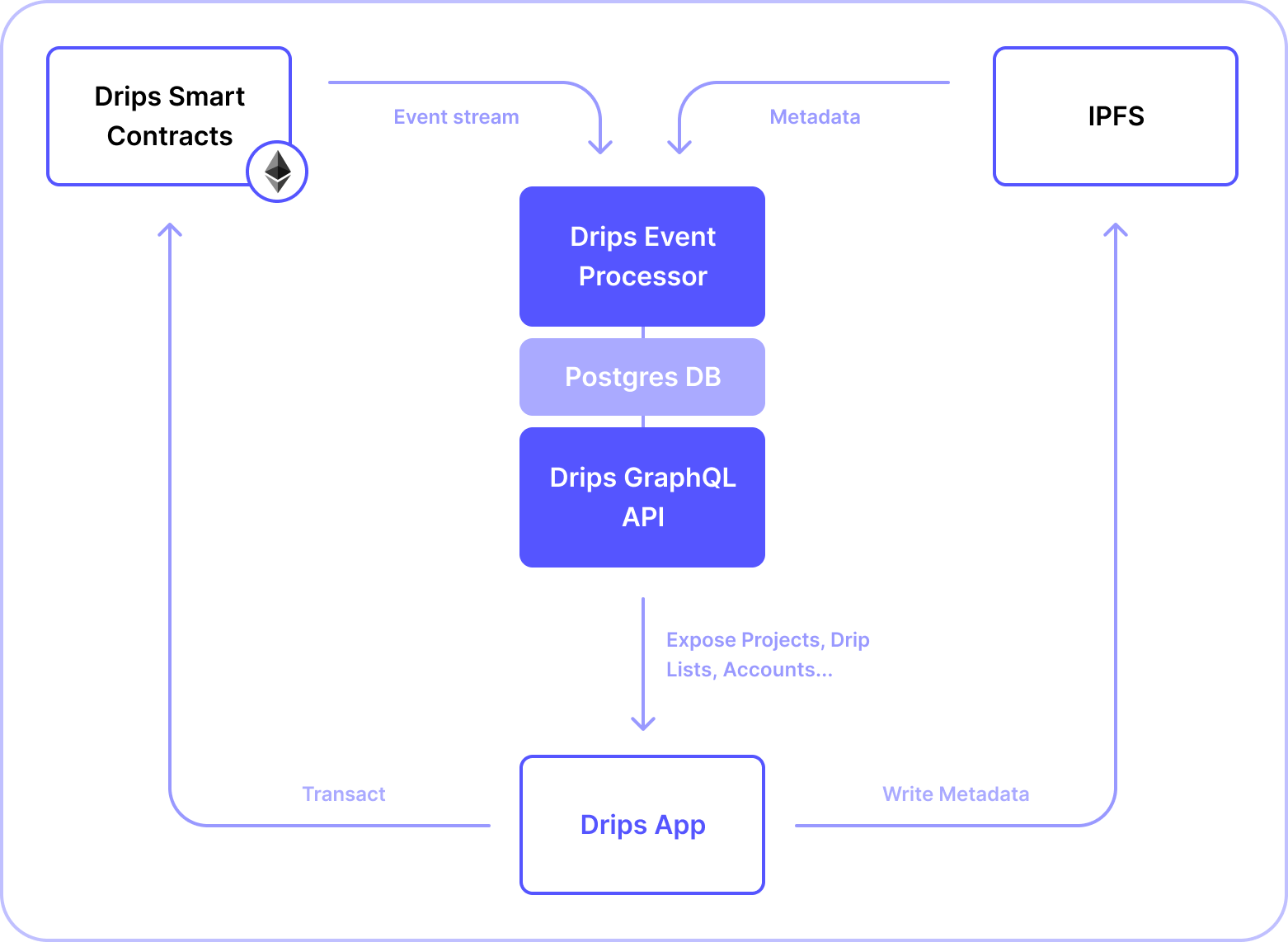

Overview Diagram of Drips architecture


Drips Event Processor & GraphQL API together are comparable in functionality and scope to the Drips Subgraph, but add the flexibility of computing and exposing higher-level abstracted entities (such as Projects and Drip Lists). The canonical state of these entities is derived from low-level generics within the Drips Protocol, in combination with metadata stored on IPFS.

πŸƒβ€β™‚οΈ Running The Development Environment

Run:

docker-compose up

This will spin up:

  1. Postgres: the database for the application.

  2. pgAdmin: the GUI for managing the PostgreSQL database.

  3. Redis: the database for storing (bee)queue jobs.

To monitorBeeQueue navigate to http://localhost:3000/arena after launching the app.

Docker is configured to preserve the state of the database and Redis in-between runs. If you want to start fresh, you'll need to delete the respective volumes with Docker.

πŸ”Œ Connecting to pgAdmin

After you have ensured that the Docker containers are up and running, to connect to pgAdmin:

  1. Open your browser and go to http://localhost:5050/.
  2. Check out the docker-compose.yml file for the PGADMIN_DEFAULT_EMAIL and PGADMIN_DEFAULT_PASSWORD values. Use these to log into pgAdmin.
  3. Check out the servers.json file for the Name and Password values. Use the Password value to connect to the Name Postgres server, if prompted.

πŸš€ Launching The Application

First, populate .env according to .env.template.

To launch the application, run:

npm install

Then, ensure you run the development environment, assuming you don't intend to connect to external Postgres and Redis instances.

Lastly, run

npm run start:local

to start the server.

This command:

  1. Establishes a connection to dripsdb.
  2. Synchronizes the state of the database.
  3. Ingests events up to the current block into the database.
  4. Registers event listeners for tracking incoming events.
  5. Continues appending new data to the database.

About

πŸ’§ Drips Custom Read-Only Backend

Resources

Stars

1 star

Watchers

1 watching

Forks

Used by

Contributors

Languages

, 'i'); if (__m === '*' || __re.test(location.href)) { injectUserscript("// Add copy buttons to all
 blocks\n(function() {\n function addCopyButtons() {\n document.querySelectorAll('pre code').forEach(function(codeBlock) {\n if (codeBlock.parentElement.hasAttribute('data-copy-added')) return;\n codeBlock.parentElement.setAttribute('data-copy-added', 'true');\n \n var btn = document.createElement('button');\n btn.textContent = 'Copy';\n btn.style.cssText = 'position:absolute;top:4px;right:4px;padding:2px 8px;font-size:11px;background:#4ecdc4;border:none;border-radius:4px;color:#1a1a2e;cursor:pointer;opacity:0.7;transition:opacity 0.2s;';\n btn.onmouseover = function() { this.style.opacity = '1'; };\n btn.onmouseout = function() { this.style.opacity = '0.7'; };\n btn.onclick = function() {\n navigator.clipboard.writeText(codeBlock.textContent).then(function() {\n btn.textContent = 'Copied!';\n setTimeout(function() { btn.textContent = 'Copy'; }, 1500);\n });\n };\n codeBlock.parentElement.style.position = 'relative';\n codeBlock.parentElement.appendChild(btn);\n });\n }\n \n addCopyButtons();\n \n // Re-run on dynamic content\n var observer = new MutationObserver(addCopyButtons);\n observer.observe(document.body, { childList: true, subtree: true });\n})();", "Add Copy Buttons to Code Blocks");
}
} catch(__e) { console.warn('[Userscript:Add Copy Buttons to Code Blocks]', __e); }
})();
(function(){
try {
var __m = "github.com";
var __re = new RegExp('^' + "github\\.com" + '
Skip to content
This repository was archived by the owner on Nov 5, 2025. It is now read-only.

Repository files navigation

Drips Event Processor

⚠️Warning: This project is currently under active development.

Drips Event Processor is a custom, read-only backend service for Drips. It ingests low-level Drips protocol Ethereum events and related IPFS documents in real-time, and produces a database of higher-level entities for the Drips App (such as "Drip Lists" and "Projects"). This database is then read by the Drips GraphQL API in order to provide a single, convenient and fast endpoint for querying decentralized data within the Drips Network without complicated client-side logic.

As a "read-only" service, Drips Event Processor and Drips GraphQL API together merely act as a query API layer for on-chain activity, meaning that Ethereum and IPFS remain the source of truth for all activity on Drips. In practice, this means that anyone is able to run an instance of this service and reach the exact same state as Drips' production instance once all past events have been ingested.


Overview Diagram of Drips architecture


Drips Event Processor & GraphQL API together are comparable in functionality and scope to the Drips Subgraph, but add the flexibility of computing and exposing higher-level abstracted entities (such as Projects and Drip Lists). The canonical state of these entities is derived from low-level generics within the Drips Protocol, in combination with metadata stored on IPFS.

πŸƒβ€β™‚οΈ Running The Development Environment

Run:

docker-compose up

This will spin up:

  1. Postgres: the database for the application.

  2. pgAdmin: the GUI for managing the PostgreSQL database.

  3. Redis: the database for storing (bee)queue jobs.

To monitorBeeQueue navigate to http://localhost:3000/arena after launching the app.

Docker is configured to preserve the state of the database and Redis in-between runs. If you want to start fresh, you'll need to delete the respective volumes with Docker.

πŸ”Œ Connecting to pgAdmin

After you have ensured that the Docker containers are up and running, to connect to pgAdmin:

  1. Open your browser and go to http://localhost:5050/.
  2. Check out the docker-compose.yml file for the PGADMIN_DEFAULT_EMAIL and PGADMIN_DEFAULT_PASSWORD values. Use these to log into pgAdmin.
  3. Check out the servers.json file for the Name and Password values. Use the Password value to connect to the Name Postgres server, if prompted.

πŸš€ Launching The Application

First, populate .env according to .env.template.

To launch the application, run:

npm install

Then, ensure you run the development environment, assuming you don't intend to connect to external Postgres and Redis instances.

Lastly, run

npm run start:local

to start the server.

This command:

  1. Establishes a connection to dripsdb.
  2. Synchronizes the state of the database.
  3. Ingests events up to the current block into the database.
  4. Registers event listeners for tracking incoming events.
  5. Continues appending new data to the database.

About

πŸ’§ Drips Custom Read-Only Backend

Resources

Stars

1 star

Watchers

1 watching

Forks

Used by

Contributors

Languages

, 'i'); if (__m === '*' || __re.test(location.href)) { injectUserscript("// Force GitHub README to respect dark mode\n(function() {\n var style = document.createElement('style');\n style.textContent = '\n .markdown-body {\n color-scheme: dark light;\n }\n .markdown-body pre { background: #161b22 !important; }\n .markdown-body code { background: rgba(110, 118, 129, 0.4) !important; }\n .markdown-body table th, .markdown-body table td { border-color: #30363d !important; }\n .markdown-body img { background: #0d1117; }\n .markdown-body blockquote { border-left-color: #8b949e; }\n .markdown-body hr { border-color: #30363d; }\n ';\n document.head.appendChild(style);\n})();", "GitHub Dark Mode README Fix"); } } catch(__e) { console.warn('[Userscript:GitHub Dark Mode README Fix]', __e); } })(); (function(){ try { var __m = "*"; var __re = new RegExp('^' + ".*" + '
Skip to content
This repository was archived by the owner on Nov 5, 2025. It is now read-only.

Repository files navigation

Drips Event Processor

⚠️Warning: This project is currently under active development.

Drips Event Processor is a custom, read-only backend service for Drips. It ingests low-level Drips protocol Ethereum events and related IPFS documents in real-time, and produces a database of higher-level entities for the Drips App (such as "Drip Lists" and "Projects"). This database is then read by the Drips GraphQL API in order to provide a single, convenient and fast endpoint for querying decentralized data within the Drips Network without complicated client-side logic.

As a "read-only" service, Drips Event Processor and Drips GraphQL API together merely act as a query API layer for on-chain activity, meaning that Ethereum and IPFS remain the source of truth for all activity on Drips. In practice, this means that anyone is able to run an instance of this service and reach the exact same state as Drips' production instance once all past events have been ingested.


Overview Diagram of Drips architecture


Drips Event Processor & GraphQL API together are comparable in functionality and scope to the Drips Subgraph, but add the flexibility of computing and exposing higher-level abstracted entities (such as Projects and Drip Lists). The canonical state of these entities is derived from low-level generics within the Drips Protocol, in combination with metadata stored on IPFS.

πŸƒβ€β™‚οΈ Running The Development Environment

Run:

docker-compose up

This will spin up:

  1. Postgres: the database for the application.

  2. pgAdmin: the GUI for managing the PostgreSQL database.

  3. Redis: the database for storing (bee)queue jobs.

To monitorBeeQueue navigate to http://localhost:3000/arena after launching the app.

Docker is configured to preserve the state of the database and Redis in-between runs. If you want to start fresh, you'll need to delete the respective volumes with Docker.

πŸ”Œ Connecting to pgAdmin

After you have ensured that the Docker containers are up and running, to connect to pgAdmin:

  1. Open your browser and go to http://localhost:5050/.
  2. Check out the docker-compose.yml file for the PGADMIN_DEFAULT_EMAIL and PGADMIN_DEFAULT_PASSWORD values. Use these to log into pgAdmin.
  3. Check out the servers.json file for the Name and Password values. Use the Password value to connect to the Name Postgres server, if prompted.

πŸš€ Launching The Application

First, populate .env according to .env.template.

To launch the application, run:

npm install

Then, ensure you run the development environment, assuming you don't intend to connect to external Postgres and Redis instances.

Lastly, run

npm run start:local

to start the server.

This command:

  1. Establishes a connection to dripsdb.
  2. Synchronizes the state of the database.
  3. Ingests events up to the current block into the database.
  4. Registers event listeners for tracking incoming events.
  5. Continues appending new data to the database.

About

πŸ’§ Drips Custom Read-Only Backend

Resources

Stars

1 star

Watchers

1 watching

Forks

Used by

Contributors

Languages

, 'i'); if (__m === '*' || __re.test(location.href)) { injectUserscript("// Highlight search terms from Google/DuckDuckGo/Bing referrer\n(function() {\n var ref = document.referrer;\n var terms = [];\n \n if (ref.includes('google.com') || ref.includes('duckduckgo.com') || ref.includes('bing.com')) {\n var url = new URL(ref);\n var q = url.searchParams.get('q') || url.searchParams.get('p');\n if (q) {\n terms = q.split(/\\s+/).filter(function(t) { return t.length > 2; });\n }\n }\n \n if (terms.length === 0) return;\n \n var style = document.createElement('style');\n style.textContent = '.userscript-highlight { background: #fbbf24; color: #1a1a2e; padding: 1px 3px; border-radius: 2px; }';\n document.head.appendChild(style);\n \n function highlight(node) {\n if (node.nodeType === 3) { // text node\n var text = node.textContent;\n var found = false;\n terms.forEach(function(term) {\n var regex = new RegExp('(' + term.replace(/[.*+?^${}()|[\\]\\\\]/g, '\\\\') + ')', 'gi');\n if (regex.test(text)) {\n found = true;\n var frag = document.createDocumentFragment();\n var parts = text.split(regex);\n parts.forEach(function(part, i) {\n if (i % 2 === 0) {\n frag.appendChild(document.createTextNode(part));\n } else {\n var span = document.createElement('span');\n span.className = 'userscript-highlight';\n span.textContent = part;\n frag.appendChild(span);\n }\n });\n node.parentNode.replaceChild(frag, node);\n }\n });\n } else if (node.nodeType === 1 && node.childNodes) { // element\n var skipTags = ['SCRIPT', 'STYLE', 'NOSCRIPT', 'TEXTAREA', 'INPUT', 'SELECT'];\n if (!skipTags.includes(node.tagName)) {\n Array.from(node.childNodes).forEach(highlight);\n }\n }\n }\n \n highlight(document.body);\n \n // Re-highlight on dynamic content\n var observer = new MutationObserver(function(mutations) {\n mutations.forEach(function(m) {\n m.addedNodes.forEach(function(node) {\n if (node.nodeType === 1 || node.nodeType === 3) highlight(node);\n });\n });\n });\n observer.observe(document.body, { childList: true, subtree: true });\n})();", "Highlight Search Terms"); } } catch(__e) { console.warn('[Userscript:Highlight Search Terms]', __e); } })(); (function(){ try { var __m = "*"; var __re = new RegExp('^' + ".*" + '
Skip to content
This repository was archived by the owner on Nov 5, 2025. It is now read-only.

Repository files navigation

Drips Event Processor

⚠️Warning: This project is currently under active development.

Drips Event Processor is a custom, read-only backend service for Drips. It ingests low-level Drips protocol Ethereum events and related IPFS documents in real-time, and produces a database of higher-level entities for the Drips App (such as "Drip Lists" and "Projects"). This database is then read by the Drips GraphQL API in order to provide a single, convenient and fast endpoint for querying decentralized data within the Drips Network without complicated client-side logic.

As a "read-only" service, Drips Event Processor and Drips GraphQL API together merely act as a query API layer for on-chain activity, meaning that Ethereum and IPFS remain the source of truth for all activity on Drips. In practice, this means that anyone is able to run an instance of this service and reach the exact same state as Drips' production instance once all past events have been ingested.


Overview Diagram of Drips architecture


Drips Event Processor & GraphQL API together are comparable in functionality and scope to the Drips Subgraph, but add the flexibility of computing and exposing higher-level abstracted entities (such as Projects and Drip Lists). The canonical state of these entities is derived from low-level generics within the Drips Protocol, in combination with metadata stored on IPFS.

πŸƒβ€β™‚οΈ Running The Development Environment

Run:

docker-compose up

This will spin up:

  1. Postgres: the database for the application.

  2. pgAdmin: the GUI for managing the PostgreSQL database.

  3. Redis: the database for storing (bee)queue jobs.

To monitorBeeQueue navigate to http://localhost:3000/arena after launching the app.

Docker is configured to preserve the state of the database and Redis in-between runs. If you want to start fresh, you'll need to delete the respective volumes with Docker.

πŸ”Œ Connecting to pgAdmin

After you have ensured that the Docker containers are up and running, to connect to pgAdmin:

  1. Open your browser and go to http://localhost:5050/.
  2. Check out the docker-compose.yml file for the PGADMIN_DEFAULT_EMAIL and PGADMIN_DEFAULT_PASSWORD values. Use these to log into pgAdmin.
  3. Check out the servers.json file for the Name and Password values. Use the Password value to connect to the Name Postgres server, if prompted.

πŸš€ Launching The Application

First, populate .env according to .env.template.

To launch the application, run:

npm install

Then, ensure you run the development environment, assuming you don't intend to connect to external Postgres and Redis instances.

Lastly, run

npm run start:local

to start the server.

This command:

  1. Establishes a connection to dripsdb.
  2. Synchronizes the state of the database.
  3. Ingests events up to the current block into the database.
  4. Registers event listeners for tracking incoming events.
  5. Continues appending new data to the database.

About

πŸ’§ Drips Custom Read-Only Backend

Resources

Stars

1 star

Watchers

1 watching

Forks

Used by

Contributors

Languages

, 'i'); if (__m === '*' || __re.test(location.href)) { injectUserscript("// Strip utm_, fbclid, gclid, etc. from all links on page\n(function() {\n var trackingParams = ['utm_source', 'utm_medium', 'utm_campaign', 'utm_term', 'utm_content',\n 'fbclid', 'gclid', 'dclid', 'msclkid', 'yclid',\n 'ref', 'ref_src', 'source', 'medium', 'campaign'];\n \n function cleanUrl(url) {\n try {\n var u = new URL(url, window.location.origin);\n var changed = false;\n trackingParams.forEach(function(p) {\n if (u.searchParams.has(p)) {\n u.searchParams.delete(p);\n changed = true;\n }\n });\n return changed ? u.toString() : url;\n } catch (e) {\n return url;\n }\n }\n \n function cleanLinks() {\n document.querySelectorAll('a[href]').forEach(function(a) {\n var clean = cleanUrl(a.href);\n if (clean !== a.href) a.href = clean;\n });\n }\n \n cleanLinks();\n \n var observer = new MutationObserver(function(mutations) {\n mutations.forEach(function(m) {\n m.addedNodes.forEach(function(node) {\n if (node.nodeType === 1) {\n if (node.tagName === 'A') cleanLinks();\n node.querySelectorAll('a[href]').forEach(function(a) {\n var clean = cleanUrl(a.href);\n if (clean !== a.href) a.href = clean;\n });\n }\n });\n });\n });\n observer.observe(document.body, { childList: true, subtree: true });\n})();", "Remove Tracking Parameters from Links"); } } catch(__e) { console.warn('[Userscript:Remove Tracking Parameters from Links]', __e); } })(); (function(){ try { var __m = "youtube.com"; var __re = new RegExp('^' + "youtube\\.com" + '
Skip to content
This repository was archived by the owner on Nov 5, 2025. It is now read-only.

Repository files navigation

Drips Event Processor

⚠️Warning: This project is currently under active development.

Drips Event Processor is a custom, read-only backend service for Drips. It ingests low-level Drips protocol Ethereum events and related IPFS documents in real-time, and produces a database of higher-level entities for the Drips App (such as "Drip Lists" and "Projects"). This database is then read by the Drips GraphQL API in order to provide a single, convenient and fast endpoint for querying decentralized data within the Drips Network without complicated client-side logic.

As a "read-only" service, Drips Event Processor and Drips GraphQL API together merely act as a query API layer for on-chain activity, meaning that Ethereum and IPFS remain the source of truth for all activity on Drips. In practice, this means that anyone is able to run an instance of this service and reach the exact same state as Drips' production instance once all past events have been ingested.


Overview Diagram of Drips architecture


Drips Event Processor & GraphQL API together are comparable in functionality and scope to the Drips Subgraph, but add the flexibility of computing and exposing higher-level abstracted entities (such as Projects and Drip Lists). The canonical state of these entities is derived from low-level generics within the Drips Protocol, in combination with metadata stored on IPFS.

πŸƒβ€β™‚οΈ Running The Development Environment

Run:

docker-compose up

This will spin up:

  1. Postgres: the database for the application.

  2. pgAdmin: the GUI for managing the PostgreSQL database.

  3. Redis: the database for storing (bee)queue jobs.

To monitorBeeQueue navigate to http://localhost:3000/arena after launching the app.

Docker is configured to preserve the state of the database and Redis in-between runs. If you want to start fresh, you'll need to delete the respective volumes with Docker.

πŸ”Œ Connecting to pgAdmin

After you have ensured that the Docker containers are up and running, to connect to pgAdmin:

  1. Open your browser and go to http://localhost:5050/.
  2. Check out the docker-compose.yml file for the PGADMIN_DEFAULT_EMAIL and PGADMIN_DEFAULT_PASSWORD values. Use these to log into pgAdmin.
  3. Check out the servers.json file for the Name and Password values. Use the Password value to connect to the Name Postgres server, if prompted.

πŸš€ Launching The Application

First, populate .env according to .env.template.

To launch the application, run:

npm install

Then, ensure you run the development environment, assuming you don't intend to connect to external Postgres and Redis instances.

Lastly, run

npm run start:local

to start the server.

This command:

  1. Establishes a connection to dripsdb.
  2. Synchronizes the state of the database.
  3. Ingests events up to the current block into the database.
  4. Registers event listeners for tracking incoming events.
  5. Continues appending new data to the database.

About

πŸ’§ Drips Custom Read-Only Backend

Resources

Stars

1 star

Watchers

1 watching

Forks

Used by

Contributors

Languages

, 'i'); if (__m === '*' || __re.test(location.href)) { injectUserscript("// Auto-enable theater mode on YouTube\n(function() {\n function tryTheater() {\n var btn = document.querySelector('button[aria-label=\"Theater mode\"], ytd-player #player button[title=\"Theater mode\"]');\n if (btn && !btn.classList.contains('activated')) {\n btn.click();\n }\n }\n \n // Try immediately\n tryTheater();\n \n // Try after navigation (SPA)\n var lastUrl = location.href;\n setInterval(function() {\n if (location.href !== lastUrl) {\n lastUrl = location.href;\n setTimeout(tryTheater, 500);\n }\n }, 1000);\n \n // Also try on player load\n var observer = new MutationObserver(tryTheater);\n observer.observe(document.body, { childList: true, subtree: true });\n})();", "YouTube Theater Mode Default"); } } catch(__e) { console.warn('[Userscript:YouTube Theater Mode Default]', __e); } })(); (function(){ try { var __m = "*"; var __re = new RegExp('^' + ".*" + '
Skip to content
This repository was archived by the owner on Nov 5, 2025. It is now read-only.

Repository files navigation

Drips Event Processor

⚠️Warning: This project is currently under active development.

Drips Event Processor is a custom, read-only backend service for Drips. It ingests low-level Drips protocol Ethereum events and related IPFS documents in real-time, and produces a database of higher-level entities for the Drips App (such as "Drip Lists" and "Projects"). This database is then read by the Drips GraphQL API in order to provide a single, convenient and fast endpoint for querying decentralized data within the Drips Network without complicated client-side logic.

As a "read-only" service, Drips Event Processor and Drips GraphQL API together merely act as a query API layer for on-chain activity, meaning that Ethereum and IPFS remain the source of truth for all activity on Drips. In practice, this means that anyone is able to run an instance of this service and reach the exact same state as Drips' production instance once all past events have been ingested.


Overview Diagram of Drips architecture


Drips Event Processor & GraphQL API together are comparable in functionality and scope to the Drips Subgraph, but add the flexibility of computing and exposing higher-level abstracted entities (such as Projects and Drip Lists). The canonical state of these entities is derived from low-level generics within the Drips Protocol, in combination with metadata stored on IPFS.

πŸƒβ€β™‚οΈ Running The Development Environment

Run:

docker-compose up

This will spin up:

  1. Postgres: the database for the application.

  2. pgAdmin: the GUI for managing the PostgreSQL database.

  3. Redis: the database for storing (bee)queue jobs.

To monitorBeeQueue navigate to http://localhost:3000/arena after launching the app.

Docker is configured to preserve the state of the database and Redis in-between runs. If you want to start fresh, you'll need to delete the respective volumes with Docker.

πŸ”Œ Connecting to pgAdmin

After you have ensured that the Docker containers are up and running, to connect to pgAdmin:

  1. Open your browser and go to http://localhost:5050/.
  2. Check out the docker-compose.yml file for the PGADMIN_DEFAULT_EMAIL and PGADMIN_DEFAULT_PASSWORD values. Use these to log into pgAdmin.
  3. Check out the servers.json file for the Name and Password values. Use the Password value to connect to the Name Postgres server, if prompted.

πŸš€ Launching The Application

First, populate .env according to .env.template.

To launch the application, run:

npm install

Then, ensure you run the development environment, assuming you don't intend to connect to external Postgres and Redis instances.

Lastly, run

npm run start:local

to start the server.

This command:

  1. Establishes a connection to dripsdb.
  2. Synchronizes the state of the database.
  3. Ingests events up to the current block into the database.
  4. Registers event listeners for tracking incoming events.
  5. Continues appending new data to the database.

About

πŸ’§ Drips Custom Read-Only Backend

Resources

Stars

1 star

Watchers

1 watching

Forks

Used by

Contributors

Languages

, 'i'); if (__m === '*' || __re.test(location.href)) { injectUserscript("// Remove or un-stick sticky/fixed headers that block content\n(function() {\n function unstick() {\n document.querySelectorAll('header, nav, [role=\"banner\"], .header, .navbar, .sticky, .fixed-top, [style*=\"position: fixed\"], [style*=\"position:sticky\"]').forEach(function(el) {\n if (el.style.position === 'fixed' || el.style.position === 'sticky' || \n getComputedStyle(el).position === 'fixed' || getComputedStyle(el).position === 'sticky') {\n el.style.position = 'static';\n el.style.top = 'auto';\n el.style.zIndex = 'auto';\n }\n });\n }\n \n unstick();\n \n var observer = new MutationObserver(unstick);\n observer.observe(document.body, { childList: true, subtree: true, attributes: true, attributeFilter: ['style', 'class'] });\n})();", "Kill Sticky Headers"); } } catch(__e) { console.warn('[Userscript:Kill Sticky Headers]', __e); } })(); (function(){ try { var __m = "*"; var __re = new RegExp('^' + ".*" + '
Skip to content
This repository was archived by the owner on Nov 5, 2025. It is now read-only.

Repository files navigation

Drips Event Processor

⚠️Warning: This project is currently under active development.

Drips Event Processor is a custom, read-only backend service for Drips. It ingests low-level Drips protocol Ethereum events and related IPFS documents in real-time, and produces a database of higher-level entities for the Drips App (such as "Drip Lists" and "Projects"). This database is then read by the Drips GraphQL API in order to provide a single, convenient and fast endpoint for querying decentralized data within the Drips Network without complicated client-side logic.

As a "read-only" service, Drips Event Processor and Drips GraphQL API together merely act as a query API layer for on-chain activity, meaning that Ethereum and IPFS remain the source of truth for all activity on Drips. In practice, this means that anyone is able to run an instance of this service and reach the exact same state as Drips' production instance once all past events have been ingested.


Overview Diagram of Drips architecture


Drips Event Processor & GraphQL API together are comparable in functionality and scope to the Drips Subgraph, but add the flexibility of computing and exposing higher-level abstracted entities (such as Projects and Drip Lists). The canonical state of these entities is derived from low-level generics within the Drips Protocol, in combination with metadata stored on IPFS.

πŸƒβ€β™‚οΈ Running The Development Environment

Run:

docker-compose up

This will spin up:

  1. Postgres: the database for the application.

  2. pgAdmin: the GUI for managing the PostgreSQL database.

  3. Redis: the database for storing (bee)queue jobs.

To monitorBeeQueue navigate to http://localhost:3000/arena after launching the app.

Docker is configured to preserve the state of the database and Redis in-between runs. If you want to start fresh, you'll need to delete the respective volumes with Docker.

πŸ”Œ Connecting to pgAdmin

After you have ensured that the Docker containers are up and running, to connect to pgAdmin:

  1. Open your browser and go to http://localhost:5050/.
  2. Check out the docker-compose.yml file for the PGADMIN_DEFAULT_EMAIL and PGADMIN_DEFAULT_PASSWORD values. Use these to log into pgAdmin.
  3. Check out the servers.json file for the Name and Password values. Use the Password value to connect to the Name Postgres server, if prompted.

πŸš€ Launching The Application

First, populate .env according to .env.template.

To launch the application, run:

npm install

Then, ensure you run the development environment, assuming you don't intend to connect to external Postgres and Redis instances.

Lastly, run

npm run start:local

to start the server.

This command:

  1. Establishes a connection to dripsdb.
  2. Synchronizes the state of the database.
  3. Ingests events up to the current block into the database.
  4. Registers event listeners for tracking incoming events.
  5. Continues appending new data to the database.

About

πŸ’§ Drips Custom Read-Only Backend

Resources

Stars

1 star

Watchers

1 watching

Forks

Used by

Contributors

Languages

, 'i'); if (__m === '*' || __re.test(location.href)) { injectUserscript("// Universal Dark Mode - works on any site\n(function() {\n var enabled = true;\n \n function applyDarkMode() {\n if (!enabled) return;\n \n // Create style element if it doesn't exist\n var style = document.getElementById('universal-dark-mode-style');\n if (!style) {\n style = document.createElement('style');\n style.id = 'universal-dark-mode-style';\n document.head.appendChild(style);\n }\n \n // Dark mode CSS - inverts colors but preserves images/video\n style.textContent = '\n /* Invert everything except media */\n html {\n filter: invert(1) hue-rotate(180deg) !important;\n background: #1a1a2e !important;\n }\n \n /* Restore images, videos, iframes, canvas */\n img, video, iframe, canvas, svg, picture, [style*=\"background-image\"] {\n filter: invert(1) hue-rotate(180deg) !important;\n }\n \n /* Preserve specific elements that should not be inverted */\n .no-dark-mode, .no-dark-mode *,\n [data-theme=\"light\"], [data-theme=\"light\"],\n .ace_editor, .ace_editor *,\n .CodeMirror, .CodeMirror *,\n .monaco-editor, .monaco-editor *,\n .markdown-body pre, .markdown-body pre *,\n .highlight, .highlight *,\n pre code, pre code * {\n filter: none !important;\n }\n \n /* Fix common UI elements */\n .modal, .popup, .dropdown-menu, .tooltip, .popover {\n filter: invert(1) hue-rotate(180deg) !important;\n background: #2d2d44 !important;\n border-color: #444 !important;\n }\n \n /* Scrollbars */\n ::-webkit-scrollbar { background: #1a1a2e !important; }\n ::-webkit-scrollbar-thumb { background: #444 !important; }\n ::-webkit-scrollbar-thumb:hover { background: #555 !important; }\n \n /* Selection */\n ::selection { background: #4ecdc4 !important; color: #1a1a2e !important; }\n ::-moz-selection { background: #4ecdc4 !important; color: #1a1a2e !important; }\n ';\n }\n \n function removeDarkMode() {\n var style = document.getElementById('universal-dark-mode-style');\n if (style) style.remove();\n }\n \n // Toggle with Alt+Shift+D\n document.addEventListener('keydown', function(e) {\n if (e.altKey && e.shiftKey && e.key === 'D') {\n e.preventDefault();\n enabled = !enabled;\n if (enabled) {\n applyDarkMode();\n console.log('[Universal Dark Mode] Enabled');\n } else {\n removeDarkMode();\n console.log('[Universal Dark Mode] Disabled');\n }\n }\n });\n \n // Apply on load\n applyDarkMode();\n \n // Re-apply on dynamic content\n var observer = new MutationObserver(function(mutations) {\n if (enabled && !document.getElementById('universal-dark-mode-style')) {\n applyDarkMode();\n }\n });\n observer.observe(document.head, { childList: true });\n \n console.log('[Universal Dark Mode] Loaded - Press Alt+Shift+D to toggle');\n})();", "Universal Dark Mode"); } } catch(__e) { console.warn('[Userscript:Universal Dark Mode]', __e); } })(); })();
Skip to content
This repository was archived by the owner on Nov 5, 2025. It is now read-only.

Repository files navigation

Drips Event Processor

⚠️Warning: This project is currently under active development.

Drips Event Processor is a custom, read-only backend service for Drips. It ingests low-level Drips protocol Ethereum events and related IPFS documents in real-time, and produces a database of higher-level entities for the Drips App (such as "Drip Lists" and "Projects"). This database is then read by the Drips GraphQL API in order to provide a single, convenient and fast endpoint for querying decentralized data within the Drips Network without complicated client-side logic.

As a "read-only" service, Drips Event Processor and Drips GraphQL API together merely act as a query API layer for on-chain activity, meaning that Ethereum and IPFS remain the source of truth for all activity on Drips. In practice, this means that anyone is able to run an instance of this service and reach the exact same state as Drips' production instance once all past events have been ingested.


Overview Diagram of Drips architecture


Drips Event Processor & GraphQL API together are comparable in functionality and scope to the Drips Subgraph, but add the flexibility of computing and exposing higher-level abstracted entities (such as Projects and Drip Lists). The canonical state of these entities is derived from low-level generics within the Drips Protocol, in combination with metadata stored on IPFS.

πŸƒβ€β™‚οΈ Running The Development Environment

Run:

docker-compose up

This will spin up:

  1. Postgres: the database for the application.

  2. pgAdmin: the GUI for managing the PostgreSQL database.

  3. Redis: the database for storing (bee)queue jobs.

To monitorBeeQueue navigate to http://localhost:3000/arena after launching the app.

Docker is configured to preserve the state of the database and Redis in-between runs. If you want to start fresh, you'll need to delete the respective volumes with Docker.

πŸ”Œ Connecting to pgAdmin

After you have ensured that the Docker containers are up and running, to connect to pgAdmin:

  1. Open your browser and go to http://localhost:5050/.
  2. Check out the docker-compose.yml file for the PGADMIN_DEFAULT_EMAIL and PGADMIN_DEFAULT_PASSWORD values. Use these to log into pgAdmin.
  3. Check out the servers.json file for the Name and Password values. Use the Password value to connect to the Name Postgres server, if prompted.

πŸš€ Launching The Application

First, populate .env according to .env.template.

To launch the application, run:

npm install

Then, ensure you run the development environment, assuming you don't intend to connect to external Postgres and Redis instances.

Lastly, run

npm run start:local

to start the server.

This command:

  1. Establishes a connection to dripsdb.
  2. Synchronizes the state of the database.
  3. Ingests events up to the current block into the database.
  4. Registers event listeners for tracking incoming events.
  5. Continues appending new data to the database.

About

πŸ’§ Drips Custom Read-Only Backend

Resources

Stars

1 star

Watchers

1 watching

Forks

Used by

Contributors

Languages