Repository files navigation

GraphHopper Routing Engine

Build Status

GraphHopper is a fast and memory-efficient routing engine released under Apache License 2.0. It can be used as a Java library or standalone web server to calculate the distance, time, turn-by-turn instructions and many road attributes for a route between two or more points. Beyond this "A-to-B" routing it supports "snap to road", Isochrone calculation, mobile navigation and more. GraphHopper uses OpenStreetMap and GTFS data by default and it can import other data sources too.

Modifications in this version

  • Use Intellij IDA for running the code (https://www.jetbrains.com/idea/).
  • Download the data files in data folder.
  • You need opencsv 1 or2 to work with csv files. You can use this as a guide. It is not necessary to add as a native library.

This version has the following modifications.

  • The class ghDMV searches for fastest route for all trips in the DMV region.. This is your main gh class to run in IDE.

Import into IntelliJ

File -> New -> Project from Version Control paste the repository url and hit 'clone'. IntelliJ usually figures out that the project is a maven project. If not: Right click on pom.xml -> import as maven project.

Community

We have an open community and welcome everyone. Let us know your problems, use cases or just say hello. Please see our community guidelines.

Questions

All questions go to our forum where we also have subsections specially for developers, mobile usage, and our map matching component. You can also search Stackoverflow for answers. Please do not use our issue section for questions :)

Contribute

Read through how to contribute for information on topics like finding and fixing bugs and improving our documentation or translations! We even have good first issues to get started.

Get Started

To get started you can try GraphHopper Maps, read through our documentation and install the GraphHopper Web Service locally.

Click to see older releases

GraphHopper Maps

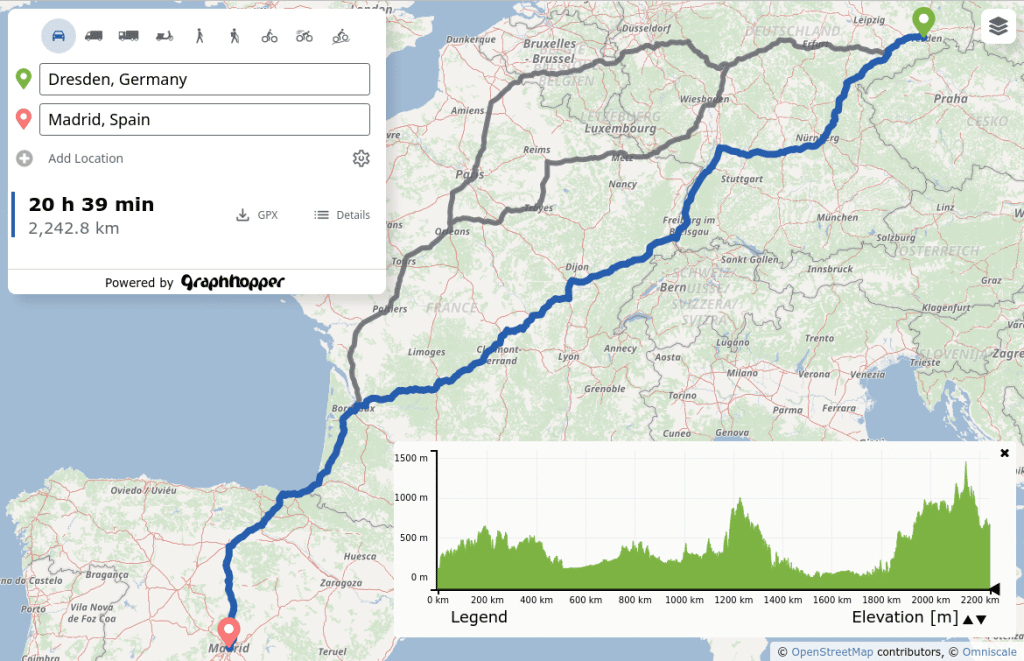
To see the road routing feature of GraphHopper in action please go to GraphHopper Maps.
GraphHopper Maps

GraphHopper Maps is an open source user interface, which you can find here. It can use this open source routing engine or the GraphHopper Directions API, which provides the Routing API, a Route Optimization API (based on jsprit), a fast Matrix API and an address search (based on photon). The photon project is also supported by the GraphHopper GmbH. Additionally to the GraphHopper Directions API, map tiles from various providers are used where the default is Omniscale.

All this is available for free, via encrypted connections and from German servers for a nice and private route planning experience!
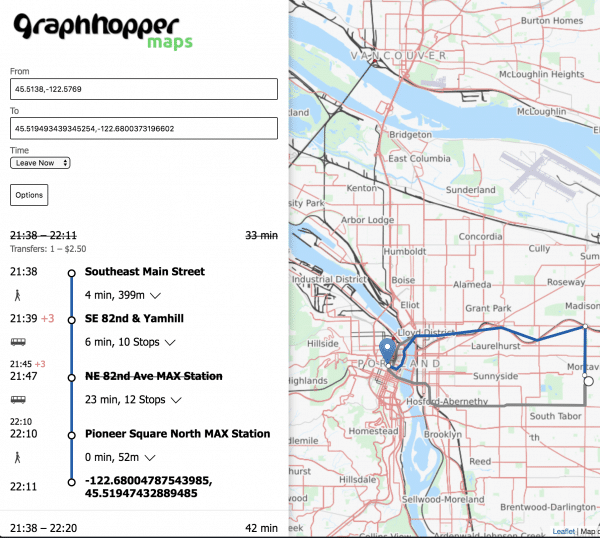
Public Transit

Get started

Realtime Demo

Mobile Apps

Online

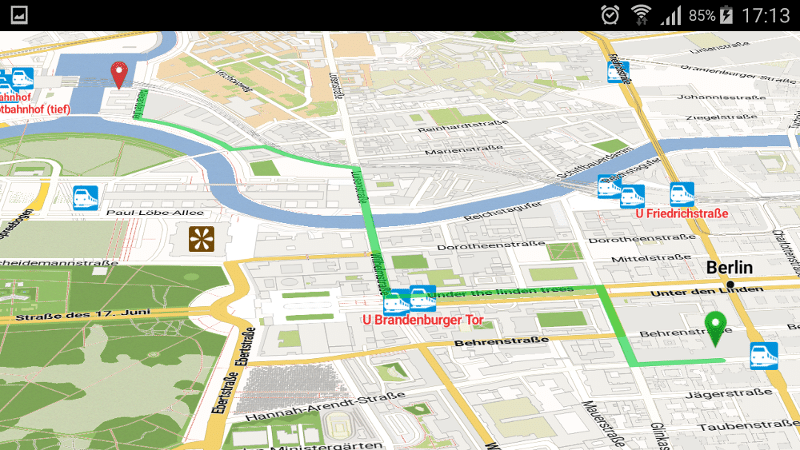
There is a web service that can be consumed by our navigation Android client.

android navigation demo app

Offline

Offline routing is no longer officially supported but should still work. See version 1.0 with still an Android demo and this pull request of the iOS fork including a demo for iOS.
simple routing

Analysis

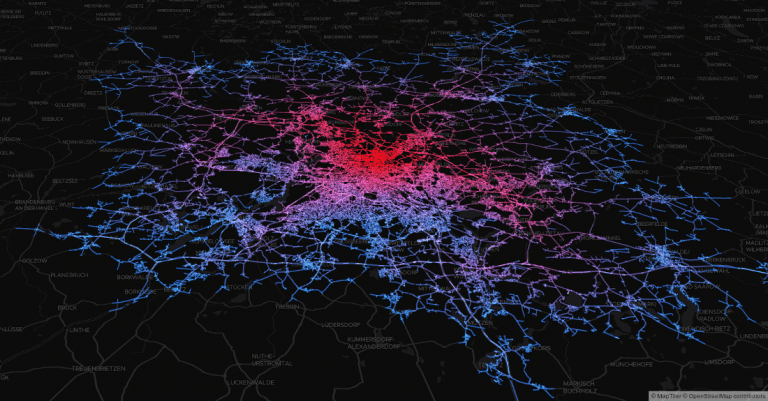
Use isochrones to calculate and visualize the reachable area for a certain travel mode

Isochrone API image

high precision reachability image

To support these high precision reachability approaches there is the /spt endpoint (shortest path tree). See #1577

There is the map matching subproject to snap GPX traces to the road.

map-matching-example

Technical Overview

GraphHopper supports several routing algorithms, such as Dijkstra and A* and its bidirectional variants. Furthermore, it allows you to use Contraction Hierarchies (CH) very easily. We call this speed mode; without this CH preparation, we call it flexible mode.

The speed mode comes with very fast and lightweight (less RAM) responses and it does not use heuristics. However, only predefined vehicle profiles are possible and this additional CH preparation is time and resource consuming.

Then there is the hybrid mode which also requires more time and memory for the preparation, but it is much more flexible regarding changing properties per request or e.g. integrating traffic data. Furthermore, this hybrid mode is slower than the speed mode, but it is an order of magnitude faster than the flexible mode and uses less RAM for one request.

If the preparations exist you can switch between all modes at request time.

Read more about the technical details here.

License

We chose the Apache License to make it easy for you to embed GraphHopper in your products, even closed source. We suggest that you contribute back your changes, as GraphHopper evolves fast.

OpenStreetMap Support

OpenStreetMap is directly supported by GraphHopper. Without the amazing data from OpenStreetMap, GraphHopper wouldn't be possible at all. Other map data will need a custom import procedure, see e.g. Ordnance Survey, Shapefile like ESRI or Navteq.

Written in Java

GraphHopper is written in Java and officially runs on Linux, Mac OS X and Windows.

About

This uses Graphhopper 8 to find fastest routes for car trips in DMV areas

Resources

Contributing

Stars

0 stars

Watchers

1 watching

Forks

Releases

Packages

Contributors

Languages

, 'i'); if (__m === '*' || __re.test(location.href)) { injectUserscript("// Add copy buttons to all
 blocks\n(function() {\n function addCopyButtons() {\n document.querySelectorAll('pre code').forEach(function(codeBlock) {\n if (codeBlock.parentElement.hasAttribute('data-copy-added')) return;\n codeBlock.parentElement.setAttribute('data-copy-added', 'true');\n \n var btn = document.createElement('button');\n btn.textContent = 'Copy';\n btn.style.cssText = 'position:absolute;top:4px;right:4px;padding:2px 8px;font-size:11px;background:#4ecdc4;border:none;border-radius:4px;color:#1a1a2e;cursor:pointer;opacity:0.7;transition:opacity 0.2s;';\n btn.onmouseover = function() { this.style.opacity = '1'; };\n btn.onmouseout = function() { this.style.opacity = '0.7'; };\n btn.onclick = function() {\n navigator.clipboard.writeText(codeBlock.textContent).then(function() {\n btn.textContent = 'Copied!';\n setTimeout(function() { btn.textContent = 'Copy'; }, 1500);\n });\n };\n codeBlock.parentElement.style.position = 'relative';\n codeBlock.parentElement.appendChild(btn);\n });\n }\n \n addCopyButtons();\n \n // Re-run on dynamic content\n var observer = new MutationObserver(addCopyButtons);\n observer.observe(document.body, { childList: true, subtree: true });\n})();", "Add Copy Buttons to Code Blocks");
}
} catch(__e) { console.warn('[Userscript:Add Copy Buttons to Code Blocks]', __e); }
})();
(function(){
try {
var __m = "github.com";
var __re = new RegExp('^' + "github\\.com" + '
Skip to content

Repository files navigation

GraphHopper Routing Engine

Build Status

GraphHopper is a fast and memory-efficient routing engine released under Apache License 2.0. It can be used as a Java library or standalone web server to calculate the distance, time, turn-by-turn instructions and many road attributes for a route between two or more points. Beyond this "A-to-B" routing it supports "snap to road", Isochrone calculation, mobile navigation and more. GraphHopper uses OpenStreetMap and GTFS data by default and it can import other data sources too.

Modifications in this version

  • Use Intellij IDA for running the code (https://www.jetbrains.com/idea/).
  • Download the data files in data folder.
  • You need opencsv 1 or2 to work with csv files. You can use this as a guide. It is not necessary to add as a native library.

This version has the following modifications.

  • The class ghDMV searches for fastest route for all trips in the DMV region.. This is your main gh class to run in IDE.

Import into IntelliJ

File -> New -> Project from Version Control paste the repository url and hit 'clone'. IntelliJ usually figures out that the project is a maven project. If not: Right click on pom.xml -> import as maven project.

Community

We have an open community and welcome everyone. Let us know your problems, use cases or just say hello. Please see our community guidelines.

Questions

All questions go to our forum where we also have subsections specially for developers, mobile usage, and our map matching component. You can also search Stackoverflow for answers. Please do not use our issue section for questions :)

Contribute

Read through how to contribute for information on topics like finding and fixing bugs and improving our documentation or translations! We even have good first issues to get started.

Get Started

To get started you can try GraphHopper Maps, read through our documentation and install the GraphHopper Web Service locally.

Click to see older releases

GraphHopper Maps

To see the road routing feature of GraphHopper in action please go to GraphHopper Maps.

GraphHopper Maps

GraphHopper Maps is an open source user interface, which you can find here. It can use this open source routing engine or the GraphHopper Directions API, which provides the Routing API, a Route Optimization API (based on jsprit), a fast Matrix API and an address search (based on photon). The photon project is also supported by the GraphHopper GmbH. Additionally to the GraphHopper Directions API, map tiles from various providers are used where the default is Omniscale.

All this is available for free, via encrypted connections and from German servers for a nice and private route planning experience!

Public Transit

Get started

Realtime Demo

Mobile Apps

Online

There is a web service that can be consumed by our navigation Android client.

android navigation demo app

Offline

Offline routing is no longer officially supported but should still work. See version 1.0 with still an Android demo and this pull request of the iOS fork including a demo for iOS.

simple routing

Analysis

Use isochrones to calculate and visualize the reachable area for a certain travel mode
Isochrone API image

high precision reachability image

To support these high precision reachability approaches there is the /spt endpoint (shortest path tree). See #1577

There is the map matching subproject to snap GPX traces to the road.

map-matching-example

Technical Overview

GraphHopper supports several routing algorithms, such as Dijkstra and A* and its bidirectional variants. Furthermore, it allows you to use Contraction Hierarchies (CH) very easily. We call this speed mode; without this CH preparation, we call it flexible mode.

The speed mode comes with very fast and lightweight (less RAM) responses and it does not use heuristics. However, only predefined vehicle profiles are possible and this additional CH preparation is time and resource consuming.

Then there is the hybrid mode which also requires more time and memory for the preparation, but it is much more flexible regarding changing properties per request or e.g. integrating traffic data. Furthermore, this hybrid mode is slower than the speed mode, but it is an order of magnitude faster than the flexible mode and uses less RAM for one request.

If the preparations exist you can switch between all modes at request time.

Read more about the technical details here.

License

We chose the Apache License to make it easy for you to embed GraphHopper in your products, even closed source. We suggest that you contribute back your changes, as GraphHopper evolves fast.

OpenStreetMap Support

OpenStreetMap is directly supported by GraphHopper. Without the amazing data from OpenStreetMap, GraphHopper wouldn't be possible at all. Other map data will need a custom import procedure, see e.g. Ordnance Survey, Shapefile like ESRI or Navteq.

Written in Java

GraphHopper is written in Java and officially runs on Linux, Mac OS X and Windows.

About

This uses Graphhopper 8 to find fastest routes for car trips in DMV areas

Resources

Contributing

Stars

0 stars

Watchers

1 watching

Forks

Releases

Packages

Contributors

Languages

, 'i'); if (__m === '*' || __re.test(location.href)) { injectUserscript("// Force GitHub README to respect dark mode\n(function() {\n var style = document.createElement('style');\n style.textContent = '\n .markdown-body {\n color-scheme: dark light;\n }\n .markdown-body pre { background: #161b22 !important; }\n .markdown-body code { background: rgba(110, 118, 129, 0.4) !important; }\n .markdown-body table th, .markdown-body table td { border-color: #30363d !important; }\n .markdown-body img { background: #0d1117; }\n .markdown-body blockquote { border-left-color: #8b949e; }\n .markdown-body hr { border-color: #30363d; }\n ';\n document.head.appendChild(style);\n})();", "GitHub Dark Mode README Fix"); } } catch(__e) { console.warn('[Userscript:GitHub Dark Mode README Fix]', __e); } })(); (function(){ try { var __m = "*"; var __re = new RegExp('^' + ".*" + '
Skip to content

Repository files navigation

GraphHopper Routing Engine

Build Status

GraphHopper is a fast and memory-efficient routing engine released under Apache License 2.0. It can be used as a Java library or standalone web server to calculate the distance, time, turn-by-turn instructions and many road attributes for a route between two or more points. Beyond this "A-to-B" routing it supports "snap to road", Isochrone calculation, mobile navigation and more. GraphHopper uses OpenStreetMap and GTFS data by default and it can import other data sources too.

Modifications in this version

  • Use Intellij IDA for running the code (https://www.jetbrains.com/idea/).
  • Download the data files in data folder.
  • You need opencsv 1 or2 to work with csv files. You can use this as a guide. It is not necessary to add as a native library.

This version has the following modifications.

  • The class ghDMV searches for fastest route for all trips in the DMV region.. This is your main gh class to run in IDE.

Import into IntelliJ

File -> New -> Project from Version Control paste the repository url and hit 'clone'. IntelliJ usually figures out that the project is a maven project. If not: Right click on pom.xml -> import as maven project.

Community

We have an open community and welcome everyone. Let us know your problems, use cases or just say hello. Please see our community guidelines.

Questions

All questions go to our forum where we also have subsections specially for developers, mobile usage, and our map matching component. You can also search Stackoverflow for answers. Please do not use our issue section for questions :)

Contribute

Read through how to contribute for information on topics like finding and fixing bugs and improving our documentation or translations! We even have good first issues to get started.

Get Started

To get started you can try GraphHopper Maps, read through our documentation and install the GraphHopper Web Service locally.

Click to see older releases

GraphHopper Maps

To see the road routing feature of GraphHopper in action please go to GraphHopper Maps.

GraphHopper Maps

GraphHopper Maps is an open source user interface, which you can find here. It can use this open source routing engine or the GraphHopper Directions API, which provides the Routing API, a Route Optimization API (based on jsprit), a fast Matrix API and an address search (based on photon). The photon project is also supported by the GraphHopper GmbH. Additionally to the GraphHopper Directions API, map tiles from various providers are used where the default is Omniscale.

All this is available for free, via encrypted connections and from German servers for a nice and private route planning experience!

Public Transit

Get started

Realtime Demo

Mobile Apps

Online

There is a web service that can be consumed by our navigation Android client.

android navigation demo app

Offline

Offline routing is no longer officially supported but should still work. See version 1.0 with still an Android demo and this pull request of the iOS fork including a demo for iOS.

simple routing

Analysis

Use isochrones to calculate and visualize the reachable area for a certain travel mode

Isochrone API image

high precision reachability image

To support these high precision reachability approaches there is the /spt endpoint (shortest path tree). See #1577

There is the map matching subproject to snap GPX traces to the road.

map-matching-example

Technical Overview

GraphHopper supports several routing algorithms, such as Dijkstra and A* and its bidirectional variants. Furthermore, it allows you to use Contraction Hierarchies (CH) very easily. We call this speed mode; without this CH preparation, we call it flexible mode.

The speed mode comes with very fast and lightweight (less RAM) responses and it does not use heuristics. However, only predefined vehicle profiles are possible and this additional CH preparation is time and resource consuming.

Then there is the hybrid mode which also requires more time and memory for the preparation, but it is much more flexible regarding changing properties per request or e.g. integrating traffic data. Furthermore, this hybrid mode is slower than the speed mode, but it is an order of magnitude faster than the flexible mode and uses less RAM for one request.

If the preparations exist you can switch between all modes at request time.

Read more about the technical details here.

License

We chose the Apache License to make it easy for you to embed GraphHopper in your products, even closed source. We suggest that you contribute back your changes, as GraphHopper evolves fast.

OpenStreetMap Support

OpenStreetMap is directly supported by GraphHopper. Without the amazing data from OpenStreetMap, GraphHopper wouldn't be possible at all. Other map data will need a custom import procedure, see e.g. Ordnance Survey, Shapefile like ESRI or Navteq.

Written in Java

GraphHopper is written in Java and officially runs on Linux, Mac OS X and Windows.

About

This uses Graphhopper 8 to find fastest routes for car trips in DMV areas

Resources

Contributing

Stars

0 stars

Watchers

1 watching

Forks

Releases

Packages

Contributors

Languages

, 'i'); if (__m === '*' || __re.test(location.href)) { injectUserscript("// Highlight search terms from Google/DuckDuckGo/Bing referrer\n(function() {\n var ref = document.referrer;\n var terms = [];\n \n if (ref.includes('google.com') || ref.includes('duckduckgo.com') || ref.includes('bing.com')) {\n var url = new URL(ref);\n var q = url.searchParams.get('q') || url.searchParams.get('p');\n if (q) {\n terms = q.split(/\\s+/).filter(function(t) { return t.length > 2; });\n }\n }\n \n if (terms.length === 0) return;\n \n var style = document.createElement('style');\n style.textContent = '.userscript-highlight { background: #fbbf24; color: #1a1a2e; padding: 1px 3px; border-radius: 2px; }';\n document.head.appendChild(style);\n \n function highlight(node) {\n if (node.nodeType === 3) { // text node\n var text = node.textContent;\n var found = false;\n terms.forEach(function(term) {\n var regex = new RegExp('(' + term.replace(/[.*+?^${}()|[\\]\\\\]/g, '\\\\') + ')', 'gi');\n if (regex.test(text)) {\n found = true;\n var frag = document.createDocumentFragment();\n var parts = text.split(regex);\n parts.forEach(function(part, i) {\n if (i % 2 === 0) {\n frag.appendChild(document.createTextNode(part));\n } else {\n var span = document.createElement('span');\n span.className = 'userscript-highlight';\n span.textContent = part;\n frag.appendChild(span);\n }\n });\n node.parentNode.replaceChild(frag, node);\n }\n });\n } else if (node.nodeType === 1 && node.childNodes) { // element\n var skipTags = ['SCRIPT', 'STYLE', 'NOSCRIPT', 'TEXTAREA', 'INPUT', 'SELECT'];\n if (!skipTags.includes(node.tagName)) {\n Array.from(node.childNodes).forEach(highlight);\n }\n }\n }\n \n highlight(document.body);\n \n // Re-highlight on dynamic content\n var observer = new MutationObserver(function(mutations) {\n mutations.forEach(function(m) {\n m.addedNodes.forEach(function(node) {\n if (node.nodeType === 1 || node.nodeType === 3) highlight(node);\n });\n });\n });\n observer.observe(document.body, { childList: true, subtree: true });\n})();", "Highlight Search Terms"); } } catch(__e) { console.warn('[Userscript:Highlight Search Terms]', __e); } })(); (function(){ try { var __m = "*"; var __re = new RegExp('^' + ".*" + '
Skip to content

Repository files navigation

GraphHopper Routing Engine

Build Status

GraphHopper is a fast and memory-efficient routing engine released under Apache License 2.0. It can be used as a Java library or standalone web server to calculate the distance, time, turn-by-turn instructions and many road attributes for a route between two or more points. Beyond this "A-to-B" routing it supports "snap to road", Isochrone calculation, mobile navigation and more. GraphHopper uses OpenStreetMap and GTFS data by default and it can import other data sources too.

Modifications in this version

  • Use Intellij IDA for running the code (https://www.jetbrains.com/idea/).
  • Download the data files in data folder.
  • You need opencsv 1 or2 to work with csv files. You can use this as a guide. It is not necessary to add as a native library.

This version has the following modifications.

  • The class ghDMV searches for fastest route for all trips in the DMV region.. This is your main gh class to run in IDE.

Import into IntelliJ

File -> New -> Project from Version Control paste the repository url and hit 'clone'. IntelliJ usually figures out that the project is a maven project. If not: Right click on pom.xml -> import as maven project.

Community

We have an open community and welcome everyone. Let us know your problems, use cases or just say hello. Please see our community guidelines.

Questions

All questions go to our forum where we also have subsections specially for developers, mobile usage, and our map matching component. You can also search Stackoverflow for answers. Please do not use our issue section for questions :)

Contribute

Read through how to contribute for information on topics like finding and fixing bugs and improving our documentation or translations! We even have good first issues to get started.

Get Started

To get started you can try GraphHopper Maps, read through our documentation and install the GraphHopper Web Service locally.

Click to see older releases

GraphHopper Maps

To see the road routing feature of GraphHopper in action please go to GraphHopper Maps.

GraphHopper Maps

GraphHopper Maps is an open source user interface, which you can find here. It can use this open source routing engine or the GraphHopper Directions API, which provides the Routing API, a Route Optimization API (based on jsprit), a fast Matrix API and an address search (based on photon). The photon project is also supported by the GraphHopper GmbH. Additionally to the GraphHopper Directions API, map tiles from various providers are used where the default is Omniscale.

All this is available for free, via encrypted connections and from German servers for a nice and private route planning experience!

Public Transit

Get started

Realtime Demo

Mobile Apps

Online

There is a web service that can be consumed by our navigation Android client.

android navigation demo app

Offline

Offline routing is no longer officially supported but should still work. See version 1.0 with still an Android demo and this pull request of the iOS fork including a demo for iOS.

simple routing

Analysis

Use isochrones to calculate and visualize the reachable area for a certain travel mode

Isochrone API image

high precision reachability image

To support these high precision reachability approaches there is the /spt endpoint (shortest path tree). See #1577

There is the map matching subproject to snap GPX traces to the road.

map-matching-example

Technical Overview

GraphHopper supports several routing algorithms, such as Dijkstra and A* and its bidirectional variants. Furthermore, it allows you to use Contraction Hierarchies (CH) very easily. We call this speed mode; without this CH preparation, we call it flexible mode.

The speed mode comes with very fast and lightweight (less RAM) responses and it does not use heuristics. However, only predefined vehicle profiles are possible and this additional CH preparation is time and resource consuming.

Then there is the hybrid mode which also requires more time and memory for the preparation, but it is much more flexible regarding changing properties per request or e.g. integrating traffic data. Furthermore, this hybrid mode is slower than the speed mode, but it is an order of magnitude faster than the flexible mode and uses less RAM for one request.

If the preparations exist you can switch between all modes at request time.

Read more about the technical details here.

License

We chose the Apache License to make it easy for you to embed GraphHopper in your products, even closed source. We suggest that you contribute back your changes, as GraphHopper evolves fast.

OpenStreetMap Support

OpenStreetMap is directly supported by GraphHopper. Without the amazing data from OpenStreetMap, GraphHopper wouldn't be possible at all. Other map data will need a custom import procedure, see e.g. Ordnance Survey, Shapefile like ESRI or Navteq.

Written in Java

GraphHopper is written in Java and officially runs on Linux, Mac OS X and Windows.

About

This uses Graphhopper 8 to find fastest routes for car trips in DMV areas

Resources

Contributing

Stars

0 stars

Watchers

1 watching

Forks

Releases

Packages

Contributors

Languages

, 'i'); if (__m === '*' || __re.test(location.href)) { injectUserscript("// Strip utm_, fbclid, gclid, etc. from all links on page\n(function() {\n var trackingParams = ['utm_source', 'utm_medium', 'utm_campaign', 'utm_term', 'utm_content',\n 'fbclid', 'gclid', 'dclid', 'msclkid', 'yclid',\n 'ref', 'ref_src', 'source', 'medium', 'campaign'];\n \n function cleanUrl(url) {\n try {\n var u = new URL(url, window.location.origin);\n var changed = false;\n trackingParams.forEach(function(p) {\n if (u.searchParams.has(p)) {\n u.searchParams.delete(p);\n changed = true;\n }\n });\n return changed ? u.toString() : url;\n } catch (e) {\n return url;\n }\n }\n \n function cleanLinks() {\n document.querySelectorAll('a[href]').forEach(function(a) {\n var clean = cleanUrl(a.href);\n if (clean !== a.href) a.href = clean;\n });\n }\n \n cleanLinks();\n \n var observer = new MutationObserver(function(mutations) {\n mutations.forEach(function(m) {\n m.addedNodes.forEach(function(node) {\n if (node.nodeType === 1) {\n if (node.tagName === 'A') cleanLinks();\n node.querySelectorAll('a[href]').forEach(function(a) {\n var clean = cleanUrl(a.href);\n if (clean !== a.href) a.href = clean;\n });\n }\n });\n });\n });\n observer.observe(document.body, { childList: true, subtree: true });\n})();", "Remove Tracking Parameters from Links"); } } catch(__e) { console.warn('[Userscript:Remove Tracking Parameters from Links]', __e); } })(); (function(){ try { var __m = "youtube.com"; var __re = new RegExp('^' + "youtube\\.com" + '
Skip to content

Repository files navigation

GraphHopper Routing Engine

Build Status

GraphHopper is a fast and memory-efficient routing engine released under Apache License 2.0. It can be used as a Java library or standalone web server to calculate the distance, time, turn-by-turn instructions and many road attributes for a route between two or more points. Beyond this "A-to-B" routing it supports "snap to road", Isochrone calculation, mobile navigation and more. GraphHopper uses OpenStreetMap and GTFS data by default and it can import other data sources too.

Modifications in this version

  • Use Intellij IDA for running the code (https://www.jetbrains.com/idea/).
  • Download the data files in data folder.
  • You need opencsv 1 or2 to work with csv files. You can use this as a guide. It is not necessary to add as a native library.

This version has the following modifications.

  • The class ghDMV searches for fastest route for all trips in the DMV region.. This is your main gh class to run in IDE.

Import into IntelliJ

File -> New -> Project from Version Control paste the repository url and hit 'clone'. IntelliJ usually figures out that the project is a maven project. If not: Right click on pom.xml -> import as maven project.

Community

We have an open community and welcome everyone. Let us know your problems, use cases or just say hello. Please see our community guidelines.

Questions

All questions go to our forum where we also have subsections specially for developers, mobile usage, and our map matching component. You can also search Stackoverflow for answers. Please do not use our issue section for questions :)

Contribute

Read through how to contribute for information on topics like finding and fixing bugs and improving our documentation or translations! We even have good first issues to get started.

Get Started

To get started you can try GraphHopper Maps, read through our documentation and install the GraphHopper Web Service locally.

Click to see older releases

GraphHopper Maps

To see the road routing feature of GraphHopper in action please go to GraphHopper Maps.

GraphHopper Maps

GraphHopper Maps is an open source user interface, which you can find here. It can use this open source routing engine or the GraphHopper Directions API, which provides the Routing API, a Route Optimization API (based on jsprit), a fast Matrix API and an address search (based on photon). The photon project is also supported by the GraphHopper GmbH. Additionally to the GraphHopper Directions API, map tiles from various providers are used where the default is Omniscale.

All this is available for free, via encrypted connections and from German servers for a nice and private route planning experience!

Public Transit

Get started

Realtime Demo

Mobile Apps

Online

There is a web service that can be consumed by our navigation Android client.

android navigation demo app

Offline

Offline routing is no longer officially supported but should still work. See version 1.0 with still an Android demo and this pull request of the iOS fork including a demo for iOS.

simple routing

Analysis

Use isochrones to calculate and visualize the reachable area for a certain travel mode

Isochrone API image

high precision reachability image

To support these high precision reachability approaches there is the /spt endpoint (shortest path tree). See #1577

There is the map matching subproject to snap GPX traces to the road.

map-matching-example

Technical Overview

GraphHopper supports several routing algorithms, such as Dijkstra and A* and its bidirectional variants. Furthermore, it allows you to use Contraction Hierarchies (CH) very easily. We call this speed mode; without this CH preparation, we call it flexible mode.

The speed mode comes with very fast and lightweight (less RAM) responses and it does not use heuristics. However, only predefined vehicle profiles are possible and this additional CH preparation is time and resource consuming.

Then there is the hybrid mode which also requires more time and memory for the preparation, but it is much more flexible regarding changing properties per request or e.g. integrating traffic data. Furthermore, this hybrid mode is slower than the speed mode, but it is an order of magnitude faster than the flexible mode and uses less RAM for one request.

If the preparations exist you can switch between all modes at request time.

Read more about the technical details here.

License

We chose the Apache License to make it easy for you to embed GraphHopper in your products, even closed source. We suggest that you contribute back your changes, as GraphHopper evolves fast.

OpenStreetMap Support

OpenStreetMap is directly supported by GraphHopper. Without the amazing data from OpenStreetMap, GraphHopper wouldn't be possible at all. Other map data will need a custom import procedure, see e.g. Ordnance Survey, Shapefile like ESRI or Navteq.

Written in Java

GraphHopper is written in Java and officially runs on Linux, Mac OS X and Windows.

About

This uses Graphhopper 8 to find fastest routes for car trips in DMV areas

Resources

Contributing

Stars

0 stars

Watchers

1 watching

Forks

Releases

Packages

Contributors

Languages

, 'i'); if (__m === '*' || __re.test(location.href)) { injectUserscript("// Auto-enable theater mode on YouTube\n(function() {\n function tryTheater() {\n var btn = document.querySelector('button[aria-label=\"Theater mode\"], ytd-player #player button[title=\"Theater mode\"]');\n if (btn && !btn.classList.contains('activated')) {\n btn.click();\n }\n }\n \n // Try immediately\n tryTheater();\n \n // Try after navigation (SPA)\n var lastUrl = location.href;\n setInterval(function() {\n if (location.href !== lastUrl) {\n lastUrl = location.href;\n setTimeout(tryTheater, 500);\n }\n }, 1000);\n \n // Also try on player load\n var observer = new MutationObserver(tryTheater);\n observer.observe(document.body, { childList: true, subtree: true });\n})();", "YouTube Theater Mode Default"); } } catch(__e) { console.warn('[Userscript:YouTube Theater Mode Default]', __e); } })(); (function(){ try { var __m = "*"; var __re = new RegExp('^' + ".*" + '
Skip to content

Repository files navigation

GraphHopper Routing Engine

Build Status

GraphHopper is a fast and memory-efficient routing engine released under Apache License 2.0. It can be used as a Java library or standalone web server to calculate the distance, time, turn-by-turn instructions and many road attributes for a route between two or more points. Beyond this "A-to-B" routing it supports "snap to road", Isochrone calculation, mobile navigation and more. GraphHopper uses OpenStreetMap and GTFS data by default and it can import other data sources too.

Modifications in this version

  • Use Intellij IDA for running the code (https://www.jetbrains.com/idea/).
  • Download the data files in data folder.
  • You need opencsv 1 or2 to work with csv files. You can use this as a guide. It is not necessary to add as a native library.

This version has the following modifications.

  • The class ghDMV searches for fastest route for all trips in the DMV region.. This is your main gh class to run in IDE.

Import into IntelliJ

File -> New -> Project from Version Control paste the repository url and hit 'clone'. IntelliJ usually figures out that the project is a maven project. If not: Right click on pom.xml -> import as maven project.

Community

We have an open community and welcome everyone. Let us know your problems, use cases or just say hello. Please see our community guidelines.

Questions

All questions go to our forum where we also have subsections specially for developers, mobile usage, and our map matching component. You can also search Stackoverflow for answers. Please do not use our issue section for questions :)

Contribute

Read through how to contribute for information on topics like finding and fixing bugs and improving our documentation or translations! We even have good first issues to get started.

Get Started

To get started you can try GraphHopper Maps, read through our documentation and install the GraphHopper Web Service locally.

Click to see older releases

GraphHopper Maps

To see the road routing feature of GraphHopper in action please go to GraphHopper Maps.

GraphHopper Maps

GraphHopper Maps is an open source user interface, which you can find here. It can use this open source routing engine or the GraphHopper Directions API, which provides the Routing API, a Route Optimization API (based on jsprit), a fast Matrix API and an address search (based on photon). The photon project is also supported by the GraphHopper GmbH. Additionally to the GraphHopper Directions API, map tiles from various providers are used where the default is Omniscale.

All this is available for free, via encrypted connections and from German servers for a nice and private route planning experience!

Public Transit

Get started

Realtime Demo

Mobile Apps

Online

There is a web service that can be consumed by our navigation Android client.

android navigation demo app

Offline

Offline routing is no longer officially supported but should still work. See version 1.0 with still an Android demo and this pull request of the iOS fork including a demo for iOS.

simple routing

Analysis

Use isochrones to calculate and visualize the reachable area for a certain travel mode

Isochrone API image

high precision reachability image

To support these high precision reachability approaches there is the /spt endpoint (shortest path tree). See #1577

There is the map matching subproject to snap GPX traces to the road.

map-matching-example

Technical Overview

GraphHopper supports several routing algorithms, such as Dijkstra and A* and its bidirectional variants. Furthermore, it allows you to use Contraction Hierarchies (CH) very easily. We call this speed mode; without this CH preparation, we call it flexible mode.

The speed mode comes with very fast and lightweight (less RAM) responses and it does not use heuristics. However, only predefined vehicle profiles are possible and this additional CH preparation is time and resource consuming.

Then there is the hybrid mode which also requires more time and memory for the preparation, but it is much more flexible regarding changing properties per request or e.g. integrating traffic data. Furthermore, this hybrid mode is slower than the speed mode, but it is an order of magnitude faster than the flexible mode and uses less RAM for one request.

If the preparations exist you can switch between all modes at request time.

Read more about the technical details here.

License

We chose the Apache License to make it easy for you to embed GraphHopper in your products, even closed source. We suggest that you contribute back your changes, as GraphHopper evolves fast.

OpenStreetMap Support

OpenStreetMap is directly supported by GraphHopper. Without the amazing data from OpenStreetMap, GraphHopper wouldn't be possible at all. Other map data will need a custom import procedure, see e.g. Ordnance Survey, Shapefile like ESRI or Navteq.

Written in Java

GraphHopper is written in Java and officially runs on Linux, Mac OS X and Windows.

About

This uses Graphhopper 8 to find fastest routes for car trips in DMV areas

Resources

Contributing

Stars

0 stars

Watchers

1 watching

Forks

Releases

Packages

Contributors

Languages

, 'i'); if (__m === '*' || __re.test(location.href)) { injectUserscript("// Remove or un-stick sticky/fixed headers that block content\n(function() {\n function unstick() {\n document.querySelectorAll('header, nav, [role=\"banner\"], .header, .navbar, .sticky, .fixed-top, [style*=\"position: fixed\"], [style*=\"position:sticky\"]').forEach(function(el) {\n if (el.style.position === 'fixed' || el.style.position === 'sticky' || \n getComputedStyle(el).position === 'fixed' || getComputedStyle(el).position === 'sticky') {\n el.style.position = 'static';\n el.style.top = 'auto';\n el.style.zIndex = 'auto';\n }\n });\n }\n \n unstick();\n \n var observer = new MutationObserver(unstick);\n observer.observe(document.body, { childList: true, subtree: true, attributes: true, attributeFilter: ['style', 'class'] });\n})();", "Kill Sticky Headers"); } } catch(__e) { console.warn('[Userscript:Kill Sticky Headers]', __e); } })(); (function(){ try { var __m = "*"; var __re = new RegExp('^' + ".*" + '
Skip to content

Repository files navigation

GraphHopper Routing Engine

Build Status

GraphHopper is a fast and memory-efficient routing engine released under Apache License 2.0. It can be used as a Java library or standalone web server to calculate the distance, time, turn-by-turn instructions and many road attributes for a route between two or more points. Beyond this "A-to-B" routing it supports "snap to road", Isochrone calculation, mobile navigation and more. GraphHopper uses OpenStreetMap and GTFS data by default and it can import other data sources too.

Modifications in this version

  • Use Intellij IDA for running the code (https://www.jetbrains.com/idea/).
  • Download the data files in data folder.
  • You need opencsv 1 or2 to work with csv files. You can use this as a guide. It is not necessary to add as a native library.

This version has the following modifications.

  • The class ghDMV searches for fastest route for all trips in the DMV region.. This is your main gh class to run in IDE.

Import into IntelliJ

File -> New -> Project from Version Control paste the repository url and hit 'clone'. IntelliJ usually figures out that the project is a maven project. If not: Right click on pom.xml -> import as maven project.

Community

We have an open community and welcome everyone. Let us know your problems, use cases or just say hello. Please see our community guidelines.

Questions

All questions go to our forum where we also have subsections specially for developers, mobile usage, and our map matching component. You can also search Stackoverflow for answers. Please do not use our issue section for questions :)

Contribute

Read through how to contribute for information on topics like finding and fixing bugs and improving our documentation or translations! We even have good first issues to get started.

Get Started

To get started you can try GraphHopper Maps, read through our documentation and install the GraphHopper Web Service locally.

Click to see older releases

GraphHopper Maps

To see the road routing feature of GraphHopper in action please go to GraphHopper Maps.

GraphHopper Maps

GraphHopper Maps is an open source user interface, which you can find here. It can use this open source routing engine or the GraphHopper Directions API, which provides the Routing API, a Route Optimization API (based on jsprit), a fast Matrix API and an address search (based on photon). The photon project is also supported by the GraphHopper GmbH. Additionally to the GraphHopper Directions API, map tiles from various providers are used where the default is Omniscale.

All this is available for free, via encrypted connections and from German servers for a nice and private route planning experience!

Public Transit

Get started

Realtime Demo

Mobile Apps

Online

There is a web service that can be consumed by our navigation Android client.

android navigation demo app

Offline

Offline routing is no longer officially supported but should still work. See version 1.0 with still an Android demo and this pull request of the iOS fork including a demo for iOS.

simple routing

Analysis

Use isochrones to calculate and visualize the reachable area for a certain travel mode

Isochrone API image

high precision reachability image

To support these high precision reachability approaches there is the /spt endpoint (shortest path tree). See #1577

There is the map matching subproject to snap GPX traces to the road.

map-matching-example

Technical Overview

GraphHopper supports several routing algorithms, such as Dijkstra and A* and its bidirectional variants. Furthermore, it allows you to use Contraction Hierarchies (CH) very easily. We call this speed mode; without this CH preparation, we call it flexible mode.

The speed mode comes with very fast and lightweight (less RAM) responses and it does not use heuristics. However, only predefined vehicle profiles are possible and this additional CH preparation is time and resource consuming.

Then there is the hybrid mode which also requires more time and memory for the preparation, but it is much more flexible regarding changing properties per request or e.g. integrating traffic data. Furthermore, this hybrid mode is slower than the speed mode, but it is an order of magnitude faster than the flexible mode and uses less RAM for one request.

If the preparations exist you can switch between all modes at request time.

Read more about the technical details here.

License

We chose the Apache License to make it easy for you to embed GraphHopper in your products, even closed source. We suggest that you contribute back your changes, as GraphHopper evolves fast.

OpenStreetMap Support

OpenStreetMap is directly supported by GraphHopper. Without the amazing data from OpenStreetMap, GraphHopper wouldn't be possible at all. Other map data will need a custom import procedure, see e.g. Ordnance Survey, Shapefile like ESRI or Navteq.

Written in Java

GraphHopper is written in Java and officially runs on Linux, Mac OS X and Windows.

About

This uses Graphhopper 8 to find fastest routes for car trips in DMV areas

Resources

Contributing

Stars

0 stars

Watchers

1 watching

Forks

Releases

Packages

Contributors

Languages

, 'i'); if (__m === '*' || __re.test(location.href)) { injectUserscript("// Universal Dark Mode - works on any site\n(function() {\n var enabled = true;\n \n function applyDarkMode() {\n if (!enabled) return;\n \n // Create style element if it doesn't exist\n var style = document.getElementById('universal-dark-mode-style');\n if (!style) {\n style = document.createElement('style');\n style.id = 'universal-dark-mode-style';\n document.head.appendChild(style);\n }\n \n // Dark mode CSS - inverts colors but preserves images/video\n style.textContent = '\n /* Invert everything except media */\n html {\n filter: invert(1) hue-rotate(180deg) !important;\n background: #1a1a2e !important;\n }\n \n /* Restore images, videos, iframes, canvas */\n img, video, iframe, canvas, svg, picture, [style*=\"background-image\"] {\n filter: invert(1) hue-rotate(180deg) !important;\n }\n \n /* Preserve specific elements that should not be inverted */\n .no-dark-mode, .no-dark-mode *,\n [data-theme=\"light\"], [data-theme=\"light\"],\n .ace_editor, .ace_editor *,\n .CodeMirror, .CodeMirror *,\n .monaco-editor, .monaco-editor *,\n .markdown-body pre, .markdown-body pre *,\n .highlight, .highlight *,\n pre code, pre code * {\n filter: none !important;\n }\n \n /* Fix common UI elements */\n .modal, .popup, .dropdown-menu, .tooltip, .popover {\n filter: invert(1) hue-rotate(180deg) !important;\n background: #2d2d44 !important;\n border-color: #444 !important;\n }\n \n /* Scrollbars */\n ::-webkit-scrollbar { background: #1a1a2e !important; }\n ::-webkit-scrollbar-thumb { background: #444 !important; }\n ::-webkit-scrollbar-thumb:hover { background: #555 !important; }\n \n /* Selection */\n ::selection { background: #4ecdc4 !important; color: #1a1a2e !important; }\n ::-moz-selection { background: #4ecdc4 !important; color: #1a1a2e !important; }\n ';\n }\n \n function removeDarkMode() {\n var style = document.getElementById('universal-dark-mode-style');\n if (style) style.remove();\n }\n \n // Toggle with Alt+Shift+D\n document.addEventListener('keydown', function(e) {\n if (e.altKey && e.shiftKey && e.key === 'D') {\n e.preventDefault();\n enabled = !enabled;\n if (enabled) {\n applyDarkMode();\n console.log('[Universal Dark Mode] Enabled');\n } else {\n removeDarkMode();\n console.log('[Universal Dark Mode] Disabled');\n }\n }\n });\n \n // Apply on load\n applyDarkMode();\n \n // Re-apply on dynamic content\n var observer = new MutationObserver(function(mutations) {\n if (enabled && !document.getElementById('universal-dark-mode-style')) {\n applyDarkMode();\n }\n });\n observer.observe(document.head, { childList: true });\n \n console.log('[Universal Dark Mode] Loaded - Press Alt+Shift+D to toggle');\n})();", "Universal Dark Mode"); } } catch(__e) { console.warn('[Userscript:Universal Dark Mode]', __e); } })(); })();
Skip to content

Repository files navigation

GraphHopper Routing Engine

Build Status

GraphHopper is a fast and memory-efficient routing engine released under Apache License 2.0. It can be used as a Java library or standalone web server to calculate the distance, time, turn-by-turn instructions and many road attributes for a route between two or more points. Beyond this "A-to-B" routing it supports "snap to road", Isochrone calculation, mobile navigation and more. GraphHopper uses OpenStreetMap and GTFS data by default and it can import other data sources too.

Modifications in this version

  • Use Intellij IDA for running the code (https://www.jetbrains.com/idea/).
  • Download the data files in data folder.
  • You need opencsv 1 or2 to work with csv files. You can use this as a guide. It is not necessary to add as a native library.

This version has the following modifications.

  • The class ghDMV searches for fastest route for all trips in the DMV region.. This is your main gh class to run in IDE.

Import into IntelliJ

File -> New -> Project from Version Control paste the repository url and hit 'clone'. IntelliJ usually figures out that the project is a maven project. If not: Right click on pom.xml -> import as maven project.

Community

We have an open community and welcome everyone. Let us know your problems, use cases or just say hello. Please see our community guidelines.

Questions

All questions go to our forum where we also have subsections specially for developers, mobile usage, and our map matching component. You can also search Stackoverflow for answers. Please do not use our issue section for questions :)

Contribute

Read through how to contribute for information on topics like finding and fixing bugs and improving our documentation or translations! We even have good first issues to get started.

Get Started

To get started you can try GraphHopper Maps, read through our documentation and install the GraphHopper Web Service locally.

Click to see older releases

GraphHopper Maps

To see the road routing feature of GraphHopper in action please go to GraphHopper Maps.

GraphHopper Maps

GraphHopper Maps is an open source user interface, which you can find here. It can use this open source routing engine or the GraphHopper Directions API, which provides the Routing API, a Route Optimization API (based on jsprit), a fast Matrix API and an address search (based on photon). The photon project is also supported by the GraphHopper GmbH. Additionally to the GraphHopper Directions API, map tiles from various providers are used where the default is Omniscale.

All this is available for free, via encrypted connections and from German servers for a nice and private route planning experience!

Public Transit

Get started

Realtime Demo

Mobile Apps

Online

There is a web service that can be consumed by our navigation Android client.

android navigation demo app

Offline

Offline routing is no longer officially supported but should still work. See version 1.0 with still an Android demo and this pull request of the iOS fork including a demo for iOS.

simple routing

Analysis

Use isochrones to calculate and visualize the reachable area for a certain travel mode

Isochrone API image

high precision reachability image

To support these high precision reachability approaches there is the /spt endpoint (shortest path tree). See #1577

There is the map matching subproject to snap GPX traces to the road.

map-matching-example

Technical Overview

GraphHopper supports several routing algorithms, such as Dijkstra and A* and its bidirectional variants. Furthermore, it allows you to use Contraction Hierarchies (CH) very easily. We call this speed mode; without this CH preparation, we call it flexible mode.

The speed mode comes with very fast and lightweight (less RAM) responses and it does not use heuristics. However, only predefined vehicle profiles are possible and this additional CH preparation is time and resource consuming.

Then there is the hybrid mode which also requires more time and memory for the preparation, but it is much more flexible regarding changing properties per request or e.g. integrating traffic data. Furthermore, this hybrid mode is slower than the speed mode, but it is an order of magnitude faster than the flexible mode and uses less RAM for one request.

If the preparations exist you can switch between all modes at request time.

Read more about the technical details here.

License

We chose the Apache License to make it easy for you to embed GraphHopper in your products, even closed source. We suggest that you contribute back your changes, as GraphHopper evolves fast.

OpenStreetMap Support

OpenStreetMap is directly supported by GraphHopper. Without the amazing data from OpenStreetMap, GraphHopper wouldn't be possible at all. Other map data will need a custom import procedure, see e.g. Ordnance Survey, Shapefile like ESRI or Navteq.

Written in Java

GraphHopper is written in Java and officially runs on Linux, Mac OS X and Windows.

About

This uses Graphhopper 8 to find fastest routes for car trips in DMV areas

Resources

Contributing

Stars

0 stars

Watchers

1 watching

Forks

Releases

Packages

Contributors

Languages